需求
《Ansible实现等保安全合规基线,运维尽力了!》一文我们主要对Centos6 和 Centos7进行了初始化和安全基线的适配,但是随着Centos停服,运维要面临多样化的替代系统。
因此我们结合《CentOS停服替代后,哪些操作差异你知道吗?》一文对Anolis8.6 和 Ubuntu22.04 操作系统的差异化操作,通过Ansible Playbook再次纳管了Anolis8.6 和 Ubuntu22.04两个操作系统的初始化配置和安全基线,实现自动化配置的可持续性。
安全控制点
既然是可持续性的接入,因此我们的配置仍从以下几方面展开:
内部标准初始化配置 身份鉴别 入侵防范 安全审计
其中,“内部标准初始化配置”可根据企业内部已有的标准规范配置进行补充拓展,例如:
标准目录 标准应用用户 统一的安装源 统一的limit参数 等等
而“身份鉴别、入侵方案、安全审计”我们仍按等保要求的安全控制点适配不同的操作系统。
差异化分析
《CentOS停服替代后,哪些操作差异你知道吗?》一文分析了与Cento7 相比,Anolis8.6 和 Ubuntu22.04 一些差异化操作,通过目录可以看出主要在以下几个方面:
DNS 时间同步 安全基线 内核安全模块 防火墙
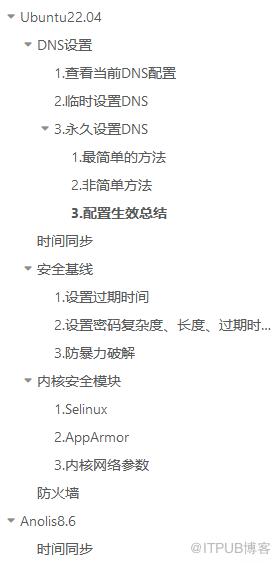 当然随着企业内部不同的安全需求,差异化的操作可能更多,但我们只需按部就班的进行集成即可。
Ansible持续集成
在自动化建设中,Ansible作为配置管理工具承担着操作系统级、基础组件安装级、集群部署级等自动化部署的角色。其中基线配置作为操作系统级的重要组成部分,我们在兼容Centos6、Centos7的基础上,再次适配了Anolis8.6和Ubuntu22.04。
本次介绍我们主要以差异较大的内部标准初始化配置、身份鉴别为主进行介绍。
1.前置解析
本次配置由ansible gather_facts获取操作系统版本,通过ansible_distribution_major_version变量来做进一步区分,如:
Centos7,ansible_distribution_major_version版本号为7 Anolis8.6,ansible_distribution_major_version版本号为8 Ubuntu22.04,ansible_distribution_major_version版本号为22
另外,我们通过ansible tag对不同模块的配置进行分类定义,以便满足后续的单独变更需求。
cat ansible-playbook/roles/os_init/task/main.yml
- include: dns.yml  #环境变量
- include: profile.yml  #环境变量
- include: selinux.yml  #selinux
- include: ntp.yml  #时间同步
- include: rsyslog.yml  #日志同步
- include: audit.yml  #安全审计
- include: sshd.yml  #ssh优化
- include: safe.yml   #Centos7 基础安全合规基线
- include: safe_anolis.yml   #anolis8.6 基础安全合规基线
- include: safe_ubuntu.yml   #Ubuntu22.04基础安全合规基线
注意:请更具实际配置调整task的顺序,例如:安全基线在生效后,后续创建的新用户都将满足新基线的过期要求,但是在安全基线配置前的仍保留永久有效的配置。「如果不注意的话,安全加固将会导致非常严重的生产事故」。
2.内部标准初始化配置
内部标准的初始化配置,我们在此特选择了几个操作系统间差异较大的dns、ntp为主进行介绍。
dns
关于dns配置,主要是Ubuntu22.04 操作有差异,为保证永久生效,需要借助resovconf。
- name:  config dns
  lineinfile:
    path: /etc/resolv.conf
    line: "{{ item }}"
  with_items:
    - "nameserver 192.168.1.1"
  when: ansible_distribution_major_version != "22"
  tags: dns

- name: test resovconf exist
  shell: which resovconf
  register: result
  ignore_errors: yes
  when: ansible_distribution_major_version == "22"
  tags: dns

- name:  config dns temp
  lineinfile:
    path: /etc/resolv.conf
    line: "{{ item }}"
  with_items:
    - "nameserver 192.168.1.1"
  when: ansible_distribution_major_version == "22" and  result.rc != 0
  tags: dns

- name: apt install resolvconf
  apt:
    name: resolvconf
    update_cache: yes
    state: present
  when: ansible_distribution_major_version == "22" and  result.rc != 0
  tags: dns

- name:  config dns forever
  lineinfile:
    path: /etc/resolvconf/resolv.conf.d/head
    line: "nameserver 192.168.1.1"
  when: ansible_distribution_major_version == "22"
  notify:
    - resolvconf -u
  tags: dns
ntp
关于ntp配置,主要是
Anolis8 舍弃了ntp,默认使用chrony进行时间同步; Ubuntu22.04 默认使用timesyncd 进行时间同步,但是通过安装ntp,也支持ntp进行同步;
- name: set ntp
  cron:
    name: "time sync for ntp"
    job: "/usr/sbin/ntpdate 192.168.1.1 && /sbin/hwclock -w"
    minute: "30"
    hour: "*"
    state: present
  when: ansible_distribution_major_version == "7"
  tags: ntp

- name: set ntp
  lineinfile:
    path: "/etc/chrony.conf"
    regexp: "^pool ntp.aliyun.com iburst"
    line: "server 192.168.1.1 iburst"
  when: ansible_distribution_major_version == "8"
  notify:
    - restart chronyd
  tags: ntp


- name: set ntp
  lineinfile:
    path: "/etc/systemd/timesyncd.conf"
    line: "NTP=192.168.1.1"
  when: ansible_distribution_major_version == "22"
  notify:
    - restart systemd-timesyncd
  tags: ntp
3.身份鉴别
❝1.应对登录的用户进行身份标识和鉴别,身份标识具有唯一性,应实现身份鉴别信息防窃取和防重用。静态口令应在8位以上,由字母、数字、符号等混合组成并每半年更换口令,不允许新设定的口令与前次旧口令相同。应用系统用户口令应在满足口令复杂度要求的基础上定期更换。 2.应具有登录失败处理功能,应配置并启用结束会话、限制登录间隔、限制非法登录次数和当登录连接超时自动退出等相关措施。 ❞
针对“规则1”标准具体限制如下:
密码过期时间(90天过期、长度最小8位、禁止使用重复密码) 密码最小长度8位,复杂度包含大小写字母、数字、特殊字符,适配Centos6、Centos7、Anolis8.6、Ubuntu22.04 密码登录尝试3次 禁止旧密码
针对“规则2”标准具体限制如下:
防暴力破解 登录失败锁定(3次输入错误,锁定60秒) 终端1800秒结束会话 ssh每次登录时间不大于一分钟 ssh身份验证尝试次数不大于4次
Anolis8.6
总体上Anolis8.6配置和Centos7 差不多,但是防暴力破解方面,faillock取代了tally。
vim safe_anolis.yml
- name: Anolis8 ban control-alt-delete
  file:
    path: /usr/lib/systemd/system/ctrl-alt-del.target
    state: absent
  when: ansible_distribution_major_version == "8"
  tags: safe_anolis

# 设置密码过期时间
- name: Anolis8 set password expire
  lineinfile:
    path: /etc/login.defs
    regexp: "{{ item.regexp_string }}"
    line: "{{ item.rule }}"
  with_items:
    - { regexp_string: "^PASS_MAX_DAYS", rule: "PASS_MAX_DAYS   90"}
    - { regexp_string: "^PASS_MIN_DAYS", rule: "PASS_MIN_DAYS   0"}
    - { regexp_string: "^PASS_MIN_LEN", rule: "PASS_MIN_LEN   8"}
    - { regexp_string: "^PASS_WARN_AGE", rule: "PASS_WARN_AGE   10"}
  when: ansible_distribution_major_version == "8"
  tags: safe_anolis

# anolis8设置密码复杂度、长度
- name: 1.Anolis8 set password quality
  lineinfile:
    path: /etc/security/pwquality.conf
    regexp: "{{ item.regexp_string }}"
    line: "{{ item.rule }}"
  with_items:
    - { regexp_string: "minlen", rule: "minlen = 8"}
    - { regexp_string: "dcredit", rule: "dcredit = -1"}
    - { regexp_string: "lcredit", rule: "lcredit = -1"}
    - { regexp_string: "ocredit", rule: "ocredit = -1"}
    - { regexp_string: "ucredit", rule: "ucredit = -1"}
  when: ansible_distribution_major_version == "8"
  tags: safe_anolis

# 禁止重复使用旧密码
- name:  Anolis8 set password quality
  lineinfile:
    path: "{{ item }}"
    regexp: "^password    sufficient    pam_unix.so"
    line: "password    sufficient    pam_unix.so sha512 shadow nullok try_first_pass use_authtok remember=5"
  with_items:
    - /etc/pam.d/password-auth
    - /etc/pam.d/system-auth
  when: ansible_distribution_major_version == "8"
  tags: safe_anolis

# 防暴力破解,共3步
- name: 1.Anolis8 prevent brute force
  lineinfile:
    path: "{{ item }}"
    insertafter: "auth        required      pam_env.so"
    line: "auth required pam_faillock.so preauth audit silent deny=3 unlock_time=60"
  with_items:
    - /etc/pam.d/password-auth
    - /etc/pam.d/system-auth
  when: ansible_distribution_major_version == "8"
  tags: safe_anolis

- name: 2.Anolis8 prevent brute force
  lineinfile:
    path: "{{ item }}"
    insertafter: "auth        sufficient    pam_unix.so try_first_pass nullok "
    line: "auth [default=die] pam_faillock.so authfail audit deny=3 unlock_time=60"
  with_items:
    - /etc/pam.d/password-auth
    - /etc/pam.d/system-auth
  when: ansible_distribution_major_version == "8"
  tags: safe_anolis

- name: 3.Anolis8 prevent brute force
  lineinfile:
    path: "{{ item }}"
    insertafter: "account     required      pam_unix.so"
    line: "account required pam_faillock.so"
  with_items:
    - /etc/pam.d/password-auth
    - /etc/pam.d/system-auth
  when: ansible_distribution_major_version == "8"
  tags: safe_anolis
Ubuntu22.04
Ubuntu22.04 与 Centos 差异较大的地方为:
默认使用 apparmor而非selinux进行内核安全限制;pam 模块使用 common-auth和common-account进行限制;
- name: Ubuntu22.04 ban control-alt-delete
  file:
    path: /usr/lib/systemd/system/ctrl-alt-del.target
    state: absent
  when: ansible_distribution_major_version == "22"
  tags: safe_ubuntu

- name: os close service
  service:
    name: "{{ item }}"
    state: stopped
    enabled: no
  with_items:
    - "apparmor"
  ignore_errors: yes
  tags: safe_ubuntu1

# 设置密码过期时间
- name: Ubuntu22.04 set password expire
  lineinfile:
    path: /etc/login.defs
    regexp: "{{ item.regexp_string }}"
    line: "{{ item.rule }}"
  with_items:
    - { regexp_string: "^PASS_MAX_DAYS", rule: "PASS_MAX_DAYS   90"}
    - { regexp_string: "^PASS_MIN_DAYS", rule: "PASS_MIN_DAYS   0"}
    - { regexp_string: "^PASS_MIN_LEN", rule: "PASS_MIN_LEN   8"}
    - { regexp_string: "^PASS_WARN_AGE", rule: "PASS_WARN_AGE   10"}
  when: ansible_distribution_major_version == "22"
  tags: safe_ubuntu

# Ubuntu22.04设置密码复杂度、长度
- name: 1.Ubuntu22.04 set password quality
  lineinfile:
    path: /etc/security/pwquality.conf
    regexp: "{{ item.regexp_string }}"
    line: "{{ item.rule }}"
  with_items:
    - { regexp_string: "minlen", rule: "minlen = 8"}
    - { regexp_string: "dcredit", rule: "dcredit = -1"}
    - { regexp_string: "lcredit", rule: "lcredit = -1"}
    - { regexp_string: "ocredit", rule: "ocredit = -1"}
    - { regexp_string: "ucredit", rule: "ucredit = -1"}
  when: ansible_distribution_major_version == "22"
  tags: safe_ubuntu


# 设置密码尝试3次
- name: 2.Ubuntu22.04 set password quality
  lineinfile:
    path: "{{ item }}"
    regexp: "^password    requisite     pam_pwquality.so"
    line: "password    requisite     pam_pwquality.so try_first_pass retry=3"
  with_items:
    - /etc/pam.d/common-password
  when: ansible_distribution_major_version == "22"
  tags: safe_ubuntu

# 禁止重复使用旧密码
- name: Ubuntu22.04 set password quality
  lineinfile:
    path: "{{ item }}"
    regexp: "^password        [success=1 default=ignore]      pam_unix.so obscure use_authtok try_first_pass yescrypt"
    line: "password        [success=1 default=ignore]      pam_unix.so obscure use_authtok try_first_pass yescrypt remember=5"
  with_items:
    - /etc/pam.d/common-password
  when: ansible_distribution_major_version == "22"
  tags: safe_ubuntu

# 防暴力破解,共3步
# 用户帐户锁定时连续身份验证失败必须达到的间隔长度默认为 900 秒
# 用户账户锁定时间为 600 秒, root用户不受管控
- name: 1.Ubuntu22.04 modify faillock
  lineinfile:
    path: /etc/security/faillock.conf
    regexp: "{{ item.regexp_string }}"
    line: "{{ item.rule }}"
  with_items:
    - { regexp_string: "# audit", rule: "audit"}
    - { regexp_string: "# deny = 3", rule: "deny = 3"}
    - { regexp_string: "# silent", rule: "silent"}
    - { regexp_string: "# unlock_time = 600", rule: "unlock_time = 600"}
  when: ansible_distribution_major_version == "22"
  tags: safe_ubuntu


- name: 2.Ubuntu22.04 common-auth authfail/authsucc
  blockinfile:
    path: "/etc/pam.d/common-auth"
    block: |
      auth    [default=die] pam_faillock.so authfail
      auth    sufficient pam_faillock.so authsucc
    insertbefore: "pam_deny.so"
  when: ansible_distribution_major_version == "22"
  tags: safe_ubuntu

- name: 3.Ubuntu22.04 common-auth preauth
  lineinfile:
    path: "/etc/pam.d/common-auth"
    line: "auth    required pam_faillock.so preauth"
    insertbefore: "pam_unix.so nullok"
  when: ansible_distribution_major_version == "22"
  tags: safe_ubuntu

- name: 3.Ubuntu22.04 common-account preauth
  lineinfile:
    path: "/etc/pam.d/common-account"
    line: "account    required pam_faillock.so"
  when: ansible_distribution_major_version == "22"
  tags: safe_ubuntu
总结
为保证我们的合规基线的可持续化配置,因此我们一直在结合Iac+GitOps的理念,借助Ansible Playbook实践,以帮助我们更好的管理 IT 基础架构需求,同时提高一致性并减少错误和手动配置。
来自 “ ITPUB博客 ” ,链接:https://blog.itpub.net/70027825/viewspace-2944739/ ,如需转载,请注明出处,否则将追究法律责任。

