淘宝详情API接口是用于获取淘宝商品详细信息的接口,它允许开发者通过发送请求,获取商品的描述、价格、评价等信息。下面是一个关于 淘宝详情API接口的示例文档,包括接口地址、请求参数、 响应参数等内容。
淘宝详情API接口文档
一、接口地址
https://api-gw.onebound.cn/taobao/item_get
二、请求参数
请求参数:num_iid=652874751412&is_promotion=1
参数说明:num_iid:淘宝商品ID
is_promotion:是否获取取促销价
三、请求示例
import java.io.BufferedReader;import java.io.IOException;import java.io.InputStream;import java.io.InputStreamReader;import java.io.Reader;import java.net.URL;import java.nio.charset.Charset;import org.json.JSONException;import org.json.JSONObject;import java.io.PrintWriter;import java.net.URLConnection;public class Example {
	private static String readAll(Reader rd) throws IOException {
		StringBuilder sb = new StringBuilder();
		int cp;
		while ((cp = rd.read()) != -1) {
			sb.append((char) cp);
		}
		return  sb.toString();
	}
	public static JSONObject postRequestFromUrl(String url, String body) throws IOException, JSONException {
		URL realUrl = new URL(url);
		URLConnection conn = realUrl.openConnection();
		conn.setDoOutput(true);
		conn.setDoInput(true);
		PrintWriter out = new PrintWriter(conn.getOutputStream());
		out.print(body);
		out.flush();
		InputStream instream = conn.getInputStream();
		try {
			BufferedReader rd = new BufferedReader(new InputStreamReader(instream, Charset.forName("UTF-8")));
			String jsonText = readAll(rd);
			JSONObject json = new JSONObject(jsonText);
			return json;
		} finally {
			instream.close();
		}
	}
	public static JSONObject getRequestFromUrl(String url) throws IOException, JSONException {
		URL realUrl = new URL(url);
		URLConnection conn = realUrl.openConnection();
		InputStream instream = conn.getInputStream();
		try {
			BufferedReader rd = new BufferedReader(new InputStreamReader(instream, Charset.forName("UTF-8")));
			String jsonText = readAll(rd);
			JSONObject json = new JSONObject(jsonText);
			return json;
		} finally {
			instream.close();
		}
	}
	public static void main(String[] args) throws IOException, JSONException {
		// 请求示例 url 默认请求参数已经URL编码处理
		String url = "https://api-gw.onebound.cn/taobao/item_get/?key=<您自己的apiKey>&secret=<您自己的apiSecret>&num_iid=652874751412&is_promotion=1";
		JSONObject json = getRequestFromUrl(url);
		System.out.println(json.toString());
	}}
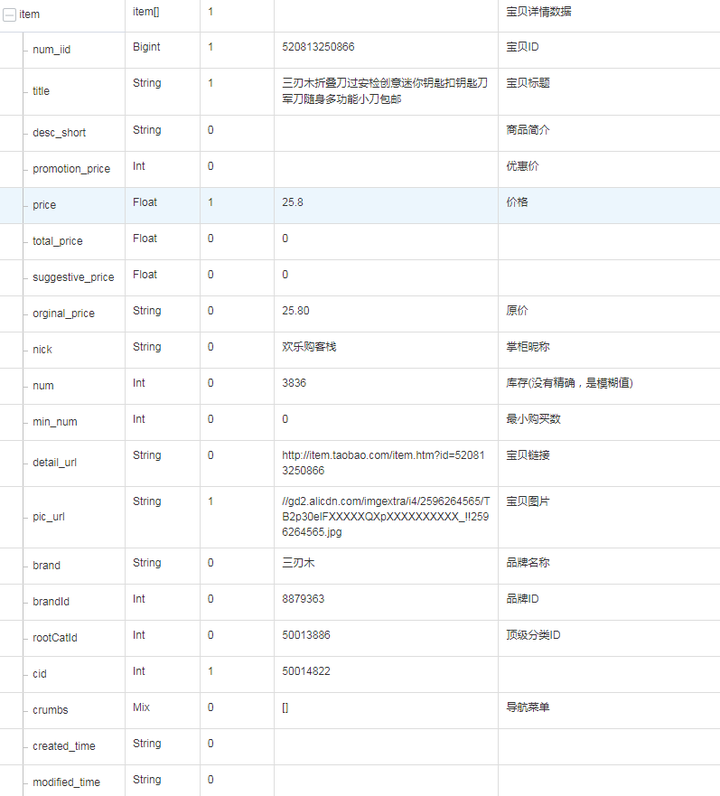
四、响应参数
六、使用说明
- 开发者需要在开放平台注册账号,并创建应用获取 accessKey和secretKey。
- 根据接口文档,构造请求参数。
- 发送HTTP请求到接口地址,携带请求参数。
- 接口返回响应后,开发者需要解析响应数据,获取商品详情信息。
来自 “ ITPUB博客 ” ,链接:https://blog.itpub.net/70026917/viewspace-3012209/ ,如需转载,请注明出处,否则将追究法律责任。
上一篇:
在API接口对接中关键示例问题(1)
下一篇:
京东详情比价接口优惠券(2)

请登录后发表评论
登录
全部评论
最新文章
- 店铺全景拆解!Open Claw 一键抓取店铺首页全部装修与布局资源(附 Python 源码)
- 选品不踩雷!Open Claw 1688 商品评论 API,自动分析好评差评(附 Python 源码)
- 做淘宝图片搜索工具6年,被识图接口坑到凌晨改代码的实战手记
- 淘宝get_item V1详情优惠字段获取
- 做京东关键字搜索系统 3 年,被接口坑到凌晨改代码的实战手记
- 做京东评论分析系统 3 年,京东评论数据解析
- 获取JD商品详情数据 get_item
- 做速卖通跨境 B2C 工具 5 年,被商品详情 API 坑到凌晨改代码的实战手记
- 做阿里国际站跨境 B2B 系统 5 年,被商品详情 API 坑到连夜改代码的实战手记
- 做义乌购批发工具 4 年,被商品详情 API 坑到连夜改代码的实战手记
