etl 读写 elastic 同步数据
Elasticsearch是什么
-
Elasticsearch一个基于Lucene的搜索服务器
-
它提供了一个分布式多用户能力的全文搜索引擎,基于RESTful web接口对外开放。
-
Elasticsearch是用Java语言开发的,并作为Apache许可条款下的开放源码发布,是一种流行的企业级搜索引擎。Elasticsearch用于云计算中,能够达到实时搜索,稳定,可靠,快速,安装使用方便。
说的直白一点,你可以用Elasticsearch在企业内部搭建出类似百度、谷歌之类的搜索服务器。
通过etl实现对elastic的读写操作
Elasticsearch的部署和使用不在这里介绍,这里主要介绍如何通过etl engine对elastic进行读写访问。
下面我们给出一个样本,实现从index为es_db3中的 elastic 读取数据,写入到index为es_db4的elastic中
elastic_to_elastic.grf 样本
<?xml version="1.0" encoding="UTF-8"?>
<Graph>
   <!--elastic 到 elastic-->

    <Node id="ELASTIC_READER_01" dbConnection="CONNECT_01"
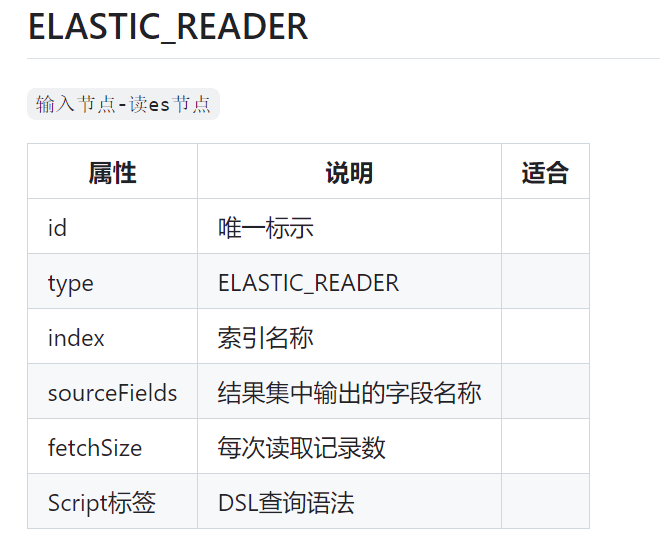
type="ELASTIC_READER" desc="节点2"  sourceFields="custom_type;username;desc;address" fetchSize="2" >
    <Script name="sqlScript"><![CDATA[
{
  "query" : {
   "bool":{
  "must":[
  //{
// "term": { "username.keyword": "王先生"  }
 //     "match": { "username": ""  }
 //  },
   {
 "term":   {   "custom_type":"t_user_info"  }
   }
  ]
   }
}
}
]]></Script>
      </Node>
     <Node id="ELASTIC_WRITER_01" dbConnection="CONNECT_02"
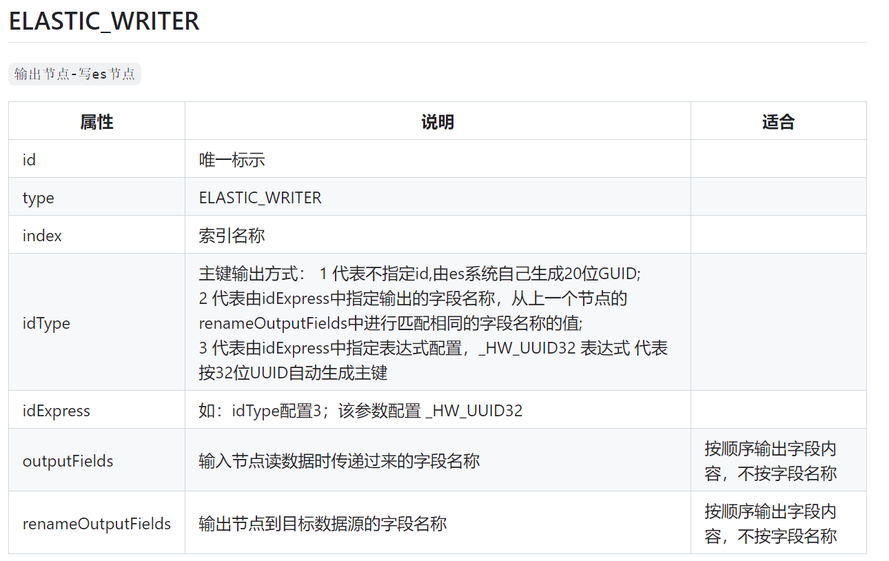
type="ELASTIC_WRITER" desc="节点2"  outputFields="custom_type;username;desc;address;_id" renameOutputFields="custom_type1;username1;desc1;address1;id1"
idType="2" idExpress="id1">
      </Node>
  <Line id="LINE_01" type="STANDARD" from="ELASTIC_READER_01" to="ELASTIC_WRITER_01" order="0" metadata="METADATA_01">线标注</Line>
  <Metadata id="METADATA_01">
     <Field name="custom_type1" type="string" default="-1" nullable="false"/>
    <Field name="username1" type="string" default="-1" nullable="false"/>
    <Field name="desc1" type="string" default="-1" nullable="false"/>
    <Field name="address1" type="string" default="-1" nullable="false"/>
     <Field name="id1" type="string" default="-1" nullable="false"/>
  </Metadata>
    <Connection id="CONNECT_01" dbURL="http://127.0.0.1:9200" database="es_db3" username="elastic" password="123456" batchSize="1000" type="ELASTIC"/>
<Connection id="CONNECT_02" dbURL="http://127.0.0.1:9200" database="es_db4" username="elastic" password="123456" batchSize="1000" type="ELASTIC"/>
</Graph>
节点使用说明
调用方式
etl_engine.exe -fileUrl elastic_to_elastic.grf
参考资料
https://github.com/hw2499/etl-engine
来自 “ ITPUB博客 ” ,链接:https://blog.itpub.net/70024931/viewspace-3024972/ ,如需转载,请注明出处,否则将追究法律责任。

请登录后发表评论
登录
全部评论
