在实施etl过程中,经常会遇到不同类型之间的转换,方式有很多种,下面是项目中使用etl-engine进行数据类型转换的收集整理,方便日后工作中查阅。
etl-engine转换的方式有多种,一种是通过sql语句直接转换(比较方便),另一种是通过在输出节点的beforeout 标签中嵌入go脚本对相应字段按业务要求进行转换(功能强大),下面只介绍第一种情况。
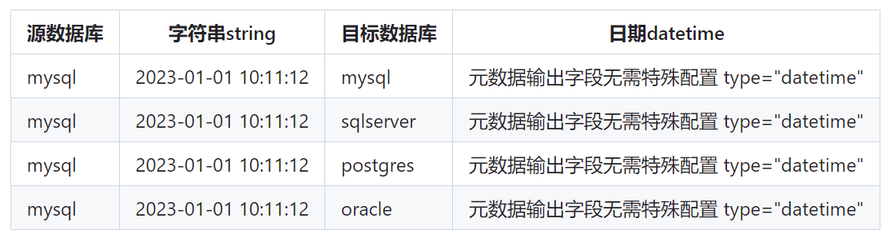
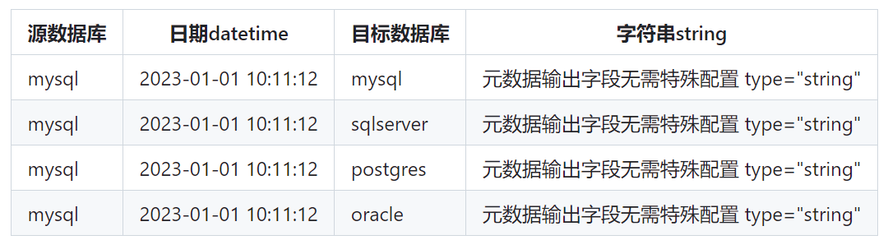
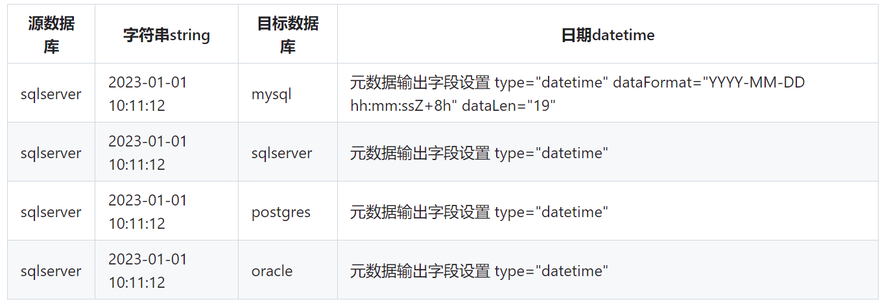
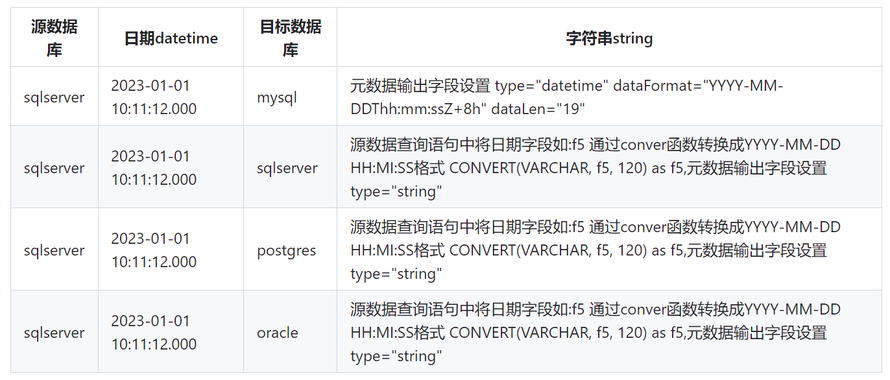
元数据文件定义目标数据格式(如输出节点中定义的renameOutputFields或renameOutputTags所对应的字段名称及字段类型)
outputFields是输入节点中数据结果集中的字段名称, 将outputFields定义的字段转换成renameOutputFields定义的字段,其renameOutputFields转换格式通过元数据文件来定义。

样本
<Metadata id="METADATA_01">
<!--    <Field name="time" type="str_timestamp" default="-1" nullable="false" errDefault=""/>-->
<!--    <Field name="time" type="string" default="-1" nullable="false" errDefault=""/>-->
    <Field name="c1" type="int32" default="-1" nullable="false" errDefault="" dataFormat="" />
<!--    <Field name="c2" type="decimal" default="-1" nullable="false" errDefault="" dataFormat="" />-->
    <Field name="c2" type="float" default="-1" nullable="false" errDefault="" dataFormat="" />
    <Field name="c3" type="string" default="-1" nullable="false" errDefault="" dataFormat="" />
    <Field name="c4" type="string" default="-1" nullable="false" errDefault="" dataFormat="" />
    <Field name="tag_1" type="string" default="-1" nullable="false" errDefault="" dataFormat="" />
    <Field name="tag_2" type="string" default="-1" nullable="false" errDefault="" dataFormat="" />
    <Field name="tag_3" type="string" default="-1" nullable="false" errDefault="" dataFormat="" />
    <Field name="tag_4" type="string" default="-1" nullable="false" errDefault="" dataFormat="" />

<!--    <Field name="writetime" type="datetime" default="" nullable="true" errDefault="" dataFormat="YYYY-MM-DD hh:mm:ssZ+8h"/> -->

  </Metadata>
mysql
字符串类型 转换 日期类型
日期类型 转换 字符串类型
日期类型 转换 日期类型

mysql样本表
CREATE TABLE `t_source_1` (
  `f1` varchar(32) NOT NULL,
  `f2` varchar(32) DEFAULT NULL,
  `f3` int(11) DEFAULT NULL,
  `f4` varchar(32) DEFAULT NULL,
  `f5` datetime DEFAULT NULL
);

CREATE TABLE `t_target_1` (
  `c1` varchar(32) NOT NULL,
  `c2` varchar(32) DEFAULT NULL,
  `c3` int(11) DEFAULT '0',
  `c4` varchar(32) DEFAULT NULL,
  `c5` datetime DEFAULT NULL
);
INSERT INTO t_source_1 (f1, f2, f3, f4, f5)
VALUES('1', 'a01', 1, '2022-07-10 23:20:22', '2022-07-10 23:20:22');
INSERT INTO t_source_1 (f1, f2, f3, f4, f5)
VALUES('10', '测试人员10', 10, '2022-07-10 23:20:13', '2022-07-10 23:20:13');
INSERT INTO t_source_1 (f1, f2, f3, f4, f5)
VALUES('11', '测试人员11', 11, '2022-07-10 23:20:14', '2022-07-10 23:20:14');
INSERT INTO t_source_1 (f1, f2, f3, f4, f5)
VALUES('12', '测试人员12', 12, '2022-07-10 23:20:15', '2022-07-10 23:20:15');
INSERT INTO t_source_1 (f1, f2, f3, f4, f5)
VALUES('13', '测试人员13', 13, '2022-07-10 23:20:16', '2022-07-10 23:20:16');
INSERT INTO t_source_1 (f1, f2, f3, f4, f5)
VALUES('14', '测试人员14', 14, '2022-07-10 23:20:17', '2022-07-10 23:20:17');
INSERT INTO t_source_1 (f1, f2, f3, f4, f5)
VALUES('15', '测试人员15', 15, '2022-07-10 23:20:18', '2022-07-10 23:20:18');
INSERT INTO t_source_1 (f1, f2, f3, f4, f5)
VALUES('16', '测试人员16', 16, '2022-07-10 23:20:19', '2022-07-10 23:20:19');
INSERT INTO t_source_1 (f1, f2, f3, f4, f5)
VALUES('17', '测试人员17', 17, '2022-07-10 23:20:20', '2022-07-10 23:20:20');
INSERT INTO t_source_1 (f1, f2, f3, f4, f5)
VALUES('18', '测试人员18', 18, '2022-07-10 23:20:21', '2022-07-10 23:20:21');
INSERT INTO t_source_1 (f1, f2, f3, f4, f5)
VALUES('19', '测试人员19', 19, '2022-07-10 23:20:01', '2022-07-10 23:20:01');
INSERT INTO t_source_1 (f1, f2, f3, f4, f5)
VALUES('2', 'a01', 2, '2022-07-10 23:20:23', '2022-07-10 23:20:23');
INSERT INTO t_source_1 (f1, f2, f3, f4, f5)
VALUES('20', '测试人员20', 20, '2022-07-10 23:20:02', '2022-07-10 23:20:02');
INSERT INTO t_source_1 (f1, f2, f3, f4, f5)
VALUES('3', 'c01', 3, '2022-07-10 23:20:24', '2022-07-10 23:20:24');
INSERT INTO t_source_1 (f1, f2, f3, f4, f5)
VALUES('4', 'd01', 4, '2022-07-10 23:20:25', '2022-07-10 23:20:25');
INSERT INTO t_source_1 (f1, f2, f3, f4, f5)
VALUES('5', 'e01', 5, '2022-07-10 23:20:26', '2022-07-10 23:20:26');
INSERT INTO t_source_1 (f1, f2, f3, f4, f5)
VALUES('6', 'f01', 6, '2022-07-10 23:20:27', '2022-07-10 23:20:27');
INSERT INTO t_source_1 (f1, f2, f3, f4, f5)
VALUES('7', 'g01', 7, '2022-07-10 23:20:28', '2022-07-10 23:20:28');
INSERT INTO t_source_1 (f1, f2, f3, f4, f5)
VALUES('8', 'h01', 8, '2022-07-10 23:20:29', '2022-07-10 23:20:29');
INSERT INTO t_source_1 (f1, f2, f3, f4, f5)
VALUES('9', 'i01', 9, '2022-07-10 23:20:12', '2022-07-10 23:20:12');
字符串类型 转换 日期类型
日期类型 转换 字符串类型
日期类型 转换 日期类型
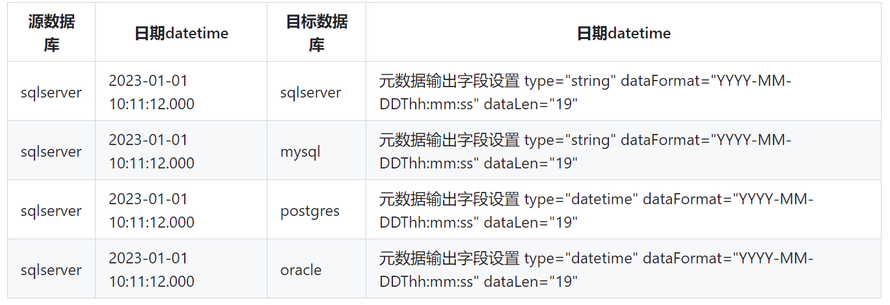
日期类型转换字符串类型样本
<?xml version="1.0" encoding="UTF-8"?>
<Graph fileName="" desc="" runMode="2">
    <BeforeRun>
        <![CDATA[]]>
    </BeforeRun>
    <Node id="DB_INPUT_TABLE_1" type="DB_INPUT_TABLE" fetchSize="100" dbConnection="CONNECT_2" desc="" x="116" y="90" isLink="true" sortId="1">
        <Script name="sqlScript">
            <![CDATA[
select f1,f2,f3,CONVERT(VARCHAR, f5, 120) as f4,f5   from t_source_1
]]>
        </Script>
    </Node>
<!--
select f1,f2, f3,CONVERT(VARCHAR, f5, 120) as f5 from t_source_1
-->
    <Node id="DB_OUTPUT_TABLE_1" type="DB_OUTPUT_TABLE" batchSize="" dbConnection="CONNECT_2" outputFields="f1;f2;f3;f4;f5" renameOutputFields="c1;c2;c3;c4;c5"
_renameOutputFields="c1;c2;c3;c4;c5" outputTags="" renameOutputTags="" rp="" measurement="" desc="" x="346" y="118" isLink="true" sortId="2">
        <Script name="sqlScript">
            <![CDATA[
 insert into t_target_1 (c1,c2,c3, c4,c5) values (?,?,?,?,?)
]]>
        </Script>
<!--
 insert into t_target_1 (c1,c2, c3,c5) values (:1,:2,:3,:4)
insert into t_target_1 (c1,c2, c3,c4,c5) values ($1,$2,$3,$4,$5)
insert into t_source_1 (f1,f2,f3,f4,f5) values (?,?,?,?,?)
insert into t_source_1 (f1,f2, f3,f4,f5) values ($1,$2,$3,$4,$5)
-->
    </Node>
    <Line from="DB_INPUT_TABLE_1" to="DB_OUTPUT_TABLE_1" type="STANDARD" order="0" metadata="METADATA_1" sortId="1" id="LINE_STANDARD_1"/>
    <Metadata id="METADATA_1" sortId="1">
        <Field name="c1" type="string" default="" nullable="true"/>
        <Field name="c2" type="string" default="" nullable="true"/>
        <Field name="c3" type="int" default="" nullable="true"/>
<Field name="c4" type="string" _dataFormat="YYYY-MM-DD hh:mm:ss" _dataLen="18" nullable="true"/>
<Field name="c5" type="string" dataFormat="YYYY-MM-DD hh:mm:ss" dataLen="19"  default="" nullable="true"/>
 <Field name="f1" type="string" default="" nullable="true"/>
        <Field name="f2" type="string" default="" nullable="true"/>
        <Field name="f3" type="int" default="" nullable="true"/>
<Field name="f4" type="string" _dataFormat="YYYY-MM-DDThh:mm:ssZ+8h" _dataLen="19"  default="" nullable="true"/>
<Field name="f5"  type="string" dataFormat="YYYY-MM-DD hh:mm:ss" dataLen="19"  default="" nullable="true"/>

    </Metadata>
    <Connection sortId="1" id="CONNECT_1" type="MYSQL" dbURL="127.0.0.1:3306" database="db1" username="root" password="******" token="" org=""/>
<Connection sortId="2" id="CONNECT_2" type="SQLSERVER" dbURL="127.0.0.1:1433" database="master" username="sa" password="******" token="" org=""/>
<Connection id="CONNECT_3" dbURL="127.0.0.1:5432" database="postgres" username="hw_u1" password="******" batchSize="1000" type="POSTGRES" />
<Connection id="CONNECT_4" dbURL="127.0.0.1:1521" database="orcl" username="hw_u1" password="******"  batchSize="1000" type="ORACLE" />

</Graph>
字符串类型 转换 日期类型
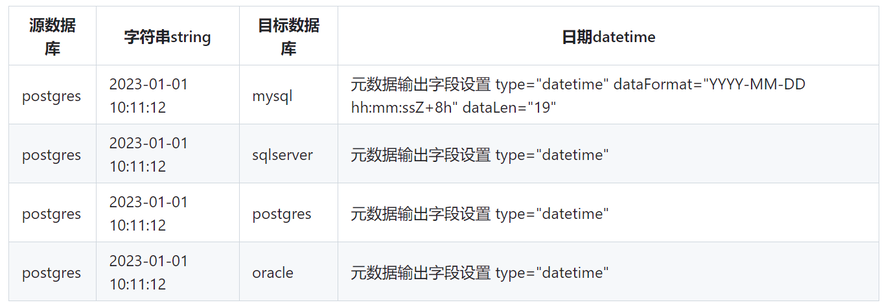
日期类型 转换 字符串类型
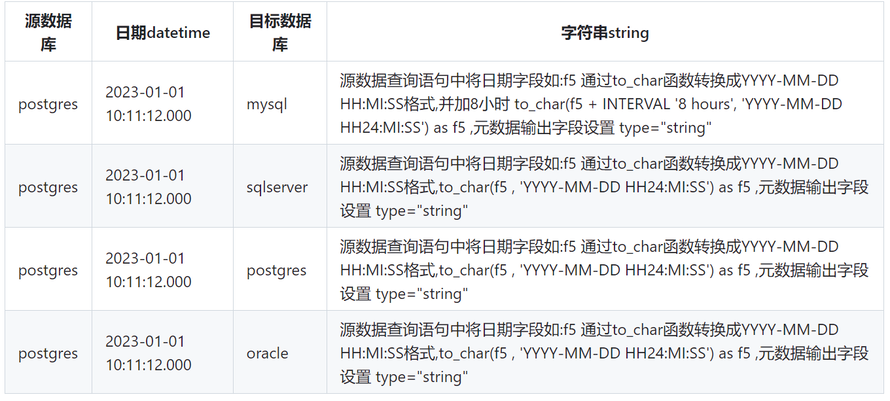

字符串类型 转换 日期类型
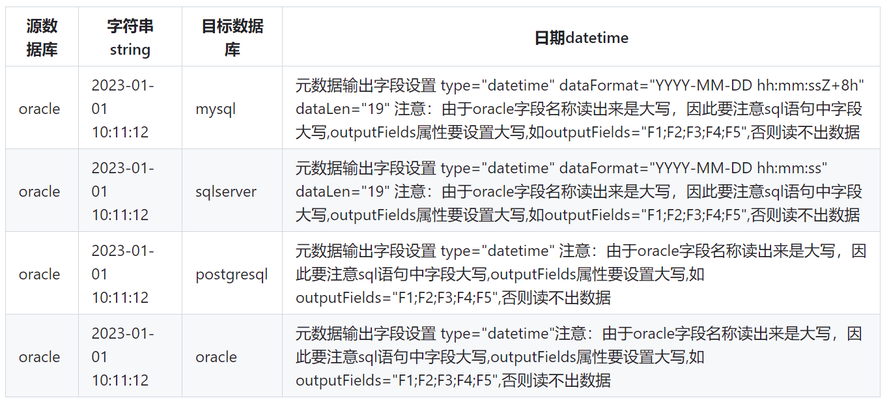
日期类型 转换 字符串类型
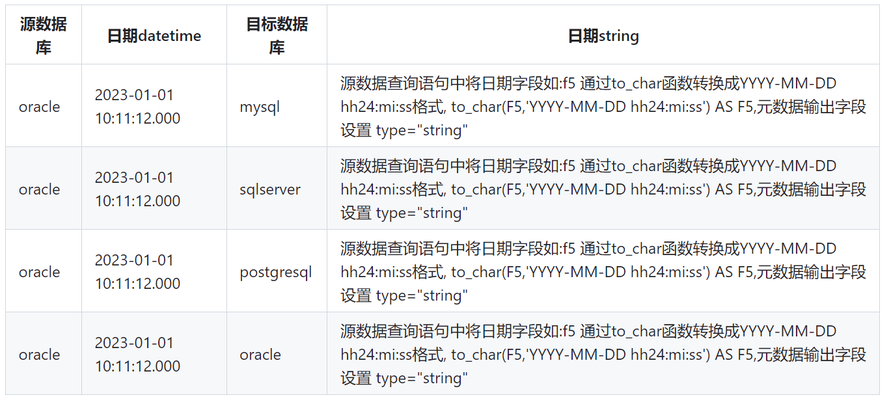
日期类型 转换 日期类型

来自 “ ITPUB博客 ” ,链接:https://blog.itpub.net/70024931/viewspace-3022496/ ,如需转载,请注明出处,否则将追究法律责任。

请登录后发表评论
登录
全部评论
