很多人在进行项目开发时都会用到Oauth2.0结合SpringSecurity或者Shiro进行权限拦截以及用户验证,网上也有很多的案例,前几天项目里边需要用到,顺便整合了进来,特此写篇博客,记录下过程。
项目结构如下:

首先准备pom.xml
<?xml version="1.0" encoding="UTF-8"?>
<project xmlns="http://maven.apache.org/POM/4.0.0" xmlns:xsi="http://www.w3.org/2001/XMLSchema-instance"
	xsi:schemaLocation="http://maven.apache.org/POM/4.0.0 http://maven.apache.org/xsd/maven-4.0.0.xsd">
	<modelVersion>4.0.0</modelVersion>
	<parent>
		<groupId>org.springframework.boot</groupId>
		<artifactId>spring-boot-starter-parent</artifactId>
		<version>2.0.3.RELEASE</version>
		<relativePath /> <!-- lookup parent from repository -->
	</parent>
	<groupId>com.xz.springcloud</groupId>
	<artifactId>f-oauth2-pwd-mode</artifactId>
	<version>0.0.1-SNAPSHOT</version>
	<name>f-oauth2-pwd-mode</name>
	<description>Demo project for Spring Boot</description>
	<properties>
		<project.build.sourceEncoding>UTF-8</project.build.sourceEncoding>
		<project.reporting.outputEncoding>UTF-8</project.reporting.outputEncoding>
		<java.version>1.8</java.version>
		<spring-cloud.version>Finchley.RELEASE</spring-cloud.version>
		<oauth.version>2.3.3.RELEASE</oauth.version>
	</properties>
	<dependencies>
        <dependency>
            <groupId>org.springframework.boot</groupId>
            <artifactId>spring-boot-starter-web</artifactId>
        </dependency>

        <dependency>
            <groupId>org.springframework.security.oauth</groupId>
            <artifactId>spring-security-oauth2</artifactId>
            <version>2.2.1.RELEASE</version>
        </dependency>

         <dependency>
            <groupId>org.springframework.boot</groupId>
            <artifactId>spring-boot-starter-security</artifactId>
        </dependency>

        <dependency>
            <groupId>org.springframework.boot</groupId>
            <artifactId>spring-boot-starter-test</artifactId>
            <scope>test</scope>
        </dependency>
    </dependencies>
	<dependencyManagement>
		<dependencies>
			<dependency>
				<groupId>org.springframework.cloud</groupId>
				<artifactId>spring-cloud-dependencies</artifactId>
				<version>${spring-cloud.version}</version>
				<type>pom</type>
				<scope>import</scope>
			</dependency>
		</dependencies>
	</dependencyManagement>
	<build>
		<plugins>
			<plugin>
				<groupId>org.springframework.boot</groupId>
				<artifactId>spring-boot-maven-plugin</artifactId>
			</plugin>
		</plugins>
	</build>
</project>
MyUserDetailService.java
package com.oauth.config;import java.util.ArrayList;import java.util.List;import org.springframework.security.core.GrantedAuthority;import org.springframework.security.core.authority.SimpleGrantedAuthority;import org.springframework.security.core.userdetails.User;import org.springframework.security.core.userdetails.UserDetails;import org.springframework.security.core.userdetails.UserDetailsService;import org.springframework.security.core.userdetails.UsernameNotFoundException;import org.springframework.stereotype.Component;/**
 *
 * @author yuxuan
 *
 */@Componentpublic class MyUserDetailsService implements UserDetailsService {    @Override
    public UserDetails loadUserByUsername(String username) throws UsernameNotFoundException {        // TODO 这个地方可以通过username从数据库获取正确的用户信息,包括密码和权限等。
        List<GrantedAuthority> grantedAuthorityList = new ArrayList<>();
        grantedAuthorityList.add(new SimpleGrantedAuthority("ROLE_USER"));
        grantedAuthorityList.add(new SimpleGrantedAuthority("ROLE_ADMIN"));        return new User(username, "{noop}123456", grantedAuthorityList);
    }
}
OAuth2ServerConfig.java
package com.oauth.config;import org.springframework.beans.factory.annotation.Autowired;import org.springframework.context.annotation.Configuration;import org.springframework.http.HttpMethod;import org.springframework.security.authentication.AuthenticationManager;import org.springframework.security.oauth2.config.annotation.configurers.ClientDetailsServiceConfigurer;import org.springframework.security.oauth2.config.annotation.web.configuration.AuthorizationServerConfigurerAdapter;import org.springframework.security.oauth2.config.annotation.web.configuration.EnableAuthorizationServer;import org.springframework.security.oauth2.config.annotation.web.configurers.AuthorizationServerEndpointsConfigurer;import org.springframework.security.oauth2.config.annotation.web.configurers.AuthorizationServerSecurityConfigurer;@Configuration@EnableAuthorizationServerpublic class OAuth2ServerConfig extends AuthorizationServerConfigurerAdapter {	 @Override
	    public void configure(AuthorizationServerSecurityConfigurer oauthServer) throws Exception {
	        oauthServer
	                .tokenKeyAccess("permitAll()") //url:/oauth/token_key,exposes public key for token verification if using JWT tokens
	                .checkTokenAccess("isAuthenticated()") //url:/oauth/check_token allow check token
	                .allowFormAuthenticationForClients();
	    }
	    /**
	     * 注入authenticationManager
	     * 来支持 password grant type
	     */
	    @Autowired
	    private AuthenticationManager authenticationManager;	    @Override
	    public void configure(AuthorizationServerEndpointsConfigurer endpoints) throws Exception {
	        endpoints.authenticationManager(authenticationManager);
	        endpoints.allowedTokenEndpointRequestMethods(HttpMethod.GET, HttpMethod.POST);
	    }	    @Override
	    public void configure(ClientDetailsServiceConfigurer clients) throws Exception {
	        clients.inMemory()
	                .withClient("client")
	                .secret("{noop}secret")
	                .authorizedGrantTypes("client_credentials", "password", "refresh_token")
	                .scopes("all")
	                .resourceIds("resourcesId")
	                .accessTokenValiditySeconds(1200)
	                .refreshTokenValiditySeconds(50000);
	}

}
ResourceServerConfig.java
package com.oauth.config;import org.springframework.context.annotation.Configuration;import org.springframework.security.config.annotation.web.builders.HttpSecurity;import org.springframework.security.oauth2.config.annotation.web.configuration.EnableResourceServer;import org.springframework.security.oauth2.config.annotation.web.configuration.ResourceServerConfigurerAdapter;import org.springframework.security.oauth2.config.annotation.web.configurers.ResourceServerSecurityConfigurer;@Configuration@EnableResourceServerpublic class ResourceServerConfig extends ResourceServerConfigurerAdapter {	@Override
	public void configure(HttpSecurity http) throws Exception {
		http.requestMatchers().antMatchers("/api/**").and().authorizeRequests().antMatchers("/api/**").authenticated();
	}
	@Override
	public void configure(ResourceServerSecurityConfigurer resources) throws Exception {
		resources.resourceId("resourcesId").stateless(true);
	}

}
WebConfig.java
package com.oauth.config;import org.springframework.context.annotation.Bean;import org.springframework.security.authentication.AuthenticationManager;import org.springframework.security.config.annotation.method.configuration.EnableGlobalMethodSecurity;import org.springframework.security.config.annotation.web.builders.HttpSecurity;import org.springframework.security.config.annotation.web.configuration.EnableWebSecurity;import org.springframework.security.config.annotation.web.configuration.WebSecurityConfigurerAdapter;@EnableWebSecurity@EnableGlobalMethodSecurity(prePostEnabled = true, proxyTargetClass = true)public class WebConfig extends WebSecurityConfigurerAdapter {	 @Override
	 protected void configure(HttpSecurity http) throws Exception {
		 http.csrf().disable();
	    http.requestMatchers().antMatchers("/oauth/**")
	    .and()
	    .authorizeRequests()
	    .antMatchers("/oauth/**").authenticated();
	 }	/**
	 * 需要配置这个支持password模式 support password grant type
	 * @return
	 * @throws Exception
	 */
	@Override
	@Bean
	public AuthenticationManager authenticationManagerBean() throws Exception {		return super.authenticationManagerBean();
	}
}
IndexCtrl.java
package com.oauth.ctrl;import org.springframework.web.bind.annotation.GetMapping;import org.springframework.web.bind.annotation.RestController;@RestControllerpublic class IndexCtrl {	@GetMapping("hello")
	public String hello() {		return "Hello World";
	}
	@GetMapping("api/hello")
	public String apiHello() {		return "Hello World";
	}

}
App.java
package com.oauth;import org.springframework.boot.SpringApplication;import org.springframework.boot.autoconfigure.SpringBootApplication;@SpringBootApplicationpublic class App {	public static void main(String[] args) {		SpringApplication.run(App.class, args);

	}
}
以上就是一个代码的配置,下面启动App类,运行main函数。项目启动完成后用rest client访问hello接口
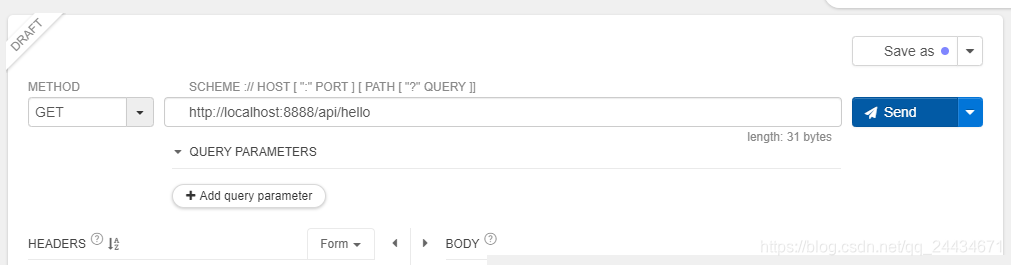

可以看到提示无效的token,接下我们请求获取token。利用CURL命令请求如下:
curl -i -X POST -d "username=admin&password=123456&grant_type=password&client_id=client&client_secret=secret" http://localhost:8888/oauth/token
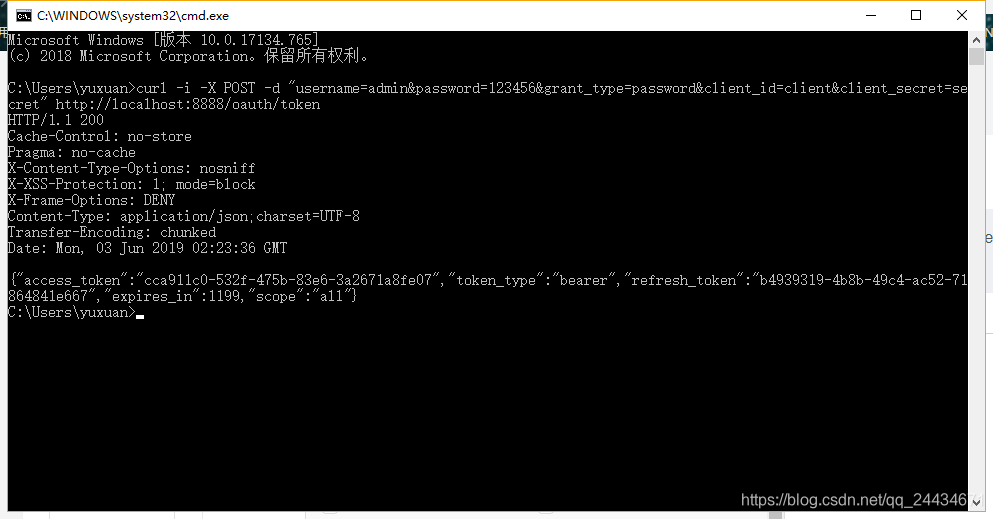


可以看到,至此已经访问成功了。
也可以利用GET方式直接访问,如下:
http://localhost:8888/api/hello?access_token=cca911c0-532f-475b-83e6-3a2671a8fe07

有问题可以在下面评论,技术问题可以私聊我。

