Ansible 是一个 Python 写的自动化工具,这个工具可以实现集群自动化管理,然后进行一些常用的运维操作。
-
以 Ansible 脚本为主导而搭建的自动化部署升级平台
-
以类似 Jenkins 流水线而搭建的自动化构建和部署平台
-
以 SDK 包为基础,以 Python 脚本执行主导的运维平台
-
Docker 容器+编排
1、安装ansible
使用pip安装
sudo pip install ansible
使用yum或者apt-get安装
ansible 也可以直接使用系统的包管理工具来安装,比如 CentOS 的 yum 命令:
sudo yum install ansible
Ubuntu 系统的 apt-get 命令:
sudo apt-get install software-properties-common
sudo apt-add-repository ppa:ansible/ansible
sudo apt-get update
sudo apt-get install ansible
2、Ansible基本用法
使用 ansible-playbook
ansible-playbook docker.yml -i hosts -u alex -k -K
# 列出所有模块ansible-doc -l# 列出yum模块的使用方式ansible-doc yum
ansible-playbook 目录结构
├── group_vars
<- 所有主机的公共变量存放位置
│   └── all├── hosts                <- 需要管理的主机的列表信息
├── roles              <- roles 存放模块, 当前有 etcd, initial, loop 三个模块
│   ├── etcd│
│   ├── files                    <- 需要直接复制到 client 的文件存放位置
│   │   │   └── etcd-proxy.service            <--即每个主机配置一样
│   │   ├── handlers                     <- 用于服务管理用的控制文件
│   │   │   └── main.yml
│   │   ├── tasks                        <- ansible 任务文件
│   │   │   ├── config.yml
│   │   │   ├── main.yml
│   │   │   ├── package.yml
│   │   │   └── service.yml
│   │   └── templates                <- 需要复制到 client 中的模板文件, 会配合变量进行配置变换
│   │       └── etcd-proxy.conf       <-- 即每个主机配置可能不一样
│   ├── initial
│   │   ├── files
│   │   │   ├── hosts
│   │   │   ├── resolv.conf
│   │   │   └── updatedb.conf
│   │   ├── handlers
│   │   ├── tasks
│   │   │   ├── main.yml
│   │   │   ├── mlocate.yml
│   │   │   ├── package.yml
│   │   │   ├── sysctl.yml
│   │   │   └── yumrepo.yml
│   │   └── templates
│   │       ├── centos7.repo
│   │       └── docker.repo
│   └── loop
│       ├── files
│       ├── handlers
│       ├── tasks
│       │   ├── main.yml
│       │   └── t1.yml
│       └── templates└── site.yml                           <- 主控制入口文件
ansible 安装 docker
项目地址:
尽量使用内置模块
# 使用shell 命令行安装- name: install yum-utilsshell: yum install yum-utils# 使用yum 模块安装- name: install yum-utilsyum:name: yum-utilsstate: present
还有下面这种直接使用pip模块的:
- name: install docker-compose  pip:
name: docker-compose
extra_args: "-i {{ pip.index_url }}
--trusted-host {{ pip.trusted_host }}"
register+when的使用
docker -v
命令查询 docker 版本,然后第二个步骤判断当 docker 不可用的时候就执行 docker 安装。
- name: check dockershell: docker -vregister: resultignore_errors: True- name: include tasks yaml if not dockerinclude_tasks: install.ymlwhen: result is failed
执行结果
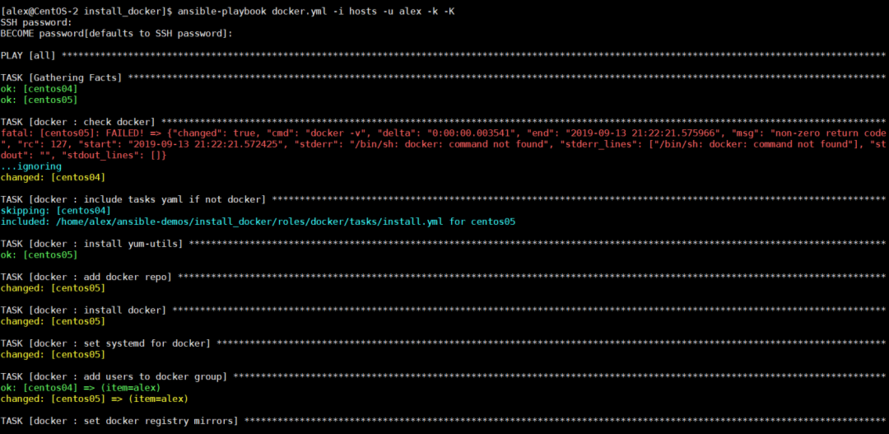
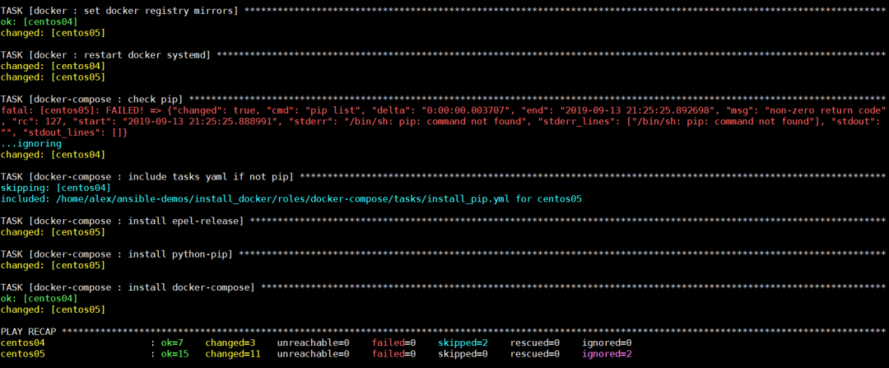
来源:https://cloud.tencent.com/developer/article/2123531
来自 “ ITPUB博客 ” ,链接:https://blog.itpub.net/70013542/viewspace-3005864/ ,如需转载,请注明出处,否则将追究法律责任。

请登录后发表评论
登录
全部评论
