
一、简介
Ubuntu,是一款基于 Debian Linux 的以桌面应用为主的操作系统,内容涵盖文字处理、电子邮件、软件开发工具和 Web 服务等,可供用户免费下载、使用和分享。
二、配置方法
参考链接: 阿里巴巴开源镜像站 阿里云 ubuntu镜像源
1、图形化界面配置操作 图形化Ubuntu操作系统安装步骤
参考链接: Ubuntu 20.04安装过程
如果安装图形化界面的Ubuntu系统的话,推荐使用此方法。 使用图形界面配置操作步骤:
使用图形界面配置操作步骤: 系统设置 -> 软件和更新 选择下载服务器 -> "mirrors.aliyun.com"
(1)打开Ubuntu系统。
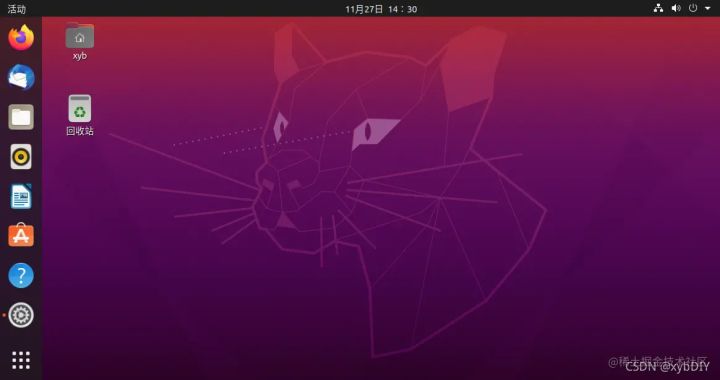
(2)右击选择"
设置"。

(3)选择”关于“,点击"软件更新"。如图所示。

(4)选择"其他站点"。
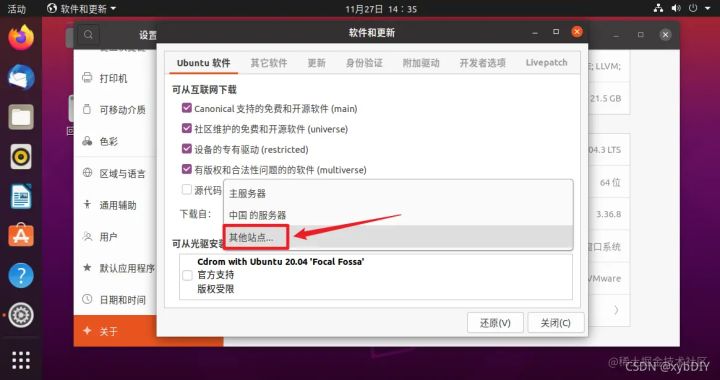
(5)选择"mirrors.aliyun.com",点击“选择服务器”。

(6)切换完成。

(7)重新载入镜像。

等待更新完成即可。

2、终端界面配置操作
参考链接:
阿里云 ubuntu镜像采用修改配置文件的方式进行切换。
(1)备份源文件。
选择"在终端中打开"。
root@xyb-virtual-machine:~# cp /etc/apt/sources.list /etc/apt/sources.list.backup
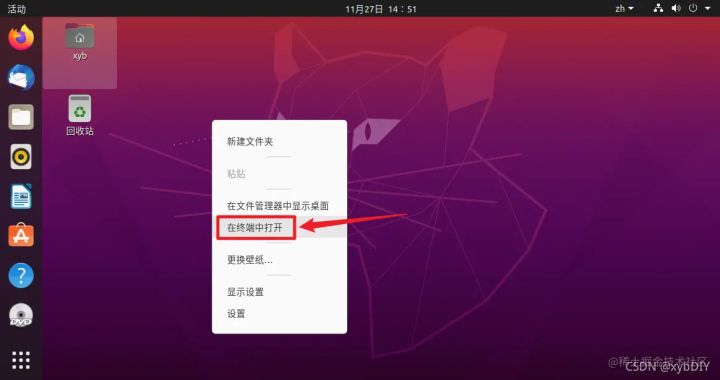
(2)手动修改源文件。
用熟悉的编辑器打开: /etc/apt/sources.list 替换默认的 archive.ubuntu.com/ 为mirrors.aliyun.comroot@xyb-virtual-machine:~# vi /etc/apt/sources.listubuntu 20.04(focal) 配置如下
deb http://mirrors.aliyun.com/ubuntu/ focal main restricted universe multiverse
deb-src http://mirrors.aliyun.com/ubuntu/ focal main restricted universe multiverse
deb http://mirrors.aliyun.com/ubuntu/ focal-security main restricted universe multiverse
deb-src http://mirrors.aliyun.com/ubuntu/ focal-security main restricted universe multiverse
deb http://mirrors.aliyun.com/ubuntu/ focal-updates main restricted universe multiverse
deb-src http://mirrors.aliyun.com/ubuntu/ focal-updates main restricted universe multiverse
deb http://mirrors.aliyun.com/ubuntu/ focal-proposed main restricted universe multiverse
deb-src http://mirrors.aliyun.com/ubuntu/ focal-proposed main restricted universe multiverse
deb http://mirrors.aliyun.com/ubuntu/ focal-backports main restricted universe multiverse
deb-src http://mirrors.aliyun.com/ubuntu/ focal-backports main restricted universe multiverse

(3)更新软件列表。
root@xyb-virtual-machine:~
# apt-get update
来自 “ ITPUB博客 ” ,链接:https://blog.itpub.net/70010340/viewspace-2847440/ ,如需转载,请注明出处,否则将追究法律责任。
下一篇:
树莓派使用

请登录后发表评论
登录
全部评论
