script setup 有哪些优势
<script setup> 是在单文件组件(SFC)中使用 组合式 API 的编译时语法糖。相比于普通的 <script>语法,它具有更多优势:


- 更少的样板内容,更 简洁的代码。
- 能够使用纯 Typescript声明 props 和抛出事件。
- 更好的运行时性能 (其模板会被编译成与其同一作用域的渲染函数,没有任何的中间代理)。
- 更好的 IDE 类型推断性能 (减少语言服务器从代码中抽离类型的工作)。
基本语法
<setup script> 是 vue3 的一个新的语法糖,用起来特别简单。 只需要在 script 标签中加上 setup 关键字。
<setup script> 中声明的 函数、 变量以及 import引入的 内容、组件都能在模板中直接使用:
<template>
<div>{{ msg }}</div>
<br />
<NButton @click="log">点击</NButton>
</template>
<script setup>
import { NButton } from 'naive-ui'
const msg = '000'
const log = () => {
console.log(msg)
}
</script>
响应式
响应式状态需要明确使用 响应式 APIs 来创建。和从 setup() 函数中返回值一样,ref 值在模板中使用的时候会自动解包:
<template>
<NButton @click="count++">点击++{{ count }}</NButton>
</template>
<script setup>
import { NButton } from 'naive-ui'
import { ref } from 'vue'
const count = ref<number>(0)
</script>
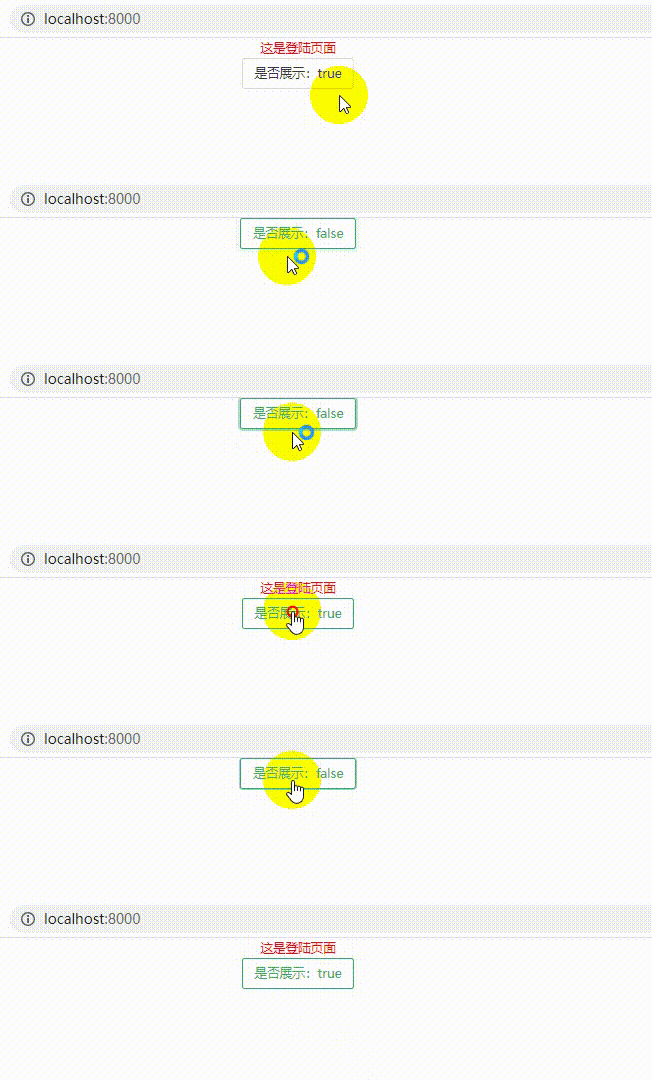
动态组件
在 setup script 中要使用动态组件的时候,用动态的 :is 来绑定:
<template>
<component :is="isShow ? LoginVue : null" />
<NButton @click="setIsShow">是否展示:{{ isShow }}</NButton>
</template>
<script setup>
import { ref } from "vue"
import LoginVue from "../login/Login.vue";
import { NButton } from 'naive-ui'
let isShow = ref<boolean>(false)
const setIsShow = ()=>{
isShow.value = !isShow.value
}
</script>
效果如下:
组件数据传递(props 和 emits)
在 <script setup> 中必须使用 defineProps 和 defineEmits API 来声明 props 和 emits , 它们具备完整的 类型推断并且在 <script setup>中 【关注尚硅谷,轻松学IT】是直接可用的
定义组件的 props
通过 defineProps指定当前 props 类型,获得上下文的 props 对象。示例:
<script setup>
const props = defineProps({
num: Number
})
</script>
定义组件的 emits
使用 defineEmit定义当前组件含有的 事件,并通过返回的上下文去执行 emit。示例:
<script setup>
const emits = defineEmits(['addNum'])
</script>
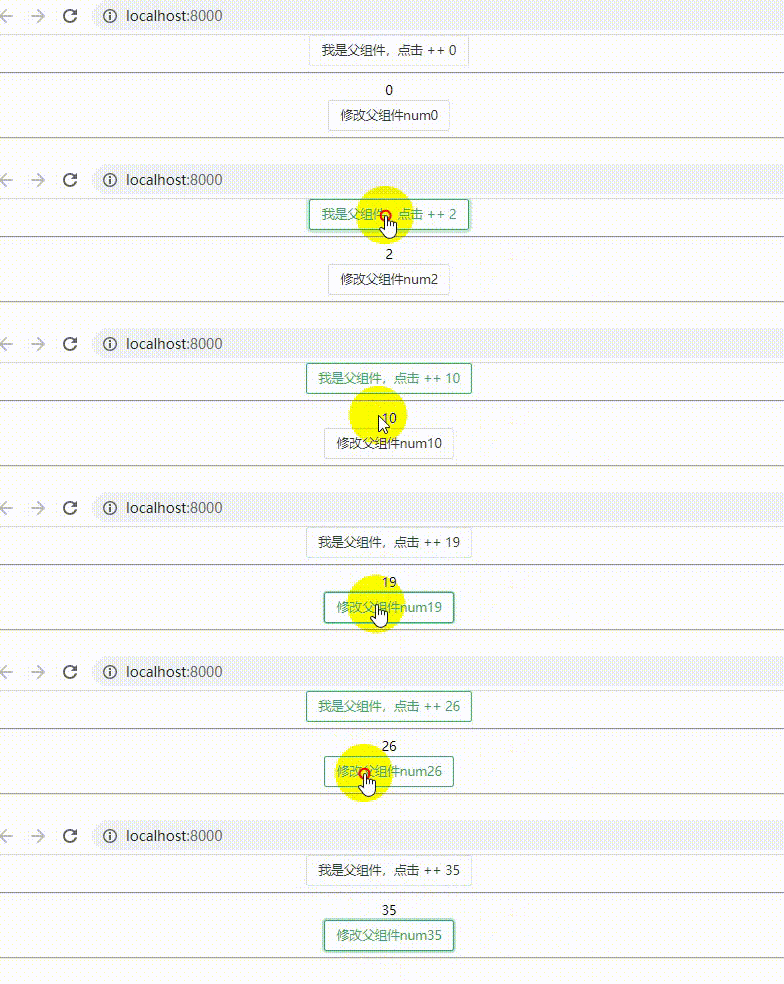
父组件:
<template>
<NButton @click="addNum">我是父组件,点击 ++ {{ num }}</NButton>
<hr />
<Child :num="num" @addNum="addNum" />
</template>
<script setup>
import Child from './Child.vue'
import { NButton } from 'naive-ui'
import { ref } from 'vue'
const num = ref<number>(0)
const addNum = () => {
num.value++
}
</script>
子组件:
<template>
<div>{{ props.num }}</div>
<NButton @click="emits('addNum')">修改父组件num{{ props.num }}</NButton>
<hr />
</template>
<script setup>
import { NButton } from 'naive-ui'
const props = defineProps({
num: Number,
})
const emits = defineEmits(['addNum'])
</script>
效果如下:
对外暴露属性(defineExpose)
<script setup> 的组件默认不会对外部暴露任何内部声明的属性。如果有部分属性要暴露出去,可以使用 defineExpose
说白了就是暴露属性给外部使用
父组件:
<template>
<NButton @click="logChildren">我是父组件</NButton>
<hr />
<Child ref="child" />
</template>
<script setup>
import Child, { ChildType } from './Child.vue'
import { NButton } from 'naive-ui'
import { ref } from 'vue'
const child = ref<ChildType>(null)
const logChildren = () => {
console.log(child.value.title)
}
</script>
子组件:
<template>
<div>我是子组件</div>
</template>
<script setup>
import { ref } from 'vue'
const title = ref<string>('我是子组件的title')
export interface ChildType {
title?: String
}
defineExpose({
title,
})
</script>
效果如下:

注意:defineProps、defineEmits、defineEmits API 不需要引入可以直接使用
获取 slots 和 attrs
注:useContext API 被弃用,取而代之的是更加细分的 api: useSlots 和 useAttrs。
在 <script setup>使用 slots 和 attrs 的情况应该是很罕见的, 【关注尚硅谷,轻松学IT】因为可以在模板中通过 $slots 和 $attrs 来访问它们。在你的确需要使用它们的罕见场景中,可以分别用 useSlots 和 useAttrs 两个辅助函数:
<script setup>
import { useSlots, useAttrs } from 'vue'
const slots = useSlots()
const attrs = useAttrs()
</script>
useSlots 和 useAttrs 是真实的运行时函数,它会返回与 setupContext.slots 和 setupContext.attrs 等价的值,同样也能在普通的组合式 API 中使用
创建异步 setup 方法(顶层 await)
<script setup>语法的另一个很酷的功能是创建异步 setup 非常容易。这对于在创建组件时加载 api,甚至将代码绑定到 <suspense>功能很有用。
我们所要做的就是让我们的 setup 函数是异步的,在我们的 <script setup> 中使用一个 顶级的await。
<script setup> 中可以使用顶层 await。结果代码会被编译成 async setup()
例如,如果我们使用的是 Fetch API,我们可以像这样使用 await:
<script setup>
const post = await fetch(`/api/pics`).then((a) => a.json())
</script>
这样setup()函数将是异步的。
文章来源于前端工匠
来自 “ ITPUB博客 ” ,链接:https://blog.itpub.net/70010293/viewspace-2856611/ ,如需转载,请注明出处,否则将追究法律责任。

