示例的测试步骤
先直接测试,看结果,下面再放代码
- 点击VS2022的启动按钮,启动程序,它会先启动Server工程,再启动AsyncAwaitDemo2工程
- 分别点击三个button
- 观察思考输出结果
测试截图
非并行异步(顺序执行的异步)
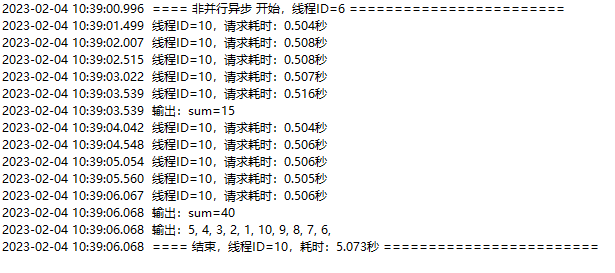
截图说明:单次请求耗时约0.5秒,共10次请求,耗时约 0.5秒×10=5秒
并行异步
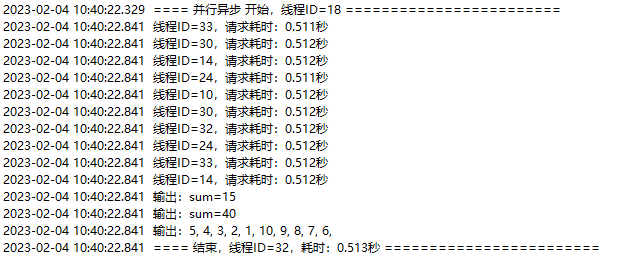

截图说明:单次请求耗时约0.5秒,共10次请求,耗时约 0.5秒
并行异步(控制并发数量)
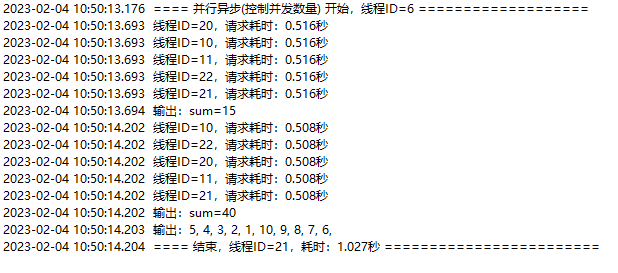
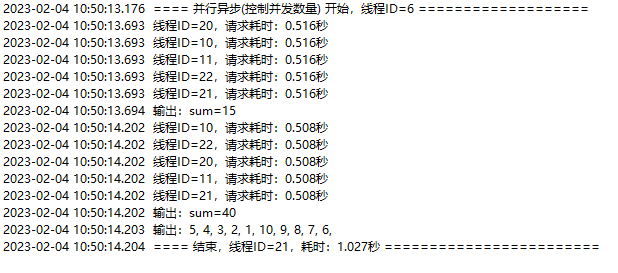
截图说明:单次请求耗时约0.5秒,共10次请求,并发数是5,耗时约 0.5秒×10÷5=1秒
服务端
服务端和客户端是两个独立的工程,测试时在一起跑,但其实可以分开部署,部署到不同的机器上
服务端是一个web api接口,用.NET 6、VS2022开发,代码如下:
[ApiController]
[Route("[controller]")]
public class TestController : ControllerBase
{
    [HttpGet]
    [Route("[action]")]
    public async Task<Dictionary<int, int>> Get(int i)
    {
        var result = new Dictionary<int, int>();

        await Task.Delay(500); //模拟耗时操作

        if (i == )
        {
            result.Add(, 5);
            result.Add(1, 4);
            result.Add(2, 3);
            result.Add(3, 2);
            result.Add(4, 1);
        }
        else if (i == 1)
        {
            result.Add(, 10);
            result.Add(1, 9);
            result.Add(2, 8);
            result.Add(3, 7);
            result.Add(4, 6);
        }

        return result;
    }
}
客户端
大家看客户端代码时,不需要关心服务端怎么写
客户端是一个Winform工程,用.NET 6、VS2022开发,代码如下:
public partial class Form1 : Form
{
    private readonly string _url = "http://localhost:5028/Test/Get";

    public Form1()
    {
        InitializeComponent();
    }

    private async void Form1_Load(object sender, EventArgs e)
    {
        //预热
        HttpClient httpClient = HttpClientFactory.GetClient();
        await (await httpClient.GetAsync(_url)).Content.ReadAsStringAsync();
    }

    //非并行异步(顺序执行的异步)
    private async void button3_Click(object sender, EventArgs e)
    {
        await Task.Run(async () =>
        {
            Log($"==== 非并行异步 开始,线程ID={Thread.CurrentThread.ManagedThreadId} ========================");
            Stopwatch sw = Stopwatch.StartNew();
            HttpClient httpClient = HttpClientFactory.GetClient();
            var tasks = new Dictionary<string, Task<string>>();
            StringBuilder sb = new StringBuilder();
            for (int i = ; i < 2; i++)
            {
                int sum = ;
                for (int j = ; j < 5; j++)
                {
                    Dictionary<int, int> dict = await RequestAsync(_url, i);
                    if (dict.ContainsKey(j))
                    {
                        int num = dict[j];
                        sum += num;
                        sb.Append($"{num}, ");
                    }
                }
                Log($"输出:sum={sum}");
            }
            Log($"输出:{sb}");
            sw.Stop();
            Log($"==== 结束,线程ID={Thread.CurrentThread.ManagedThreadId},耗时:{sw.Elapsed.TotalSeconds:0.000}秒 ========================");
        });
    }

    // 并行异步
    private async void button4_Click(object sender, EventArgs e)
    {
        await Task.Run(async () =>
        {
            Log($"==== 并行异步 开始,线程ID={Thread.CurrentThread.ManagedThreadId} ========================");
            Stopwatch sw = Stopwatch.StartNew();
            HttpClient httpClient = HttpClientFactory.GetClient();
            var tasks = new Dictionary<string, Task<Dictionary<int, int>>>();
            StringBuilder sb = new StringBuilder();
            //双层循环写第一遍
            for (int i = ; i < 2; i++)
            {
                for (int j = ; j < 5; j++)
                {
                    var task = RequestAsync(_url, i);
                    tasks.Add($"{i}_{j}", task);
                }
            }
            //双层循环写第二遍
            for (int i = ; i < 2; i++)
            {
                int sum = ;
                for (int j = ; j < 5; j++)
                {
                    Dictionary<int, int> dict = await tasks[$"{i}_{j}"];
                    if (dict.ContainsKey(j))
                    {
                        int num = dict[j];
                        sum += num;
                        sb.Append($"{num}, ");
                    }
                }
                Log($"输出:sum={sum}");
            }
            Log($"输出:{sb}");
            sw.Stop();
            Log($"==== 结束,线程ID={Thread.CurrentThread.ManagedThreadId},耗时:{sw.Elapsed.TotalSeconds:0.000}秒 ========================");
        });
    }

    // 并行异步(控制并发数量)
    private async void button5_Click(object sender, EventArgs e)
    {
        await Task.Run(async () =>
        {
            Log($"==== 并行异步(控制并发数量) 开始,线程ID={Thread.CurrentThread.ManagedThreadId} ===================");
            Stopwatch sw = Stopwatch.StartNew();
            HttpClient httpClient = HttpClientFactory.GetClient();
            var tasks = new Dictionary<string, Task<Dictionary<int, int>>>();
            Semaphore sem = new Semaphore(5, 5);
            StringBuilder sb = new StringBuilder();
            //双层循环写第一遍
            for (int i = ; i < 2; i++)
            {
                for (int j = ; j < 5; j++)
                {
                    var task = RequestAsync(_url, i, sem);
                    tasks.Add($"{i}_{j}", task);
                }
            }
            //双层循环写第二遍
            for (int i = ; i < 2; i++)
            {
                int sum = ;
                for (int j = ; j < 5; j++)
                {
                    Dictionary<int, int> dict = await tasks[$"{i}_{j}"];
                    if (dict.ContainsKey(j))
                    {
                        int num = dict[j];
                        sum += num;
                        sb.Append($"{num}, ");
                    }
                }
                Log($"输出:sum={sum}");
            }
            sem.Dispose(); //别忘了释放
            Log($"输出:{sb}");
            sw.Stop();
            Log($"==== 结束,线程ID={Thread.CurrentThread.ManagedThreadId},耗时:{sw.Elapsed.TotalSeconds:0.000}秒 ========================");
        });
    }

    private async Task<Dictionary<int, int>> RequestAsync(string url, int i)
    {
        Stopwatch sw = Stopwatch.StartNew();
        HttpClient httpClient = HttpClientFactory.GetClient();
        var result = await (await httpClient.GetAsync($"{url}?i={i}")).Content.ReadAsStringAsync();
        sw.Stop();
        Log($"线程ID={Thread.CurrentThread.ManagedThreadId},请求耗时:{sw.Elapsed.TotalSeconds:0.000}秒");
        return JsonSerializer.Deserialize<Dictionary<int, int>>(result);
    }

    private async Task<Dictionary<int, int>> RequestAsync(string url, int i, Semaphore semaphore)
    {
        semaphore.WaitOne();
        try
        {
            Stopwatch sw = Stopwatch.StartNew();
            HttpClient httpClient = HttpClientFactory.GetClient();
            var result = await (await httpClient.GetAsync($"{url}?i={i}")).Content.ReadAsStringAsync();
            sw.Stop();
            Log($"线程ID={Thread.CurrentThread.ManagedThreadId},请求耗时:{sw.Elapsed.TotalSeconds:0.000}秒");
            return JsonSerializer.Deserialize<Dictionary<int, int>>(result);
        }
        catch (Exception ex)
        {
            Log($"错误:{ex}");
            throw;
        }
        finally
        {
            semaphore.Release();
        }
    }

    #region Log
    private void Log(string msg)
    {
        msg = $"{DateTime.Now.ToString("yyyy-MM-dd HH:mm:ss.fff")}  {msg}\r\n";

        if (this.InvokeRequired)
        {
            this.BeginInvoke(new Action(() =>
            {
                txtLog.AppendText(msg);
            }));
        }
        else
        {
            txtLog.AppendText(msg);
        }
    }
    #endregion

    private void button6_Click(object sender, EventArgs e)
    {
        txtLog.Text = string.Empty;
    }
}
思考
1. 使用Semaphore的注意事项
- 如果是Winform程序,可以在button事件方法中定义它的局部变量。如果是WebAPI接口服务,请在接口方法中定义Semaphore的局部变量。注意,别定义成全局的,或者定义成静态的,或者定义成Controller的成员变量,那样会严重限制使用它的接口的吞吐能力!
- 用完调用Dispose释放
2. 尽量不增加代码复杂度
请思考代码中的注释"双层循环写第一遍""双层循环写第二遍",这个写法尽量不增加代码复杂度,试想一下,如果你用Task.Run,且不说占用线程,就问你怎么写能简单?
有人说,这题我会,这样写不就行了:
Dictionary<int, int>[] result = await Task.WhenAll(tasks.Values);
那请问,你接下来怎么写?我相信你肯定会写,但问题是,代码的逻辑结构变了,代码复杂度增加了!
所以"双层循环写第一遍""双层循环写第二遍"是什么意思?你即能方便合并,又能方便拆分,代码逻辑结构没变,只是复制了一份。
3. RequestAsync的复杂度可控
RequestAsync的复杂度并没有因为Semaphore的引入变得更复杂,增加的代码可以接受。
我写这篇博客不只是写个Demo,我确实有实际项目中的问题需要解决,代码如下:
WebAPI的Controller层:
[HttpPost]
[Route("[action]")]
public async Task<List<NightActivitiesResultItem>> Get([FromBody] NightActivitiesPostData data)
{
    return await ServiceFactory.Get<NightActivitiesService>().Get(data.startDate, data.endDate, data.startTime, data.endTime, data.threshold, data.peopleClusters);
}
WebAPI的Service层:
public async Task<List<NightActivitiesResultItem>> Get(string strStartDate, string strEndDate, string strStartTime, string strEndTime, decimal threshold, List<PeopleCluster> peopleClusterList)
{
    List<NightActivitiesResultItem> result = new List<NightActivitiesResultItem>();

    DateTime startDate = DateTime.ParseExact(strStartDate, "yyyyMMdd", CultureInfo.InvariantCulture);
    DateTime endDate = DateTime.ParseExact(strEndDate, "yyyyMMdd", CultureInfo.InvariantCulture);
    string[][] strTimes;
    if (string.Compare(strStartTime, strEndTime) > )
    {
        strTimes = new string[2][] { new string[2], new string[2] };
        strTimes[][] = strStartTime;
        strTimes[][1] = "235959";
        strTimes[1][] = "000000";
        strTimes[1][1] = strEndTime;
    }
    else
    {
        strTimes = new string[1][] { new string[2] };
        strTimes[][] = strStartTime;
        strTimes[][1] = strEndTime;
    }

    foreach (PeopleCluster peopleCluster in peopleClusterList)
    {
        for (DateTime day = startDate; day <= endDate; day = day.AddDays(1))
        {
            string strDate = day.ToString("yyyyMMdd");
            int sum = ;
            foreach (string[] timeArr in strTimes)
            {
                List<PeopleFeatureAgg> list = await ServiceFactory.Get<PeopleFeatureQueryService>().QueryAgg(strDate + timeArr[], strDate + timeArr[1], peopleCluster.ClusterIds);
                Dictionary<string, int> agg = list.ToLookup(a => a.ClusterId).ToDictionary(a => a.Key, a => a.First().Count);

                foreach (string clusterId in peopleCluster.ClusterIds)
                {
                    if (agg.TryGetValue(clusterId, out int count))
                    {
                        sum += count;
                    }
                }
            }
            if (sum >= threshold) //大于或等于阈值
            {
                NightActivitiesResultItem item = new NightActivitiesResultItem();
                item.peopleCluster = peopleCluster;
                item.date = strDate;
                item.count = sum;
                foreach (string[] timeArr in strTimes)
                {
                    PeopleFeatureQueryResult featureList = await ServiceFactory.Get<PeopleFeatureQueryService>().Query(strDate + timeArr[], strDate + timeArr[1], peopleCluster.ClusterIds, 10000);
                    item.list.AddRange(featureList.list);
                }
                item.dataType = "xxx";
                result.Add(item);
            }
        }
    }

    var clusters = result.ConvertAll<PeopleCluster>(a => a.peopleCluster);
    await ServiceFactory.Get<PersonScoreService>().Set(OpeType.Xxx, peopleClusterList, clusters, startDate.ToString("yyyyMMddHHmmss"), endDate.ToString("yyyyMMddHHmmss"));

    return result;
}
思考
上述接口代码,它有三层循环,在第三层循环体中await,第一层循环的数量会达到1000甚至10000,第二层循环的数量会达到30(一个月30天),甚至90(三个月),第三层循环的数量很少。
那么总请求次数会达到3万甚至90万,如果不使用并行异步请求,那耗时将会很长。
请问:在尽量不增加代码复杂度的前提下,怎么优化,能缩短该服务接口的执行时间?
我知道肯定有人要说我了,你傻啊,请求3万次?你可以改写一下,只请求一次,或者按天来,每天的数据只请求一次,那最多也才90次。然后在内存中计算,这不就快了?
确实是这样的,确实不应该请求3万次。但问题没这么简单:
- 且不说代码的复杂度,你写的不是一个接口,可能会有几十个这样的接口要写,复杂度增加一点这么多接口都要写死人。
- 这3万请求,可都是精确查询,es强大的缓存机制,肯定会命中缓存,也就是这些请求实际上基本是直接从内存中拿数据,连遍历集合都不需要,直接命中索引。只是网络往返次数太多。
- 这1次请求,或30次请求,对es来说,变成了范围查询,es要遍历,要给你查询并组织数据,返回集合给你。当然es集群的运算速度肯定很快。
- 这1次请求,或30次请求,结果返回后,你就要在内存中计算了,有的接口我就是这样写的,但要多写代码,比如在内存中计算,为了提高效率,先创建字典,相当于建索引。
- 只是逻辑复杂了吗?你还要多定义一些临时的变量啊!还可能要多定义一些实体类,哪怕是匿名对象。
- 代码写着写着就变懒了,对于每个接口,先组织好数据,再进行1次请求,然后在内存中再遍历再计算,心智负担好重
- 我在网上看到es集群默认最多支持10000个并发查询,需要请求es的业务程序肯定不止一个,对一个业务程序而言,确实要控制并发量
- 根据我的观察,一个WebAPI程序,线程数一般也就几十,多的时候上百,在没有异步的时候,并发请求数量实际上受限于物理线程。
- 使用异步之后,并发请求数量实际上受限于虚拟线程。确实会增加请求es的并发数量,压力大的时候,这个并发数量可能会很大。
怎么查看并发请求数
windows的cmd命令:
netstat -ano | findstr 5028
还有两个问题,博客中没有体现
1. 客户端程序执行请求时,客户端线程数量
通过任务管理器查看,非并行异步,线程数很少,请求开始后只增加了一两个线程。并行异步线程数较多。并行异步控制并发数量,线程数少很多。
2. Semaphore会阻塞当前线程
semaphore.WaitOne()阻塞线程一直阻塞到semaphore.Release(),使用了Semaphore的接口,被请求一次,阻塞一个线程,不过问题不是很大。
思考
.NET只有一个CLR线程池和一个异步线程池(完成端口线程池),当线程池中线程数量不够用时,.NET每秒才增加1到2个线程,线程增加的速度非常缓慢。结合异步,考虑一下这是为什么?
我认为(不一定对):
- 异步不需要大量物理线程,少量即可
- 如果线程增加速度很快,以异步的吞吐量,怕不是要把es请求挂!因为并发请求数太多了。
总结
- 并行异步,会有并发量太大,导致诸如数据库或者es集群抗不住的问题,谨慎使用。
- 并行异步(控制并发数量),这个目前是最佳实践。
完整测试源码
注意是AsyncParallel分支
https://gitee.com/s0611163/AsyncAwaitDemo2/tree/AsyncParallel/
最后
上述我写的实际接口,可优化也可不优化,耗时长没有问题,还有很多服务接口,它们通过定时任务在凌晨错开时间跑,结果存储在数据库中供前端查询。这是离线分析。
前同事写的接口是实时的,所以他觉得es慢了,如果只请求一次呢,可能es的查询语句也不好写,所以用ClickHouse,利用SQL灵活性,只查询一次,然后在内存中计算。
后续
又写了个测试程序,测试大量请求,并限制请求并发量。
注意是AsyncParallel2分支
https://gitee.com/s0611163/AsyncAwaitDemo2/tree/AsyncParallel2/
怎么测试?
- 启动服务端后,再启动客户端
- 点击第一个按钮,观察输出,打开Windows的资源管理器,查看Server.exe进程和AsyncAwaitDemo2.exe进程的线程数量,然后客户端可以关了,因为跑完至少要半小时。
- 点击第二个按钮,观察输出,打开Windows的资源管理器同上,观察工作线程数和异步线程数占用,能看到数据明显变化,大概几秒后就可以跑完。
- 点击第三个按钮,观察输出,打开Windows的资源管理器同上,观察工作线程数和异步线程数占用,能看到数据明显变化,大概20秒能跑完。0.065秒/每次请求×3万次请求÷100并发量≈20秒。
注意观察服务端线程数量
并行异步请求
并行异步请求时,请求3万次只需要几秒,第二次点击需要的时间更短,仅需大约2.5秒。注意观察服务端线程数量,50不到!
我把服务端修改成同步接口,客户端代码不动,试了一下,3万个请求,客户端报异常:由于目标计算机积极拒绝,无法连接。
我把服务端的线程池改大一些,ThreadPool.SetMinThreads(200, 200),客户还是报异常:远程主机强迫关闭了一个现有的连接。并行异步请求(控制并发数量)
3万次请求,耗时大约60秒,很显然服务端的吞吐量较低。
把服务端的线程池改大一些,ThreadPool.SetMinThreads(200, 200),可以达到异步接口同样的吞吐量。
来自 “ ITPUB博客 ” ,链接:https://blog.itpub.net/70000523/viewspace-3128522/ ,如需转载,请注明出处,否则将追究法律责任。

