说明:本文档为测试过程;整体测试思路为,先将分区表与主表分离->其次修改该表的表名->然后修改该表与分区键相关数据->最后将该表加入主表。
1.处理过程
1.1创建两张测试表及分区表并插入数据
--创建测试主表1
create table test.fenqu1(
qhdm text,
qxname text,
id int,
xinxi TEXT
) partition by list(qhdm);
--创建测试主表为1的分区表
create table test.fenqu1_part_120100 partition of test.fenqu1 for values in ('120100');
create table test.fenqu1_part_120000 partition of test.fenqu1 for values in ('120000');

--创建测试主表2
create table test.fenqu2(
qhdm text,
qxname text,
id int,
xinxi TEXT
) partition by list(qhdm);
--创建测试主表为1的分区表
create table test.fenqu2_part_120100 partition of test.fenqu2 for values in ('120100');
create table test.fenqu2_part_120000 partition of test.fenqu2 for values in ('120000');
--插入数据至主表1
insert into test.fenqu1 values('120100','bbb','1','zhao');
insert into test.fenqu1 values('120100','bbb','2','qian');
insert into test.fenqu1 values('120100','bbb','3','sun');
insert into test.fenqu1 values('120100','bbb','4','li');
insert into test.fenqu1 values('120100','bbb','5','chen');
insert into test.fenqu1 values('120100','bbb','6','tie');
insert into test.fenqu1 values('120100','bbb','7','song');
insert into test.fenqu1 values('120100','bbb','8','shen');
insert into test.fenqu1 values('120100','bbb','9','cheng');
insert into test.fenqu1 values('120100','bbb','10','wang');
insert into test.fenqu1 values('120100','bbb','11','ouyang');
insert into test.fenqu1 values('120100','bbb','12','chu');
insert into test.fenqu1 values('120000','aaa','20','zhao');
insert into test.fenqu1 values('120000','aaa','21','qian');
insert into test.fenqu1 values('120000','aaa','22','sun');
insert into test.fenqu1 values('120000','aaa','23','li');
insert into test.fenqu1 values('120000','aaa','24','chen');
insert into test.fenqu1 values('120000','aaa','25','tie');
insert into test.fenqu1 values('120000','aaa','26','song');
insert into test.fenqu1 values('120000','aaa','27','shen');
insert into test.fenqu1 values('120000','aaa','28','cheng');
insert into test.fenqu1 values('120000','aaa','29','wang');
insert into test.fenqu1 values('120000','aaa','30','ouyang');
insert into test.fenqu1 values('120000','aaa','31','chu');
--插入数据至主表2
insert into test.fenqu2 values('120100','bbb','1','赵');
insert into test.fenqu2 values('120100','bbb','2','钱');
insert into test.fenqu2 values('120100','bbb','3','孙');
insert into test.fenqu2 values('120100','bbb','4','李');
insert into test.fenqu2 values('120100','bbb','5','陈');
insert into test.fenqu2 values('120100','bbb','6','铁');
insert into test.fenqu2 values('120100','bbb','7','宋');
insert into test.fenqu2 values('120100','bbb','8','申');
insert into test.fenqu2 values('120100','bbb','9','成');
insert into test.fenqu2 values('120100','bbb','10','王');
insert into test.fenqu2 values('120100','bbb','11','欧阳');
insert into test.fenqu2 values('120100','bbb','12','褚');
insert into test.fenqu2 values('120000','aaa','20','ss');
insert into test.fenqu2 values('120000','aaa','21','等等');
insert into test.fenqu2 values('120000','aaa','22','ff');
insert into test.fenqu2 values('120000','aaa','23','刚刚');
insert into test.fenqu2 values('120000','aaa','24','给');
insert into test.fenqu2 values('120000','aaa','25','铁');
insert into test.fenqu2 values('120000','aaa','26','啦啦');
insert into test.fenqu2 values('120000','aaa','27','联想');
insert into test.fenqu2 values('120000','aaa','28','成');
insert into test.fenqu2 values('120000','aaa','29','啊哈哈');
insert into test.fenqu2 values('120000','aaa','30','切');
insert into test.fenqu2 values('120000','aaa','31','来来来');
1.2通过主表查看两张表所插入的数据
test_biaofenqu=# select * from test.fenqu1;  qhdm  | qxname | id | xinxi
--------+--------+----+--------
 120000 | aaa    | 20 | zhao
 120000 | aaa    | 21 | qian
 120000 | aaa    | 22 | sun
 120000 | aaa    | 23 | li
 120000 | aaa    | 24 | chen
 120000 | aaa    | 25 | tie
 120000 | aaa    | 26 | song
 120000 | aaa    | 27 | shen
 120000 | aaa    | 28 | cheng
 120000 | aaa    | 29 | wang
 120000 | aaa    | 30 | ouyang
 120000 | aaa    | 31 | chu
 120100 | bbb    | 1 | zhao
 120100 | bbb    | 2 | qian
 120100 | bbb    | 3 | sun
 120100 | bbb    | 4 | li
 120100 | bbb    | 5 | chen
 120100 | bbb    | 6 | tie
 120100 | bbb    | 7 | song
 120100 | bbb    | 8 | shen
 120100 | bbb    | 9 | cheng
 120100 | bbb    | 10 | wang
 120100 | bbb    | 11 | ouyang
 120100 | bbb    | 12 | chu
(24 行记录)

test_biaofenqu=# select * from test.fenqu2;
  qhdm  | qxname | id | xinxi
--------+--------+----+--------
120000 | aaa    | 20 | ss
120000 | aaa    | 21 | 等等
120000 | aaa    | 22 | ff
120000 | aaa    | 23 | 刚刚
120000 | aaa    | 24 | 给
120000 | aaa    | 25 | 铁
120000 | aaa    | 26 | 啦啦
120000 | aaa    | 27 | 联想
120000 | aaa    | 28 | 成
120000 | aaa    | 29 | 啊哈哈
120000 | aaa    | 30 | 切
120000 | aaa    | 31 | 来来来
120100 | bbb    | 1 | 赵
120100 | bbb    | 2 | 钱
120100 | bbb    | 3 | 孙
120100 | bbb    | 4 | 李
120100 | bbb    | 5 | 陈
120100 | bbb    | 6 | 铁
120100 | bbb    | 7 | 宋
120100 | bbb    | 8 | 申
120100 | bbb    | 9 | 成
120100 | bbb    | 10 | 王
120100 | bbb    | 11 | 欧阳
120100 | bbb    | 12 | 褚
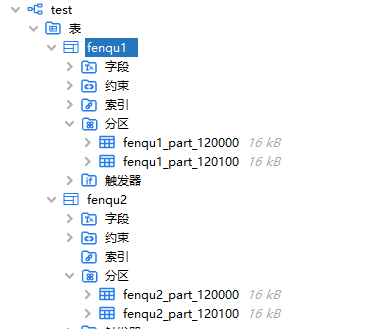
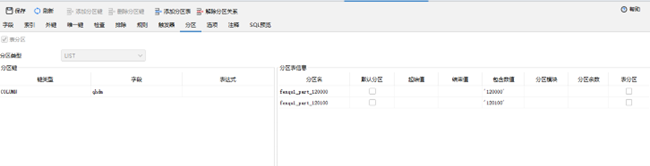
1.3查看主表与分区表的关系
1.4创建存储过程及存储过程使用的相关表格
(1)创建用于存放新老区划编码对应表格table_qhdm,并插入数据;
--创建表格table_qhdm,用于存所有的区划代码
create table table_qxdm (
    qhdm text
,
    qxdmnew TEXT
) ;
--插入区划编码数据
insert into table_qxdm values('120100','130100');
insert into table_qxdm values('120000','130000');
(2)   创建表格table_tablename,用于存放所有主表的名称,并插入数据
create table table_tablename (
    tabname text
) ;

--插入主表名称数据
insert into table_tablename values('fenqu1');
insert into table_tablename values('fenqu2');
(3)创建存放拼接后的sql语句存放表格ql_pinjie
--创建用于存储拼接后的语句表sql_pinjie
create table sql_pinjie (
    sql_pinjie text
) ;
(4)创建拼接过程中存放报错表格tab_error
create table tab_error (
    tab_error_sql text
) ;
(5)创建存储过程update_fenqu_table
CREATE OR REPLACE PROCEDURE test.update_fenqu_table()
 LANGUAGE plpgsql
AS $procedure$
DECLARE
         v_qhdm record ;
     v_tablename record ;
     v_count int8 ;
BEGIN
    --获取所有区划代码,区划代码包括,旧区划代码,新区划代码
 FOR v_qhdm in ( select qhdm , qxdmnew from table_qxdm )
 loop BEGIN
     FOR v_tablename in ( select tabname from table_tablename )
    loop BEGIN
    insert into sql_pinjie VALUES ('alter table test.'||v_tablename.tabname ||' detach PARTITION test.'||v_tablename.tabname||'_part_'|| v_qhdm.qhdm || ';' ) ;

    insert into sql_pinjie VALUES ('alter table test.'||v_tablename.tabname||'_part_'||v_qhdm.qhdm||' RENAME to '||v_tablename.tabname||'_part_'|| v_qhdm.qxdmnew||';') ;

    insert into sql_pinjie VALUES ( 'update test.'||v_tablename.tabname||'_part_'||v_qhdm.qxdmnew||' set qhdm='''||v_qhdm.qxdmnew||''';') ;
    insert into sql_pinjie VALUES ( 'alter table test.'||v_tablename.tabname||' ATTACH PARTITION test.'||v_tablename.tabname||'_part_'||v_qhdm.qxdmnew||' for values in ('''||v_qhdm.qxdmnew||''');');

EXCEPTION WHEN OTHERS THEN insert
        into tab_error values ( 'EXCEPT TABLE' || v_tablename.tabname || '_part_' || v_qhdm.qhdm || ';' ) ;
   END ;
   END loop ;
   COMMIT ;
   END ;
   END loop ;
   END $procedure$;
(6)执行存储过程update_fenqu_table
  call update_fenqu_table
(7)查看所拼接的sql语句
test_biaofenqu=# select * from sql_pinjie;
                      sql_pinjie
--------------------------------------------------------------------------------------------
 alter table test.fenqu1 detach PARTITION test.fenqu1_part_120100;
 alter table test.fenqu1_part_120100 RENAME to fenqu1_part_130100;
 update test.fenqu1_part_130100 set qhdm='130100';
 alter table test.fenqu1 ATTACH PARTITION test.fenqu1_part_130100 for values in ('130100');
 alter table test.fenqu2 detach PARTITION test.fenqu2_part_120100;
 alter table test.fenqu2_part_120100 RENAME to fenqu2_part_130100;
 update test.fenqu2_part_130100 set qhdm='130100';
 alter table test.fenqu2 ATTACH PARTITION test.fenqu2_part_130100 for values in ('130100');
 alter table test.fenqu1 detach PARTITION test.fenqu1_part_120000;
 alter table test.fenqu1_part_120000 RENAME to fenqu1_part_130000;
 update test.fenqu1_part_130000 set qhdm='130000';
 alter table test.fenqu1 ATTACH PARTITION test.fenqu1_part_130000 for values in ('130000');
 alter table test.fenqu2 detach PARTITION test.fenqu2_part_120000;
 alter table test.fenqu2_part_120000 RENAME to fenqu2_part_130000;
 update test.fenqu2_part_130000 set qhdm='130000';
 alter table test.fenqu2 ATTACH PARTITION test.fenqu2_part_130000 for values in ('130000');
(16 行记录)
(8)执行对应的sql,对分区表完成操作
 alter table test.fenqu1 detach PARTITION test.fenqu1_part_120100;
 alter table test.fenqu1_part_120100 RENAME to fenqu1_part_130100;
 update test.fenqu1_part_130100 set qhdm='130100';
 alter table test.fenqu1 ATTACH PARTITION test.fenqu1_part_130100 for values in ('130100');

 alter table test.fenqu2 detach PARTITION test.fenqu2_part_120100;
 alter table test.fenqu2_part_120100 RENAME to fenqu2_part_130100;
 update test.fenqu2_part_130100 set qhdm='130100';
 alter table test.fenqu2 ATTACH PARTITION test.fenqu2_part_130100 for values in ('130100');

 alter table test.fenqu1 detach PARTITION test.fenqu1_part_120000;
 alter table test.fenqu1_part_120000 RENAME to fenqu1_part_130000;
 update test.fenqu1_part_130000 set qhdm='130000';
 alter table test.fenqu1 ATTACH PARTITION test.fenqu1_part_130000 for values in ('130000');

 alter table test.fenqu2 detach PARTITION test.fenqu2_part_120000;
 alter table test.fenqu2_part_120000 RENAME to fenqu2_part_130000;
 update test.fenqu2_part_130000 set qhdm='130000';
 alter table test.fenqu2 ATTACH PARTITION test.fenqu2_part_130000 for values in ('130000');
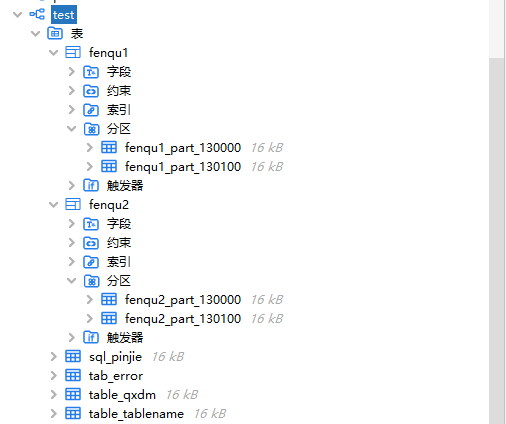
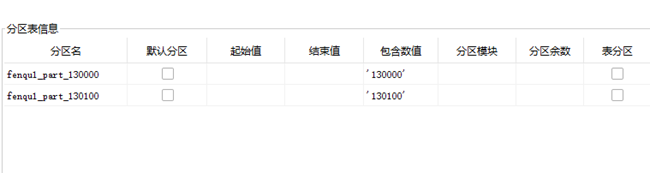
1.5查看修改后主表与分区表的关系