登录页面是直播视频app源码非常重要的一个页面,用户只有通过登陆以后才能创建直播视频app源码账号,以便用户更方便的管理系统数据。
一.分析
1.组合多个控件完成此输入框静态效果
2.hint值上浮下潜动画
3.一些直播视频app源码登录的功能
二、步骤
1.自定义一个控件
public class MyEditVIew extends RelativeLayout {
    public MyEditVIew(Context context) {
        super(context,null);
    }
    public MyEditVIew(Context context, AttributeSet attrs) {
        super(context, attrs,0);
    }
    public MyEditVIew(Context context, AttributeSet attrs, int defStyleAttr) {
        super(context, attrs, defStyleAttr);
    }
}
复制代码

2.写一个相似布局(代码在最后)
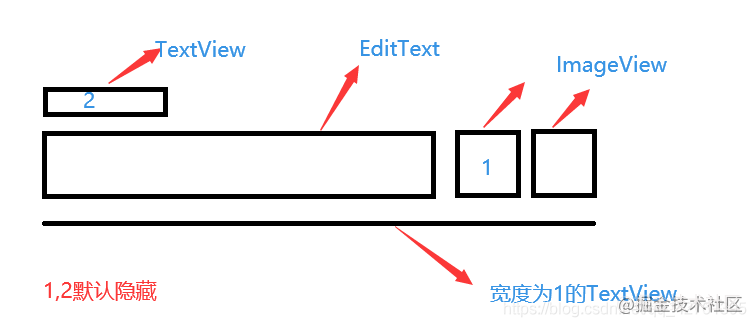
//代码在最后源码部分
3.将布局打气到view中
LayoutInflater.from(context).inflate(R.layout.my_edit_view, this);
4.小提示文字上浮下潜动画
 //小提示文字出现动画
    private void minTextshow(TextView textView) {
        AnimationSet animationSet = new AnimationSet(true);
        Animation mHiddenAction = new TranslateAnimation(Animation.RELATIVE_TO_SELF,
                0.0f, Animation.RELATIVE_TO_SELF, 0.0f,
                Animation.RELATIVE_TO_SELF, 1.0f, Animation.RELATIVE_TO_SELF,
                0.0f);
        Animation alphaAnimation = new AlphaAnimation(0, 1f);
        animationSet.addAnimation(mHiddenAction);
        animationSet.addAnimation(alphaAnimation);
        animationSet.setDuration(300);
        textview.startAnimation(animationSet);
    }
    //小提示文字隐藏动画
    private void minTexthide(TextView textView) {
        AnimationSet animationSet = new AnimationSet(true);
        Animation mShowAction = new TranslateAnimation(Animation.RELATIVE_TO_SELF, 0.0f,
                Animation.RELATIVE_TO_SELF, 0.0f, Animation.RELATIVE_TO_SELF,
                0.0f, Animation.RELATIVE_TO_SELF, 1.0f);
        mShowAction.setRepeatMode(Animation.REVERSE);
        Animation alphaAnimation = new AlphaAnimation(1f, 0);
        animationSet.addAnimation(mShowAction);
        animationSet.addAnimation(alphaAnimation);
        animationSet.setRepeatMode(Animation.REVERSE);
        animationSet.setDuration(300);
        textview.startAnimation(animationSet);
        CountDownTimer countDownTimer = new CountDownTimer(300, 300) {
            @Override
            public void onTick(long millisUntilFinished) {
            }
            @Override
            public void onFinish() {
                textview.setText("");
            }
        }.start();
    }
5.密码加密解密显示TransformationMethod、HideReturnsTransformationMethod
主要代码
 //设置文字非加密
 HideReturnsTransformationMethod method = HideReturnsTransformationMethod.getInstance();
 edittext.setTransformationMethod(method);
 //设置文字加密
 TransformationMethod method = PasswordTransformationMethod.getInstance();
 edittext.setTransformationMethod(method);
6.其他一些小知识点
1.将光标移到最后
//将光标移到最后
edittext.setSelection(edittext.getText().toString().length());
2.将键盘中的回车和空格去除
    public static void setEditTextInputSpace(EditText editText) {
        InputFilter filter = new InputFilter() {
            @Override
            public CharSequence filter(CharSequence source, int start, int end, Spanned dest, int dstart, int dend) {
                if (source.equals(" ") || source.toString().contentEquals("\n")) {
                    return "";
                } else {
                    return null;
                }
            }
        };
        editText.setFilters(new InputFilter[]{filter});
    }
3.给自定义view对外提供一个获取值的方法
 public String getText() {
        return edittext.getText().toString();
    }
7.源码
1.MyEditVIew.java
public class MyEditVIew extends RelativeLayout {
    private TextView textview;
    private EditText edittext;
    private boolean mtextisshow;     //文字是否显示判断
    private boolean imgisshow;       //图片是否显示判断
    private String hintText;
    private ImageView imageView;
    private ImageView iV_clean;
    public MyEditVIew(Context context) {
        super(context,null);
    }
    public MyEditVIew(Context context, AttributeSet attrs) {
        super(context, attrs,0);
        init(context, attrs);
        setEditTextInputSpace(edittext);
        textAddChanged();
        imageOnClick();
    }
    public MyEditVIew(Context context, AttributeSet attrs, int defStyleAttr) {
        super(context, attrs, defStyleAttr);
    }
    //打气布局,获取自定义属性的值
    private void init(Context context, AttributeSet attrs) {
        LayoutInflater.from(context).inflate(R.layout.my_edit_view, this);
        textview = findViewById(R.id.textview);
        edittext = findViewById(R.id.edittext);
        imageView = findViewById(R.id.imageView);
        iV_clean=findViewById(R.id.iV_clean);
        TypedArray ta = context.obtainStyledAttributes(attrs, R.styleable.MyEditVIew);
        hintText = ta.getString(R.styleable.MyEditVIew_myhintText);
    }
    //文字输入监听以及一些逻辑处理(未优化)
    private void textAddChanged(){
        edittext.addTextChangedListener(new TextWatcher() {
            @Override
            public void beforeTextChanged(CharSequence s, int start, int count, int after) {
            }
            @Override
            public void onTextChanged(CharSequence s, int start, int before, int count) {
            }
            @Override
            public void afterTextChanged(Editable s) {
                int textSum = s.toString().trim().length();
                if (textSum == 0) {
                    if (mtextisshow == true) {
                        minTexthide(textview);
                        mtextisshow = false;
                        iV_clean.setVisibility(INVISIBLE);
                        edittext.setHint(hintText);
                    }
                } else {
                    if (imgisshow) {
                        //设置文字非加密
                        HideReturnsTransformationMethod method = HideReturnsTransformationMethod.getInstance();
                        edittext.setTransformationMethod(method);
                        edittext.setSelection(edittext.getText().toString().length());
                    } else {
                        //设置文字加密
                        TransformationMethod method = PasswordTransformationMethod.getInstance();
                        edittext.setTransformationMethod(method);
                        //将光标移到最后
                        edittext.setSelection(edittext.getText().toString().length());
                    }
                    if (mtextisshow == false) {
                        textview.setText(hintText);
                        minTextshow(textview);
                        iV_clean.setVisibility(VISIBLE);
                        mtextisshow = true;
                    }
                }
            }
        });
    }
    //两个图片的点击事件,加密,清除文字
    private void imageOnClick(){
        imageView.setOnClickListener(new OnClickListener() {
            @Override
            public void onClick(View v) {
                if (imgisshow) {
                    imageView.setImageResource(R.mipmap.password_show);
                    HideReturnsTransformationMethod method = HideReturnsTransformationMethod.getInstance();
                    edittext.setTransformationMethod(method);
                    edittext.setSelection(edittext.getText().toString().length());
                    imgisshow = false;
                } else {
                    imageView.setImageResource(R.mipmap.pwd_invisible);
                    TransformationMethod method = PasswordTransformationMethod.getInstance();
                    edittext.setTransformationMethod(method);
                    edittext.setSelection(edittext.getText().toString().length());
                    imgisshow = true;
                }
            }
        });
        iV_clean.setOnClickListener(new OnClickListener() {
            @Override
            public void onClick(View v) {
                edittext.setText("");
            }
        });
    }
    //小提示文字出现动画
    private void minTextshow(TextView textView) {
        AnimationSet animationSet = new AnimationSet(true);
        Animation mHiddenAction = new TranslateAnimation(Animation.RELATIVE_TO_SELF,
                0.0f, Animation.RELATIVE_TO_SELF, 0.0f,
                Animation.RELATIVE_TO_SELF, 1.0f, Animation.RELATIVE_TO_SELF,
                0.0f);
        Animation alphaAnimation = new AlphaAnimation(0, 1f);
        animationSet.addAnimation(mHiddenAction);
        animationSet.addAnimation(alphaAnimation);
        animationSet.setDuration(300);
        textview.startAnimation(animationSet);
    }
    //小提示文字隐藏动画
    private void minTexthide(TextView textView) {
        AnimationSet animationSet = new AnimationSet(true);
        Animation mShowAction = new TranslateAnimation(Animation.RELATIVE_TO_SELF, 0.0f,
                Animation.RELATIVE_TO_SELF, 0.0f, Animation.RELATIVE_TO_SELF,
                0.0f, Animation.RELATIVE_TO_SELF, 1.0f);
        mShowAction.setRepeatMode(Animation.REVERSE);
        Animation alphaAnimation = new AlphaAnimation(1f, 0);
        animationSet.addAnimation(mShowAction);
        animationSet.addAnimation(alphaAnimation);
        animationSet.setRepeatMode(Animation.REVERSE);
        animationSet.setDuration(300);
        textview.startAnimation(animationSet);
        CountDownTimer countDownTimer = new CountDownTimer(300, 300) {
            @Override
            public void onTick(long millisUntilFinished) {
            }
            @Override
            public void onFinish() {
                textview.setText("");
            }
        }.start();
    }
    //将键盘中的回车和空格去除
    public static void setEditTextInputSpace(EditText editText) {
        InputFilter filter = new InputFilter() {
            @Override
            public CharSequence filter(CharSequence source, int start, int end, Spanned dest, int dstart, int dend) {
                if (source.equals(" ") || source.toString().contentEquals("\n")) {
                    return "";
                } else {
                    return null;
                }
            }
        };
        editText.setFilters(new InputFilter[]{filter});
    }
    //提供一个可获取的值
    public String getText() {
        return edittext.getText().toString();
    }
}
2.my_edit_view.xml
<LinearLayout xmlns:android="http://schemas.android.com/apk/res/android"
    android:layout_width="match_parent"
    android:layout_height="wrap_content"
    android:orientation="vertical"
    android:paddingLeft="4dp"
    android:paddingRight="4dp"
    >
    <TextView
        android:id="@+id/textview"
        android:textSize="12sp"
        android:layout_width="match_parent"
        android:layout_height="wrap_content"
        android:textColor="#b1b1b1"
        android:layout_marginRight="16dp"
        android:layout_marginLeft="16dp"/>
<LinearLayout
    android:layout_width="match_parent"
    android:layout_height="wrap_content"
    android:orientation="horizontal">
    <EditText
        android:id="@+id/edittext"
        android:layout_weight="1"
        android:layout_height="wrap_content"
        android:background="@null"
        android:hint="密码"
        android:textSize="22sp"
        android:layout_width="0dp"
        android:layout_marginLeft="16dp"
        android:layout_marginBottom="6dp"
        android:lines="1"
        />
    <ImageView
        android:id="@+id/iV_clean"
        android:layout_width="wrap_content"
        android:layout_height="wrap_content"
        android:src="@mipmap/clean"
        android:visibility="invisible"
        android:layout_marginRight="4dp"/>
    <ImageView
        android:id="@+id/imageView"
        android:layout_width="wrap_content"
        android:layout_height="wrap_content"
        android:src="@mipmap/pwd_invisible"
        android:layout_marginRight="16dp"/>
 </LinearLayout>
    <TextView
        android:layout_width="match_parent"
        android:layout_height="1dp"
        android:background="#b1b1b1"
        android:layout_marginRight="16dp"
        android:layout_marginLeft="16dp"/>
</LinearLayout>
3.attrs文件
    <declare-styleable name="MyEditVIew">
        <attr name="myhintText" format="string"/>
    </declare-styleable>
总结
希望这篇直播视频app源码实现登陆页面的文章,对您有所帮助,欢迎各位大佬留言点评
声明:本文由云豹科技转发自计蒙不吃鱼博客,如有侵权请联系作者删除
来自 “ ITPUB博客 ” ,链接:https://blog.itpub.net/69982461/viewspace-2789191/ ,如需转载,请注明出处,否则将追究法律责任。
下一篇:
直播带货平台开发如何实现抗丢包技术

请登录后发表评论
登录
全部评论
