d.网络图片的替换逻辑
思路:直播卖货系统通过Picasso拿到网络图片的bitmap,设置给ImageSpan
public class URLImageParser {

    private Context mContext;
    private TextView mTextView;
    private int mImageSize;

    /**
     *
     * @param textView 图文混排TextView
     * @param context
     * @param imageSize 图片显示高度
     */
    public URLImageParser(TextView textView, Context context, int imageSize) {
        mTextView = textView;
        mContext = context;
        mImageSize = imageSize;
    }

    public Drawable getDrawable(String url) {
        URLDrawable urlDrawable = new URLDrawable();
        new ImageGetterAsyncTask(mContext, url, urlDrawable).execute(mTextView);
        return urlDrawable;
    }

    public class ImageGetterAsyncTask extends AsyncTask<TextView, Void, Bitmap> {

        private URLDrawable urlDrawable;
        private Context context;
        private String source;
        private TextView textView;

        public ImageGetterAsyncTask(Context context, String source, URLDrawable urlDrawable) {
            this.context = context;
            this.source = source;
            this.urlDrawable = urlDrawable;
        }

        @Override
        protected Bitmap doInBackground(TextView... params) {
            textView = params[0];
            try {
                //下载网络图片,以下是使用Picasso和Glide获取网络图片例子,也可以其他方式下载网络图片

                // 使用Picasso获取网络图片Bitmap
                return Picasso.with(context).load(source).get();
                // 使用Glide获取网络图片Bitmap(使用Glide获取图片bitmap还有待研究)
//                return Glide.with(context).load(source).asBitmap().fitCenter().into(mImageSize * 3, mImageSize * 3).get();
            } catch (Exception e) {
                return null;
            }
        }

        @Override
        protected void onPostExecute(final Bitmap bitmap) {
            try {
                //获取图片宽高比
                float ratio = bitmap.getWidth() * 1.0f / bitmap.getHeight();
                Drawable bitmapDrawable = new BitmapDrawable(context.getResources(), bitmap);
                bitmapDrawable.setBounds(0, 0, (int) (mImageSize * ratio), mImageSize);
                //设置图片宽、高(这里传入的mImageSize为字体大小,所以,设置的高为字体大小,宽为按宽高比缩放)
                urlDrawable.setBounds(0, 0, (int) (mImageSize * ratio), mImageSize);
                urlDrawable.drawable = bitmapDrawable;
                //两次调用invalidate才会在异步加载完图片后,刷新图文混排TextView,显示出图片
                urlDrawable.invalidateSelf();
                textView.invalidate();
            } catch (Exception e) {
                /* Like a null bitmap, etc. */
            }
        }
    }

}

public class URLDrawable extends BitmapDrawable {

    protected Drawable drawable;

    @Override
    public void draw(Canvas canvas) {
        // override the draw to facilitate refresh function later
        if (drawable != null) {
            drawable.draw(canvas);
        }
    }
}
e.本地图片的替换
直播卖货系统会把[房管][可爱]这些,事先存到到map中,存储格式为:
HashMap<String, String> emojiMap = new HashMap<String, String>();//key=[可爱] value=emoji_1
上面的代码:matcher.group()得到的就是[可爱],如果发现直播卖货系统本地存储的map中有key为[可爱],就拿到其drawable名emoji_1,
这图片直播卖货系统是存储在drawable下的,通过如下代码拿到drawable的id:
int resId = mContext.getResources().getIdentifier(value, "drawable", mContext.getPackageName());
还有个方法就是:map存储格式为 key=[可爱] value=R.drawable.emoji_1,这样就可以直接拿到drawable了。
那么问题来了,怎么将本地图片快速存储到map中,当然这也一定是我们的准备工作
f.本地图片快速存储到map
先在assets在放置文件:
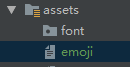
内容为:
emoji_0.png,[房管]
emoji_1.png,[可爱]
emoji_2.png,[笑脸]
emoji_3.png,[囧]
emoji_4.png,[生气]
emoji_5.png,[鬼脸]
然后我们一行一行的读,再保存到map中,这个相信大家应该都会。代码如下:
调用如下代码即可:
ParseData(getEmojiFile(context), context);
解析方法如下:
private HashMap<String, String> emojiMap = new HashMap<String, String>();//[可爱],emoji_1

//解析字符
    private void ParseData(List<String> data, Context context) {
        if (data == null) {
            return;
        }
        ChatEmoji emojEentry;
        try {
            //单行格式:emoji_1.png,[可爱]
            for (String str : data) {
                String[] text = str.split(",");
                String fileName = text[0].substring(0, text[0].lastIndexOf("."));
                emojiMap.put(text[1], fileName);
                Log.e("测试表情: ", "KEY=" + text[1] + "  VALUE=" + fileName +"  context.getPackageName()="+context.getPackageName());
            }
        } catch (Exception e) {
            e.printStackTrace();
        }
    }

    //从assest获取图片名
    public static List<String> getEmojiFile(Context context) {
        try {
            List<String> list = new ArrayList<String>();
            InputStream in = context.getResources().getAssets().open("emoji");
            BufferedReader br = new BufferedReader(new InputStreamReader(in, "UTF-8"));
            String str = null;
            while ((str = br.readLine()) != null) {
                list.add(str);
            }
            return list;
        } catch (IOException e) {
            e.printStackTrace();
        }
        return null;
    }
g.注意
由于直播卖货系统遍历SpannableStringBuilder,本身就耗时,所有我们聊天处,每处理一条消息,一定要定向的刷新,千万不能通过notifyDataSetChanged()做整体刷新,需要调用如下方法去添加和局部刷新数据:
//添加数据
public void addData(ChatBean data) {
        mList.add(data);
        notifyItemInserted(getItemCount());
        notifyItemRangeChanged(getItemCount(), 1);
}
————————————————
声明:本文由云豹科技转发自
只管羊毛薅博客,如有侵权请联系作者删除
来自 “ ITPUB博客 ” ,链接:https://blog.itpub.net/69982461/viewspace-2783620/ ,如需转载,请注明出处,否则将追究法律责任。

