现在直播非常火爆,可以从PC或手机直播,然后从PC或是手机或是 支持HTML5的浏览器 收看。但是,你知道直播电商源码后面的技术和实现原理码?
首先,视频有它的播放协议。原则上,RTSP,RTMP,HTTP都可以做直播和点播,但一般做直播用RTSP和RTMP,做点播用HTTP。我们选用的是RTMP协议。
RTMP 协议
RTMP(Real Time Message Protocol/实时信息传输协议)是应用层协议,靠底层传输层协议(通常是TCP)来保证信息传输的可靠性的。在TCP链接建立后,RTMP协议也要客户端和服务器通过“握手”来建立RTMP Connection,然后在Connection上传输控制信息。RTMP协议传输时会对数据格式化,而实际传输的时候为了更好地实现多路复用、分包和信息的公平性,发送端会把Message划分为带有Message ID的Chunk,每个Chunk可能是一个单独的Message,也可能是Message的一部分,在接受端会根据Chunk中包含的data的长度,message id和message的长度把chunk还原成完整的Message,从而实现信息的收发。
我们看看两个常用的视频服务。一个是由直播电商源码向服务器发起请求推流到服务器,这个就是直播的播放服务,流程如下。

另一个是由直播电商源码向服务器发起请求从服务器端接受数据,可以多次调用,这就是播放服务。流程如下。
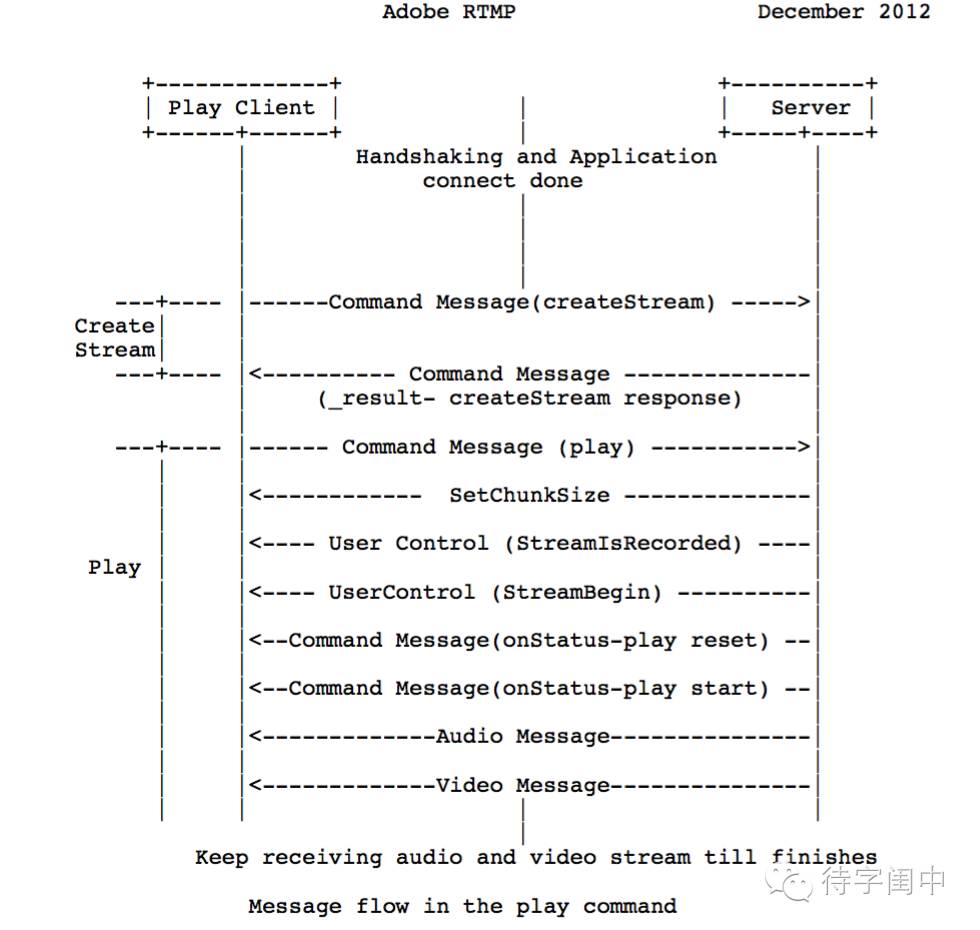
RTMP是直播后面的协议,有很多的开源软件实现了,细节我们不再细说。下面,我们看看怎么搭建直播电商源码后台服务系统。
安装和配置 LEMP
LEMP栈是指Linux(L), NGINX(E), MySQL(M), PHP(P),还记得LAMP吗?LEMP既是将NGINX(E)取代了Apache(A)。
首先,用以下命令安装和启动NGINX web server。
# sudo apt-get update
# sudo apt-get install nginx
# sudo service nginx start
接着,安装MySQL。
# sudo apt-get install mysql-server mysql php5-mysql
接着,安装和配置PHP。
# sudo apt-get install php5-fpm
location ~ .php$ {
  try_files $uri =404;
  fastcgi_pass unix:/var/run/php5-fpm.sock;
  fastcgi_index index.php;
  fastcgi_param SCRIPT_FILENAME $document_root$fastcgi_script_name;
  include fastcgi_params;
}
最后,重新启动NGINX web server。
# sudo service nginx restart
这样,后台的web server设置好了,可以对外提供网页和PHP服务了。但是,NGINX并不支持RTMP协议,我们需要下载,编译,安装和配置RTMP模块。
安装和配置nginx-rtmp-module
首先,下载NGINX的源代码,确保环境下能正确的编译。
# git clone https://github.com/nginx/nginx.git
然后,下载RTMP模块。
# git clone https://github.com/arut/nginx-rtmp-module.git
然后,cd到NGINX的源代码目录,config,make和install 刚才下载的RTMP模块。
# ./configure --add-module=/path/to/nginx-rtmp-module make make install
# make
# make install
最后,在NGINX的配置文件中,加上RTMP相关的配置,并且重新启动NGINX server。
rtmp {
    server {
        listen 1935;
        chunk_size 4000;
        # HLS
        application hls {
            live on;
            hls on;
            hls_path /tmp/hls;
        }
        # MPEG-DASH is similar to HLS
        application dash {
            live on;
            dash on;
            dash_path /tmp/dash;
        }
    }
}
# HTTP can be used for accessing RTMP stats
http {
    server {
        listen      8080;
        # This URL provides RTMP statistics in XML
        location /stat {
            rtmp_stat all;
            # Use this stylesheet to view XML as web page
            # in browser
            rtmp_stat_stylesheet stat.xsl;
        }
        location /stat.xsl {
            # XML stylesheet to view RTMP stats.
            # Copy stat.xsl wherever you want
            # and put the full directory path here
            root /path/to/stat.xsl/;
        }
        location /hls {
            # Serve HLS fragments
            types {
                application/vnd.apple.mpegurl m3u8;
                video/mp2t ts;
            }
            root /tmp;
            add_header Cache-Control no-cache;
        }
        location /dash {
            # Serve DASH fragments
            root /tmp;
            add_header Cache-Control no-cache;
        }
    }
}
声明:本文由云豹科技转发自 找个毛线博客,如有侵权请联系作者删除
来自 “ ITPUB博客 ” ,链接:https://blog.itpub.net/69982461/viewspace-2781126/ ,如需转载,请注明出处,否则将追究法律责任。

