在白码低代码开发平台上对接七陌外呼接口,实现选择客户进行外呼,并保存通话记录的功能。
外呼接口实现
官方接口文档:http://developer.7moor.com/v2docs/dialout/
1、对接数据查询
向七陌商务索取到七陌用户中心账号密码,在查询页面查询到三个参数
    let accountId = "T0********";//账户id
    let apiSecret = "495b60****************5f0555af";//账户secret
    let host = "https://openapis.7moor.com";//请求域名
查询页面:http://developer.7moor.com/data-query/
2、接口鉴权信息
-
时间戳
    //时间
    let date = new Date();
    let YY = date.getFullYear();
    let MM = (date.getMonth() + 1 < 10 ? '0' + (date.getMonth() + 1) : date.getMonth() + 1);
    let DD = (date.getDate() + 1 <= 10 ? '0' + date.getDate() : date.getDate());
    let hh = (date.getHours() + 1 <= 10 ? '0' + date.getHours() : date.getHours());
    let mm = date.getMinutes() + 1 <= 10 ? '0' + date.getMinutes() : date.getMinutes();
    let ss = date.getSeconds() + 1 <= 10 ? '0' + date.getSeconds() : date.getSeconds();
    let time = YY + MM + DD + hh + mm + ss;
-
包头验证信息Authorization
    //包头验证信息 Authorization的值为 Base64编码(账户Id +冒号+时间戳)
    let buffer = $modules.lib.Buffer.from(accountId + ":" + time);
    let authorization = buffer.toString("base64");
-
请求参数sig
    //sig, 32位大写MD5加密 (帐号Id + 帐号APISecret +时间戳)
    const crypto = $modules.crypto;
    const hash = crypto.createHash('md5');
    let sig = hash.update(accountId + apiSecret + time).digest('hex').toLocaleUpperCase();
3、外呼接口请求地址
    //请求地址
    let url = host + "/v20180426/call/dialout/" + accountId + "?sig=" + sig;
4、请求头部
    //请求头部
    let headers = {
        "Content-Type": "application/json;charset=utf-8",
        "Authorization": authorization,
    }
5、请求体
相关参数参考官方文档:http://developer.7moor.com/v2docs/dialout/
    //请求体
    let data = {
        "FromExten": $input.FromExten,
        "Exten": $input.Exten,
        "ExtenType": typeMap[$input.ExtenType],
        "ActionID": $input.ActionID,
        "DialoutStrVar": $input.DialoutStrVar,
    };
为了方便用户端理解,extenType参数输入增加map
    //ExtenType map
    let typeMap = {
        "手机": "Local",
        "软电话": "sip",
        "IP话机": "gateway",
    }
6、发起外呼请求
    //外呼
    let call = await $modules.curl(url, {
        method: "post",
        dataType: "json",
        headers,
        data,
    });
7、输出请求结果
    //输出
    //$output.sig = sig;
    //$output.authorization = authorization;
    $output.request = data;
    $output.result = call.data;
    $output.success = call.data.Succeed.toString();
    $output.msg = call.data.Message;
坐席接听方式说明:外呼时强制坐席使用该接听方式进行外呼。
Local为“手机”,”sip为“软电话”需登录企话宝,gateway为“语音网关”,需注册绑定IP话机。
-
Sip方式外呼效果:
通话记录事件推送实现
官方接口文档:http://developer.7moor.com/event/
1、设置推送地址
添加一个webhook,设置路径。
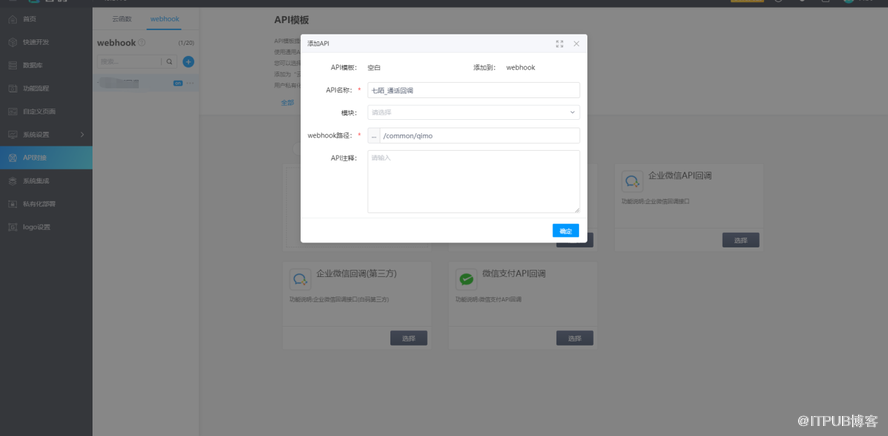
将完整路径复制,与用户中心账户名一并发给七陌业务员,让对方配置该路径。
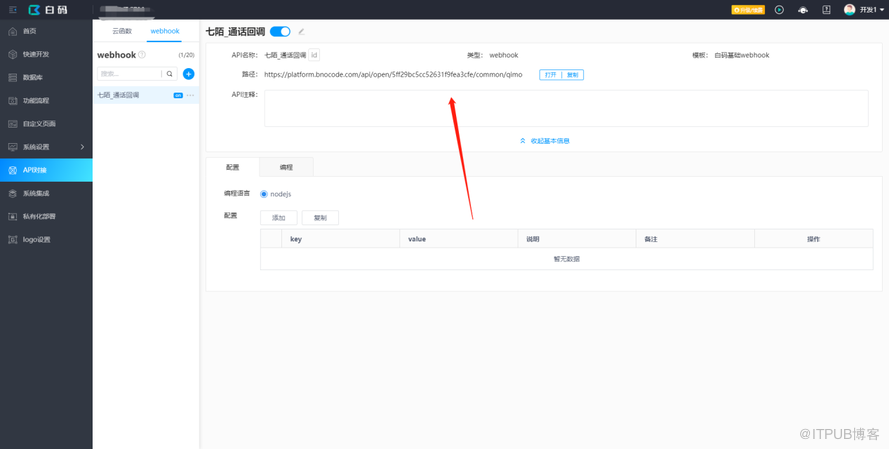
2、处理接收的信息
async function hook($req = request, $resp = response, $modules = modules) {
    //返回字符串 200,告知七陌已成功接收
    $resp.body = "200";

    let json = {
        query: $req.query,//接收的数据,get方式
        body: $req.body,//接收的数据,post方式
        timestamp: new Date().toString()
    }
    //保存接收的数据
    $modules.data.saveData("60177fad283f87288d276269", {
        "60177fc32f8b27288c6023dd": JSON.stringify(json)
    })
}
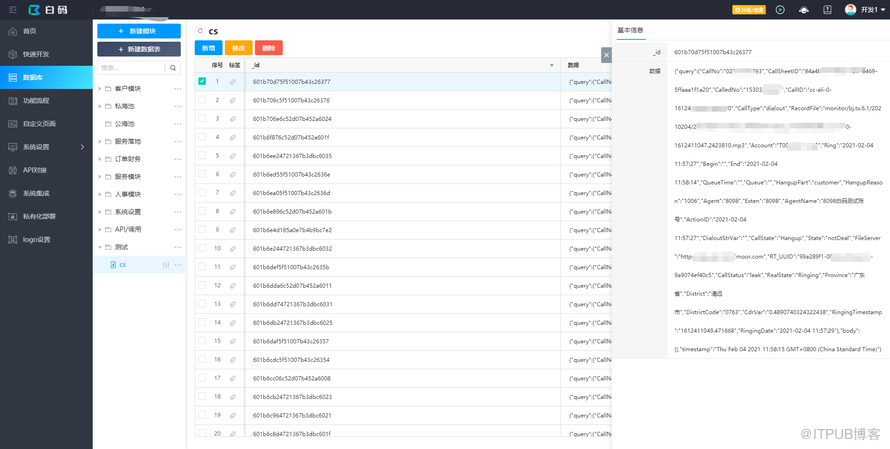
接收到的数据:
来自 “ ITPUB博客 ” ,链接:https://blog.itpub.net/69981626/viewspace-2756401/ ,如需转载,请注明出处,否则将追究法律责任。
上一篇:
CRM公海客户自动分配功能的实现
下一篇:
CRM七天无跟进自动退回公海功能的实现

请登录后发表评论
登录
全部评论
