01-基于Redis的分布式爬虫(基于RedisCrawlSpider类)
分布式爬虫:
    1.概念:多台机器上可以执行统一爬虫程序,实现网站数据的分布式爬取。
    2.原生的scrapy 是不可以实现分布式爬虫的。
        2.1 调度器无法共享
        2.2 管道无法共享
    3. scrapy-redis组件:专门为scrapy开发的组件。实现分布式爬取
        3.1 下载:pip install scrapy-redis
    4.分布式爬取的流程:
        a. 安装Redis数据库
        b. redis配置文件的配置
        c. redis服务的开启,基于配置配置文件
        d. 创建scrapy工程后,创建基于crawlSpider的爬虫文件
        e. 导入 from scrapy_redis.spiders import RedisCrawlSpider
        f. 然后爬虫文件基于 RedisCrawlSpider 这个类的源文件
            class RedisqiubaiSpider(RedisCrawlSpider):
        g. 修改
            # start_urls = ['https://']
            # 调度器队列的名称 该行代码 跟start_urls含义一样
            redis_key = 'qiubaiSpider'
        h. 将项目的管道和调度器 配置成 基于 scrapy-redis的组件
        i. 执行爬虫文件
            scrapy runspider reidsQiubai.py
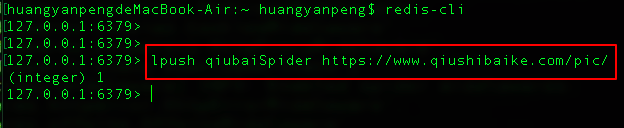
        j. 在redis的客户端,将起始url 放到调度器的队列中(qiubaiSpider 是调度器队列名称)
            lpush qiubaiSpider https://
        k. 查询爬取结果
            lrange redisQiubai:items 0 -1
修改配置文件
#

 settings.py
ROBOTSTXT_OBEY = False
USER_AGENT = "Mozilla/5.0 (Windows NT 6.1; Win64; x64) AppleWebKit/537.36 (KHTML, like Gecko) Chrome/67.0.3396.87 Safari/537.36"
# 使用scrapy-redis组件中封装好的管道,将每台机器爬取到的数据存储通过该管道存储到redis数据库中,从而实现了多台机器的管道共享。ITEM_PIPELINES = {    # 'redisPro.pipelines.RedisproPipeline': 300,
    'scrapy_redis.pipelines.RedisPipeline': 400,
}# 使用scrapy-redis组件中封装好的调度器,将所有的url存储到该指定的调度器中,从而实现了多台机器的调度器共享。# 使用scrapy-redis组件的去重队列DUPEFILTER_CLASS = "scrapy_redis.dupefilter.RFPDupeFilter"# 使用scrapy-redis组件自己的调度器SCHEDULER = "scrapy_redis.scheduler.Scheduler"# 是否允许暂停SCHEDULER_PERSIST = True# 如果redis 服务器不在自己本机,则需要如下配置:# REDIS_HOST = 'redis服务的ip地址'# REDIS_PORT = 6379
# 创建新项目


scrapy startproject redisPro
cd
redisPro
/

scrapy
genspider
-t crawl redisQiubai
# redisQiubai.py# -*- coding: utf-8 -*-import scrapyfrom scrapy.linkextractors import LinkExtractorfrom scrapy.spiders import CrawlSpider, Rulefrom redisPro.items import RedisproItemfrom scrapy_redis.spiders import RedisCrawlSpiderclass RedisqiubaiSpider(RedisCrawlSpider):
    name = 'redisQiubai'
    # allowed_domains = ['']
    # start_urls = ['https://']
    # 调度器队列的名称 该行代码 跟start_urls含义一样
    redis_key = 'qiubaiSpider'
    link = LinkExtractor(allow=r'/pic/page/\d+')
    rules = (
        Rule(link, callback='parse_item', follow=True),
    )    def parse_item(self, response):
        div_list = response.xpath('//*[@id="content-left"]/div')        for div in div_list:
            img_url = "https:" + div.xpath('.//div[@class="thumb"]/a/img/@src').extract_first()
            item = RedisproItem()
            item['img_url'] = img_url            yield item
# 切换到爬虫文件的目录cd redisPro/redisPro/spiders/# 执行爬虫文件scrapy runspider redisQiubai.py
将起始url 放到 调度器队列中
查看爬取结果

02-UA池
- 作用:尽可能多的将scrapy工程中的请求伪装成不同类型的浏览器身份。- 操作流程:
    1.在下载中间件中拦截请求
    2.将拦截到的请求的请求头信息中的UA进行篡改伪装
    3.在配置文件中开启下载中间件
# pipelines.py# 导包from scrapy.contrib.downloadermiddleware.useragent import UserAgentMiddlewareimport random# UA池代码的编写(单独给UA池封装一个下载中间件的一个类)class RandomUserAgent(UserAgentMiddleware):
    def process_request(self, request, spider):
        # 从列表中随机抽选出一个ua值
        ua = random.choice(user_agent_list)        # ua值进行当前拦截到请求的ua的写入操作
        request.headers.setdefault('User-Agent',ua)
user_agent_list = [        "Mozilla/5.0 (Windows NT 6.1; WOW64) AppleWebKit/537.1 "
        "(KHTML, like Gecko) Chrome/22.0.1207.1 Safari/537.1",        "Mozilla/5.0 (X11; CrOS i686 2268.111.0) AppleWebKit/536.11 "
        "(KHTML, like Gecko) Chrome/20.0.1132.57 Safari/536.11",        "Mozilla/5.0 (Windows NT 6.1; WOW64) AppleWebKit/536.6 "
        "(KHTML, like Gecko) Chrome/20.0.1092.0 Safari/536.6",        "Mozilla/5.0 (Windows NT 6.2) AppleWebKit/536.6 "
        "(KHTML, like Gecko) Chrome/20.0.1090.0 Safari/536.6",        "Mozilla/5.0 (Windows NT 6.2; WOW64) AppleWebKit/537.1 "
        "(KHTML, like Gecko) Chrome/19.77.34.5 Safari/537.1",        "Mozilla/5.0 (X11; Linux x86_64) AppleWebKit/536.5 "
        "(KHTML, like Gecko) Chrome/19.0.1084.9 Safari/536.5",        "Mozilla/5.0 (Windows NT 6.0) AppleWebKit/536.5 "
        "(KHTML, like Gecko) Chrome/19.0.1084.36 Safari/536.5",        "Mozilla/5.0 (Windows NT 6.1; WOW64) AppleWebKit/536.3 "
        "(KHTML, like Gecko) Chrome/19.0.1063.0 Safari/536.3",        "Mozilla/5.0 (Windows NT 5.1) AppleWebKit/536.3 "
        "(KHTML, like Gecko) Chrome/19.0.1063.0 Safari/536.3",        "Mozilla/5.0 (Macintosh; Intel Mac OS X 10_8_0) AppleWebKit/536.3 "
        "(KHTML, like Gecko) Chrome/19.0.1063.0 Safari/536.3",        "Mozilla/5.0 (Windows NT 6.2) AppleWebKit/536.3 "
        "(KHTML, like Gecko) Chrome/19.0.1062.0 Safari/536.3",        "Mozilla/5.0 (Windows NT 6.1; WOW64) AppleWebKit/536.3 "
        "(KHTML, like Gecko) Chrome/19.0.1062.0 Safari/536.3",        "Mozilla/5.0 (Windows NT 6.2) AppleWebKit/536.3 "
        "(KHTML, like Gecko) Chrome/19.0.1061.1 Safari/536.3",        "Mozilla/5.0 (Windows NT 6.1; WOW64) AppleWebKit/536.3 "
        "(KHTML, like Gecko) Chrome/19.0.1061.1 Safari/536.3",        "Mozilla/5.0 (Windows NT 6.1) AppleWebKit/536.3 "
        "(KHTML, like Gecko) Chrome/19.0.1061.1 Safari/536.3",        "Mozilla/5.0 (Windows NT 6.2) AppleWebKit/536.3 "
        "(KHTML, like Gecko) Chrome/19.0.1061.0 Safari/536.3",        "Mozilla/5.0 (X11; Linux x86_64) AppleWebKit/535.24 "
        "(KHTML, like Gecko) Chrome/19.0.1055.1 Safari/535.24",        "Mozilla/5.0 (Windows NT 6.2; WOW64) AppleWebKit/535.24 "
        "(KHTML, like Gecko) Chrome/19.0.1055.1 Safari/535.24"]
03-代理池
- 作用:尽可能多的将scrapy工程中的请求的IP设置成不同的。- 免费代理ip:http://www.goubanjia.com/- 操作流程:
    1.在下载中间件中拦截请求    2.将拦截到的请求的IP修改成某一代理IP    3.在配置文件中开启下载中间件
# pipelines.py# 批量对拦截到的请求进行ip更换# 单独封装下载中间件类class Proxy(object):
    def process_request(self, request, spider):
        # 对拦截到请求的url进行判断(协议头到底是http还是https)
        # request.url返回值:http://www.xxx.com
        h = request.url.split(':')[0]  # 请求的协议头
        if h == 'https':
            ip = random.choice(PROXY_https)
            request.meta['proxy'] = 'https://'+ip        else:
            ip = random.choice(PROXY_http)
            request.meta['proxy'] = 'http://' + ip# 可被选用的代理IPPROXY_http = [    '153.180.102.104:80',    '195.208.131.189:56055',
]
PROXY_https = [    '120.83.49.90:9000',    '95.189.112.214:35508',
]
04-selenium在scrapy中的应用
selenium如何被应用到scrapy:
    a)在爬虫文件中导入webdriver类
    b)在爬虫文件的爬虫类的构造方法中进行了浏览器实例化的操作
    c)在爬虫类的closed方法中进行浏览器关闭的操作
    d)在下载中间件的process_response方法中编写执行浏览器自动化的操作
·需求:爬取的是基于文字的新闻数据(国内,国际,军事,航空)
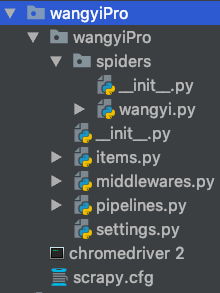


# -*- coding: utf-8 -*-# Define here the models for your spider middleware## See documentation in:# https://doc.scrapy.org/en/latest/topics/spider-middleware.htmlfrom scrapy.http import HtmlResponseimport time'''UA池'''# 导包from scrapy.contrib.downloadermiddleware.useragent import UserAgentMiddlewareimport random# UA池代码的编写(单独给UA池封装一个下载中间件的一个类)class RandomUserAgent(UserAgentMiddleware):
    def process_request(self, request, spider):
        # 从列表中随机抽选出一个ua值
        ua = random.choice(user_agent_list)        # ua值进行当前拦截到请求的ua的写入操作
        request.headers.setdefault('User-Agent',ua)
user_agent_list = [        "Mozilla/5.0 (Windows NT 6.1; WOW64) AppleWebKit/537.1 "
        "(KHTML, like Gecko) Chrome/22.0.1207.1 Safari/537.1",        "Mozilla/5.0 (X11; CrOS i686 2268.111.0) AppleWebKit/536.11 "
        "(KHTML, like Gecko) Chrome/20.0.1132.57 Safari/536.11",        "Mozilla/5.0 (Windows NT 6.1; WOW64) AppleWebKit/536.6 "
        "(KHTML, like Gecko) Chrome/20.0.1092.0 Safari/536.6",        "Mozilla/5.0 (Windows NT 6.2) AppleWebKit/536.6 "
        "(KHTML, like Gecko) Chrome/20.0.1090.0 Safari/536.6",        "Mozilla/5.0 (Windows NT 6.2; WOW64) AppleWebKit/537.1 "
        "(KHTML, like Gecko) Chrome/19.77.34.5 Safari/537.1",        "Mozilla/5.0 (X11; Linux x86_64) AppleWebKit/536.5 "
        "(KHTML, like Gecko) Chrome/19.0.1084.9 Safari/536.5",        "Mozilla/5.0 (Windows NT 6.0) AppleWebKit/536.5 "
        "(KHTML, like Gecko) Chrome/19.0.1084.36 Safari/536.5",        "Mozilla/5.0 (Windows NT 6.1; WOW64) AppleWebKit/536.3 "
        "(KHTML, like Gecko) Chrome/19.0.1063.0 Safari/536.3",        "Mozilla/5.0 (Windows NT 5.1) AppleWebKit/536.3 "
        "(KHTML, like Gecko) Chrome/19.0.1063.0 Safari/536.3",        "Mozilla/5.0 (Macintosh; Intel Mac OS X 10_8_0) AppleWebKit/536.3 "
        "(KHTML, like Gecko) Chrome/19.0.1063.0 Safari/536.3",        "Mozilla/5.0 (Windows NT 6.2) AppleWebKit/536.3 "
        "(KHTML, like Gecko) Chrome/19.0.1062.0 Safari/536.3",        "Mozilla/5.0 (Windows NT 6.1; WOW64) AppleWebKit/536.3 "
        "(KHTML, like Gecko) Chrome/19.0.1062.0 Safari/536.3",        "Mozilla/5.0 (Windows NT 6.2) AppleWebKit/536.3 "
        "(KHTML, like Gecko) Chrome/19.0.1061.1 Safari/536.3",        "Mozilla/5.0 (Windows NT 6.1; WOW64) AppleWebKit/536.3 "
        "(KHTML, like Gecko) Chrome/19.0.1061.1 Safari/536.3",        "Mozilla/5.0 (Windows NT 6.1) AppleWebKit/536.3 "
        "(KHTML, like Gecko) Chrome/19.0.1061.1 Safari/536.3",        "Mozilla/5.0 (Windows NT 6.2) AppleWebKit/536.3 "
        "(KHTML, like Gecko) Chrome/19.0.1061.0 Safari/536.3",        "Mozilla/5.0 (X11; Linux x86_64) AppleWebKit/535.24 "
        "(KHTML, like Gecko) Chrome/19.0.1055.1 Safari/535.24",        "Mozilla/5.0 (Windows NT 6.2; WOW64) AppleWebKit/535.24 "
        "(KHTML, like Gecko) Chrome/19.0.1055.1 Safari/535.24"]class WangyiproDownloaderMiddleware(object):
    # Not all methods need to be defined. If a method is not defined,
    # scrapy acts as if the downloader middleware does not modify the
    # passed objects.
    def process_request(self, request, spider):
        # Called for each request that goes through the downloader
        # middleware.
        # Must either:
        # - return None: continue processing this request
        # - or return a Response object
        # - or return a Request object
        # - or raise IgnoreRequest: process_exception() methods of
        #   installed downloader middleware will be called
        return None
    # 可以拦截到响应对象(下载器传递给spider的响应对象)
    # request:响应对象对应的请求对象
    # response:拦截到的响应对象
    # spider:爬虫文件中对应的爬虫类的实例
    def process_response(self, request, response, spider):
        # Called with the response returned from the downloader.
        # Must either;
        # - return a Response object
        # - return a Request object
        # - or raise IgnoreRequest
        # 响应对象中存储页面数据的篡改
        # print(request.url)
        if request.url in ['http://news.163.com/domestic/', 'http://news.163.com/air/', 'http://war.163.com/', 'http://news.163.com/world/']:
            spider.bro.get(url=request.url)
            js = 'windows.scrollTo(0, document.body.scrollHeight)'
            spider.bro.execute_script(js)            # 一定要给浏览器移动的缓冲加载数据的时间
            time.sleep(2)            # page_text 包含了动态加载出来的页面数据
            page_text = spider.bro.page_source            # current_url属性 表示 刚才浏览器发起请求所对应的url
            # body: 表示 响应对象所携带的数据值
            return HtmlResponse(url=spider.bro.current_url, body=page_text, encoding='utf-8', request=request)        else:            return response'''代理池'''# 批量对拦截到的请求进行ip更换# 单独封装下载中间件类class Proxy(object):
    def process_request(self, request, spider):
        # 对拦截到请求的url进行判断(协议头到底是http还是https)
        # request.url返回值:http://www.xxx.com
        h = request.url.split(':')[0]  # 请求的协议头
        if h == 'https':
            ip = random.choice(PROXY_https)
            request.meta['proxy'] = 'https://'+ip        else:
            ip = random.choice(PROXY_http)
            request.meta['proxy'] = 'http://' + ip# 可被选用的代理IPPROXY_http = [    '153.180.102.104:80',    '195.208.131.189:56055',
]
PROXY_https = [    '120.83.49.90:9000',    '95.189.112.214:35508',
]
middlewares.py


# -*- coding: utf-8 -*-import scrapyfrom selenium import webdriverfrom wangyiPro.items import WangyiproItemclass WangyiSpider(scrapy.Spider):
    name = 'wangyi'
    # allowed_domains = ['https://news.163.com']
    start_urls = ['https://news.163.com/']    def __init__(self):
        # 实例化一个浏览器对象
        self.bro = webdriver.Chrome(executable_path='./chromedriver 2')    # 必须在整个爬虫结束后,关闭浏览器
    def closed(self, spider):
        print("爬虫结束!")
        self.bro.quit()    def parse(self, response):
        lis = response.xpath('//div[@class="ns_area list"]/ul/li')
        indexs = [3, 4, 6, 7]        # 存储的是 国内,国际,军事,航空 四个板块对应的li标签对象
        li_list = []        for index in indexs:
            li_list.append(lis[index])        # 获取四个板块的链接和文字标题
        for li in li_list:
            url = li.xpath('./a/@href').extract_first()
            title = li.xpath('./a/text()').extract_first()            # headers = {
            #     'Connection': 'close',
            # }
            # print(title, url)
            # 对每一个板块对应的url发起请求,获取页面数据(标题,缩略图,关键字,发布时间,标题的url)
            yield scrapy.Request(url=url, callback=self.parseSecond, meta={'title': title, 'url': url})    def parseSecond(self, response):
        div_list = response.xpath('//div[@class="data_row news_article clearfix"]')        # print(len(div_list))
        for div in div_list:            # 标题
            head = div.xpath('.//div[@class="news_title"]/h3/a/text()').extract_first()            # 缩略图链接
            img_url = div.xpath('./a/img/@src').extract_first()
            tag = div.xpath('.//div[@class="news_tag"]//text()').extract()
            tags = []            for i in tag:
                i = i.strip('\n \t')
                tags.append(i)
            tag = "".join(tags)            # 标题链接
            title_url = div.xpath('.//div[@class="news_title"]/h3/a/@href').extract_first()

# -*- coding: utf-8 -*-# Scrapy settings for wangyiPro project## For simplicity, this file contains only settings considered important or# commonly used. You can find more settings consulting the documentation:##     https://doc.scrapy.org/en/latest/topics/settings.html#     https://doc.scrapy.org/en/latest/topics/downloader-middleware.html#     https://doc.scrapy.org/en/latest/topics/spider-middleware.htmlBOT_NAME = 'wangyiPro'SPIDER_MODULES = ['wangyiPro.spiders']
NEWSPIDER_MODULE = 'wangyiPro.spiders'# Crawl responsibly by identifying yourself (and your website) on the user-agent# USER_AGENT = 'wangyiPro (+http://www.yourdomain.com)'USER_AGENT = "Mozilla/5.0 (Windows NT 6.1; Win64; x64) AppleWebKit/537.36 (KHTML, like Gecko) Chrome/67.0.3396.87 Safari/537.36"# Obey robots.txt rulesROBOTSTXT_OBEY = False# Configure maximum concurrent requests performed by Scrapy (default: 16)# CONCURRENT_REQUESTS = 32# Configure a delay for requests for the same website (default: 0)# See https://doc.scrapy.org/en/latest/topics/settings.html#download-delay# See also autothrottle settings and docs#DOWNLOAD_DELAY = 3# The download delay setting will honor only one of:#CONCURRENT_REQUESTS_PER_DOMAIN = 16#CONCURRENT_REQUESTS_PER_IP = 16# Disable cookies (enabled by default)#COOKIES_ENABLED = False# Disable Telnet Console (enabled by default)#TELNETCONSOLE_ENABLED = False# Override the default request headers:#DEFAULT_REQUEST_HEADERS = {#   'Accept': 'text/html,application/xhtml+xml,application/xml;q=0.9,*/*;q=0.8',#   'Accept-Language': 'en',#}# Enable or disable spider middlewares# See https://doc.scrapy.org/en/latest/topics/spider-middleware.html#SPIDER_MIDDLEWARES = {#    'wangyiPro.middlewares.WangyiproSpiderMiddleware': 543,#}# Enable or disable downloader middlewares# See https://doc.scrapy.org/en/latest/topics/downloader-middleware.htmlDOWNLOADER_MIDDLEWARES = {   'wangyiPro.middlewares.WangyiproDownloaderMiddleware': 543,   'wangyiPro.middlewares.RandomUserAgent': 542,   'wangyiPro.middlewares.Proxy': 541,
}# Enable or disable extensions# See https://doc.scrapy.org/en/latest/topics/extensions.html#EXTENSIONS = {#    'scrapy.extensions.telnet.TelnetConsole': None,#}# Configure item pipelines# See https://doc.scrapy.org/en/latest/topics/item-pipeline.htmlITEM_PIPELINES = {   'wangyiPro.pipelines.WangyiproPipeline': 300,
}# Enable and configure the AutoThrottle extension (disabled by default)# See https://doc.scrapy.org/en/latest/topics/autothrottle.html#AUTOTHROTTLE_ENABLED = True# The initial download delay#AUTOTHROTTLE_START_DELAY = 5# The maximum download delay to be set in case of high latencies#AUTOTHROTTLE_MAX_DELAY = 60# The average number of requests Scrapy should be sending in parallel to# each remote server#AUTOTHROTTLE_TARGET_CONCURRENCY = 1.0# Enable showing throttling stats for every response received:#AUTOTHROTTLE_DEBUG = False# Enable and configure HTTP caching (disabled by default)# See https://doc.scrapy.org/en/latest/topics/downloader-middleware.html#httpcache-middleware-settings#HTTPCACHE_ENABLED = True#HTTPCACHE_EXPIRATION_SECS = 0#HTTPCACHE_DIR = 'httpcache'#HTTPCACHE_IGNORE_HTTP_CODES = []#HTTPCACHE_STORAGE = 'scrapy.extensions.httpcache.FilesystemCacheStorage'
05-基于RedisSpider类实现的分布式爬虫
a)代码修改(爬虫类):
    i.导包:


from scrapy_redis.spiders
import
 RedisSpider
    ii.将爬虫类的父类修改成RedisSpider
    iii.将起始url列表注释,添加一个redis_key(调度器队列的名称)的属性
      redis_key =
 ‘wangyi’
b)redis数据库配置文件的配置redisxxx.conf:
    i.

#

bind 127.0.0.1
    ii.protected-
mode no
c)对项目中settings进行配置:REDIS_HOST =
'
redis服务的ip地址
'
REDIS_PORT = 6379
REDIS_ENCODING = ‘utf-8
’
REDIS_PARAMS = {‘password’:’123456
’}

#

 使用scrapy-redis组件的去重队列DUPEFILTER_CLASS =

"

scrapy_redis.dupefilter.RFPDupeFilter

"

#

 使用scrapy-redis组件自己的调度器SCHEDULER =

"

scrapy_redis.scheduler.Scheduler

"

#

 是否允许暂停SCHEDULER_PERSIST =
 True

#

 使用scrapy-redis组件中封装好的管道ITEM_PIPELINES =
 {
'
scrapy_redis.pipelines.RedisPipeline
': 400
,
}
d)开启redis数据库的服务:redis-
server 配置文件
e)执行爬虫文件:在spiders文件夹下

  scrapy runspider wangyi.py
f)向调度器的队列中扔一个起始url:
  i.开启redis客户端: redis-cli
  ii.向调度器队列中扔一个起始url
     lpush wangyi https://news.163.com


# -*- coding: utf-8 -*-import scrapyfrom selenium import webdriverfrom wangyiPro.items import WangyiproItemfrom scrapy_redis.spiders import RedisSpiderclass WangyiSpider(RedisSpider):
    name = 'wangyi'
    # allowed_domains = ['https://news.163.com']
    # start_urls = ['https://news.163.com/']
    redis_key = 'wangyi'
    def __init__(self):
        # 实例化一个浏览器对象
        self.bro = webdriver.Chrome(executable_path='/Users/huangyanpeng/Desktop/scrapy框架/firstScrapy/wangyiPro/chromedriver 2')    # 必须在整个爬虫结束后,关闭浏览器
    def closed(self, spider):
        print("爬虫结束!")
        self.bro.quit()    def parse(self, response):
        lis = response.xpath('//div[@class="ns_area list"]/ul/li')
        indexs = [3, 4, 6, 7]        # 存储的是 国内,国际,军事,航空 四个板块对应的li标签对象
        li_list = []        for index in indexs:
            li_list.append(lis[index])        # 获取四个板块的链接和文字标题
        for li in li_list:
            url = li.xpath('./a/@href').extract_first()
            title = li.xpath('./a/text()').extract_first()            # print(title, url)
            # 对每一个板块对应的url发起请求,获取页面数据(标题,缩略图,关键字,发布时间,标题的url)
            yield scrapy.Request(url=url, callback=self.parseSecond, meta={'title': title, 'url': url})    def parseSecond(self, response):
        div_list = response.xpath('//div[@class="data_row news_article clearfix "]')        # print(len(div_list))
        for div in div_list:
            head = div.xpath('.//div[@class="news_title"]/h3/a/text()').extract_first()
            url = div.xpath('.//div[@class="news_title"]/h3/a/@href').extract_first()
            imgUrl = div.xpath('./a/img/@src').extract_first()
            tag = div.xpath('.//div[@class="news_tag"]//text()').extract()
            tags = []            for t in tag:
                t = t.strip(' \n \t')
                tags.append(t)
            tag = "".join(tags)            # 获取meta传递过来的数据值title
            title = response.meta['title']            # 实例化item对象,将解析到的数据值存储到item对象中
            item = WangyiproItem()
            item['head'] = head
            item['url'] = url
            item['imgUrl'] = imgUrl
            item['tag'] = tag
            item['title'] = title            # 对url发起请求,获取对应页面中存储的新闻内容数据
            yield scrapy.Request(url=url, callback=self.getContent, meta={'item': item})            print(head+":"+url+":"+imgUrl+":"+tag)    def getContent(self, response):
        # 获取传递过来的item
        item = response.meta['item']        # 解析当前页面中存储的新闻数据
        content_list = response.xpath('//div[@class="post_text"]/p/text()').extract()
        content = "".join(content_list)
        item['content'] = content        yield item

# -*- coding: utf-8 -*-# Define here the models for your scraped items## See documentation in:# https://doc.scrapy.org/en/latest/topics/items.htmlimport scrapyclass WangyiproItem(scrapy.Item):    # define the fields for your item here like:
    head = scrapy.Field()
    url = scrapy.Field()
    imgUrl = scrapy.Field()
    tag = scrapy.Field()
    title = scrapy.Field()
    content = scrapy.Field()


# -*- coding: utf-8 -*-# Define here the models for your spider middleware## See documentation in:# https://doc.scrapy.org/en/latest/topics/spider-middleware.htmlfrom scrapy.http import HtmlResponseimport time'''UA池'''# 导包from scrapy.contrib.downloadermiddleware.useragent import UserAgentMiddlewareimport random# UA池代码的编写(单独给UA池封装一个下载中间件的一个类)class RandomUserAgent(UserAgentMiddleware):
    def process_request(self, request, spider):
        # 从列表中随机抽选出一个ua值
        ua = random.choice(user_agent_list)        # ua值进行当前拦截到请求的ua的写入操作
        request.headers.setdefault('User-Agent',ua)
user_agent_list = [        "Mozilla/5.0 (Windows NT 6.1; WOW64) AppleWebKit/537.1 "
        "(KHTML, like Gecko) Chrome/22.0.1207.1 Safari/537.1",        "Mozilla/5.0 (X11; CrOS i686 2268.111.0) AppleWebKit/536.11 "
        "(KHTML, like Gecko) Chrome/20.0.1132.57 Safari/536.11",        "Mozilla/5.0 (Windows NT 6.1; WOW64) AppleWebKit/536.6 "
        "(KHTML, like Gecko) Chrome/20.0.1092.0 Safari/536.6",        "Mozilla/5.0 (Windows NT 6.2) AppleWebKit/536.6 "
        "(KHTML, like Gecko) Chrome/20.0.1090.0 Safari/536.6",        "Mozilla/5.0 (Windows NT 6.2; WOW64) AppleWebKit/537.1 "
        "(KHTML, like Gecko) Chrome/19.77.34.5 Safari/537.1",        "Mozilla/5.0 (X11; Linux x86_64) AppleWebKit/536.5 "
        "(KHTML, like Gecko) Chrome/19.0.1084.9 Safari/536.5",        "Mozilla/5.0 (Windows NT 6.0) AppleWebKit/536.5 "
        "(KHTML, like Gecko) Chrome/19.0.1084.36 Safari/536.5",        "Mozilla/5.0 (Windows NT 6.1; WOW64) AppleWebKit/536.3 "
        "(KHTML, like Gecko) Chrome/19.0.1063.0 Safari/536.3",        "Mozilla/5.0 (Windows NT 5.1) AppleWebKit/536.3 "
        "(KHTML, like Gecko) Chrome/19.0.1063.0 Safari/536.3",        "Mozilla/5.0 (Macintosh; Intel Mac OS X 10_8_0) AppleWebKit/536.3 "
        "(KHTML, like Gecko) Chrome/19.0.1063.0 Safari/536.3",        "Mozilla/5.0 (Windows NT 6.2) AppleWebKit/536.3 "
        "(KHTML, like Gecko) Chrome/19.0.1062.0 Safari/536.3",        "Mozilla/5.0 (Windows NT 6.1; WOW64) AppleWebKit/536.3 "
        "(KHTML, like Gecko) Chrome/19.0.1062.0 Safari/536.3",        "Mozilla/5.0 (Windows NT 6.2) AppleWebKit/536.3 "
        "(KHTML, like Gecko) Chrome/19.0.1061.1 Safari/536.3",        "Mozilla/5.0 (Windows NT 6.1; WOW64) AppleWebKit/536.3 "
        "(KHTML, like Gecko) Chrome/19.0.1061.1 Safari/536.3",        "Mozilla/5.0 (Windows NT 6.1) AppleWebKit/536.3 "
        "(KHTML, like Gecko) Chrome/19.0.1061.1 Safari/536.3",        "Mozilla/5.0 (Windows NT 6.2) AppleWebKit/536.3 "
        "(KHTML, like Gecko) Chrome/19.0.1061.0 Safari/536.3",        "Mozilla/5.0 (X11; Linux x86_64) AppleWebKit/535.24 "
        "(KHTML, like Gecko) Chrome/19.0.1055.1 Safari/535.24",        "Mozilla/5.0 (Windows NT 6.2; WOW64) AppleWebKit/535.24 "
        "(KHTML, like Gecko) Chrome/19.0.1055.1 Safari/535.24"]class WangyiproDownloaderMiddleware(object):
    # Not all methods need to be defined. If a method is not defined,
    # scrapy acts as if the downloader middleware does not modify the
    # passed objects.
    def process_request(self, request, spider):
        # Called for each request that goes through the downloader
        # middleware.
        # Must either:
        # - return None: continue processing this request
        # - or return a Response object
        # - or return a Request object
        # - or raise IgnoreRequest: process_exception() methods of
        #   installed downloader middleware will be called
        return None
    # 可以拦截到响应对象(下载器传递给spider的响应对象)
    # request:响应对象对应的请求对象
    # response:拦截到的响应对象
    # spider:爬虫文件中对应的爬虫类的实例
    def process_response(self, request, response, spider):
        # Called with the response returned from the downloader.
        # Must either;
        # - return a Response object
        # - return a Request object
        # - or raise IgnoreRequest
        # 响应对象中存储页面数据的篡改
        # print(request.url)
        if request.url in ['http://news.163.com/domestic/', 'http://news.163.com/air/', 'http://war.163.com/', 'http://news.163.com/world/']:
            spider.bro.get(url=request.url)
            js = 'windows.scrollTo(0, document.body.scrollHeight)'
            spider.bro.execute_script(js)            # 一定要给浏览器移动的缓冲加载数据的时间
            time.sleep(2)            # page_text 包含了动态加载出来的页面数据
            page_text = spider.bro.page_source            # current_url属性 表示 刚才浏览器发起请求所对应的url
            # body: 表示 响应对象所携带的数据值
            return HtmlResponse(url=spider.bro.current_url, body=page_text, encoding='utf-8', request=request)        else:            return response'''代理池'''# 批量对拦截到的请求进行ip更换# 单独封装下载中间件类class Proxy(object):
    def process_request(self, request, spider):
        # 对拦截到请求的url进行判断(协议头到底是http还是https)
        # request.url返回值:http://www.xxx.com
        h = request.url.split(':')[0]  # 请求的协议头
        if h == 'https':
            ip = random.choice(PROXY_https)
            request.meta['proxy'] = 'https://'+ip        else:
            ip = random.choice(PROXY_http)
            request.meta['proxy'] = 'http://' + ip# 可被选用的代理IPPROXY_http = [    '153.180.102.104:80',    '195.208.131.189:56055',
]
PROXY_https = [    '120.83.49.90:9000',    '95.189.112.214:35508',
]

# -*- coding: utf-8 -*-# Scrapy settings for wangyiPro project## For simplicity, this file contains only settings considered important or# commonly used. You can find more settings consulting the documentation:##     https://doc.scrapy.org/en/latest/topics/settings.html#     https://doc.scrapy.org/en/latest/topics/downloader-middleware.html#     https://doc.scrapy.org/en/latest/topics/spider-middleware.htmlBOT_NAME = 'wangyiPro'SPIDER_MODULES = ['wangyiPro.spiders']
NEWSPIDER_MODULE = 'wangyiPro.spiders'# Crawl responsibly by identifying yourself (and your website) on the user-agent# USER_AGENT = 'wangyiPro (+http://www.yourdomain.com)'USER_AGENT = "Mozilla/5.0 (Windows NT 6.1; Win64; x64) AppleWebKit/537.36 (KHTML, like Gecko) Chrome/67.0.3396.87 Safari/537.36"# Obey robots.txt rulesROBOTSTXT_OBEY = False# Configure maximum concurrent requests performed by Scrapy (default: 16)# CONCURRENT_REQUESTS = 32# Configure a delay for requests for the same website (default: 0)# See https://doc.scrapy.org/en/latest/topics/settings.html#download-delay# See also autothrottle settings and docs#DOWNLOAD_DELAY = 3# The download delay setting will honor only one of:#CONCURRENT_REQUESTS_PER_DOMAIN = 16#CONCURRENT_REQUESTS_PER_IP = 16# Disable cookies (enabled by default)#COOKIES_ENABLED = False# Disable Telnet Console (enabled by default)#TELNETCONSOLE_ENABLED = False# Override the default request headers:#DEFAULT_REQUEST_HEADERS = {#   'Accept': 'text/html,application/xhtml+xml,application/xml;q=0.9,*/*;q=0.8',#   'Accept-Language': 'en',#}# Enable or disable spider middlewares# See https://doc.scrapy.org/en/latest/topics/spider-middleware.html#SPIDER_MIDDLEWARES = {#    'wangyiPro.middlewares.WangyiproSpiderMiddleware': 543,#}# Enable or disable downloader middlewares# See https://doc.scrapy.org/en/latest/topics/downloader-middleware.htmlDOWNLOADER_MIDDLEWARES = {   'wangyiPro.middlewares.WangyiproDownloaderMiddleware': 543,   'wangyiPro.middlewares.RandomUserAgent': 542,   'wangyiPro.middlewares.Proxy': 541,
}# Enable or disable extensions# See https://doc.scrapy.org/en/latest/topics/extensions.html#EXTENSIONS = {#    'scrapy.extensions.telnet.TelnetConsole': None,#}# Configure item pipelines# See https://doc.scrapy.org/en/latest/topics/item-pipeline.htmlITEM_PIPELINES = {   # 'wangyiPro.pipelines.WangyiproPipeline': 300,
   'scrapy_redis.pipelines.RedisPipeline': 400,
}# Enable and configure the AutoThrottle extension (disabled by default)# See https://doc.scrapy.org/en/latest/topics/autothrottle.html#AUTOTHROTTLE_ENABLED = True# The initial download delay#AUTOTHROTTLE_START_DELAY = 5# The maximum download delay to be set in case of high latencies#AUTOTHROTTLE_MAX_DELAY = 60# The average number of requests Scrapy should be sending in parallel to# each remote server#AUTOTHROTTLE_TARGET_CONCURRENCY = 1.0# Enable showing throttling stats for every response received:#AUTOTHROTTLE_DEBUG = False# Enable and configure HTTP caching (disabled by default)# See https://doc.scrapy.org/en/latest/topics/downloader-middleware.html#httpcache-middleware-settings#HTTPCACHE_ENABLED = True#HTTPCACHE_EXPIRATION_SECS = 0#HTTPCACHE_DIR = 'httpcache'#HTTPCACHE_IGNORE_HTTP_CODES = []#HTTPCACHE_STORAGE = 'scrapy.extensions.httpcache.FilesystemCacheStorage'# REDIS_HOST = '127.0.0.1'REDIS_PORT = 6379REDIS_ENCODING = 'utf-8'# REDIS_PARAMS = {'password': '123456'}# 使用scrapy-redis组件的去重队列DUPEFILTER_CLASS = "scrapy_redis.dupefilter.RFPDupeFilter"# 使用scrapy-redis组件自己的调度器SCHEDULER = "scrapy_redis.scheduler.Scheduler"# 是否允许暂停SCHEDULER_PERSIST = True
来自 “ ITPUB博客 ” ,链接:https://blog.itpub.net/69981395/viewspace-2711179/ ,如需转载,请注明出处,否则将追究法律责任。
上一篇:
智能营销总部:网络爬虫简介
下一篇:
山东创睦网络科技:爬虫综合

请登录后发表评论
登录
全部评论
