什么是开屏广告
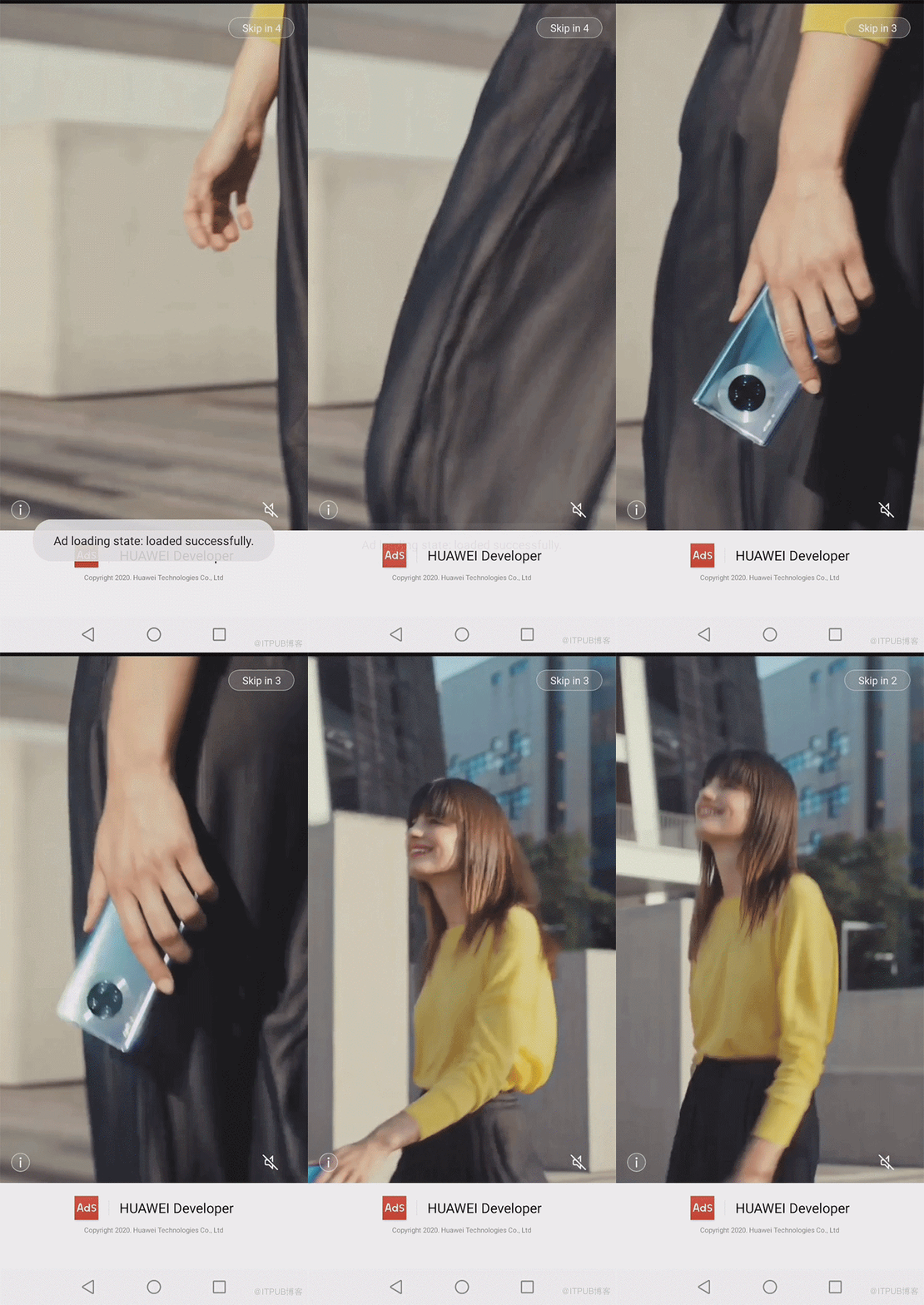
开屏广告示例
开屏广告的优势
位置优势:用户在进入App前就会看到开屏广告,相比于应用内广告提前,并且只要使用App的用户就要强制观看。
展示面积大:广告全屏显示,视觉冲击力很强,便于优质内容曝光,吸引用户眼球,增强用户点击率与品牌曝光度。
当用户刚打开应用时,用户覆盖面广,用户注意力集中。因此开屏广告适用于广告主进行大规模的品牌宣传和产品推广。
华为广告服务能够帮助开发者接入包括开屏广告在内的6种广告位。接下来的文章会详细讲解开屏广告的开发步骤。示例代码已在相关社区进行开源,欢迎开发者关注、下载并提供宝贵意见:
前提条件
HUAWEI Ads SDK依赖HMS Core(APK)4.0.0.300及以上版本。如果设备上未安装HMS Core(APK)4.0.0.300及以上版本,则无法使用HUAWEI Ads SDK的相关接口。
开发前准备
1.1 添加SplashView。
<?xml version="1.0" encoding="utf-8"?>
<RelativeLayout xmlns:android="http://schemas.android.com/apk/res/android"
    xmlns:tools="http://schemas.android.com/tools"
    android:layout_width="match_parent"
    android:layout_height="match_parent"
    tools:context=".SplashActivity">

    <!-- 开屏广告Logo区域 -->
    <RelativeLayout
        android:id="@+id/logo_area"
        android:layout_width="match_parent"
        android:layout_height="100dp"
        android:layout_alignParentBottom="true"
        android:background="@android:color/white"
        android:visibility="visible">
        <LinearLayout
            android:layout_width="wrap_content"
            android:layout_height="wrap_content"
            android:layout_alignParentBottom="true"
            android:layout_centerHorizontal="true"
            android:layout_marginBottom="40dp"
            android:orientation="vertical">
            <LinearLayout
                android:layout_width="wrap_content"
                android:layout_height="wrap_content"
                android:layout_gravity="center"
                android:layout_marginBottom="6dp"
                android:gravity="center"
                android:orientation="horizontal">
                <ImageView
                    android:layout_width="28dp"
                    android:layout_height="28dp"
                    android:background="@mipmap/ic_launcher" />
                <View
                    android:layout_width="0.5dp"
                    android:layout_height="18dp"
                    android:layout_marginLeft="12dp"
                    android:layout_marginRight="12dp"
                    android:alpha="0.1"
                    android:background="@android:color/black" />
                <TextView
                    android:layout_width="wrap_content"
                    android:layout_height="wrap_content"
                    android:alpha="1"
                    android:text="@string/owner"
                    android:textColor="@android:color/black"
                    android:textSize="16sp" />
            </LinearLayout>
            <TextView
                android:layout_width="wrap_content"
                android:layout_height="wrap_content"
                android:layout_gravity="center"
                android:alpha="0.5"
                android:text="@string/copyright_info"
                android:textColor="@android:color/black"
                android:textSize="8sp" />
        </LinearLayout>
    </RelativeLayout>

    <!-- 开屏广告视图 -->
    <com.huawei.hms.ads.splash.SplashView
        android:id="@+id/splash_ad_view"
        android:layout_width="match_parent"
        android:layout_height="match_parent"
        android:layout_above="@id/logo" />
</RelativeLayout>
以下示例代码展示了如何获取SplashView
SplashView splashView = findViewById(R.id.splash_ad_view);
1.2 修改应用默认启动页面。
修改AndroidManifest.xml, 将默认启动的activity修改为SplashActivity,这样即可在应用主界面加载前展示开屏广告。
<?xml version="1.0" encoding="utf-8"?>
<manifest xmlns:android="http://schemas.android.com/apk/res/android"
    package="com.huawei.hms.ads.sdk">
    <application
        android:allowBackup="true"
        android:icon="@mipmap/ic_launcher"
        android:label="@string/app_name"
        android:roundIcon="@mipmap/ic_launcher_round"
        android:supportsRtl="true"
        android:theme="@style/AppTheme">
        <activity
            android:name=".MainActivity"
            android:exported="false"
            android:screenOrientation="portrait">
        </activity>
        <activity
            android:name=".SplashActivity"
            android:exported="true"
            android:screenOrientation="portrait">
            <intent-filter>
                <action android:name="android.intent.action.MAIN" />
                <category android:name="android.intent.category.LAUNCHER" />
            </intent-filter>
        </activity>
        ...
    </application>
</manifest>
创建SplashActivity.java类,用于实现开屏广告获取和展示。
...
import android.os.Build;
import androidx.appcompat.app.AppCompatActivity;

public class SplashActivity extends AppCompatActivity {
    // "testq6zq98hecj"为测试专用的广告位ID, App正式发布时需要改为正式的广告位ID
    private static final String AD_ID = "testq6zq98hecj";
    private static final int AD_TIMEOUT = 5000;
    private static final int MSG_AD_TIMEOUT = 1001;

    /**
     * 暂停标志位。
     * 在开屏广告页面展示时:
     * 按返回键退出应用时需设置为true,以确保应用主界面不被拉起;
     * 切换至其他界面时需设置为false,以确保从其他页面回到开屏广告页面时仍然可以正常跳转至应用主界面;
     */
    private boolean hasPaused = false;

    // 收到广告展示超时消息时的回调处理
    private Handler timeoutHandler = new Handler(new Handler.Callback() {
        @Override
        public boolean handleMessage(@NonNull Message msg) {
            if (SplashActivity.this.hasWindowFocus()) {
                jump();
            }
            return false;
        }
    });

    @Override
    protected void onCreate(Bundle savedInstanceState) {
        super.onCreate(savedInstanceState);
        setContentView(R.layout.activity_splash);
        // 获取并展示开屏广告
        loadAd();
    }
    /**
     * 广告展示完毕时,从广告界面跳转至App主界面
     */
    private void jump() {
        if (!hasPaused) {
            hasPaused = true;
            startActivity(new Intent(SplashActivity.this, MainActivity.class));
            finish();
        }
    }
    /**
     * 按返回键退出应用时需设置为true,以确保应用主界面不被拉起
     */
    @Override
    protected void onStop() {
        // 移除消息队列中等待的超时消息
        timeoutHandler.removeMessages(MSG_AD_TIMEOUT);
        hasPaused = true;
        super.onStop();
    }
    /**
     * 从其他页面回到开屏页面时调用,进入应用主界面
     */
    @Override
    protected void onRestart() {
        super.onRestart();
        hasPaused = false;
        jump();
    }
    @Override
    protected void onDestroy() {
        super.onDestroy();
1.3 获取广告。
SplashView创建好之后,通过SplashView类的load()方法来获取广告。
private void loadAd() {
    int orientation = ActivityInfo.SCREEN_ORIENTATION_PORTRAIT;
    AdParam adParam = new AdParam.Builder().build();
    SplashView.SplashAdLoadListener splashAdLoadListener = new SplashView.SplashAdLoadListener() {
        @Override
        public void onAdLoaded() {
            // 广告获取成功时调用
            ...
        }
        @Override
        public void onAdFailedToLoad(int errorCode) {
            // 广告获取失败时调用, 跳转至App主界面
            jump();
        }
        @Override
        public void onAdDismissed() {
            // 广告展示完毕时调用, 跳转至App主界面
            jump();
        }
    };
    // 获取SplashView
    SplashView splashView = findViewById(R.id.splash_ad_view);
    // 设置默认Slogan
    splashView.setSloganResId(R.drawable.default_slogan);
    // 设置视频类开屏广告的音频焦点类型
    splashView.setAudioFocusType(AudioFocusType.NOT_GAIN_AUDIO_FOCUS_WHEN_MUTE);
    // 获取广告,其中AD_ID为广告位ID
    splashView.load(AD_ID, orientation, adParam, splashAdLoadListener);
    // 发送延时消息,保证广告显示超时后,APP首页可以正常显示
    timeoutHandler.removeMessages(MSG_AD_TIMEOUT);
    timeoutHandler.sendEmptyMessageDelayed(MSG_AD_TIMEOUT, AD_TIMEOUT);
1.4 监听广告事件。
SplashAdDisplayListener adDisplayListener = new SplashAdDisplayListener() {
    @Override
    public void onAdShowed() {
        // 广告显示时调用
        ...
    }
    @Override
    public void onAdClick() {
        // 广告被点击时调用
        ...
    }
};
splashView.setAdDisplayListener(adDisplayListener);
更多应用内广告形式操作指南:
1、
应用内添加Banner广告位
2、
应用内添加激励广告
3、
应用内添加原生广告
4、应用内添加开屏广告
5、
应用内添加插屏广告
6、
应用内添加贴片广告
原文链接: https://developer.huawei.com/consumer/cn/forum/topic/0202568885258240762?fid=18
原作者:胡椒
来自 “ ITPUB博客 ” ,链接:https://blog.itpub.net/69970551/viewspace-2779382/ ,如需转载,请注明出处,否则将追究法律责任。

