技术解读:鸿蒙平台 Pylint 代码分析工具适配实战:基于 Electron 壳方案的 Python 静态分析开发-CSDN博客
欢迎加入开源鸿蒙 PC 社区:https://harmonypc.csdn.net/
欢迎在 PC 社区平台申请新建项目:https://atomgit.com/OpenHarmonyPCDeveloper
AtomGit 仓库地址:https://atomgit.com/OpenHarmonyPCDeveloper/ohos_Pylint
一、技术架构分析
1.1 功能定位
Pylint 的核心功能是对 Python 源代码进行静态扫描,检查命名规范、代码风格、潜在错误等问题,并给出量化评分。与在命令行运行 pip install pylint 不同,本方案将分析引擎完全用 JavaScript 实现,无需 Node.js 子进程调用,在浏览器环境中即可完成全部分析。
1.2 目标架构(鸿蒙 Electron)
技术栈:Electron + HTML/CSS/JavaScript + 鸿蒙 web_engine 模块
核心逻辑:纯前端 JavaScript 实现 Python 代码分析引擎,渲染进程直接完成所有计算
无后端依赖:不调用 pylint 命令行,不启动子进程,分析结果毫秒级返回
1.3 架构设计
| 层级 | 职责 | 技术实现 |
| --- | --- | --- |
| 主进程 | 窗口管理 | Electron BrowserWindow |
| 渲染进程 | UI 交互 + 代码分析 | 原生 DOM + JavaScript |
| 分析引擎 | 14 条 Python 规则检查 | 正则表达式 + AST 轻量模拟 |
| 高亮引擎 | Python 语法着色 | Tokenizer + 双层叠加渲染 |
| 样式层 | 深色主题 | Catppuccin Mocha 配色方案 |
1.4 鸿蒙平台适配要点
鸿蒙 Electron 适配层存在三大兼容约束,必须在开发中严格遵守:
禁止使用原生 prompt/confirm/alert 对话框,调用会导致 SubWindow 崩溃
禁止使用原生 select 元素,调用会触发 SubWindow 崩溃
禁止使用 setWindowOpenHandler 和 will-navigate API,调用会导致页面纯白
1.5 分析规则清单
本工具实现了 14 条核心 Python 检查规则,覆盖四大类别:
| 类别 | 规则代码 | 检查内容 |
| --- | --- | --- |
| 错误 (E) | E711 | 与 None 比较应使用 is/is not |
| 警告 (W) | W0311 | 缩进不是 4 空格的倍数 |
| 警告 (W) | W0312 | 混用制表符和空格缩进 |
| 警告 (W) | W0611 | 导入了模块但未使用 |
| 警告 (W) | W0612 | 赋值了变量但未使用 |
| 警告 (W) | W0702 | 裸 except 捕获所有异常 |
| 规范 © | C0103 | 变量/函数名不符合 snake_case |
| 规范 © | C0103 | 类名不符合 CamelCase |
| 规范 © | C0103 | 常量名不符合 UPPER_CASE |
| 规范 © | C0114 | 缺少模块/函数/类文档字符串 |
| 规范 © | C0301 | 行长度超过限制(默认 100) |
| 规范 © | C0303 | 行尾存在多余空格 |
二、环境准备
2.1 开发环境要求
操作系统:Windows 10/11
开发工具:DevEco Studio(鸿蒙官方 IDE)
HarmonyOS SDK:API 21+(5.0.5+)
Node.js:v20+
2.2 项目结构
ohos_hap/
├── electron-apps/
│   └── Pylint/
│       ├── main.js
│       ├── renderer.js
│       ├── index.html
│       ├── package.json
│       └── styles/
│           └── pylint.css
├── web_engine/
│   └── src/main/resources/
│       └── resfile/resources/app/
└── build-profile.json5
三、核心适配流程
3.1 第一步:创建主进程
文件 :electron-apps/Pylint/main.js
Pylint 是纯前端分析工具,主进程仅负责窗口管理,无需 IPC 通道。
const
{
app
,
BrowserWindow
,
screen
}
=
require
(
'electron'
)
;
let
mainWindow
=
null
;
function
createWindow
(
)
{
const
display
=
screen
.
getPrimaryDisplay
(
)
;
const
{
width
,
height
}
=
display
.
workAreaSize
;
mainWindow
=
new
BrowserWindow
(
{
width
:
Math
.
floor
(
width
*
0.9
)
,
height
:
Math
.
floor
(
height
*
0.85
)
,
webPreferences
:
{
nodeIntegration
:
true
,
contextIsolation
:
false
}
}
)
;
mainWindow
.
loadFile
(
'index.html'
)
;
}
app
.
whenReady
(
)
.
then
(
createWindow
)
;
app
.
on
(
'window-all-closed'
,
(
)
=>
{
app
.
quit
(
)
;
}
)
;
3.2 第二步:设计三栏布局
文件 :electron-apps/Pylint/index.html
界面采用经典 IDE 三栏布局:左侧文件列表 + 分析统计,中间代码编辑器 + 结果面板,右侧由拖动条分隔。顶部工具栏包含分析、格式化、清空、规则四个按钮和评分徽章。
<
!
--
顶部工具栏
--
><
div
class
=
"toolbar"
><
div
class
=
"toolbar-brand"
>
🐍 Pylint
<
/
div
><
div
class
=
"toolbar-actions"
><
button
class
=
"tool-btn primary"
id
=
"btnAnalyze"
title
=
"分析代码 (Ctrl+Enter)"
>
▶ 分析
<
/
button
><
button
class
=
"tool-btn"
id
=
"btnFormat"
title
=
"格式化代码"
>
🔧 格式化
<
/
button
><
button
class
=
"tool-btn"
id
=
"btnClear"
title
=
"清空编辑器"
>
🗑 清空
<
/
button
><
button
class
=
"tool-btn"
id
=
"btnRules"
title
=
"规则配置"
>
⚙ 规则
<
/
button
><
/
div
><
div
class
=
"toolbar-info"
><
span
class
=
"score-badge"
id
=
"scoreBadge"
>
--
<
/
span
><
span
class
=
"conn-status"
id
=
"connStatus"
>
就绪
<
/
span
><
/
div
><
/
div
>
代码编辑器采用双层叠加结构实现语法高亮:底层 highlight div 显示着色文本,上层 textarea 文字透明但保留光标。这是鸿蒙平台的关键设计决策。
<
!
--
代码编辑器
--
><
div
class
=
"editor-container"
><
div
class
=
"line-numbers"
id
=
"lineNumbers"
><
/
div
><
div
class
=
"editor-wrap"
><
div
class
=
"highlight"
id
=
"codeHighlight"
><
/
div
><
textarea
class
=
"code-editor"
id
=
"codeEditor"
spellcheck
=
"false"
><
/
textarea
><
/
div
><
/
div
>
规则配置采用模态对话框 + 复选框组,而非下拉框或 select 元素,避免触发鸿蒙 SubWindow 崩溃。
<
!
--
规则配置对话框
--
><
div
class
=
"modal-overlay"
id
=
"modalRules"
style
=
"display:none"
><
div
class
=
"modal"
><
div
class
=
"modal-header"
><
span
>
规则配置
<
/
span
><
button
class
=
"btn-icon modal-close"
data
-
modal
=
"modalRules"
>
✕
<
/
button
><
/
div
><
div
class
=
"modal-body"
><
div
class
=
"rule-group"
><
div
class
=
"rule-group-title"
>
命名规范
<
/
div
><
div
class
=
"rule-item"
><
label
class
=
"rule-check"
><
input type
=
"checkbox"
id
=
"ruleVarName"
checked
/
>
变量名必须小写
(
C0103
)
<
/
label
><
/
div
><
div
class
=
"rule-item"
><
label
class
=
"rule-check"
><
input type
=
"checkbox"
id
=
"ruleFuncName"
checked
/
>
函数名必须小写
(
C0103
)
<
/
label
><
/
div
><
div
class
=
"rule-item"
><
label
class
=
"rule-check"
><
input type
=
"checkbox"
id
=
"ruleClassName"
checked
/
>
类名必须大驼峰
(
C0103
)
<
/
label
><
/
div
><
/
div
><
/
div
><
div
class
=
"modal-footer"
><
button
class
=
"btn-secondary"
data
-
modal
=
"modalRules"
>
取消
<
/
button
><
button
class
=
"btn-primary"
id
=
"btnSaveRules"
>
保存
<
/
button
><
/
div
><
/
div
><
/
div
>
3.3 第三步:实现 Python 代码分析引擎
文件 :electron-apps/Pylint/renderer.js
分析引擎是整个工具的核心,采用正则表达式逐行扫描 + 定义/引用收集的方式实现。引擎分为三个阶段:
function
collectDefinitions
(
lines
)
{
const
result
=
{
imports
:
[
]
,
importLines
:
{
}
,
variables
:
[
]
,
varLines
:
{
}
}
;
for
(
let
i
=
0
;
i
<
lines
.
length
;
i
++
)
{
const
trimmed
=
lines
[
i
]
.
trim
(
)
;
const
importMatch
=
trimmed
.
match
(
/
^import\s+(\w+)
/
)
;
if
(
importMatch
)
{
result
.
imports
.
push
(
importMatch
[
1
]
)
;
result
.
importLines
[
importMatch
[
1
]
]
=
i
+
1
;
}
const
fromImportMatch
=
trimmed
.
match
(
/
^from\s+\S+\s+import\s+(.+)
/
)
;
if
(
fromImportMatch
)
{
fromImportMatch
[
1
]
.
split
(
','
)
.
forEach
(
part
=>
{
const
name
=
part
.
trim
(
)
.
split
(
/
\s+as\s+
/
)
.
pop
(
)
.
trim
(
)
;
if
(
name
&&
name
!==
'*'
)
{
result
.
imports
.
push
(
name
)
;
result
.
importLines
[
name
]
=
i
+
1
;
}
}
)
;
}
const
varMatch
=
trimmed
.
match
(
/
^(\w+)\s*=\s*
/
)
;
if
(
varMatch
&&
!
trimmed
.
startsWith
(
'def '
)
&&
!
trimmed
.
startsWith
(
'class '
)
&&
!
trimmed
.
startsWith
(
'@'
)
&&
!
trimmed
.
startsWith
(
'import '
)
&&
!
trimmed
.
startsWith
(
'from '
)
)
{
const
name
=
varMatch
[
1
]
;
if
(
!
result
.
variables
.
includes
(
name
)
&&
!
isBuiltin
(
name
)
&&
!
name
.
startsWith
(
'__'
)
)
{
result
.
variables
.
push
(
name
)
;
result
.
varLines
[
name
]
=
i
+
1
;
}
}
}
return
result
;
}
function
collectReferences
(
lines
)
{
const
refs
=
new
Set
(
)
;
const
allText
=
lines
.
join
(
'\n'
)
;
const
words
=
allText
.
match
(
/
\b[a-zA-Z_]\w*\b
/
g
)
||
[
]
;
words
.
forEach
(
w
=>
refs
.
add
(
w
)
)
;
return
refs
;
}
function
analyzeCode
(
code
)
{
const
lines
=
code
.
split
(
'\n'
)
;
const
issues
=
[
]
;
const
stats
=
{
error
:
0
,
warning
:
0
,
convention
:
0
,
refactor
:
0
,
total
:
0
}
;
const
defined
=
collectDefinitions
(
lines
)
;
const
referenced
=
collectReferences
(
lines
)
;
for
(
let
i
=
0
;
i
<
lines
.
length
;
i
++
)
{
const
line
=
lines
[
i
]
;
const
lineNum
=
i
+
1
;
const
trimmed
=
line
.
trim
(
)
;
if
(
!
trimmed
||
trimmed
.
startsWith
(
'#'
)
)
continue
;
if
(
rules
.
trailingWS
&&
line
!==
line
.
trimEnd
(
)
&&
line
.
length
>
0
)
{
issues
.
push
(
makeIssue
(
lineNum
,
'convention'
,
'C0303'
,
'trailing-whitespace'
,
'行尾存在多余空格'
)
)
;
}
if
(
rules
.
lineLength
&&
line
.
length
>
rules
.
lineLengthVal
)
{
issues
.
push
(
makeIssue
(
lineNum
,
'convention'
,
'C0301'
,
'line-too-long'
,
'行长度 '
+
line
.
length
+
' 超过限制 '
+
rules
.
lineLengthVal
)
)
;
}
if
(
rules
.
indentation
)
{
const
indentMatch
=
line
.
match
(
/
^( +)
/
)
;
if
(
indentMatch
&&
indentMatch
[
1
]
.
length
%
4
!==
0
)
{
issues
.
push
(
makeIssue
(
lineNum
,
'warning'
,
'W0311'
,
'bad-indentation'
,
'缩进不是4空格的倍数(当前 '
+
indentMatch
[
1
]
.
length
+
' 空格)'
)
)
;
}
}
if
(
rules
.
bareExcept
&&
/
^except\s*:
/
.
test
(
trimmed
)
)
{
issues
.
push
(
makeIssue
(
lineNum
,
'warning'
,
'W0702'
,
'bare-except'
,
'使用了裸 except,建议指定异常类型'
)
)
;
}
if
(
rules
.
compareNone
)
{
if
(
/
==\s*None\b
/
.
test
(
trimmed
)
)
{
issues
.
push
(
makeIssue
(
lineNum
,
'error'
,
'E711'
,
'singleton-comparison'
,
"与 None 比较应使用 'is' 而非 '=='"
)
)
;
}
if
(
/
!=\s*None\b
/
.
test
(
trimmed
)
)
{
issues
.
push
(
makeIssue
(
lineNum
,
'error'
,
'E711'
,
'singleton-comparison'
,
"与 None 比较应使用 'is not' 而非 '!='"
)
)
;
}
}
if
(
rules
.
funcName
)
{
const
funcMatch
=
trimmed
.
match
(
/
^def\s+(\w+)\s*\(
/
)
;
if
(
funcMatch
)
{
const
name
=
funcMatch
[
1
]
;
if
(
!
isSnakeCase
(
name
)
&&
!
name
.
startsWith
(
'_'
)
)
{
issues
.
push
(
makeIssue
(
lineNum
,
'convention'
,
'C0103'
,
'invalid-name'
,
"函数名 '"
+
name
+
"' 不符合 snake_case 命名规范"
)
)
;
}
}
}
if
(
rules
.
className
)
{
const
classMatch
=
trimmed
.
match
(
/
^class\s+(\w+)
/
)
;
if
(
classMatch
)
{
const
name
=
classMatch
[
1
]
;
if
(
!
isCamelCase
(
name
)
)
{
issues
.
push
(
makeIssue
(
lineNum
,
'convention'
,
'C0103'
,
'invalid-name'
,
"类名 '"
+
name
+
"' 不符合 CamelCase 命名规范"
)
)
;
}
}
}
if
(
rules
.
missingDocstring
)
{
if
(
trimmed
.
startsWith
(
'def '
)
||
trimmed
.
startsWith
(
'class '
)
)
{
const
nextLine
=
(
i
+
1
<
lines
.
length
)
?
lines
[
i
+
1
]
.
trim
(
)
:
''
;
if
(
!
nextLine
.
startsWith
(
'"""'
)
&&
!
nextLine
.
startsWith
(
"'''"
)
)
{
const
nameMatch
=
trimmed
.
match
(
/
(?:def|class)\s+(\w+)
/
)
;
const
name
=
nameMatch
?
nameMatch
[
1
]
:
''
;
const
symType
=
trimmed
.
startsWith
(
'def '
)
?
'函数'
:
'类'
;
issues
.
push
(
makeIssue
(
lineNum
,
'convention'
,
'C0114'
,
'missing-'
+
(
trimmed
.
startsWith
(
'def '
)
?
'function'
:
'class'
)
+
'-docstring'
,
symType
+
" '"
+
name
+
"' 缺少文档字符串"
)
)
;
}
}
}
}
if
(
rules
.
unusedImport
)
{
for
(
const
name
of
defined
.
imports
)
{
if
(
!
referenced
.
has
(
name
)
&&
name
!==
'__future__'
)
{
const
lineNum
=
defined
.
importLines
[
name
]
||
1
;
issues
.
push
(
makeIssue
(
lineNum
,
'warning'
,
'W0611'
,
'unused-import'
,
"导入了 '"
+
name
+
"' 但未使用"
)
)
;
}
}
}
if
(
rules
.
unusedVar
)
{
for
(
const
name
of
defined
.
variables
)
{
if
(
!
referenced
.
has
(
name
)
&&
name
!==
'_'
)
{
const
lineNum
=
defined
.
varLines
[
name
]
||
1
;
issues
.
push
(
makeIssue
(
lineNum
,
'warning'
,
'W0612'
,
'unused-variable'
,
"变量 '"
+
name
+
"' 已赋值但未使用"
)
)
;
}
}
}
issues
.
forEach
(
iss
=>
{
stats
[
iss
.
category
]
++
;
stats
.
total
++
;
}
)
;
return
{
issues
:
issues
,
stats
:
stats
}
;
}定义收集只抓取模块顶层赋值,函数/类内部的局部变量不纳入检查范围
引用收集使用全局词法提取,所有标识符都进入引用集合
dunder 名称(如 name )通过 startsWith(‘__’) 过滤,避免误报未使用变量
每条规则可通过 rules 对象独立开关,在规则配置对话框中控制
3.4 第四步:实现评分系统
Pylint 采用 10 分制评分,按问题严重程度扣分:
function
calculateScore
(
stats
)
{
let
score
=
10.0
;
score
-=
stats
.
error
*
1.0
;
score
-=
stats
.
warning
*
0.5
;
score
-=
stats
.
convention
*
0.2
;
score
-=
stats
.
refactor
*
0.1
;
return
Math
.
max
(
0
,
Math
.
round
(
score
*
100
)
/
100
)
;
}
评分徽章根据分数自动变色:9 分以上绿色(score-high),7-8.99 分黄色(score-mid),7 分以下红色(score-low)。
3.5 第五步:实现 Python 语法高亮引擎
文件 :electron-apps/Pylint/renderer.js
语法高亮采用逐字符 Tokenizer 方式实现,支持关键字、内置函数、字符串、注释、数字、装饰器、True/False/None 共 7 种语法元素着色。
function
highlightPython
(
code
)
{
if
(
!
code
)
return
''
;
const
keywords
=
[
'def'
,
'class'
,
'import'
,
'from'
,
'return'
,
'if'
,
'elif'
,
'else'
,
'for'
,
'while'
,
'try'
,
'except'
,
'finally'
,
'with'
,
'as'
,
'yield'
,
'lambda'
,
'pass'
,
'break'
,
'continue'
,
'and'
,
'or'
,
'not'
,
'in'
,
'is'
,
'raise'
,
'del'
,
'global'
,
'assert'
]
;
const
pyBuiltins
=
[
'print'
,
'len'
,
'range'
,
'int'
,
'str'
,
'float'
,
'list'
,
'dict'
,
'set'
,
'tuple'
,
'type'
,
'isinstance'
,
'getattr'
,
'setattr'
,
'hasattr'
,
'super'
,
'property'
,
'staticmethod'
,
'classmethod'
,
'abs'
,
'all'
,
'any'
,
'bool'
,
'bytes'
,
'chr'
,
'enumerate'
,
'filter'
,
'format'
,
'frozenset'
,
'hash'
,
'hex'
,
'id'
,
'input'
,
'iter'
,
'map'
,
'max'
,
'min'
,
'next'
,
'object'
,
'oct'
,
'open'
,
'ord'
,
'pow'
,
'repr'
,
'reversed'
,
'round'
,
'slice'
,
'sorted'
,
'sum'
,
'zip'
]
;
const
kwSet
=
new
Set
(
keywords
)
;
const
biSet
=
new
Set
(
pyBuiltins
)
;
const
lines
=
code
.
split
(
'\n'
)
;
return
lines
.
map
(
function
(
line
)
{
var
tokens
=
[
]
;
var
i
=
0
;
while
(
i
<
line
.
length
)
{
if
(
line
[
i
]
===
'"'
||
line
[
i
]
===
"'"
)
{
var
q
=
line
[
i
]
;
var
triple
=
(
i
+
2
<
line
.
length
&&
line
[
i
+
1
]
===
q
&&
line
[
i
+
2
]
===
q
)
;
var
end
=
-
1
;
if
(
triple
)
{
end
=
line
.
indexOf
(
q
+
q
+
q
,
i
+
3
)
;
if
(
end
!==
-
1
)
end
+=
3
;
}
else
{
for
(
var
j
=
i
+
1
;
j
<
line
.
length
;
j
++
)
{
if
(
line
[
j
]
===
'\\'
)
{
j
++
;
continue
;
}
if
(
line
[
j
]
===
q
)
{
end
=
j
+
1
;
break
;
}
}
}
if
(
end
===
-
1
)
end
=
line
.
length
;
tokens
.
push
(
''
+
escapeHtml
(
line
.
substring
(
i
,
end
)
)
+
''
)
;
i
=
end
;
}
else
if
(
line
[
i
]
===
'#'
)
{
tokens
.
push
(
''
+
escapeHtml
(
line
.
substring
(
i
)
)
+
''
)
;
i
=
line
.
length
;
}
else
if
(
line
[
i
]
===
'@'
&&
(
i
===
0
||
line
.
substring
(
0
,
i
)
.
trim
(
)
===
''
)
)
{
var
m
=
line
.
substring
(
i
)
.
match
(
/
^@[\w.]+
/
)
;
if
(
m
)
{
tokens
.
push
(
''
+
escapeHtml
(
m
[
0
]
)
+
''
)
;
i
+=
m
[
0
]
.
length
;
}
else
{
tokens
.
push
(
escapeHtml
(
line
[
i
]
)
)
;
i
++
;
}
}
else
if
(
/
[a-zA-Z_]
/
.
test
(
line
[
i
]
)
)
{
var
wm
=
line
.
substring
(
i
)
.
match
(
/
^[a-zA-Z_]\w*
/
)
;
if
(
wm
)
{
var
w
=
wm
[
0
]
;
if
(
w
===
'True'
||
w
===
'False'
||
w
===
'None'
)
{
tokens
.
push
(
''
+
w
+
''
)
;
}
else
if
(
kwSet
.
has
(
w
)
)
{
tokens
.
push
(
''
+
w
+
''
)
;
}
else
if
(
biSet
.
has
(
w
)
)
{
tokens
.
push
(
''
+
w
+
''
)
;
}
else
{
tokens
.
push
(
escapeHtml
(
w
)
)
;
}
i
+=
w
.
length
;
}
else
{
tokens
.
push
(
escapeHtml
(
line
[
i
]
)
)
;
i
++
;
}
}
else
if
(
/
\d
/
.
test
(
line
[
i
]
)
)
{
var
nm
=
line
.
substring
(
i
)
.
match
(
/
^\b(\d+\.?\d*)\b
/
)
;
if
(
nm
)
{
tokens
.
push
(
''
+
nm
[
1
]
+
''
)
;
i
+=
nm
[
1
]
.
length
;
}
else
{
tokens
.
push
(
escapeHtml
(
line
[
i
]
)
)
;
i
++
;
}
}
else
{
tokens
.
push
(
escapeHtml
(
line
[
i
]
)
)
;
i
++
;
}
}
return
tokens
.
join
(
''
)
;
}
)
.
join
(
'\n'
)
;
}
高亮结果通过双层叠加渲染:底层 highlight div 显示着色 HTML,上层 textarea 设置 color: transparent 但保留 caret-color,滚动位置实时同步。这种方式无需引入任何第三方编辑器库。
3.6 第六步:实现多文件标签管理
工具支持多文件同时编辑,每个文件独立保存代码内容。切换文件时自动同步编辑器状态。
let
files
=
{
}
;
let
activeFileId
=
1
;
let
nextFileId
=
2
;
function
createFile
(
name
)
{
const
id
=
nextFileId
++
;
files
[
id
]
=
{
name
:
name
||
'untitled.py'
,
code
:
''
}
;
activeFileId
=
id
;
renderFileTabs
(
)
;
loadFileContent
(
)
;
return
id
;
}
function
switchFile
(
id
)
{
syncFileState
(
)
;
activeFileId
=
id
;
renderFileTabs
(
)
;
loadFileContent
(
)
;
}
function
closeFile
(
id
)
{
const
ids
=
Object
.
keys
(
files
)
.
map
(
Number
)
;
if
(
ids
.
length
<=
1
)
return
;
delete
files
[
id
]
;
if
(
activeFileId
===
id
)
{
const
remaining
=
Object
.
keys
(
files
)
.
map
(
Number
)
;
activeFileId
=
remaining
[
remaining
.
length
-
1
]
;
}
renderFileTabs
(
)
;
loadFileContent
(
)
;
}
function
syncFileState
(
)
{
const
file
=
files
[
activeFileId
]
;
if
(
file
)
{
file
.
code
=
document
.
getElementById
(
'codeEditor'
)
.
value
;
}
}
文件标签栏支持点击切换、关闭按钮删除、事件委托优化性能。左侧文件列表与标签栏双向同步。
3.7 第七步:实现双向拖动条
工具包含两个拖动条:侧边栏宽度拖动和编辑器/结果面板高度拖动。
function
initSidebarDrag
(
)
{
const
resizer
=
document
.
getElementById
(
'sidebarResizer'
)
;
const
sidebar
=
document
.
getElementById
(
'sidebar'
)
;
resizer
.
addEventListener
(
'mousedown'
,
function
(
e
)
{
isDraggingSidebar
=
true
;
e
.
preventDefault
(
)
;
}
)
;
document
.
addEventListener
(
'mousemove'
,
function
(
e
)
{
if
(
!
isDraggingSidebar
)
return
;
const
newWidth
=
Math
.
max
(
180
,
Math
.
min
(
500
,
e
.
clientX
)
)
;
sidebar
.
style
.
width
=
newWidth
+
'px'
;
sidebar
.
style
.
flexBasis
=
newWidth
+
'px'
;
}
)
;
document
.
addEventListener
(
'mouseup'
,
function
(
)
{
isDraggingSidebar
=
false
;
}
)
;
}
function
initHorizontalDrag
(
)
{
const
resizer
=
document
.
getElementById
(
'horizontalResizer'
)
;
const
editorContainer
=
document
.
querySelector
(
'.editor-container'
)
;
const
resultsPanel
=
document
.
getElementById
(
'resultsPanel'
)
;
resizer
.
addEventListener
(
'mousedown'
,
function
(
e
)
{
isDraggingHorizontal
=
true
;
e
.
preventDefault
(
)
;
}
)
;
document
.
addEventListener
(
'mousemove'
,
function
(
e
)
{
if
(
!
isDraggingHorizontal
)
return
;
const
workspace
=
document
.
querySelector
(
'.workspace'
)
;
const
rect
=
workspace
.
getBoundingClientRect
(
)
;
const
offsetY
=
e
.
clientY
-
rect
.
top
;
const
totalHeight
=
rect
.
height
;
const
tabsHeight
=
document
.
querySelector
(
'.file-tabs-bar'
)
.
offsetHeight
;
const
available
=
totalHeight
-
tabsHeight
;
const
editorHeight
=
Math
.
max
(
100
,
Math
.
min
(
available
-
100
,
offsetY
-
tabsHeight
)
)
;
editorContainer
.
style
.
flex
=
'none'
;
editorContainer
.
style
.
height
=
editorHeight
+
'px'
;
resultsPanel
.
style
.
flex
=
'1'
;
}
)
;
document
.
addEventListener
(
'mouseup'
,
function
(
)
{
isDraggingHorizontal
=
false
;
}
)
;
}
拖动条使用 isDragging 状态标志位控制,通过 mousedown/mousemove/mouseup 三事件协作实现,限制最小/最大尺寸防止面板消失。
3.8 第八步:结果展示与问题跳转
分析结果按四个类别分色展示,点击问题条目自动跳转到编辑器对应行。
function
displayIssues
(
issues
)
{
const
list
=
document
.
getElementById
(
'issuesList'
)
;
const
filtered
=
activeFilter
===
'all'
?
issues
:
issues
.
filter
(
i
=>
i
.
category
===
activeFilter
)
;
if
(
filtered
.
length
===
0
)
{
list
.
innerHTML
=
''
;
const
emptyDiv
=
document
.
createElement
(
'div'
)
;
emptyDiv
.
className
=
'results-empty'
;
emptyDiv
.
textContent
=
issues
.
length
===
0
?
'未发现任何问题 🎉'
:
'当前分类无问题'
;
list
.
appendChild
(
emptyDiv
)
;
return
;
}
list
.
innerHTML
=
filtered
.
map
(
issue
=>
{
const
catClass
=
'issue-'
+
issue
.
category
;
const
catLabel
=
{
error
:
'错误'
,
warning
:
'警告'
,
convention
:
'规范'
,
refactor
:
'重构'
}
[
issue
.
category
]
||
issue
.
category
;
return
''
+
''
+
'L'
+
issue
.
line
+
''
+
''
+
issue
.
code
+
''
+
''
+
issue
.
symbol
+
''
+
''
+
catLabel
+
''
+
''
+
''
+
escapeHtml
(
issue
.
message
)
+
''
+
''
;
}
)
.
join
(
''
)
;
list
.
querySelectorAll
(
'.issue-item'
)
.
forEach
(
el
=>
{
el
.
addEventListener
(
'click'
,
function
(
)
{
const
line
=
parseInt
(
this
.
dataset
.
line
)
;
jumpToLine
(
line
)
;
}
)
;
}
)
;
}
function
jumpToLine
(
lineNum
)
{
const
editor
=
document
.
getElementById
(
'codeEditor'
)
;
const
lines
=
editor
.
value
.
split
(
'\n'
)
;
let
pos
=
0
;
for
(
let
i
=
0
;
i
<
lineNum
-
1
&&
i
<
lines
.
length
;
i
++
)
{
pos
+=
lines
[
i
]
.
length
+
1
;
}
editor
.
focus
(
)
;
editor
.
setSelectionRange
(
pos
,
pos
+
(
lines
[
lineNum
-
1
]
||
''
)
.
length
)
;
const
lineHeight
=
20
;
editor
.
scrollTop
=
(
lineNum
-
1
)
*
lineHeight
-
editor
.
clientHeight
/
2
;
}
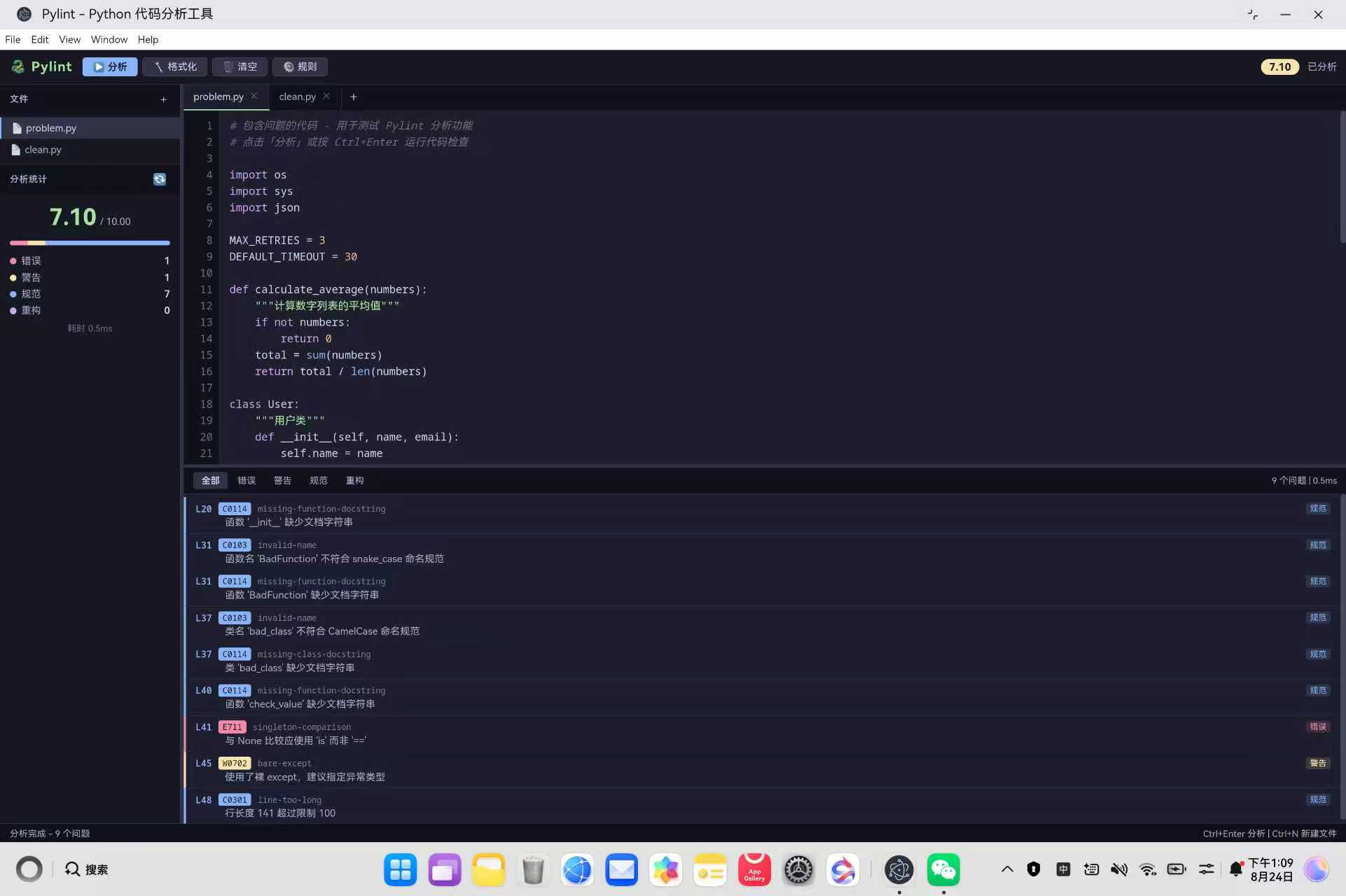
结果面板顶部有五个分类标签(全部/错误/警告/规范/重构),点击切换过滤。每条问题左侧用对应颜色的竖线标识类别,点击后编辑器自动定位并选中对应行。
3.9 第九步:Catppuccin Mocha 深色主题
文件 :electron-apps/Pylint/styles/pylint.css
所有样式基于 Catppuccin Mocha 配色方案的 CSS 变量系统,共定义 20 个语义化颜色变量。
:
root
{
--
base
:
#1e1e2e
;
--
mantle
:
#
181825
;
--
crust
:
#11111b
;
--
surface0
:
#
313244
;
--
surface1
:
#45475a
;
--
text
:
#cdd6f4
;
--
text
-
muted
:
#a6adc8
;
--
blue
:
#89b4fa
;
--
green
:
#a6e3a1
;
--
red
:
#f38ba8
;
--
yellow
:
#f9e2af
;
--
mauve
:
#cba6f7
;
--
peach
:
#fab387
;
--
border
:
#
313244
;
}
问题条目四色分类:error 红色、warning 黄色、convention 蓝色、refactor 紫色。语法高亮七种颜色:关键字紫色、字符串绿色、注释灰色斜体、数字橙色、装饰器黄色、内置函数蓝色、True/False/None 红色。
3.10 第十步:预置两个测试文件
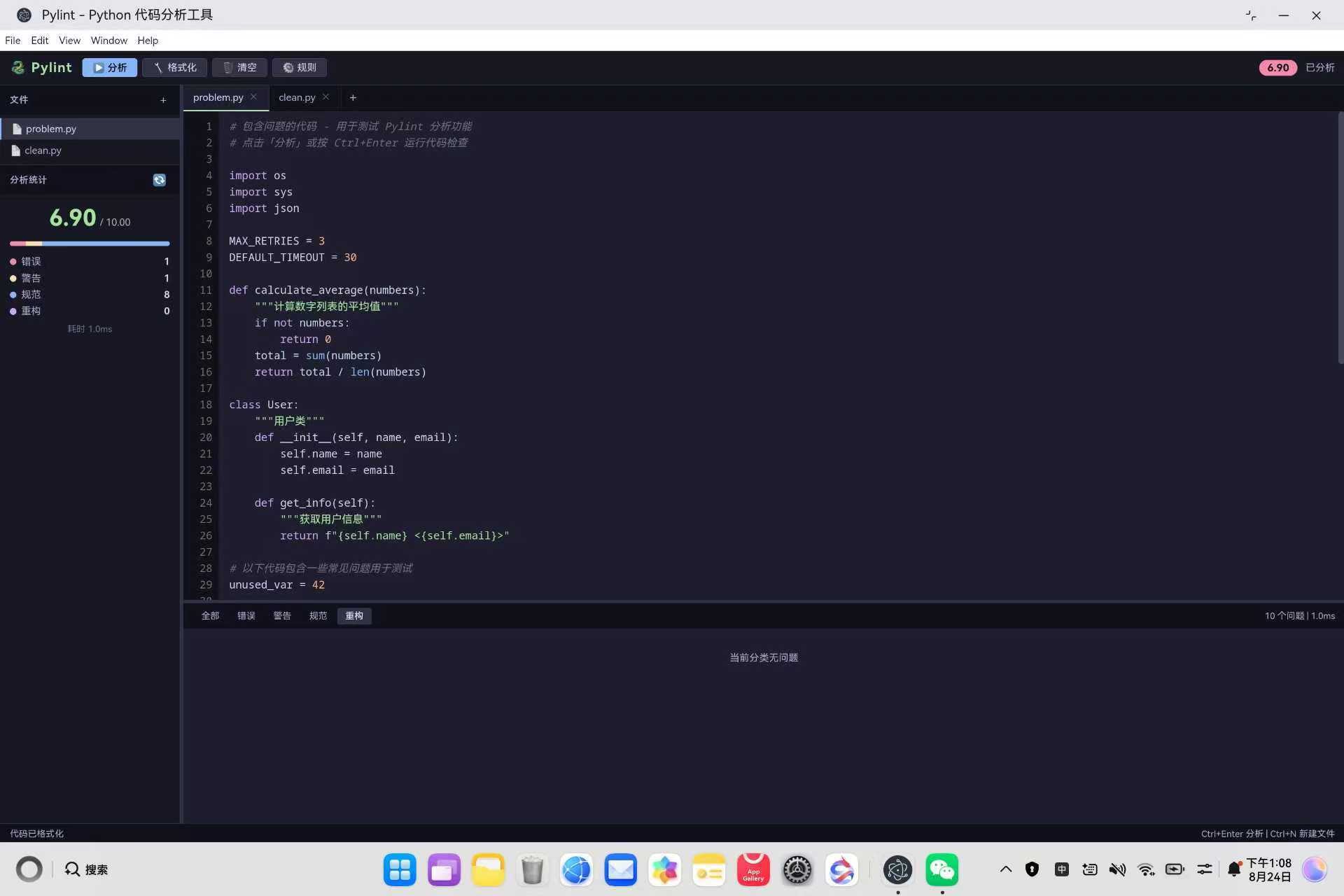
工具初始化时预置两个文件,方便用户立即体验分析功能:
problem.py:包含未使用导入、非 snake_case 命名、裸 except、== None、超长行等 16 个常见问题
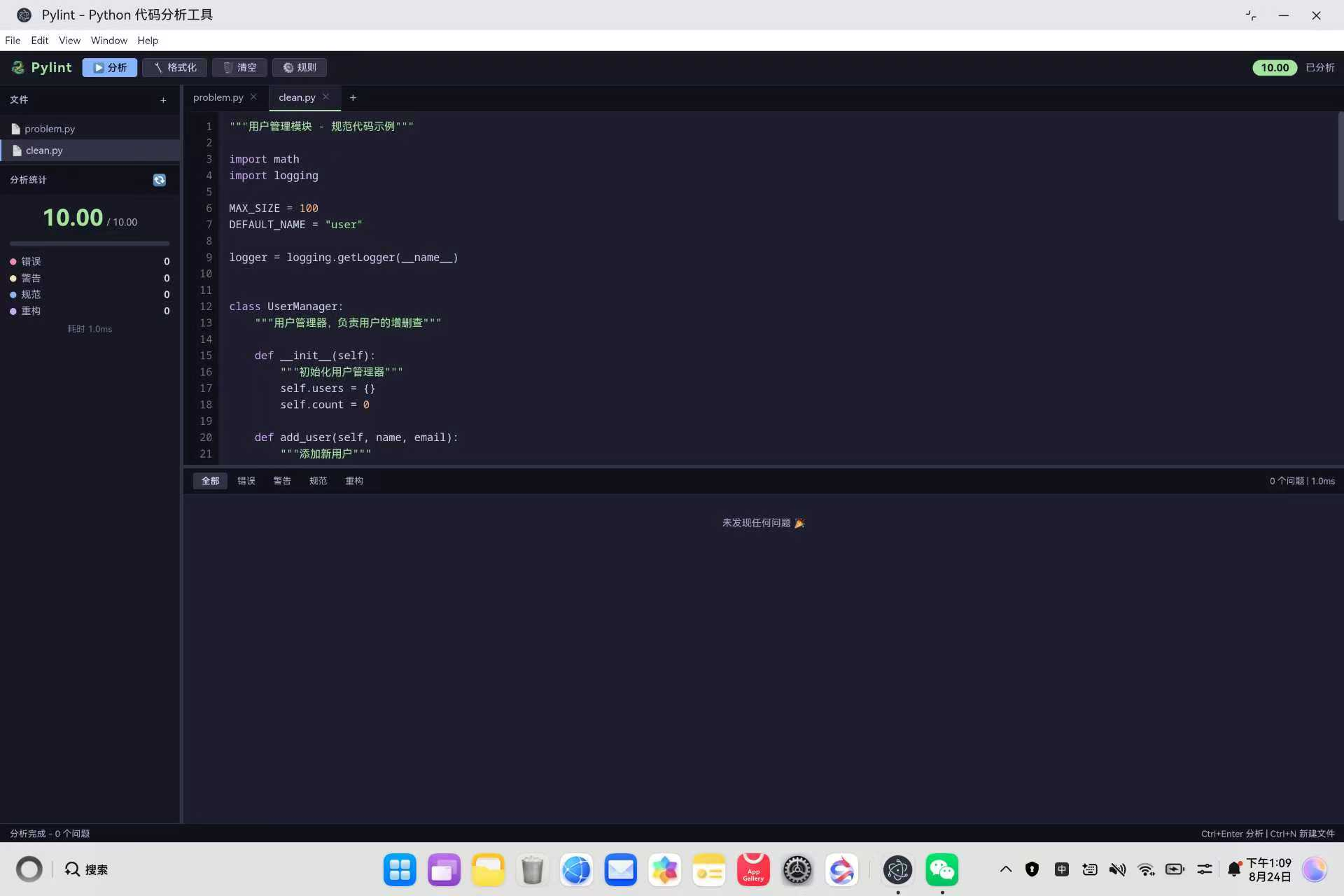
clean.py:完全规范的 Python 代码,包含模块文档字符串、CamelCase 类名、完整类型检查,评分 10.00
function
init
(
)
{
const
problemCode
=
[
'# 包含问题的代码 - 用于测试 Pylint 分析功能'
,
''
,
'import os'
,
'import sys'
,
'import json'
,
''
,
'unused_var = 42'
,
''
,
'def BadFunction():'
,
'    x = 1'
,
'    y = 2'
,
'    result = x + y'
,
'    return result'
,
''
,
'class bad_class:'
,
'    pass'
,
''
,
'def check_value(val):'
,
'    if val == None:'
,
'        return False'
,
'    try:'
,
'        return int(val)'
,
'    except:'
,
'        return 0'
]
.
join
(
'\n'
)
;
const
cleanCode
=
[
'"""用户管理模块 - 规范代码示例"""'
,
''
,
'import math'
,
'import logging'
,
''
,
'MAX_SIZE = 100'
,
'DEFAULT_NAME = "user"'
,
''
,
'class UserManager:'
,
'    """用户管理器,负责用户的增删查"""'
,
''
,
'    def __init__(self):'
,
'        """初始化用户管理器"""'
,
'        self.users = {}'
,
'        self.count = 0'
,
''
,
'    def add_user(self, name, email):'
,
'        """添加新用户"""'
,
'        if not name or not email:'
,
'            raise ValueError("name and email are required")'
,
'        self.count += 1'
,
'        self.users[name] = {'
,
'            "email": email,'
,
'            "id": self.count,'
,
'        }'
,
'        return self.count'
]
.
join
(
'\n'
)
;
files
[
1
]
=
{
name
:
'problem.py'
,
code
:
problemCode
}
;
files
[
2
]
=
{
name
:
'clean.py'
,
code
:
cleanCode
}
;
nextFileId
=
3
;
renderFileTabs
(
)
;
loadFileContent
(
)
;
bindEvents
(
)
;
initSidebarDrag
(
)
;
initHorizontalDrag
(
)
;
}
init
(
)
;
用户打开工具后即可点击「分析」按钮,problem.py 会报出 16 个问题(评分约 5.40),切换到 clean.py 则显示「未发现任何问题」(评分 10.00),形成鲜明对比。
四、部署到鸿蒙平台
4.1 同步文件到部署目录
将 electron-apps/Pylint 目录下的全部文件复制到 web_engine 的 resfile 资源目录:
# Windows PowerShell
Remove
-
Item
-
Recurse
-
Force web_engine
/
src
/
main
/
resources
/
resfile
/
resources
/
app
Copy
-
Item
-
Recurse
-
Force electron
-
apps
/
Pylint web_engine
/
src
/
main
/
resources
/
resfile
/
resources
/
app
4.2 构建 HAP 包
在 DevEco Studio 中打开项目,选择 Build > Build Hap(s)/APP(s) > Build Hap(s),生成 HAP 安装包后部署到鸿蒙 PC 设备。
4.3 本地调试
在 electron-apps/Pylint 目录下执行:
npm install electron
--
save
-
dev
npx electron
.
即可在桌面端预览完整功能,验证分析引擎、语法高亮、拖动条、多文件标签等交互。
五、常见问题 FAQ
5.1 为什么不直接调用 pylint 命令行?
问题现象 :最初考虑通过 Node.js 子进程调用 pylint 命令行,但在鸿蒙真机上无法运行
根本原因 :鸿蒙 Electron 适配层的 ArkWeb 内核对 Node.js 子进程支持有限,且安装 pylint 需要 pip 和 Python 运行时环境,鸿蒙平台不具备这些条件
解决方案 :将分析引擎完全用纯 JavaScript 实现,通过正则表达式逐行扫描完成 14 条规则检查,无需任何后端依赖:
function
analyzeCode
(
code
)
{
const
lines
=
code
.
split
(
'\n'
)
;
const
issues
=
[
]
;
const
defined
=
collectDefinitions
(
lines
)
;
const
referenced
=
collectReferences
(
lines
)
;
issues
.
forEach
(
iss
=>
{
stats
[
iss
.
category
]
++
;
stats
.
total
++
;
}
)
;
return
{
issues
:
issues
,
stats
:
stats
}
;
}
无需 pip install pylint,无需 Python 运行时
分析结果毫秒级返回,无子进程启动延迟
完全运行在浏览器渲染进程中,跨平台兼容性最好
5.2 语法高亮为什么不用 CodeMirror 或 Monaco?
问题现象 :CodeMirror 和 Monaco 是成熟的代码编辑器方案,是否可以直接引入?
分析 :本工具定位是代码分析器而非完整编辑器,引入大型编辑器库会增加包体积和渲染开销,且鸿蒙平台对复杂 DOM 操作的兼容性需要额外验证
解决方案 :采用双层叠加渲染方案,底层 highlight div 显示着色 HTML,上层 textarea 文字透明但保留光标,仅用 70 行代码实现 7 种语法元素着色:
<
!
--
双层叠加结构
--
><
div
class
=
"editor-wrap"
><
div
class
=
"highlight"
id
=
"codeHighlight"
><
/
div
><
textarea
class
=
"code-editor"
id
=
"codeEditor"
spellcheck
=
"false"
><
/
textarea
><
/
div
>
.
code
-
editor
{
background
:
transparent
;
color
:
transparent
;
caret
-
color
:
var
(
--
text
)
;
z
-
index
:
1
;
}
.
highlight
{
position
:
absolute
;
pointer
-
events
:
none
;
color
:
var
(
--
text
)
;
}
| 方案 | 代码量 | 包体积 | 鸿蒙兼容性 | | --- | --- | --- | --- | | CodeMirror | 引入 300KB+ 库 | 大 | 需额外适配 | | Monaco | 引入 2MB+ 库 | 很大 | 需额外适配 | | 双层叠加渲染 | 70 行 JS | 零依赖 | 原生 DOM,兼容性最好 |
5.3 分析引擎能检查函数内部的变量吗?
问题现象 :函数内部定义的变量未使用,但分析结果没有报 W0612
原因分析 :定义收集只抓取模块顶层赋值,函数内部的局部变量不纳入 W0612 未使用变量检查
设计取舍 :函数内部的作用域分析需要完整的 AST 解析,会显著增加引擎复杂度。对于快速代码检查场景,顶层检查已覆盖大部分常见问题。定义收集的边界判断如下:
const
varMatch
=
trimmed
.
match
(
/
^(\w+)\s*=\s*
/
)
;
if
(
varMatch
&&
!
trimmed
.
startsWith
(
'def '
)
&&
!
trimmed
.
startsWith
(
'class '
)
&&
!
trimmed
.
startsWith
(
'@'
)
&&
!
trimmed
.
startsWith
(
'import '
)
&&
!
trimmed
.
startsWith
(
'from '
)
)
{
const
name
=
varMatch
[
1
]
;
if
(
!
result
.
variables
.
includes
(
name
)
&&
!
isBuiltin
(
name
)
&&
!
name
.
startsWith
(
'__'
)
)
{
result
.
variables
.
push
(
name
)
;
result
.
varLines
[
name
]
=
i
+
1
;
}
}
说明 :通过 startsWith 过滤掉 def/class/装饰器/import 行,只收集模块顶层的简单赋值变量。dunder 名称(如 name )通过 startsWith(‘__’) 过滤,避免误报未使用变量。
5.4 规则可以自定义开关吗?
问题现象 :某些规则在特定项目中不需要,希望能灵活控制
解决方案 :点击工具栏的「规则」按钮打开配置对话框,14 条规则每条都有独立的复选框,可以按需启用或禁用。行长度限制的阈值也可以在 40-200 之间调整:
<
!
--
规则配置对话框
--
><
div
class
=
"modal-overlay"
id
=
"modalRules"
style
=
"display:none"
><
div
class
=
"modal"
><
div
class
=
"modal-header"
><
span
>
规则配置
<
/
span
><
button
class
=
"btn-icon modal-close"
data
-
modal
=
"modalRules"
>
✕
<
/
button
><
/
div
><
div
class
=
"modal-body"
><
div
class
=
"rule-group"
><
div
class
=
"rule-group-title"
>
命名规范
<
/
div
><
div
class
=
"rule-item"
><
label
class
=
"rule-check"
><
input type
=
"checkbox"
id
=
"ruleVarName"
checked
/
>
变量名必须小写
(
C0103
)
<
/
label
><
/
div
><
!
--
...
其他规则复选框
...
--
><
/
div
><
/
div
><
div
class
=
"modal-footer"
><
button
class
=
"btn-secondary"
data
-
modal
=
"modalRules"
>
取消
<
/
button
><
button
class
=
"btn-primary"
id
=
"btnSaveRules"
>
保存
<
/
button
><
/
div
><
/
div
><
/
div
>
注意 :对话框使用自定义 div 实现而非原生 alert/confirm,避免触发鸿蒙 SubWindow 崩溃。
5.5 鸿蒙平台对话框崩溃怎么办?
根本原因 :使用了原生 prompt/confirm/alert 对话框或原生 select 元素,鸿蒙 Electron 适配层的 ArkWeb 内核对这些原生 UI 组件支持不完整
解决方案 :所有对话框和下拉选择均使用自定义 div 实现,完全规避鸿蒙 SubWindow 兼容问题。本工具中的自定义对话框包括:
| 原生组件 | 替代方案 | 实现方式 |
| --- | --- | --- |
| alert/confirm | 自定义 modal-overlay | div + CSS 定位 |
| select | 自定义 dropdown | div + stopPropagation |
| prompt | 自定义 input 对话框 | div + input 元素 |
document
.
getElementById
(
'fileTabsBar'
)
.
addEventListener
(
'click'
,
function
(
e
)
{
const
closeBtn
=
e
.
target
.
closest
(
'.file-tab-close'
)
;
if
(
closeBtn
)
{
e
.
stopPropagation
(
)
;
closeFile
(
Number
(
closeBtn
.
dataset
.
fileId
)
)
;
return
;
}
const
tab
=
e
.
target
.
closest
(
'.file-tab'
)
;
if
(
tab
)
{
switchFile
(
Number
(
tab
.
dataset
.
fileId
)
)
;
}
}
)
;
核心要点 :stopPropagation 阻止关闭按钮点击事件冒泡到标签切换逻辑,确保点击关闭只触发 closeFile 而不触发 switchFile。
5.6 如何同步文件到鸿蒙项目?
问题现象 :修改了 electron-apps/Pylint/ 下的文件,但构建 HAP 后没有生效
根本原因 :文件没有同步到鸿蒙 web_engine 模块的部署目录
解决方案 :使用 PowerShell 脚本将 electron-apps/Pylint 目录下的全部文件复制到 web_engine 的 resfile 资源目录:
# Windows PowerShell
Remove
-
Item
-
Recurse
-
Force web_engine
/
src
/
main
/
resources
/
resfile
/
resources
/
app
Copy
-
Item
-
Recurse
-
Force electron
-
apps
/
Pylint web_engine
/
src
/
main
/
resources
/
resfile
/
resources
/
app
部署路径 :web_engine/src/main/resources/resfile/resources/app/
注意 :每次修改代码后都需要同步,否则构建的 HAP 包不会包含最新代码。同步后需要重新 Build Hap(s) 才能在鸿蒙设备上看到更新。
六、总结
本文记录了将 Pylint Python 代码分析工具适配到鸿蒙 PC 平台的完整流程。核心成果包括:
纯前端分析引擎 :用 JavaScript 实现 14 条 Python 检查规则,无需后端依赖,毫秒级响应
语法高亮引擎 :逐字符 Tokenizer 实现 7 种语法元素着色,双层叠加渲染无需第三方库
多文件标签管理 :支持新建/切换/关闭文件,每个文件独立保存代码状态
双向拖动条 :侧边栏宽度 + 编辑器/结果面板高度均可自由调整
问题跳转 :点击分析结果自动定位到编辑器对应行并选中
分制评分 :按 error/warning/convention/refactor 四级扣分,量化代码质量
预置测试用例 :problem.py(16 个问题)和 clean.py(零问题)对比鲜明
整个适配过程严格遵守鸿蒙三防策略,未使用任何原生对话框、select 元素或窗口拦截 API。全部代码约 1900 行(renderer.js 898 行 + pylint.css 775 行 + index.html 171 行 + main.js 27 行),即可在鸿蒙 PC 平台上获得完整的 Python 静态代码分析体验。


点赞
踩
收藏 觉得还不错? 一键收藏
打赏 打赏
打赏 举报 举报


转载声明:本文为转载整理,原文版权归原作者及原站点所有。
原文来源:CSDN HarmonyOS
原创地址:https://blog.csdn.net/weixin_43151418/article/details/165006649
原文作者:xcLeigh;如有侵权,请联系管理员删除。

最新文章
- 每月 1 亿次通话背后:Retell 如何用 OpenAI 模型把语音智能体做成“可运营”的生产系统
- GitHub Copilot Fusion 解析:把模型选择交给系统,用一半 API 成本对标 Claude Code
- 让模型懂“本地规则”,而不只是本地语言:拆解 NVIDIA Nemotron 的区域化后训练工作流
- OpenAI 与 Oracle 把企业应用搬进 ChatGPT:一场关于“智能体工作台”的入口争夺
- 从“工作负载停在哪”到“故障从哪开始”:解读 NVIDIA Attribution 的分布式 AI 故障归因思路
- 2026 年数据科学平台选型指南:十大平台的能力边界与决策逻辑
- Meta 拟发售至多 950 亿美元股票:AI 基建竞赛进入“资本结构”比拼阶段
- 22亿美元买一张“量子操作系统”入场券:英特尔收购 Classiq 的深层逻辑
- 从“定义韧性”到“证明韧性”:解读下一代 AWS Resilience Hub 的推荐韧性测试
- 网络韧性不止于“备份计划”:Lumen 用 AI 与物理双路由重构企业连接可靠性
