rman_换设备迁移恢复
写在前面:上面文写rman的备份,这次写不同情况的恢复
1 准备
备端:有个最新的200201.ZIP备份包。恢复端:192.168.56.60
恢复端:创建个接受备份包的路径
ORACLE>mkdir /home/oracle/rman
备端:scp 200201.zip root@192.168.56.60:/home/oracle/rman
2 数据库启动到nomount
i) nomount是读取的参数文件spfile,由于我们没有spfile文件,要创建可用性的假的pfile文件骗数据库
ORACLE>vi a.txt
db_block_size=8192
qw
ii) 用a.txt启动
SQL> startup nomount pfile='/home/oracle/rman/a.txt';
用备份集恢复真实spfile
RMAN> restore spfile from '/home/oracle/rman/200201/full_TEST_1031238574_279_1';
--注:全备里最小的是参数文件
iii)关库,再启动,会默认用spfile启动
SQL> shutdown immediate
SQL> startup nomount;
ORA-00845: MEMORY_TARGET not supported on this system
--再次启动nomount报错,百度原因是因为我一个库里有两个实例,启动时/dev/shm就不够用了。
a)先查看shm大小
ROOT>df -h /dev/shm/
Filesystem Size Used Avail Use% Mounted on
tmpfs 495M 224K 494M 1% /dev/shm
b)修改大小
ROOT>vi /etc/fstab
tmpfs /dev/shm tmpfs defaults,size=8G 0 0
--具体为何改成8G不太明明了
c)一定一定要remount
ROOT>mount -o remount /dev/shm
再次启动到nomount,又报错
SQL> startup nomount;
ORA-01261: Parameter db_recovery_file_dest destination string cannot be translated
ORA-01262: Stat failed on a file destination directory
Linux-x86_64 Error: 2: No such file or directory
--百度原因:参数文件中,没有db_recovery_file_dest值得路径
a)由于已经恢复spfile,就要生成pfile查看db_recovery_file_dest
SQL> create pfile='/home/oracle/rman/b.txt' from spfile;
File created.
b)查看b.txt文件(先前假文件是a.txt哈,不要混)
vi b.txt
*.db_recovery_file_dest='/u01/app/oracle/fast_recovery_area' 咱就是没有这个目录,所以要在oracle下创建
c)[oracle@jcy1 ~]$ mkdir /u01/app/oracle/fast_recovery_area 一定要注意写全路径
再次启动到nomount
SQL> startup nomount;
ORACLE instance started.
3 启动到mount状态
mount 读取的是控制文件
i)RMAN> restore controlfile from '/home/oracle/rman/200201/ctl_TEST_1031238591_283_1';
Starting restore at 01-FEB-20
using target database control file instead of recovery catalog
allocated channel: ORA_DISK_1
channel ORA_DISK_1: SID=20 device type=DISK
channel ORA_DISK_1: restoring control file
RMAN-00571: ===========================================================
RMAN-00569: =============== ERROR MESSAGE STACK FOLLOWS ===============
RMAN-00571: ===========================================================
RMAN-03002: failure of restore command at 02/01/2020 10:55:54
ORA-19870: error while restoring backup piece /home/oracle/rman/200201/ctl_TEST_1031238591_283_1
ORA-19504: failed to create file "/oradata/test/control01.ctl"
ORA-27040: file create error, unable to create file
Linux-x86_64 Error: 2: No such file or directory
Additional information: 1
报错原因:可能是参数文件中,control_files=的位置问题
a)查看b.txt,

解决方法:把02.ctl删除,后期再添加,由于这时数据库已经在nomount状态,又修改了pfile文件,所以需要关库,生成spfile,再启动
b)SQL> shutdown immediate
SQL> create spfile from pfile='/home/oracle/rman/b.txt';
SQL> startup nomount;
c)再次恢复控制文件
RMAN> restore controlfile from '/home/oracle/rman/200201/ctl_TEST_1031238591_283_1';
还是报 i 的同样错,这是咋回事呢 ?
ORA-19504: failed to create file "/oradata/test/control01.ctl"
噢 ,原来是路径问题,没有test路径
ORACLE>mkdir /oradata/test -p
ii)再次恢复控制文件
RMAN> restore controlfile from '/home/oracle/rman/200201/ctl_TEST_1031238591_283_1';
Starting restore at 01-FEB-20
using channel ORA_DISK_1
channel ORA_DISK_1: restoring control file
channel ORA_DISK_1: restore complete, elapsed time: 00:00:01
output file name=/oradata/test/control01.ctl
Finished restore at 01-FEB-20
iii)启动到mount
RMAN> alter database mount;
database mounted
released channel: ORA_DISK_1
iii)RMAN> catalog start with '/home/oracle/rman/200201';
Do you really want to catalog the above files (enter YES or NO)? yes
这里遇到了注册问题
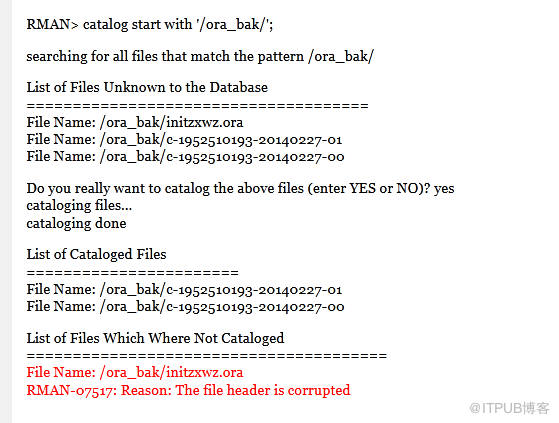
解决方法:直接删除备份集,然后重新注册
a)重名名备份目录
mv 200201 20200201
b)删除备份集
RMAN>delete backup
c)重新注册
RMAN>catalog start with '/home/oracle/rman/20200201';
Do you really want to catalog the above files (enter YES or NO)? yes
完成
4 数据库启动到open
先恢复数据文件
i)RMAN> restore database;
Starting restore at 01-FEB-20
allocated channel: ORA_DISK_1
channel ORA_DISK_1: SID=24 device type=DISK
RMAN-00571: ===========================================================
RMAN-00569: =============== ERROR MESSAGE STACK FOLLOWS ===============
RMAN-00571: ===========================================================
RMAN-03002: failure of restore command at 02/01/2020 14:55:12
RMAN-06026: some targets not found - aborting restore
RMAN-06023: no backup or copy of datafile 4 found to restore
暂未解决,网上百度关于化身的问题,但是不懂呀,不懂
后来想到先逐个恢复数据文件
RMAN> restore datafile 1;
RMAN> restore datafile 2;
RMAN> restore datafile 3;
RMAN> restore datafile 4;
Starting restore at 07-FEB-20
using channel ORA_DISK_1
RMAN-00571: ===========================================================
RMAN-00569: =============== ERROR MESSAGE STACK FOLLOWS ===============
RMAN-00571: ===========================================================
RMAN-03002: failure of restore command at 02/07/2020 21:51:13
RMAN-06026: some targets not found - aborting restore
RMAN-06023: no backup or copy of datafile 4 found to restore
RMAN> restore datafile 5;
RMAN> restore datafile 6;
具体恢复几个文件,可以查询一下,因为这时候数据库已经mount了
select name,status,file# from v$datafile;
恢复
RMAN> restore database skip tablespace users;
Starting restore at 07-FEB-20
using channel ORA_DISK_1
skipping datafile 1; already restored to file /oradata/test/system01.dbf
skipping datafile 3; already restored to file /oradata/test/undotbs01.dbf
skipping datafile 2; already restored to file /oradata/test/sysaux01.dbf
skipping datafile 5; already restored to file /oradata/js_data01.dbf
restore not done; all files read only, offline, or already restored
Finished restore at 07-FEB-20
RMAN> recover database skip tablespace users;
Starting recover at 07-FEB-20
using channel ORA_DISK_1
Executing: alter database datafile 4 offline
Executing: alter database datafile 6 offline
starting media recovery
channel ORA_DISK_1: starting archived log restore to default destination
channel ORA_DISK_1: restoring archived log
archived log thread=1 sequence=54
channel ORA_DISK_1: reading from backup piece /home/oracle/rman/0212/0211/arch_TEST_1032111767_307_1
channel ORA_DISK_1: piece handle=/home/oracle/rman/0212/0211/arch_TEST_1032111767_307_1 tag=TAG20200211T174247
channel ORA_DISK_1: restored backup piece 1
channel ORA_DISK_1: restore complete, elapsed time: 00:00:01
archived log file name=/arch/1_54_1026827294.dbf thread=1 sequence=54
channel ORA_DISK_1: starting archived log restore to default destination
channel ORA_DISK_1: restoring archived log
archived log thread=1 sequence=55
channel ORA_DISK_1: reading from backup piece /home/oracle/rman/0212/arch_TEST_1032111767_308_1
channel ORA_DISK_1: piece handle=/home/oracle/rman/0212/arch_TEST_1032111767_308_1 tag=TAG20200211T174247
channel ORA_DISK_1: restored backup piece 1
channel ORA_DISK_1: restore complete, elapsed time: 00:00:01
archived log file name=/arch/1_55_1026827294.dbf thread=1 sequence=55
unable to find archived log
archived log thread=1 sequence=56
RMAN-00571: ===========================================================
RMAN-00569: =============== ERROR MESSAGE STACK FOLLOWS ===============
RMAN-00571: ===========================================================
RMAN-03002: failure of recover command at 02/07/2020 22:01:04
RMAN-06054: media recovery requesting unknown archived log for thread 1 with sequence 56 and starting SCN of 1640815
RMAN> alter database open resetlogs;
database opened
原来是备份有问题,备端的200201.ZIP备份包,有文件是offline的
SQL> select name,status,file# from v$datafile;
NAME STATUS FILE#
------------------------------ ------- ----------
/oradata/test/system01.dbf SYSTEM 1
/oradata/test/sysaux01.dbf ONLINE 2
/oradata/test/undotbs01.dbf ONLINE 3
/oradata/test/users01.dbf
OFFLINE 4
/oradata/js_data01.dbf ONLINE 5
/oradata/USERS02.DBF
OFFLINE 6
6 rows selected.

来自 “ ITPUB博客 ” ,链接:https://blog.itpub.net/69959246/viewspace-2674348/ ,如需转载,请注明出处,否则将追究法律责任。

