CentOS下NFS网络文件系统服务的部署

NFS(Network File System)网络文件系统服务可以将远程Linux系统上的文件共享资源挂载到本地主机的目录上,从而使得本地主机(Linux客户端)基于TCP/IP协议,像使用本地主机上的资源那样读写远程Linux系统上的共享文件
如下拓扑图所示
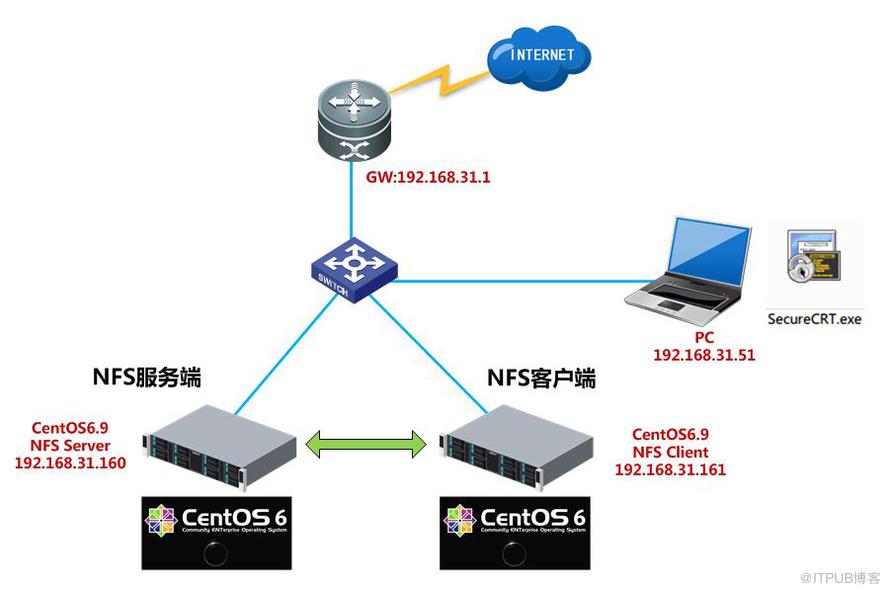
1)IP:192.168.31.160 CentOS6.9服务器NFS Server服务端
2)IP:192.168.31.161 CentOS6.9服务器NFS Client客户端
3)IP:192.168.31.51 Win7PC一台
CentOS下NFS服务器部署步骤如下
一、NFS Server端配置
1)yum方式安装nfs-util和rpcbind服务
[root@localhost ~]# yum install nfs-utils rpcbind -y

2)vi编辑NFS服务器端配置文件/etc/exports
/data/nfs_sharefiles 192.168.31.0/24(rw,sync,no_root_squash)

参数说明:
/data/nfs_sharefiles #NFS共享目录
192.168.31.0/24 #允许这个网段内的IP地址访问共享目录
rw #读取写入权限
sync #数据实时同步
用于配置NFS服务程序配置文件的参数说明
参数 |
作用 |
ro |
只读 |
rw |
读写 |
root_squash |
当NFS客户端以root管理员访问时,映射为NFS服务器的匿名用户 |
no_root_squash |
当NFS客户端以root管理员访问时,映射为NFS服务器的root管理员 |
all_squash |
无论NFS客户端使用什么账户访问,均映射为NFS服务器的匿名用户 |
sync |
同时将数据写入到内存与硬盘中,保证不丢失数据 |
async |
优先将数据保存到内存,然后再写入硬盘;这样效率更高,但可能会丢失数据 |
3)创建共享目录
[root@localhost ~]# mkdir -p /data/nfs_sharefiles
[root@localhost ~]# touch /data/nfs_sharefiles/share.txt
[root@localhost ~]# exportfs -rv
exportfs -rv重新加载NFS配置或者service nfs reload 用于生产环境,不需要重启restart nfs服务

4)启动nfs服务和rpcbind服务并设置为开机自启动
[root@localhost ~]# /etc/init.d/rpcbind start
[root@localhost ~]# /etc/init.d/nfs start
需要先启动rpcbind服务再启动nfs服务
[root@localhost ~]# chkconfig rpcbind on
[root@localhost ~]# chkconfig nfs on

5)[root@localhost ~]# showmount -e localhost
查看NFS服务器本地挂载情况
[root@localhost ~]# cat /var/lib/nfs/etab
查看NFS Server配置文件的参数,含默认加载的参数

二、NFS Client端配置
1)NFS Client端只需启动rpcbind服务,不必启动NFS服务
[root@NFSClient ~]# yum install rpcbind nfs-utils -y
[root@NFSClient ~]# chkconfig rpcbind on
[root@NFSClient ~]# chkconfig rpcbind --list
[root@NFSClient ~]# service rpcbind start
[root@NFSClient ~]# showmount -e 192.168.31.160
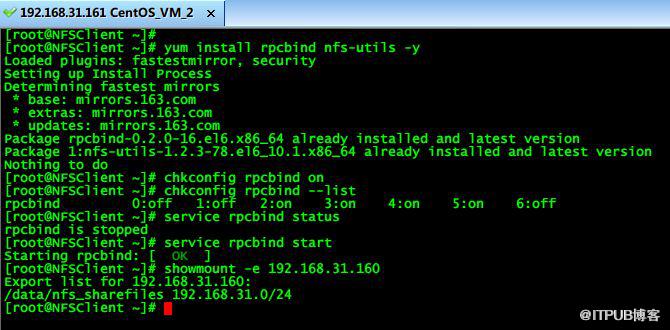
2)挂载NFS共享目录后并测试读写
[root@NFSClient ~]# mkdir -p /mnt/nfs_share
[root@NFSClient ~]# mount -t nfs 192.168.31.160:/data/nfs_sharefiles /mnt/nfs_share/
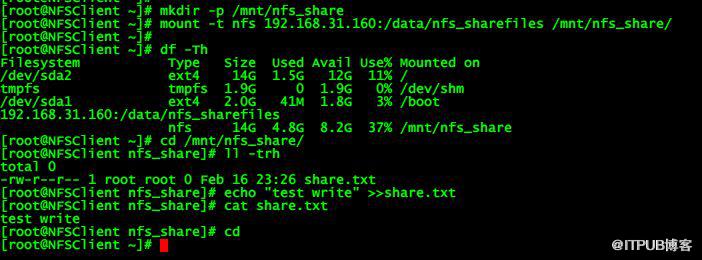
mount命令所有挂载情况可以看到nfs挂载的详细信息

3)将挂载加入开机自启动文件/etc/rc.local
[root@NFSClient ~]# echo "mount -t nfs 192.168.31.160:/data/nfs_sharefiles /mnt/nfs_share/" >>/etc/rc.local

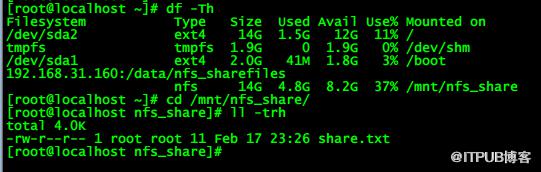
4)客户端服务器重启后验证是否会开机自动挂载NFS共享目录
原文作者:WalkingCloud;如有侵权,请联系管理员删除。

最新文章
- GrayLog常见问题收录-FAQ篇
- 使用GraylogDataNode作为内置OpenSearch日志存储的GrayLog6.1.2一键安装脚本
- 开源日志平台GrayLog最新版本6.1.0的一键安装脚本
- GrayLog6.0.X通过yum方式升级到最新版本
- 专业强大好用的SSH终端/SFTP客户端工具-Xshell8+XFTP8免费版
- GrayLog对接DLP并实现数据安全告警单独发送给员工主管
- 国产免费NAS系统-飞牛私有云fnOS安装初体验
- 使用RR(Redpill Recovery)引导安装最新群晖NAS系统DSM7.2.1
- 开源日志平台GrayLog最新稳定版本6.0.5的一键安装脚本
- shell脚本+webhook实现联动一键联动删除异常大小的文件
