SecureCRT远程端口转发不生效的解决方法
点击上方"walkingcloud"关注,并选择"星标"公众号

SecureCRT远程端口转发
在上一篇文章【利用腾讯云主机+SSH远程端口转发实现内网穿透】中使用SecureCRT进行远程端口转发,但是转发到云主机(外网)服务器后,发现从外网访问连接转发后的端口出现报错,无法正常访问
通过Google搜索相关问题,最终找到了问题的根因

(图片可放大查看)
如下图所示

(图片可放大查看)
内网Win10 192.168.198.1 内网CentOS7.6服务器 192.168.198.130 SSH端口22 云主机CentOS7.6一台 公网IP X.X.X.X
需求场景:通过内网win10机器SecureCRT连接上云主机的SSH,配置SecureCRT远程端口转发,将本地192.168.198.130 SSH端口22转发到云主机的8622端口上
云主机SSH配置中已经将/etc/ssh/sshd_config中GatewayPorts no改为了GatewayPorts yes 云主机安全组中也将TCP 8622端口放通
具体排查与解决步骤如下
1、问题复现
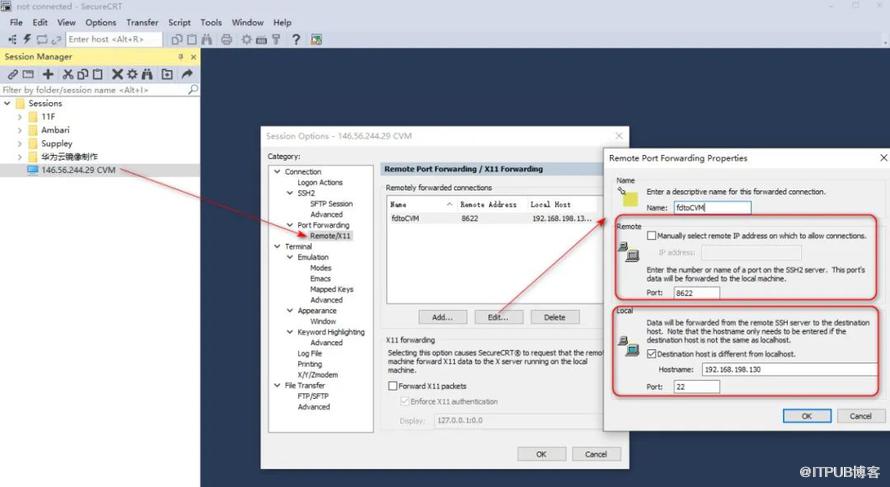
(图片可放大查看)
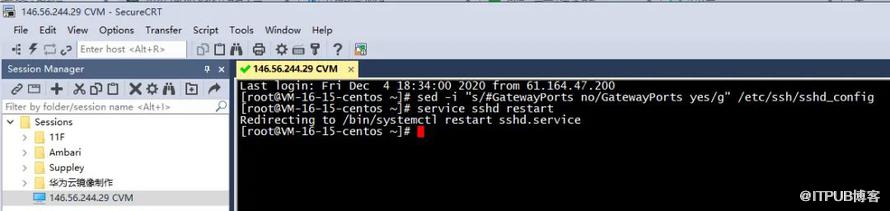
(图片可放大查看)

(图片可放大查看)

(图片可放大查看)
2、开启SecureCRT Trace Option
可发现如下报错提示
[LOCAL] : RECV: CHANNEL_OPEN[forwarded-tcpip]
[LOCAL] : Rejecting remote forward request from 61.X.X.X:54962 to 192.168.198.130:22 because the current filters do not allow 61.X.X.X:54962 to use the remote forward.

(图片可放大查看)
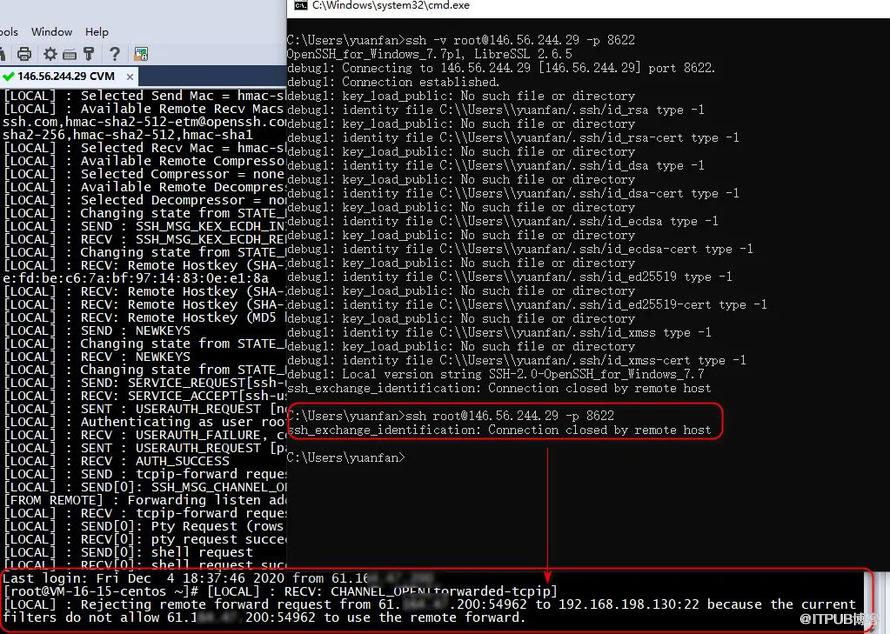
(图片可放大查看)
3、修改会话ini文件中Reverse Forward Filter
修改前为
S:"Reverse Forward Filter"=allow,127.0.0.1,0 deny,0.0.0.0/0.0.0.0,0
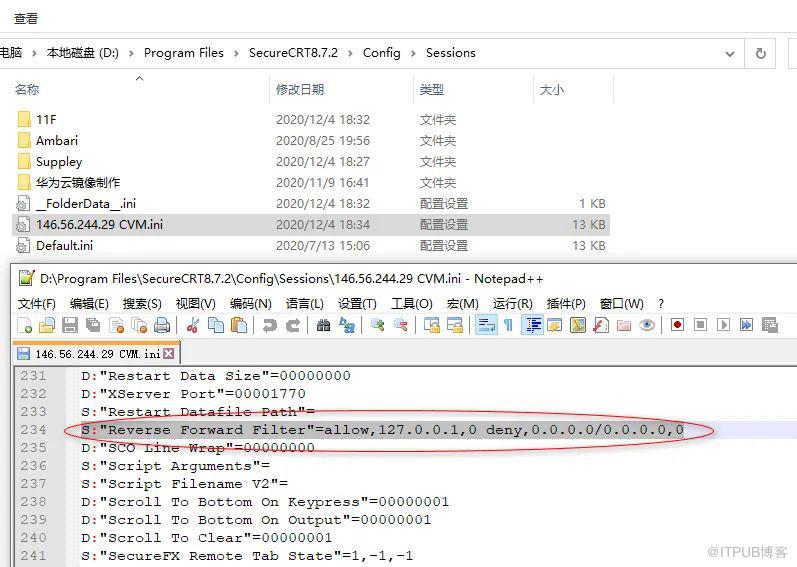
(图片可放大查看)
修改后为
S:"Reverse Forward Filter"=allow,0.0.0.0/0.0.0.0,0
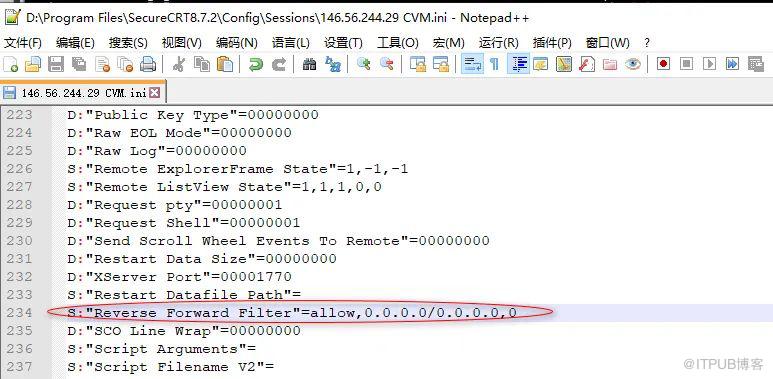
(图片可放大查看)
也就是允许所有IP访问
4、修改完成后重新打开SecureCRT,并打开该SSH会话
这时就可以正常从外网访问连接转发后的端口,问题解决
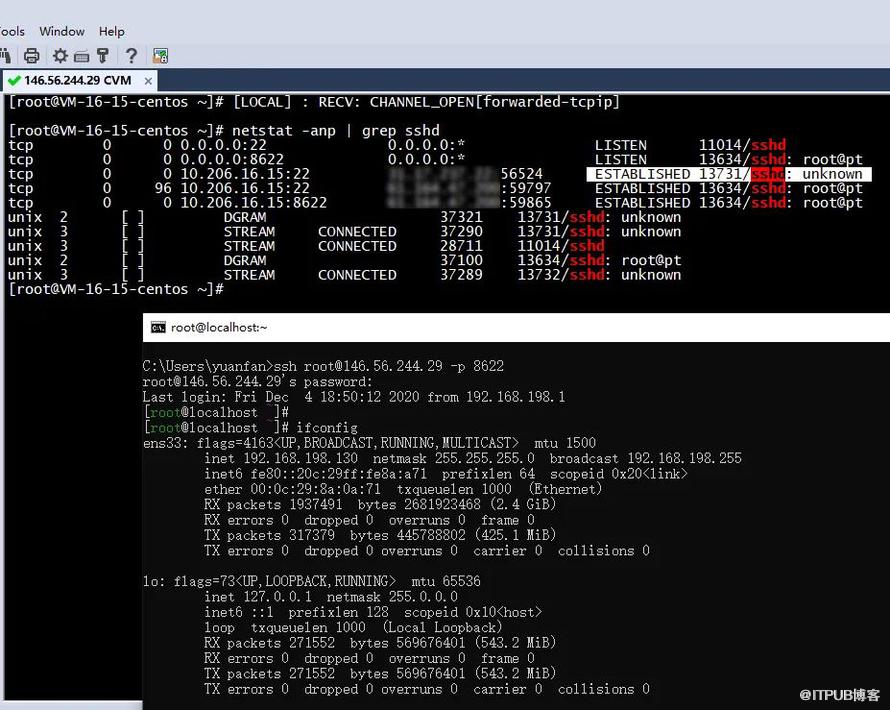
(图片可放大查看)
下面是SecureCRT官网论坛关于Remote port forwarding filter/Reverse Forward Filter的说明
SecureCRT's port forwarding "allowances" fall on the cautious side of security. This is the case for both local and remote/reverse port fowards, which ensures security by default but also means it's not the most convenient default setting if your needs are "special".

In the case of reverse forwards, SecureCRT imposes a default filter that rejects any forwards that don't originate on the server side from the server's loopback address (127.0.0.1). This means that if the (server-side) client application sets the src addr to anything other than 127.0.0.1 (such as a non-loopback NIC address like 192.168.x.y), SecureCRT will deny such forwarding packets received, dropping packets w/o forwarding them on to the configured destination on the SecureCRT side. Such a denial can be seen in debug output if you enable Trace Options (SecureCRT's main "File" menu) prior to connecting to the remote machine.

A denial/rejection looks like this, as one example, in Trace Options debug output (displayed in the SecureCRT terminal window the moment a server-side client application attempts to access the port from a filtered src address/port):

[LOCAL] : RECV: CHANNEL_OPEN[forwarded-tcpip]
[LOCAL] : Rejecting remote forward request from 192.168.232.101:1220 to 10.0.0.1:8080 because the current filters do not allow 192.168.232.101:1220 to use the remote forward.


To relax SecureCRT's reverse forward filters to allow access for more than just localhost-originating addresses on the remote side, you'll need to manually edit the session's .ini file appropriately (make sure you close SecureCRT prior to changing a session's .ini file manually).

Here's the line in the session's .ini file that you'll need to modify:

S:"Reverse Forward Filter"=allow,127.0.0.1,0 deny,0.0.0.0/0.0.0.0,0


If you want to allow everything through (not the most secure choice, but works if you're just setting it up for a PC on a controlled LAB network), do this:

S:"Reverse Forward Filter"=allow,0.0.0.0/0.0.0.0,0


If you just want to allow everthing on the 192.168.x LAN segment, as well as any loopback adapter access to the forwarded port (denying access to all other originating addresses), do this:

S:"Reverse Forward Filter"=allow,192.168.0.1/255.255.0.0,0 allow,127.0.0.1/255.0.0.0,0 deny,0.0.0.0/0.0.0.0,0


This information is described in detail (including ipv6 how-to) within the SecureCRT help under the topic titled, "Configuring Port-Forwarding Filters" located within the "Secure Connections" top-level chapter.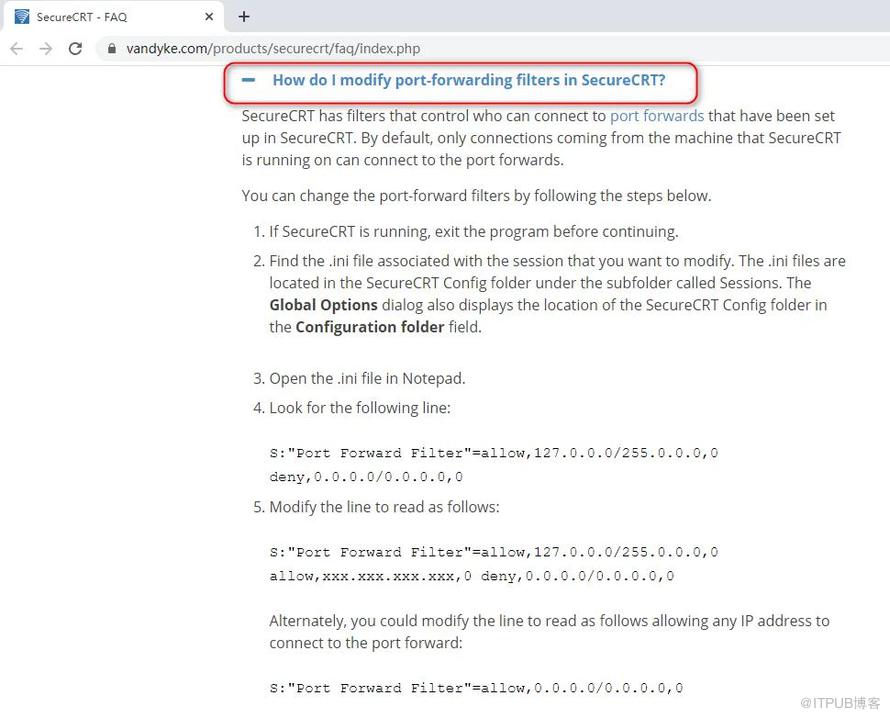
(图片可放大查看)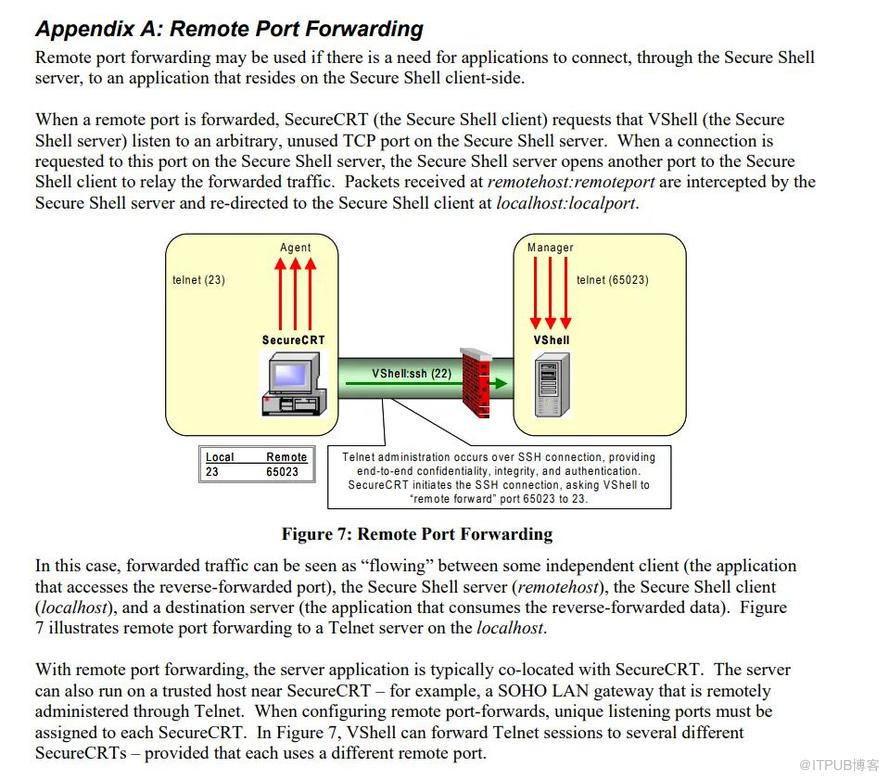
(图片可放大查看)
附上SecureCRT本地端口转发与X11转发的原理图,未收集到远程端口转发的原理图

(图片可放大查看)

(图片可放大查看)
原文作者:WalkingCloud;如有侵权,请联系管理员删除。
上一篇:
几种常用Linux系统的软件镜像源配置

请登录后发表评论
登录
全部评论
最新文章
- GrayLog常见问题收录-FAQ篇
- 使用GraylogDataNode作为内置OpenSearch日志存储的GrayLog6.1.2一键安装脚本
- 开源日志平台GrayLog最新版本6.1.0的一键安装脚本
- GrayLog6.0.X通过yum方式升级到最新版本
- 专业强大好用的SSH终端/SFTP客户端工具-Xshell8+XFTP8免费版
- GrayLog对接DLP并实现数据安全告警单独发送给员工主管
- 国产免费NAS系统-飞牛私有云fnOS安装初体验
- 使用RR(Redpill Recovery)引导安装最新群晖NAS系统DSM7.2.1
- 开源日志平台GrayLog最新稳定版本6.0.5的一键安装脚本
- shell脚本+webhook实现联动一键联动删除异常大小的文件
