一、学习数据库应该学什么?
1. 数据库类型:关系型数据库(SQLServer-->MySql-->Oracle--和其他的小型的关系型数据库)
表-->一条一条的数据(就是标准化)
-->非关系型数据库(缓存数据库)
2. 关系型数据库,最大的特点:就是全部都用的统一的结构化查询语言(SQL) T-SQL
3. 应该学习哪些内容?
【1】正确的创建数据库和数据表、各种约束(使用脚本)
【2】正确的添加测试数据
【3】数据库的各种操作(重点是查询、添加、修改、删除)
【4】熟练的编写数据库视图和存储过程(主要用来提升性能的)、索引
【5】 数据安全(首先要保证输入的和操作的数据是安全--就是一致性)学习事务、触发器慎重
【6】数据库的相关的关联(备份、恢复、定时任务、日志查看....)
4. 数据库开发环境的熟悉
【1】登录数据库(注意登录的几个条件)
--》服务器名称:如果是本机相对简单,这个服务器名称或者是电脑名称,或者是IP地址。
但是,请注意你的安装实例。(安装实例:就是你安装数据库的服务,这个服务通过计算机的“服务”列表查看)
我的电脑上面的服务情况是:SQLServer(MSSQLSERVER) 这个是默认实例,如果是默认实例我们登录数据库的时候
服务器名称:就是电脑名称或IP地址。或者“.”
--》命名实例:SQLServer(XIKETANG) SQLServer(SQLEXPRESS)
在一台计算机上,如果安装了默认实例,第二次安装不同版本的数据库的时候,就必须用命名实例。
服务器名称:电脑名称或IP地址或者"."\实例名称 比如:AGOD21-06021316\xiketang
记忆:\是给windows操作系统用的。 /这个是给linux操作的时候,我们通常用的。
--》身份验证:windows身份验证(这个一般都是直接登录,权利最大)但是这个只能用于本机。不能局域网或远程。
SQLServer身份验证(账号、密码) sa账号,具有全部的操作权限。
sa账号密码的修改:总结了3个步骤。演示
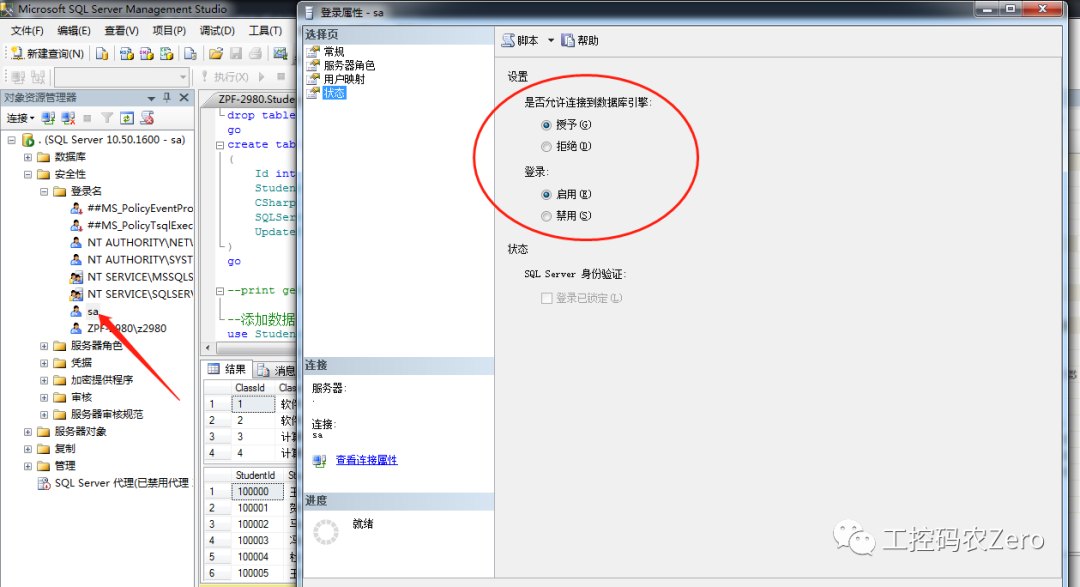
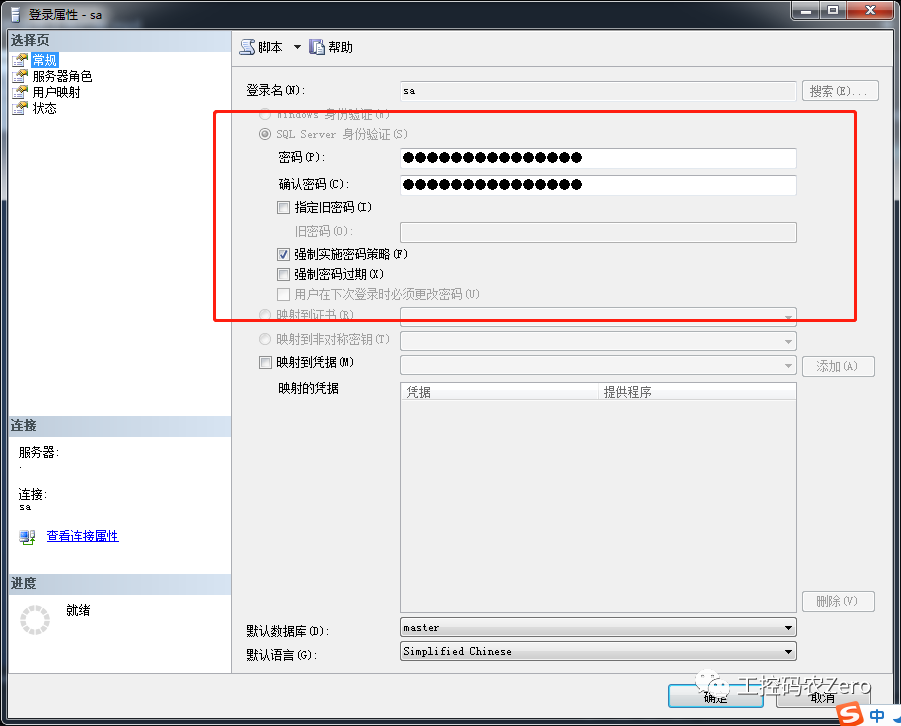
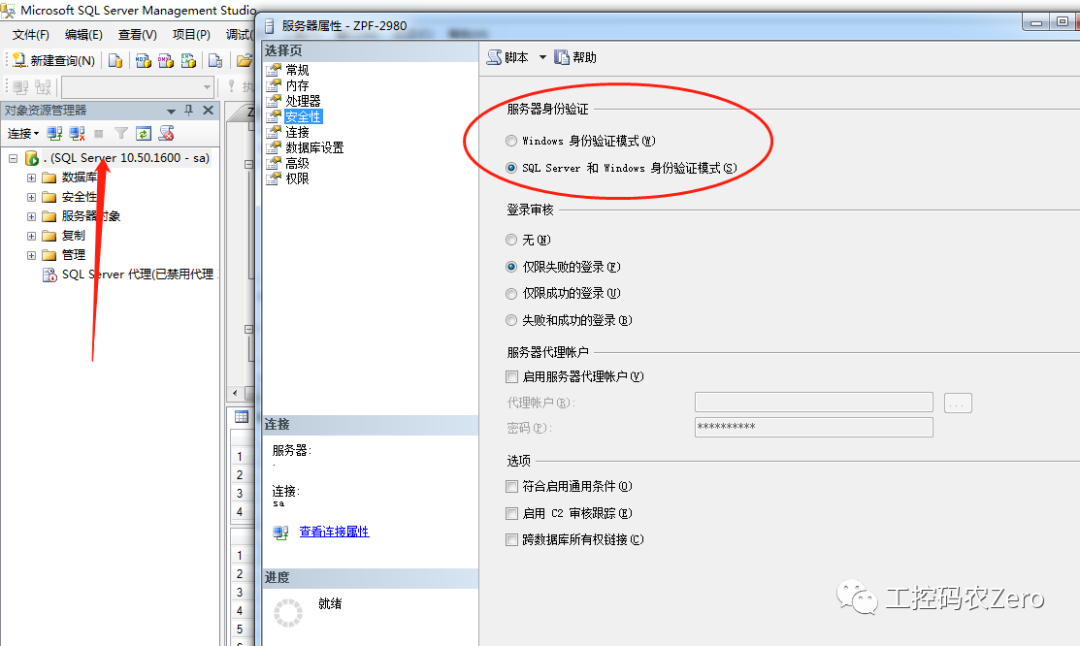
【2】会使用查询分析器(新建一个查询,我们以后都用这个)
5.数据库账号管理
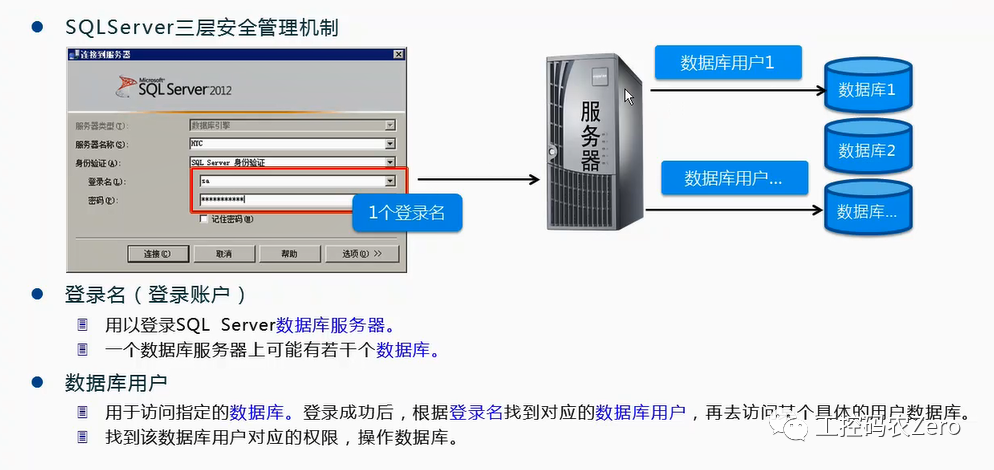
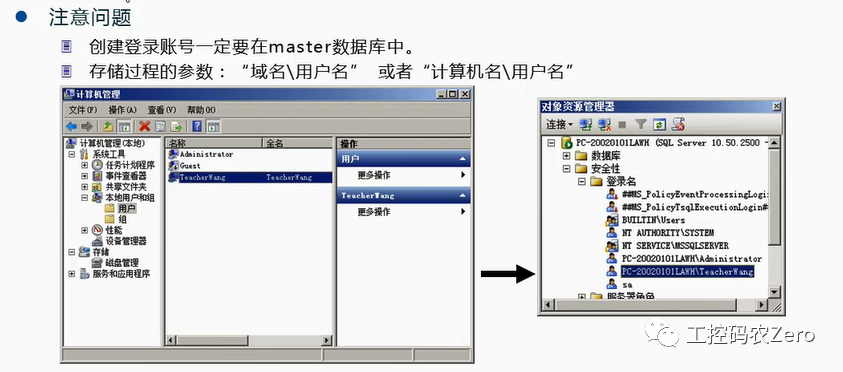
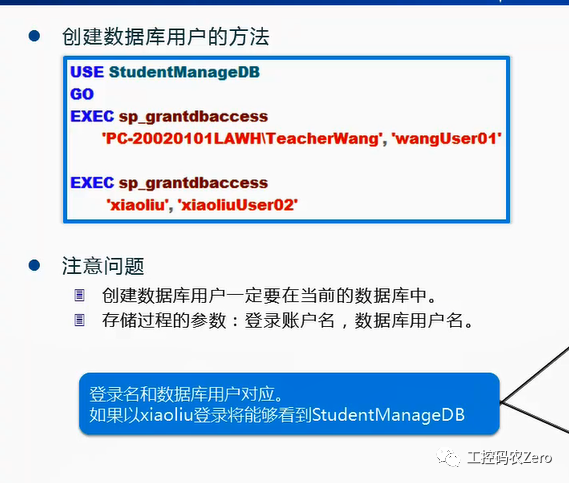
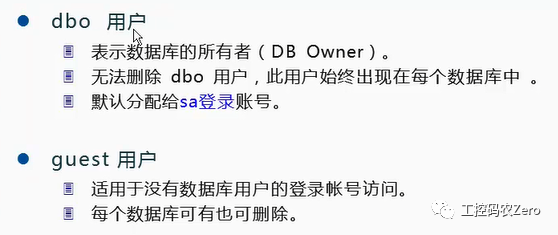
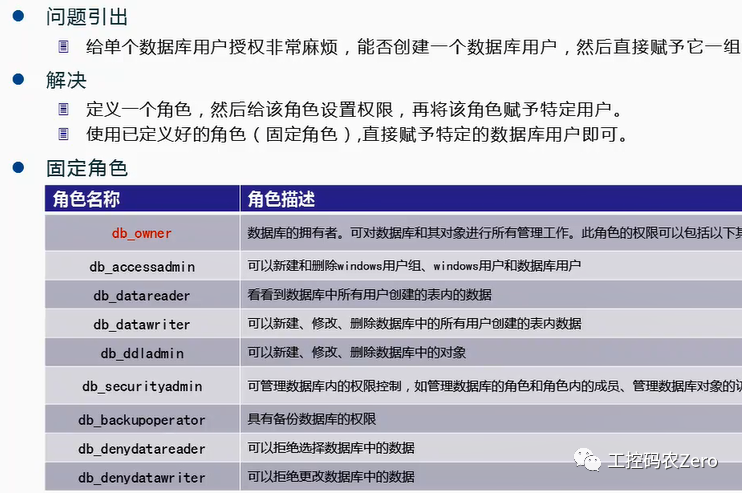
--创建登录账号


use master


go


--添加Windows登入账号


exec sp_grantlogin 'hyc\TeacherWang'


--添加SqlServer登入账号


exec sp_addlogin 'xiaoliu','1234'


--创建数据库用户


use StudentManageDB


go


exec sp_grantdbaccess 'hyc\TeacherWang','wangUser01'


exec sp_grantdbaccess 'xiaoliu','xiaoliuUser02'


use SaleManagerDB


go


exec sp_grantdbaccess 'xiaoliu','xiaoliuUser03'


--删除登录帐号


use master


go


exec sp_droplogin 'xiaoliu'


--删除数据库用户


use StudentManageDB


go


exec sp_dropuser 'xiaoliuUser02'


use SaleManagerDB


go


exec sp_dropuser 'xiaoliuUser03'


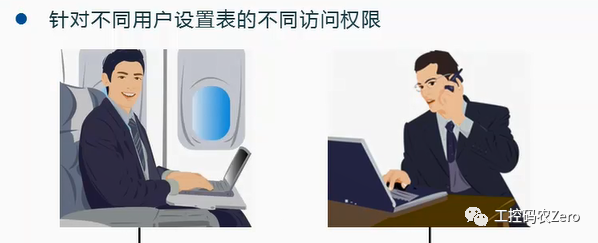
--给数据库用户授权


use StudentManageDB


go


--分配权限


grant select,insert,update on Students to xiaoliuUser02


grant create table to xiaoliuUser02


--收回权限


revoke select,insert,update on Students to xiaoliuUser02


use StudentManageDB


go


--给数据库用户赋予角色


exec sp_addrolemember 'db_owner','xiaoliuUser02'


--删除数据库用户角色


exec sp_droprolemember 'db_owner','xiaoliuUser02'
二、数据库脚本的使用(T-SQL创建数据库和数据表)
1. 创建数据库
use master


go


if exists(select * from sysdatabases  where name='StudentManageDB')


drop database StudentManageDB


go


--创建数据库


create database StudentManageDB


on primary


(


     --数据库文件的逻辑名(数据库管理系统用的,必须唯一)


   name='StudentManageDB_data',


   --数据库的物理文件名(绝对路径)


   filename='D:\DB\StudentManageDB_data.mdf',--主数据文件


   --数据文件初始大小


   size=20MB,--实际开发中,请根据需要设置合理的大小


   --数据文件增长量  (建议不要指望这个增长)


   filegrowth=5MB


)


,


(


     name='StudentManageDB_data1',


   filename='D:\DB\StudentManageDB_data.ndf',--次要数据文件


   size=20MB,


   filegrowth=5MB


)


log on


(


   name='StudentManageDB_log',


   filename='D:\DB\StudentManageDB_log.ldf',--主数据文件


   size=20MB,


   filegrowth=5MB


),


(


   name='StudentManageDB_log1',


   filename='D:\DB\StudentManageDB_log1.ldf',--主数据文件


   size=20MB,


   filegrowth=5MB


)


go
2. 创建数据表
3. 创建约束
--创建数据表:建议,我们最好要给数据做统一的规范命名(建议大家使用Pascal命名法)


use StudentManageDB


go


--创建数据表


if exists(select * from sysobjects where name='StudentClass')


drop table StudentClass


go


create table StudentClass


(


   ClassId int primary key,  --列的规范:列的名称   数据类型  各种约束


   ClassName varchar(20) not null


)


go


if exists(select * from sysobjects where name='Students')


drop table Students


go


create table Students


(


   StudentId int identity(100000,1) primary key,


   StudentName varchar(20) not null,


   Gender char(2) check(Gender='男' or Gender='女'),  --check检查约束


   DateOfBirth datetime not null ,--(Birthday)


   StudentIdNo numeric(18,) check(len(StudentIdNo)=18) unique, --身份证要求唯一,


   --StudentIdNo char(18) check(len(StudentIdNo)=18) unique,  --实际应用中,使用char(18)


   Age int check(age>18 and age<35),


   PhoneNumber varchar(50) ,


   StudentAddress nvarchar(200) default('地址不详'),  --default是默认约束


   ClassId int references StudentClass(ClassId)   --外键约束,要求:列的数据类型和长度和主键表对应字段必须一致


)


go


--创建管理员用户表


if exists(select * from sysobjects where name='Admins')


drop table Admins


go


create table Admins


(


  LoginId int identity(1000,1) primary key,


    LoginPwd varchar(20) not null,


    AdminName varchar(20) not null


)


go


if exists(select * from sysobjects where name='ScoreList')


drop table ScoreList


go


create table ScoreList


(


  Id int identity(1,1) primary key,


    StudentId int references Students(StudentId),


    CSharp int null,


  SQLServerDB int null,


  UpdateTime datetime default(getdate())


)


go
4. 添加测试数据
--添加数据


use StudentManageDB


go


insert into StudentClass(ClassId,ClassName) values(1,'软件1班'),(2,'软件2班'),(3,'计算机1班'),(4,'计算机2班')


select * from StudentClass


insert into Students ( StudentName, Gender, DateOfBirth,  Age, StudentIdNo,PhoneNumber, StudentAddress, ClassId)


values('王小虎','男','1989-08-07',22,120223198908071111,'022-22222222','天津市南开区红磡公寓5-5-102',1)


     ,('贺小张','女','1989-05-06',22,120223198905062426,'022-33333333','天津市河北区王串场58号',2)


     ,('马小李','男','1990-02-07',21,120223199002078915,'022-44444444','天津市红桥区丁字沽曙光路79号',4)


      ,('冯小强','女','1987-05-12',24,130223198705125167,'022-55555555',default,2)


       ,('杜小丽','女','1986-05-08',25,130223198605081528,'022-66666666','河北衡水路北道69号',1)


     ,('王俊桥','男','1987-07-18',24,130223198707182235,'022-77777777',default,1)


     ,('张永利','男','1988-09-28',24,130223198909282235,'022-88888888','河北保定市风华道12号',3)


     ,('李铭','男','1987-01-18',24,130223198701182257,'022-99999999','河北邢台市幸福路5号',1)


     ,('宁俊燕','女','1987-06-15',24,130223198706152211,'022-11111111',default,3)


     ,('刘玲玲','女','1989-08-19',24,130223198908192235,'022-11111222',default,4)


select * from Students


insert into ScoreList (StudentId,CSharp,SQLServerDB)values(100000,60,78)


,(100001,55,88),(100002,90,58),(100003,88,75),(100004,62,88),(100006,52,80),


(100007,91,66),(100009,78,35)


insert into ScoreList (StudentId,CSharp)values(100005,60)


select * from ScoreList


--插入管理员表


insert into Admins (LoginPwd,AdminName) values(123456,'王晓军'),(123456,'张明丽')


5. 数据库的基础操作


---数据的基本操作


--【1】查询有null的数据


select  * from ScoreList where  SQLServerDB is null


--【2】取查询结果的前面几条数据(后面我们分页中会经常遇到)


select  top 3  StudentId,SQLServerDB from ScoreList


select  top 3  StudentId,SQLServerDB from ScoreList   order by SQLServerDB ASC


select  top 3  StudentId,SQLServerDB from ScoreList where SQLServerDB is not null  order by SQLServerDB ASC


--请大家注意上面两条查询的区别,排序的时候,null是参与的


select  top 20 percent  StudentId,SQLServerDB from ScoreList   order by SQLServerDB ASC


select 学号=StudentId, 总成绩=(SQLServerDB+CSharp)from ScoreList


select StudentId as 学号, (SQLServerDB+CSharp)  as 总成绩  from ScoreList


 select * from Students


select * from ScoreList


--链接查询的需求:当我们查询的结果在不同的表中时,我们通常需要将两个或多个表关联起来查询


select Students.StudentId,StudentName,Age,总成绩=(Csharp+SQLServerDB) from ScoreList


inner join Students on Students.StudentId=ScoreList.StudentId


--左外链接查询(优先保证左边的数据的表的所有数据,右边的如果没有对应的数据,则用null填充)


select Students.StudentId,StudentName,Age,总成绩=(Csharp+SQLServerDB) from Students


left join ScoreList  on Students.StudentId=ScoreList.StudentId


--上面这个left join能查询没有参加考试的学员信息


select Students.StudentId,StudentName,Age,总成绩=(Csharp+SQLServerDB) from Students


right join ScoreList  on Students.StudentId=ScoreList.StudentId


--like关键字 模糊查询  (%通配符     %张    张%    %张% )


--between  80 and 90


select StudentId,StudentName,Age from Students where StudentName like '%张%'


select Students.StudentId,StudentName,Age,总成绩=(Csharp+SQLServerDB) from ScoreList


inner join Students on Students.StudentId=ScoreList.StudentId


where (Csharp+SQLServerDB) between 160 and 190


--统计函数  avg  max min  sum


select avg(CSharp) as C#平均, 学生总数=count(*),SQLServer最高成绩=max(SQLServerDB) from ScoreList
数据库-->若干数据表-->若干字段

补充:常用的数据库的类型(系统数据库(master)、用户数据库)
1.Master数据库是SQL Server系统最重要的数据库,它记录了SQL Server系统的所有系统信息
2.model 数据库用作在 SQL Server 实例上创建的所有数据库的模板
3.Msdb数据库是代理服务数据库,为其报警、任务调度和记录操作员的操作提供存储空间。
4.Tempdb是一个临时数据库,它为所有的临时表、临时存储过程及其他临时操作提供存储空间。
数据库文件包括:主数据文件(必须有,且只能有一个)次要数据文件(可以有多个)日志文件(至少有一个)
关于创建数据表的建议:我们根据数据库的设计,首先创建没有外键关系的表。就是因为后面我们添加外键表,需要创建外键关系的时候要引用主键表。否则就找不到。
三、标识列的使用
identity(100000,1)
1. 使用场合:如果你需要设计一个字段是自动增长的字段,那你就可以直接使用。
如果你的数据表的列,没有能够唯一区分的列,这时候,我们可以使用自动增长列(本质是没有什么特殊意义)仅仅是为了区别而已。同时,也会再给当前列设置主键约束。
主键:不仅唯一,重要的影响数据的索引。
2. identity(标识种子,增长量)
3. 注意问题:使用普通的delete删除数据后,标识列不会自动补全的。
比如:100005 100006(被删除) 1000007
四、关于约束问题和数据插入问题
1、为什么要使用约束?也就是约束是保证数据有效性,和正确性的最后一个屏障。(应用程序验证也是保证数据合法性)
2、约束类型:主键约束-->要求唯一、并且不能为null,数据存储默认会参考主键约束。用来保证数据唯一的最好方法。
标识列--》自定维护的,也是唯一的。标识列一般都会和主键挂钩,当我们不能够选出一个字段作为主键的时候,可以使用。注意不能为标识列显示的插入值。
常见错误:当 IDENTITY_INSERT 设置为 OFF 时,不能为表 'Students' 中的标识列插入显式值。 以上两者都是为了保证实体(数据)唯一能够区分的。保证某一行的。
检查约束Check:保证某一列的字段值,在我们希望的范围内。
默认约束default:就是给某一个字段提供一个默认的数据。
外键约束foreign key :主要是表直接的关联约束。比如我们在外键表中插入数据的时候,外键的值(比如Students表中的ClassId)会自动的和关联的主键表(StudentClass)中的对应主键ClassId做检查,也就是说你在外键表中插入的外键数据必须在主键表中存在。否则就会出错。
常见错误:INSERT 语句与 FOREIGN KEY 约束"FK__Students__ClassI__173876EA"冲突。该冲突发生于数据库"StudentManageDB",表"dbo.StudentClass", column 'ClassId'。语句已终止。
insert into Students ( StudentName, Gender, DateOfBirth, Age, StudentIdNo,PhoneNumber, StudentAddress, ClassId) values('王小虎','男','1989-08-07',22,120223198908071111,'022-22222222','天津市南开区红磡公寓5-5-102',5)
原因:因为外键表中ClassId只有1 2 3 4 这四个,而我们现在用的是5,5不存在与主键表中所以出现这个错误。
其他错误:INSERT 语句中列的数目大于 VALUES 子句中指定的值的数目。VALUES 子句中值的数目必须与 INSERT 语句中指定的列的数目匹配。
这种错误就是我们SQL语句中,字段个数和Values中的字段值个数不同导致的。
五、数据的基本操作
* 表示所有的通配符。我们在测试中使用,程序中一般不用
关于附近有语法错误的解决:select * from ScoreList SQLServerDB is null 关键字 'is' 附近有语法错误。
附近:就是这个关键字的前面或者后面,多数情况下是紧挨着关键字的前后,有时候也可能间隔一个
六、视图(View)
1. 为什么要学习视图?
在没有视图之前,我们都是写各种各样的SQL语句,有点,非常灵活。后面我们学习应用程序开发的时候,通过C#发送过来的SQL语句到达数据库的时候,会执行什么过程呢?
数据库接收到各种应用程序发送的SQL语句的时候,通常的流程是这样的:
【1】语法检查-->【2】优化(根据你的查询条件内容,和索引情况等,综合优化一下)-->【3】编译-->【4】执行
我们常见的查询,尤其是组合查询,能不能把查询固化到数据库服务器端,然后客户端使用的时候,只是调用一下呢?
当然可以,这个就是我们要学习的存储过程和视图。
视图其实就是一个查询,本身没有数据,就是把我们要查询的SQL语句,经过优化后经过编译存储到数据库服务器端。视图我们本身也可以把它看成一个“没有数据的表”。
2.视图的创建与使用
use SaleManagerDB


go


--普通查询


select Products.ProductId,ProductName,Unit,UnitPrice,TotalCount,MaxCount,MinCount,StatusDesc


from Products


inner join ProductInventory on ProductInventory.ProductId=Products.ProductId


inner join InventoryStatus on InventoryStatus.StatusId=ProductInventory.StatusId


--将前面的查询保存到视图


if exists(select * from sysobjects where  name='view_QueryInventoryInfo')


drop view view_QueryInventoryInfo


go


create view view_QueryInventoryInfo


as


      select Products.ProductId,ProductName,Unit,UnitPrice,TotalCount,MaxCount,MinCount,StatusDesc


from Products


inner join ProductInventory on ProductInventory.ProductId=Products.ProductId


inner join InventoryStatus on InventoryStatus.StatusId=ProductInventory.StatusId


go


--视图创建好以后,我们可以把它看成表一样查询


select * from view_QueryInventoryInfo where MaxCount>400


--视图不要嵌套


--实际开发中,我们可以根据查询的需要,创建很多视图,对于已经存在的视图,也可以修改。


--实际开发中我们查询的可能比较复杂,如下:(回顾C#基础语法中,有switch case)


if exists(select * from sysobjects where  name='view_QueryInventoryInfo2')


drop view view_QueryInventoryInfo2


go


create view view_QueryInventoryInfo2


as


      select Products.ProductId,ProductName,Unit,UnitPrice,TotalCount,MaxCount,MinCount,


    StatusDesc=case


                         when TotalCount>MaxCount then '库存过高'


               when TotalCount<MinCount then '库存紧张'


               when TotalCount=0 then '缺货'


               else '库存正常'


         end


from Products


inner join ProductInventory on ProductInventory.ProductId=Products.ProductId


inner join InventoryStatus on InventoryStatus.StatusId=ProductInventory.StatusId


go


select * from view_QueryInventoryInfo2
3. 视图和普通的SQL语句查询比较
【1】视图本身就是一个提前写好的查询。但是这个查询保存到数据库服务器端。应用程序通过调用可以直接执行。
【2】普通的SQL语句查询。它在应用程序端。要执行,需要通过程序把SQL语句发送到数据库服务器端。
【3】后期的查询维护不同。如果我们要通过应用程序发送SQL语句,你必须要修改程序。但是如果我们使用视图呢?
可以适当的直接在数据库服务器上修改。
4. 视图本身的特点:本身不保存任何数据,只是保存到服务器端的一段编译好的SQL语句而已,并且已经优化好和编译好。
5. 关于使用建议:我们在学习阶段,必须会使用脚本写视图。如果是正式开发阶段,我们可以适当的使用可视化方式创建视图。创建完毕后,把SQL语句优化好,再复制到你要创建的视图中。这个仅仅是为了省时间。必要的时候可以使用。
6. 视图还有一个非常重要的功能:比如我们在项目中会根据不同的角色,做不同的数据查询,这时候,我们在必要的时候完全可以针对不同的用户角色,设计不同的视图,保证数据的安全。
七、存储过程
1. 概念:存储过程就是编写到数据库服务器端的SQL语句,存储过程的内容不仅仅是可以实现查询,也可以实现CRUD同时操作。
使用选择:如果仅仅是查询,建议你使用视图。尤其是针对不同的角色需要调用不同的视图。这时候视图是非常方便的。
2. 分类:系统存储过程(请大家自己学习一下,知道即可,可以随时查询)-->系统给我们提前定义好的,我们可以直接使用。用户自定义存储过程(我们主要用的)
3. 好处:
【1】执行效率高。已经编译好,并保存到服务器端。只需要调用,必要的时候传递参数即可。减轻客户端的压力。
【2】安全型好。客户端调用,只需要发送指令即可。数据安全有保障。
【3】维护方便。如果后续有改动,可以直接在服务器端修改即可,而客户端程序不用修改。
4. 调用:
【1】在数据库服务器端,写脚本调用。
【2】在应用程序中调用。
5. 编写
--存储过程编写


if exists(select * from sysobjects where name='usp_AddProduct')


drop procedure usp_AddProduct


go


create procedure usp_AddProduct


--存储过程输入参数的定义


@ProductId varchar(50),


@ProductName varchar(50),


@UnitPrice numeric(18,2),


@Unit varchar(50),


@CategoryId int,


@MinCount int,


@MaxCount int


as


  --在这里编写具体的存储过程内容


  --在商品信息表中,添加数据


  insert into Products(ProductId, ProductName, UnitPrice, Unit,  CategoryId)


  values(@ProductId, @ProductName, @UnitPrice, @Unit,  @CategoryId)


  --同时在商品库存表中,添加数据


  insert into ProductInventory(ProductId, MinCount, MaxCount, TotalCount,StatusId)


  values(@ProductId, @MinCount, @MaxCount,0, -2)


go


--存储过程调用


exec usp_AddProduct '6005004003099','测试商品1',50,'箱',10,100,200


--查询刚才添加的数据


select Products.ProductId, ProductName, UnitPrice, Unit, Discount, CategoryId,


 TotalCount, MinCount, MaxCount, StatusId


 from Products


 inner join ProductInventory on ProductInventory.ProductId=Products.ProductId


 where Products.ProductId='6005004003099'


 --创建一个存储过程,带参数默认值


 if exists(select * from sysobjects where name='usp_AddProduct2')


drop procedure usp_AddProduct2


go


create procedure usp_AddProduct2


--存储过程输入参数的定义


@ProductId varchar(50),


@ProductName varchar(50),


@UnitPrice numeric(18,2),


@Unit varchar(50),


@CategoryId int,


@MinCount int,


@MaxCount int,


@TotalCount int=0,  --可以给参数添加默认值,有默认值的参数必须放到后面,方便调用


@StatusId int=-2      --参数默认值


as


  --在这里编写具体的存储过程内容


  --在这个地方使用declare声明你要使用的变量...


  --在商品信息表中,添加数据


  insert into Products(ProductId, ProductName, UnitPrice, Unit,  CategoryId)


  values(@ProductId, @ProductName, @UnitPrice, @Unit,  @CategoryId)


  --同时在商品库存表中,添加数据


  insert into ProductInventory(ProductId, MinCount, MaxCount, TotalCount,StatusId)


  values(@ProductId, @MinCount, @MaxCount,@TotalCount,@StatusId)


  --如果你声明了自己的参数,可以在这个地方根据你的业务使用...(这个就相当于C#方法中的局部变量)


go


--调用带参数默认值的存储过程


exec usp_AddProduct2 '7005004003099','测试商品2',60,'箱',10,100,200  --后面两个参数全部使用默认值


exec usp_AddProduct2 '8005004003099','测试商品3',65,'箱',10,100,200,150,1  --都不使用默认值


exec usp_AddProduct2 '9005004003099','测试商品4',65,'箱',10,100,200,150 --第2个使用默认值


exec usp_AddProduct2 '9005004003199','测试商品5',65,'箱',10,100,200, @StatusId=1 --第1个使用默认值


--查询


select Products.ProductId,UnitPrice,Unit,categoryId,TotalCount,MinCount,MaxCount,StatusId


from Products


inner join ProductInventory on ProductInventory.ProductId=Products.ProductId


--输出参数的存储过程


 if exists(select * from sysobjects where name='usp_QueryProduct')


drop procedure usp_QueryProduct


go


create procedure usp_QueryProduct


 @ProductCount int output   --定义输出参数


as


     -- 你可以在这个地方执行任何的查询....


   select ProductId, productName,UnitPrice from Products


   --....


   select @ProductCount=count(*)  from Products


go


--调用带参数的存储过程(我们在这个地方练习的时候还是比较麻烦的,但是你要学会,一般测试阶段都要用)


--在SQLServer中,声明变量使用declare


declare @ProductCount int  --首先定义输出参数


exec usp_QueryProduct @ProductCount output


--使用参数


select 商品总数=@ProductCount


--测试:我们给Products中的UnitPrice添加一个检查约束


alter table Products


add constraint ck_UnitPrice check(UnitPrice>=2)


--下面的操作,会造成第一个insert失败,但是第二个照常执行(引出事务)


exec usp_AddProduct '6005004003299','测试商品1',1,'箱',10,100,200
八、事务
1. 为什么要使用事务?
通过刚才示例的观察,我们发现,当一个存储过程或多个SQL语句(指代insert、update、delete类型)依次执行时候,如果其中一条或几条发生错误,但是其他的还会继续执行,会造成数据的不一致,非常危险。常见的,比如银行,我们从一个账号转钱到另一个账号,如果当我们转出的时候,系统发生了故障,但是没有转入,这样的话,银行的数据就出问题。
想解决这个问题,我们使用事务!
2. 事务的特点
原子性:就是不可分割性,是一个整体。
一致性:也就是我们操作的数据,前后都保持高度的一致。
3. 主要作用:就是保证数据在不同的操作中,或者这些操作全部成功,或者失败的时候全部取消。
4. 事务的创建和使用(示例代码)
----------------------------------【事务的编写】----------------------------------------------------------------------------------------


--首先测试@@error全局变量的使用


if exists(select * from sysobjects where name='usp_AddProduct3')


drop procedure usp_AddProduct3


go


create procedure usp_AddProduct3


@ProductId varchar(50),


@ProductName varchar(50),


@UnitPrice numeric(18,2),


@Unit varchar(50),


@CategoryId int,


@MinCount int,


@MaxCount int


as


  declare @errorSum int --@errorSum这个变量用来记录错误号码的总数


  --在商品信息表中,添加数据


  insert into Products(ProductId, ProductName, UnitPrice, Unit,  CategoryId)


  values(@ProductId, @ProductName, @UnitPrice, @Unit,  @CategoryId)


  select @@error


  --同时在商品库存表中,添加数据


  insert into ProductInventory(ProductId, MinCount, MaxCount, TotalCount,StatusId)


  values(@ProductId, @MinCount, @MaxCount,0, -2)


  select 错误号码=@@error


go


--观察错误号码


exec usp_AddProduct3 '6005004003599','测试商品1',1,'箱',10,100,200


--正式编写事务


-----------------------------------------------------------------------------------------------------------------------------


if exists(select * from sysobjects where name='usp_AddProduct4')


drop procedure usp_AddProduct4


go


create procedure usp_AddProduct4


@ProductId varchar(50),


@ProductName varchar(50),


@UnitPrice numeric(18,2),


@Unit varchar(50),


@CategoryId int,


@MinCount int,


@MaxCount int


as


  declare @errorSum int --@errorSum这个变量用来记录错误号码的总数


  set @errorSum=0    --给当前的变量赋值初始数据


  --开启事务


  begin transaction


     begin


        insert into Products(ProductId, ProductName, UnitPrice, Unit,  CategoryId)


          values(@ProductId, @ProductName, @UnitPrice, @Unit,  @CategoryId)


      --紧跟在SQL语句后面,来捕获错误号码  @@error只要前面的SQL语句有错误,这个变量就不为0


      set @errorSum=@errorSum+@@error


       insert into ProductInventory(ProductId, MinCount, MaxCount, TotalCount,StatusId)


           values(@ProductId, @MinCount, @MaxCount,0, -2)


       set @errorSum=@errorSum+@@error   --注意如果你有查询语句,查询语句后面不用记录


       --测试(实际开发中,这个print不用谢)


       print @errorSum


       --判断是否发生错误


       if @errorSum>0


           rollback transaction   --回滚事务


       else


           commit transaction    --提交事务


   end


go


--通过事务,测试下面的错误数据,会保证回滚


exec usp_AddProduct4 '6005004003799','测试商品1',1,'箱',10,100,200


--这个是正确的


exec usp_AddProduct4 '6005004003799','测试商品1',10,'箱',10,100,200


select * from Products where ProductId='6005004003799'


select * from ProductInventory  where ProductId='6005004003799'
在SQLServer中全局变量使用@@标识
常见的:@@Identity 用来存储标识列数据 @@error 用来存储SQL操作最后一条语句的状态。
通过练习,充分感觉到使用事务的重要性!
建议:如果你在开发中,使用存储过程,只要是两个或两个以上的insert、update或delete类型的SQL被执行,你就都可以使用事务。
九、SQLServer触发器
1.Products数据表:存放了商品信息。
2.ProductStorage数据表:存放了商品进货信息。
3.ProductInventory数据表:存放了当前所有商品的库存信息。
基本业务:当我们完成基础数据的时候,一般商品信息和商品库存基础已经录入完毕。开始进货后,库管会把进货信息录入到进货单里面。同时库存表对应的该商品库存信息会增加。当商品被销售后,对应的库存信息会减少。
进货-->(增加+)库存(-减少)<--销售
可以使用单独的sql语句,增加一条进货信息,会同时增加对应的库存信息,同样写一条SQL语句。
思考:同时执行增删改操作的时候,应该考虑使用事务。
【基本概念】:触发器是一种不能被显示调用的特殊存储过程。
【使用时机】:给一个表添加了相关的触发器后,当对这个表执行insert、update或Delete操作时 触发器会被激活(触发)。
【重要作用】:通过触发器开业实现添加更加复杂的完整性性约束;或者对不同表的相关字段或数据 更新任务等。比如添加一条进货信息,会同时更新库存和采购订单数据。
【使用不足】:触发器后期维护关联内容太多的时候,很容易出问题的,一般可以用存储过程代替。
----------------------------------------------------------------------------------------
【触发器的两种表】:Inserted和Deleted表,由系统维护,在内存中的临时表。
Inserted和Deleted表结构和触发器所在的表结构相同。触发器执行完毕后,这两个表自动删除。
(1)Inserted表:当执行insert或update语句时,除了在当前数据表中真实的插入一条数据外, 同时在Inserted临时表中插入一条数据。500-->300
(2)Deleted表:当执行Delete或Update语句时,删除的或修改前的数据会存放到此表。
注意:当修改一条数据的时候,首先把修改前的数据,插入到deleted表。然后把修改后的数据 插入到inserted表中。
当删除一条数据的时候,只是在deleted表中插入已经删除的数据。
当插入一条数据的时候,只是在inserted表中插入一条新数据。
----------------------------------------------------------------------------------------
【触发器类型】:
(1)Instead of触发器:除表作用与表之外,Instead of 触发器也可以用于视图,用来扩展视图可以支持的更新操作。
(2)after触发器:在Insert、Update、Delete语句执行后,进行复杂业务处理,或进行约束检查等after触发器只能用于表。
【触发器执行的时机】:
(1)如果一个Insert、update或delete语句违反了约束,after触发器不会执行,因为对约束的检查是在after触发器被触发(激活)之前发生的,所以after触发器不能超越约束。
(2)Instead of 触发器在约束之前执行,所以,它可以对约束进行一些预处理。
use SaleManagerDB


go


--给商品入库表创建Insert触发器(也就是用户对商品入库信息增加的时候)


if exists(select * from sysobjects where name='ProductStorage_Insert')


drop trigger ProductStorage_Insert


go


create trigger ProductStorage_Insert


on ProductStorage after insert


as


    declare @ProductId varchar(50),@AddedCount int


  --从插入的Inserted临时表中获取数据


  select @ProductId=ProductId,@AddedCount=AddedCount from inserted


  --更新库存表中对应商品的库存数据


  update ProductInventory set TotalCount=TotalCount+@AddedCount


                where ProductId=@ProductId


go


--给库存表创建update触发器


if exists(select * from sysobjects where name='ProductInventory_update')


drop trigger ProductInventory_update


go


create trigger ProductInventory_update


on ProductInventory after update


as


   declare @ProductId varchar(50),@totalCount int


   --从插入的临时表中获取商品ID和商品库存数据


   select @ProductId=ProductId,@totalCount=TotalCount from inserted


   --根据当前的库存数量更新商品的库存状态


   update ProductInventory set StatusId=case


                 when @totalCount>MaxCount then 2


         when @totalCount<MinCount and @totalCount>0 then -1


         when @totalCount=0 then -2


         else 1


     end where ProductId=@ProductId


go


--给商品入库表创建【update】触发器(修改了对应商品的入库数量)


if exists(select * from sysobjects where name='ProductStorage_Update')


drop trigger ProductStorage_Update


go


create trigger ProductStorage_Update


on ProductStorage after update


as


       declare @ProductId varchar(50),@AddedCount int,@deletedCount int


     --从删除的临时表中获取旧的数据(也就是修改之前的数据)


     select @ProductId=ProductId,@deletedCount=AddedCount from deleted


     --从插入的临时表中获取新的数据


     select @AddedCount=AddedCount from inserted


     --更新库存表中库存数据


     update ProductInventory set TotalCount=TotalCount-@deletedCount+@AddedCount


                where ProductId=@ProductId


go


--给商品入库表创建【delete】触发器(删除了入库信息)


if exists(select * from sysobjects where name='ProductStorage_Delete')


drop trigger ProductStorage_Delete


go


create trigger ProductStorage_Delete


on ProductStorage after  delete


as


       declare @ProductId varchar(50),@AddedCount int


     --从删除的临时表中获取已经删除的数据


     select @AddedCount=AddedCount,@ProductId=ProductId from deleted


      --更新库存表中对应商品的库存数据


     update ProductInventory set TotalCount=TotalCount-@AddedCount


                where ProductId=@ProductId


go


---------------------------------------【测试触发器】---------------------------------------


select * from ProductStorage


select * from ProductInventory where ProductId='6005004003001'


----商品进货入库


--insert into ProductStorage (ProductId,AddedCount) values('6005004003001',50)


--update ProductInventory set TotalCount=300,StatusId=1 where ProductId='6005004003001'


--修改入库数量


--update ProductStorage set AddedCount=100 where StorageId=100010


--删除已经添加的数据


delete from ProductStorage where StorageId=100012


select * from ProductStorage


select * from ProductInventory where ProductId='6005004003001'
本文来源https://www.modb.pro/db/242864
来自 “ ITPUB博客 ” ,链接:https://blog.itpub.net/69953058/viewspace-3152406/ ,如需转载,请注明出处,否则将追究法律责任。

