*作者:子白、冬岛*
AI 技术正在引领科技创新浪潮,随着 ChatGPT 和 Midjourney 的走红,AIGC 技术正在世界范围内掀起一股 AI 技术浪潮。开源领域也涌现了许多类似模型,如 FastGPT、Moss、Stable Diffusion 等。这些模型展现出的惊人效果吸引企业和开发者们投身其中,但是复杂繁琐的部署方式成为了拦路虎。阿里云 ASK 提供 Serverless 化的容器服务,用户无需关心资源及环境配置,可以帮助开发者们零门槛快速部署 AI 模型。本文以开源的 FastChat 为例,详细展示如何在 ASK 中快速搭建一个私人代码助理。**目前,ASK 已加入阿里云免费试用计划,为开发者、企业提供一定额度的试用资源。** 如对 ASK 感兴趣,欢迎大家通过点击文末的 *“此处”* 访问并领取。

## 效果预览
Cursor + GPT-4 的代码生成是不是觉得很智能,我们通过 FastChat + VSCode 插件也能做到一样的效果!
- 快速生成一个 Golang Hello World
地址:<https://intranetproxy.alipay.com/skylark/lark/0/2023/gif/11431/1682574183392-11e16131-3dae-4969-a0d1-79a0a9eefb01.gif>
- 快速生成一个 Kubernetes Deployment
地址:<https://intranetproxy.alipay.com/skylark/lark/0/2023/gif/11431/1682574192825-7a1d3c76-025d-45db-bea1-4ca5dd885520.gif>
## 背景介绍
ASK(Alibaba Serverless Kubernetes)是阿里云容器服务团队提供的一款面向 Serverless 场景的容器产品。用户可以使用 Kubernetes API 直接创建 Workload,免去节点运维烦恼。**ASK 作为容器 Serverless 平台,具有免运维、弹性扩容、兼容 K8s 社区、强隔离四大特性。**
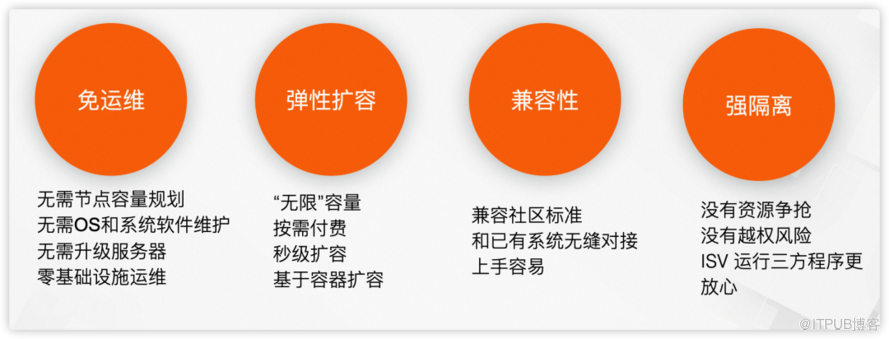
大规模 AI 应用训练和部署主要面临以下挑战。
- **GPU 资源受限且训练成本较高**
大规模 AI 应用在训练及推理时都需要使用 GPU,但是很多开发者缺少 GPU 资源。单独购买 GPU 卡,或者购买 ECS 实例都需要较高成本。
- **资源异构**
并行训练时需要大量的 GPU 资源,这些 GPU 往往是不同系列的。不同 GPU 支持的 CUDA 版本不同,且跟内核版本、nvidia-container-cli 版本相互绑定,开发者需要关注底层资源,为 AI 应用开发增加了许多难度。
- **镜像加载慢**
AI 类应用镜像经常有几十 GB,下载往往需要几十分钟甚至数小时。
针对上述问题,ASK 提供了完美的解决方案。在 ASK 中可以通过 Kubernetes Workload 十分方便的使用 GPU 资源,无需其前置准备使用,用完即可立即释放,使用成本低。ASK 屏蔽了底层资源,用户无需关心 GPU、CUDA 版本等等的依赖问题,只需关心 AI 应用的自身逻辑即可。同时,ASK 默认就提供了镜像缓存能力,当 Pod 第 2 次创建时可以秒级启动。
## 部署流程
### 1. 前提条件
- 已创建 ASK 集群。具体操作,请参见创建 ASK 集群 **[** **1]** 。
- 下载 llama-7b 模型并上传到 OSS 。具体操作,请参见本文附录部分。
### 2. 使用 Kubectl 创建
*替换 yaml 文件中变量*
*${your-ak} 您的 AK*
*${your-sk} 您的 SK*
*${oss-endpoint-url} OSS 的 enpoint*
*${llama-oss-path} 替换为存放 llama-7b 模型的地址(路径末尾不需要/),如 oss://xxxx/llama-7b-hf*
```
apiVersion: v1
kind: Secret
metadata:
name: oss-secret
type: Opaque
stringData:
.ossutilconfig: |
[Credentials]
language=ch
accessKeyID=${your-ak}
accessKeySecret=${your-sk}
endpoint=${oss-endpoint-url}
---
apiVersion: apps/v1
kind: Deployment
metadata:
labels:
app: fastchat
name: fastchat
namespace: default
spec:
replicas: 1
selector:
matchLabels:
app: fastchat
strategy:
rollingUpdate:
maxSurge: 100%
maxUnavailable: 100%
type: RollingUpdate
template:
metadata:
labels:
app: fastchat
alibabacloud.com/eci: "true"
annotations:
k8s.aliyun.com/eci-use-specs: ecs.gn6e-c12g1.3xlarge
spec:
volumes:
- name: data
emptyDir: {}
- name: oss-volume
secret:
secretName: oss-secret
dnsPolicy: Default
initContainers:
- name: llama-7b
image: yunqi-registry.cn-shanghai.cr.aliyuncs.com/lab/ossutil:v1
volumeMounts:
- name: data
mountPath: /data
- name: oss-volume
mountPath: /root/
readOnly: true
command:
- sh
- -c
- ossutil cp -r ${llama-oss-path} /data/
resources:
limits:
ephemeral-storage: 50Gi
containers:
- command:
- sh
- -c
- "/root/webui.sh"
image: yunqi-registry.cn-shanghai.cr.aliyuncs.com/lab/fastchat:v1.0.0
imagePullPolicy: IfNotPresent
name: fastchat
ports:
- containerPort: 7860
protocol: TCP
- containerPort: 8000
protocol: TCP
readinessProbe:
failureThreshold: 3
initialDelaySeconds: 5
periodSeconds: 10
successThreshold: 1
tcpSocket:
port: 7860
timeoutSeconds: 1
resources:
requests:
cpu: "4"
memory: 8Gi
limits:
nvidia.com/gpu: 1
ephemeral-storage: 100Gi
volumeMounts:
- mountPath: /data
name: data
---
apiVersion: v1
kind: Service
metadata:
annotations:
service.beta.kubernetes.io/alibaba-cloud-loadbalancer-address-type: internet
service.beta.kubernetes.io/alibaba-cloud-loadbalancer-instance-charge-type: PayByCLCU
name: fastchat
namespace: default
spec:
externalTrafficPolicy: Local
ports:
- port: 7860
protocol: TCP
targetPort: 7860
name: web
- port: 8000
protocol: TCP
targetPort: 8000
name: api
selector:
app: fastchat
type: LoadBalancer
```
**
**
### 3. 等待 FastChat Ready
等待 pod ready 后,在浏览器中访问 http://${externa-ip}:7860
*📍**启动后需要下载 vicuna-7b 模型,模型大小约 13GB*
*下载模型时间大概耗时约 20 分钟左右,如果提前做好磁盘快照,通过磁盘快照创建磁盘并挂载到 pod,就是秒级生效*
```
kubectl get po |grep fastchat
# NAME READY STATUS RESTARTS AGE
# fastchat-69ff78cf46-tpbvp 1/1 Running 0 20m
kubectl get svc fastchat
# NAME TYPE CLUSTER-IP EXTERNAL-IP PORT(S) AGE
# fastchat LoadBalancer 192.168.230.108 xxx.xx.x.xxx 7860:31444/TCP 22m
```
## 效果展示
### Case 1:通过控制台使用 FastChat
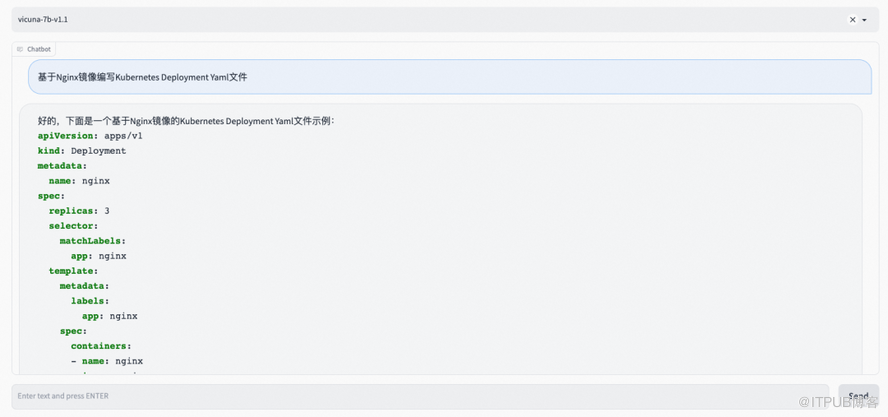
在浏览器中访问 http://${externa-ip}:7860,可以直接测试聊天功能。比如使用自然语言让 FastChat 写一段代码。
输入:*基于 Nginx 镜像编写 Kubernetes Deployment Yaml 文件*
FastChat 输出如下图所示。
### Case 2:通过 API 使用 FastChat
FastChat API 监听在 8000 端口,如下所示,通过 curl 发起一个 API 调用,然后返回结果。
- curl 命令
```
curl http://xxx:xxx:xxx:8000/v1/chat/completions \
-H "Content-Type: application/json" \
-d '{
"model": "vicuna-7b-v1.1",
"messages": [{"role": "user", "content": "golang 生成一个 hello world"}]
}'
```
- 输出结果
````
{"id":"3xqtJcXSLnBomSWocuLW2b","object":"chat.completion","created":1682574393,"choices":[{"index":0,"message":{"role":"assistant","content":"下面是使用 Go 语言生成 "Hello, World!" 的代码:\n```go\npackage main\n\nimport "fmt"\n\nfunc main() {\n fmt.Println("Hello, World!")\n}\n```\n运行该代码后,会输出 "Hello, World!"。"},"finish_reason":"stop"}],"usage":null}
````
### Case 3: VSCode 插件
既然有了 API 接口,在 IDE 中怎么快速集成这个能力呢。你是不是想到了 Copilot、Cursor、Tabnine ,那咱们就通过 VSCode 插件集成一下 FastChat 看看吧。VSCode 插件几个核心文件:src/extension.ts、package.json 和 tsconfig.json
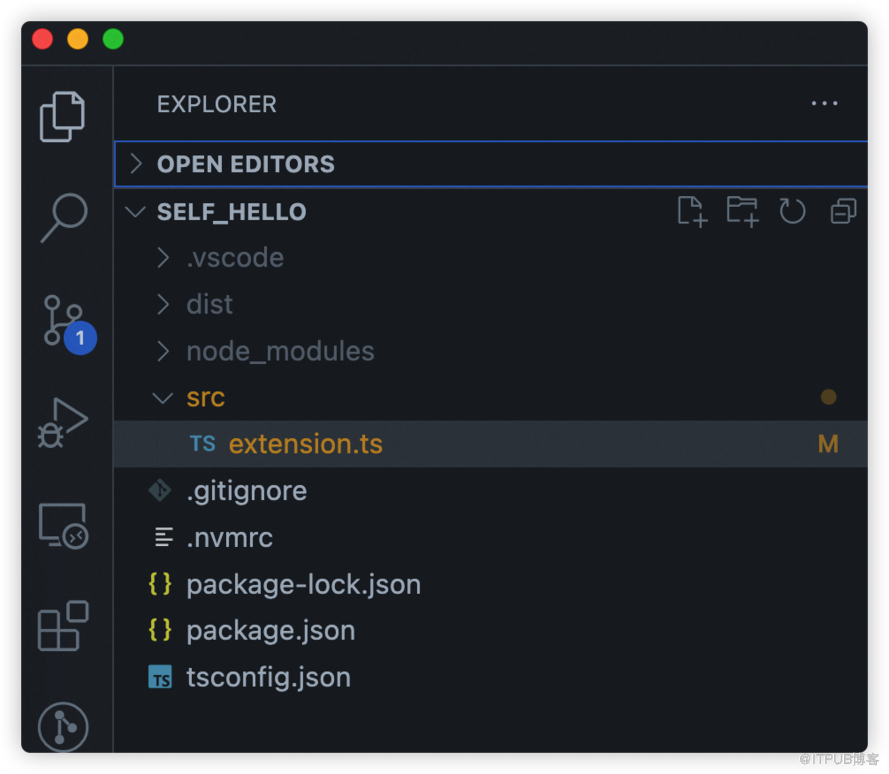
这三个文件的内容分别如下:
- src/extension.ts
````
import * as vscode from 'vscode';
import axios from 'axios';
import { ExtensionContext, commands, window } from "vscode";
const editor = window.activeTextEditor
export function activate(context: vscode.ExtensionContext) {
let fastchat = async () => {
vscode.window.showInputBox({ prompt: '请输入代码提示语' }).then((inputValue) => {
if (!inputValue) {
return;
}
vscode.window.withProgress({
location: vscode.ProgressLocation.Notification,
title: '正在请求...',
cancellable: false
}, (progress, token) => {
return axios.post('http://example.com:8000/v1/chat/completions', {
model: 'vicuna-7b-v1.1',
messages: [{ role: 'user', content: inputValue }]
}, {
headers: {
'Content-Type': 'application/json'
}
}).then((response) => {
// const content = JSON.stringify(response.data);
const content = response.data.choices[0].message.content;
console.log(response.data)
const regex = /```.*\n([\s\S]*?)```/
const matches = content.match(regex)
if (matches && matches.length > 1) {
editor?.edit(editBuilder => {
let position = editor.selection.active;
position && editBuilder.insert(position, matches[1].trim())
})
}
}).catch((error) => {
console.log(error);
});
});
});
}
let command = commands.registerCommand(
"fastchat",
fastchat
)
context.subscriptions.push(command)
}
````
- package.json
```
{
"name": "fastchat",
"version": "1.0.0",
"publisher": "yourname",
"engines": {
"vscode": "^1.0.0"
},
"categories": [
"Other"
],
"activationEvents": [
"onCommand:fastchat"
],
"main": "./dist/extension.js",
"contributes": {
"commands": [
{
"command": "fastchat",
"title": "fastchat code generator"
}
]
},
"devDependencies": {
"@types/node": "^18.16.1",
"@types/vscode": "^1.77.0",
"axios": "^1.3.6",
"typescript": "^5.0.4"
}
}
```
- tsconfig.json
```
{
"compilerOptions": {
"target": "ES2018",
"module": "commonjs",
"outDir": "./dist",
"strict": true,
"esModuleInterop": true,
"resolveJsonModule": true,
"declaration": true
},
"include": ["src/**/*"],
"exclude": ["node_modules", "**/*.test.ts"]
}
```
好,插件开发完咱们就看一下效果。
- 快速生成一个 Golang Hello World
地址:<https://intranetproxy.alipay.com/skylark/lark/0/2023/gif/11431/1682574183392-11e16131-3dae-4969-a0d1-79a0a9eefb01.gif>
- 快速生成一个 Kubernetes Deployment
地址:<https://intranetproxy.alipay.com/skylark/lark/0/2023/gif/11431/1682574192825-7a1d3c76-025d-45db-bea1-4ca5dd885520.gif>
## 总结
ASK 作为容器 Serverless 平台,具有免运维、弹性扩缩容、屏蔽异构资源、镜像加速等能力,非常适合 AI 大模型部署场景,欢迎试用。
## **附录:**
1. 下载 llama-7b 模型
模型地址:
*<https://huggingface.co/decapoda-research/llama-7b-hf/tree/main>*
```
# 如果使用的是阿里云 ECS,需要运行如下命令安装 git-lfs
# yum install git-lfs
git clone https://huggingface.co/decapoda-research/llama-7b-hf
git lfs install
git lfs pull
```
2. 上传到 OSS
可参考文档:
*<https://help.aliyun.com/document_detail/195960.html>*
## **参考文档:**
[1] 创建 ASK 集群
*<https://help.aliyun.com/document_detail/86377.htm?spm=a2c4g.186945.0.0.61eb3e0694K2ej#task-e3c-311-ydb>*
[2] ASK 概述
*<https://help.aliyun.com/document_detail/86366.html?spm=a2c4g.750001.0.i1>*
点击[此处](https://free.aliyun.com/?product=9596839),领取 ASK 免费试用限额资源
来自 “ ITPUB博客 ” ,链接:https://blog.itpub.net/69953029/viewspace-2950913/ ,如需转载,请注明出处,否则将追究法律责任。

最新文章
- 阿里云易立:以云原生之力,实现大模型时代基础设施能力跃升 | KubeCon 主论坛分享
- 网关改造正当时,跟学 HigressOps 夏季营
- 如何通过网关降低大模型的调用费用,并提升合规性
- 云原生微服务应用的平台工程实践
- 活动回顾丨阿里云 Serverless 技术实战与创新广州站回放& PPT 下载
- 阿里云斩获 4 项年度云原生优秀案例丨阿里云云原生 6 月动态
- 开发者评价:Serverless 容器最值得推荐的能力是什么?
- 【活动】30 秒上云体验,一键体验 RocketMQ 六大生产环境
- 云拨测全面升级丨单次拨测低至 0.001 元
- 应对突发流量,如何快速为自建 K8s 添加云上弹性能力
