*作者:子白*
本文介绍如何在阿里云容器平台 ACK 上快速搭建一套可对外提供服务的 Stable Diffusion。
## CPU 版本
### 前提条件
- 已创建 Kubernetes 托管版集群。具体操作,请参见创建 Kubernetes 托管版集群[1]。
*📍无需 GPU,节点需要 8c16g 以上*
- 已通过 kubectl 连接 kubernetes 集群。具体操作,请参见**通过 Kubectl 连接 Kubernetes 集群 **[** **2]** **。
### 使用控制台创建
1. 登录容器服务管理控制台[3],在左侧导航栏选择集群。
1. 在集群列表页面中,单击目标集群名称或者目标集群右侧操作列下的详情。
1. 在集群管理页左侧导航栏中,选择**工作负载 > 无状态**。
1. 在**无状态**页面中,单击**使用镜像创建**。
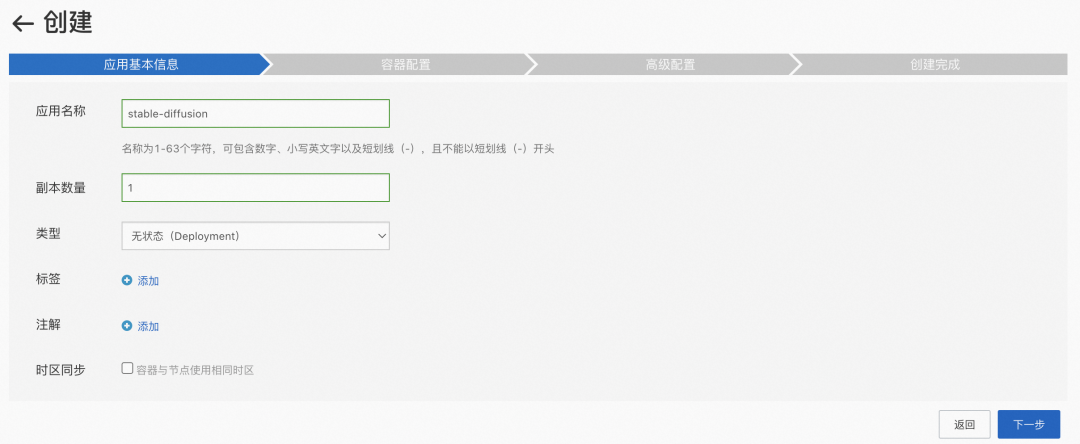
1. 在**应用基本信息**配置向导页面中,设置应用的基本信息。
```
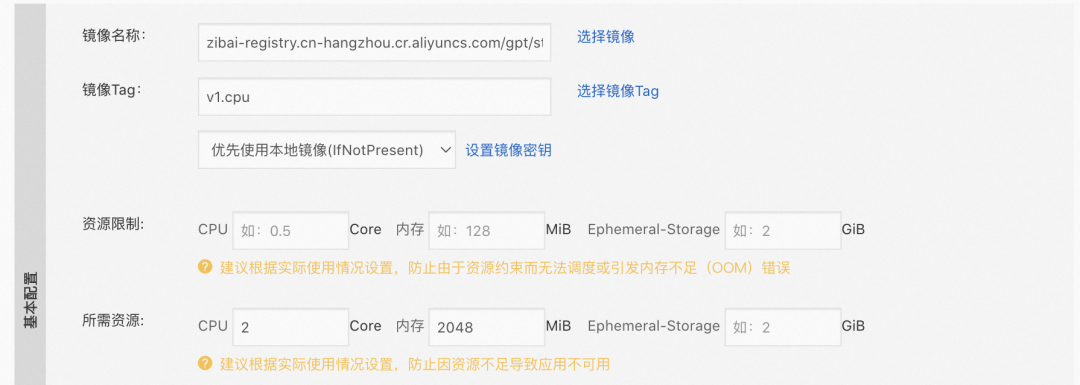
zibai-registry.cn-hangzhou.cr.aliyuncs.com/gpt/stable-diffusion:v1.cpu
```
```
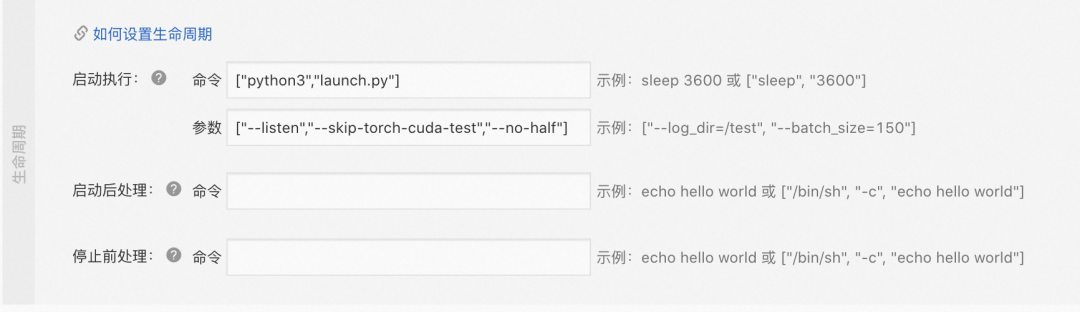
["python3", "launch.py"]
["--listen", "--skip-torch-cuda-test", "--no-half"]
```
等待 pod ready
*📍镜像大小为 12.7GB,内网下载约 10min*

6. 在集群管理页左侧导航栏中,选择**网络 > 服务**。
新建服务,选择负载均衡类型。
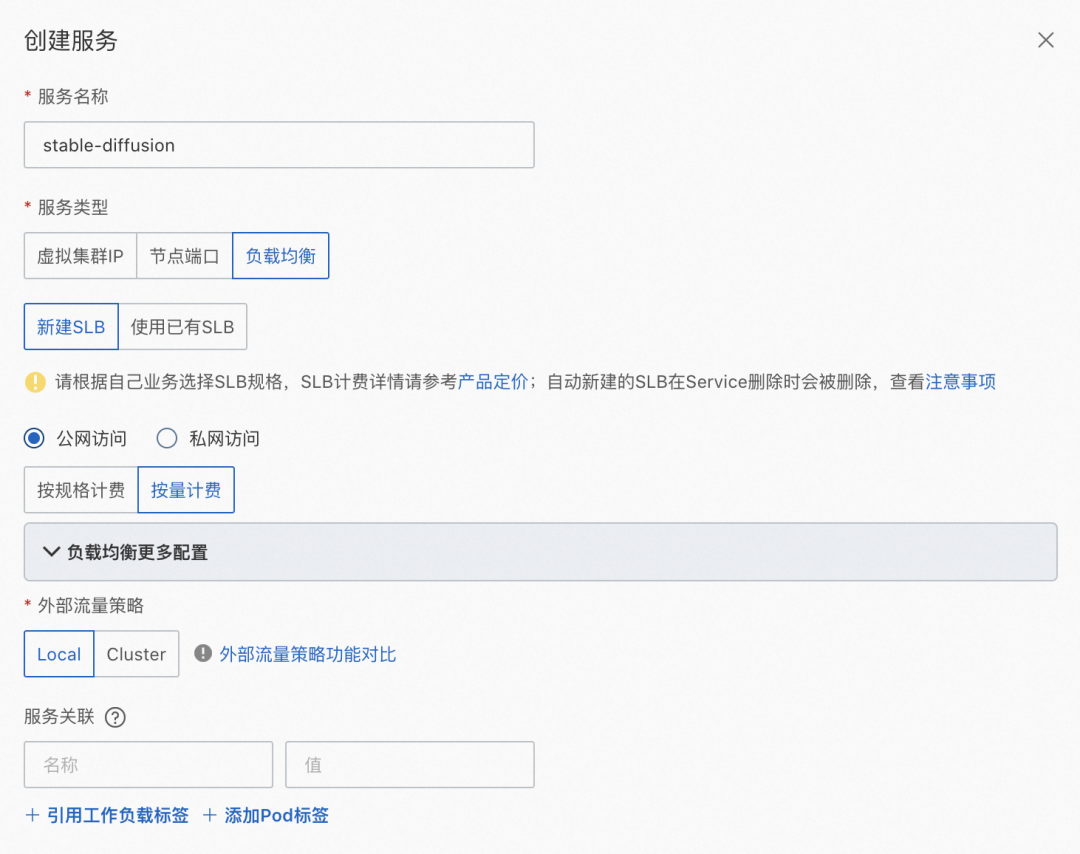
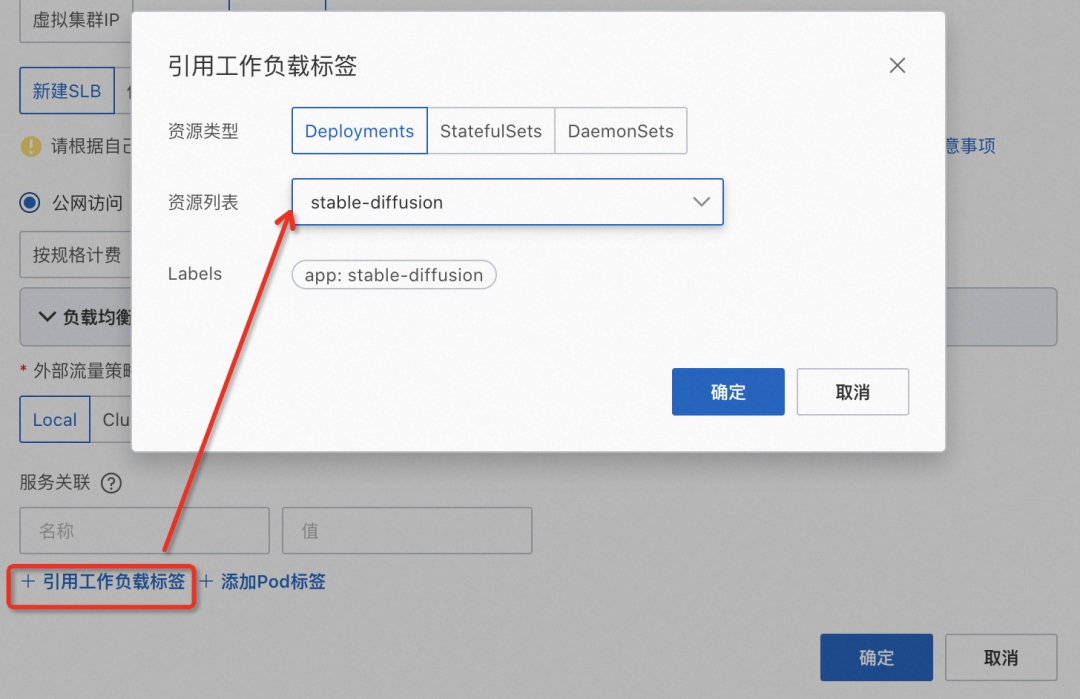

等待约 1min 后,刷新页面可以看到 External IP 列有具体 IP

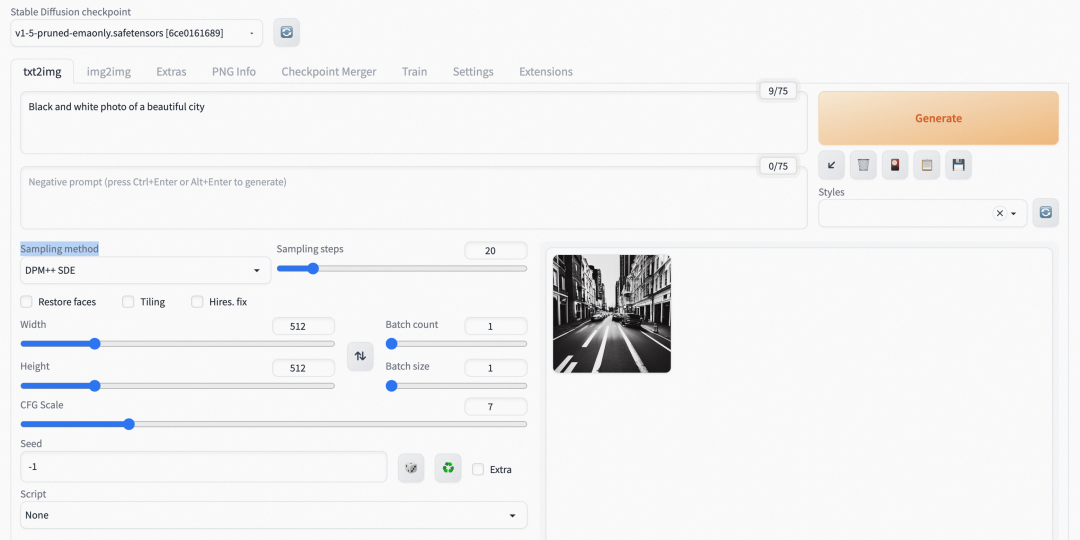
在浏览器中访问上一步获取到的 <http://xxx.xxx.xxx.xxx:7860>,即可看到如下页面。
Prompt:Black and white photo of a beautiful city
Sampling method:DPM++ SDE
### 使用 kubectl 创建
stable-diffusion.yaml
```
apiVersion: apps/v1
kind: Deployment
metadata:
labels:
app: stable-diffusion
name: stable-diffusion
namespace: default
spec:
replicas: 1
selector:
matchLabels:
app: stable-diffusion
template:
metadata:
labels:
app: stable-diffusion
spec:
containers:
- args:
- --listen
- --skip-torch-cuda-test
- --no-half
command:
- python3
- launch.py
image: zibai-registry.cn-hangzhou.cr.aliyuncs.com/gpt/stable-diffusion:v1.cpu
imagePullPolicy: IfNotPresent
name: stable-diffusion
resources:
requests:
cpu: "2"
memory: 2Gi
---
apiVersion: v1
kind: Service
metadata:
annotations:
service.beta.kubernetes.io/alibaba-cloud-loadbalancer-address-type: internet
service.beta.kubernetes.io/alibaba-cloud-loadbalancer-instance-charge-type: PayByCLCU
name: stable-diffusion
namespace: default
spec:
externalTrafficPolicy: Local
ports:
- port: 7860
protocol: TCP
targetPort: 7860
selector:
app: stable-diffusion
type: LoadBalancer
```
```
kubectl apply -f stable-diffusion.yaml
```
等待 pod ready
*📍镜像大小为 12.7GB,内网下载约 10min*
```
# 查看pod状态,等待pod running
kubectl get po |grep stable-diffusion
# 查看CLB IP
kubectl get svc stable-diffusion
NAME TYPE CLUSTER-IP EXTERNAL-IP PORT(S) AGE
stable-diffusion LoadBalancer 192.168.x.x xx.xx.xx.xxx 7860:32320/TCP 12m
```
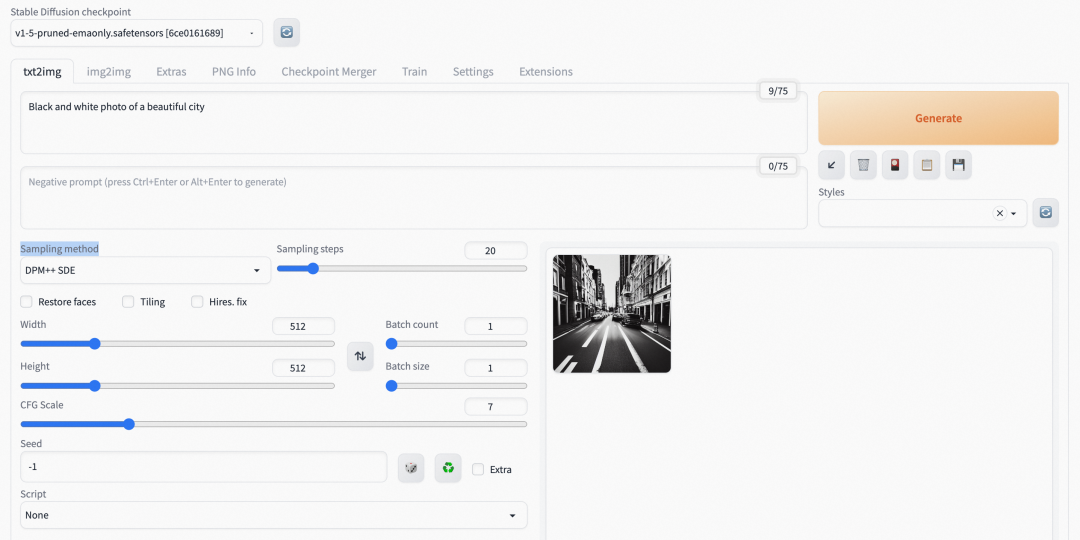
在浏览器中访问上一步获取到的 <http://xxx.xxx.xxx.xxx:7860>,即可看到如下页面。
Prompt:Black and white photo of a beautiful city
Sampling method:DPM++ SDE
## GPU 版本
### 前提条件
- 已创建 Kubernetes 异构集群集群。具体操作,请参见创建托管 GPU 集群[4]。
*📍需要 GPU 节点,磁盘剩余容量需大于 40G*
- 已通过 kubectl 连接kubernetes集群。具体操作,请参见通过 Kubectl 连接 Kubernetes 集群。
### 使用 kubectl 创建
stable-diffusion.yaml
```
apiVersion: apps/v1
kind: Deployment
metadata:
labels:
app: stable-diffusion
name: stable-diffusion
namespace: default
spec:
replicas: 1
selector:
matchLabels:
app: stable-diffusion
template:
metadata:
labels:
app: stable-diffusion
spec:
containers:
- args:
- --listen
command:
- python3
- launch.py
image: zibai-registry.cn-hangzhou.cr.aliyuncs.com/gpt/stable-diffusion:v1.gpu
imagePullPolicy: IfNotPresent
name: stable-diffusion
resources:
requests:
cpu: "2"
memory: 2Gi
limits:
nvidia.com/gpu: 1
---
apiVersion: v1
kind: Service
metadata:
annotations:
service.beta.kubernetes.io/alibaba-cloud-loadbalancer-address-type: internet
service.beta.kubernetes.io/alibaba-cloud-loadbalancer-instance-charge-type: PayByCLCU
name: stable-diffusion
namespace: default
spec:
externalTrafficPolicy: Local
ports:
- port: 7860
protocol: TCP
targetPort: 7860
selector:
app: stable-diffusion
type: LoadBalancer
```
```
kubectl apply -f stable-diffusion.yaml
```
等待 pod ready
*📍镜像大小为 15.1GB,内网下载约 15min*
```
# 查看pod状态,等待pod running
kubectl get po |grep stable-diffusion
# 查看CLB IP
kubectl get svc stable-diffusion
NAME TYPE CLUSTER-IP EXTERNAL-IP PORT(S) AGE
stable-diffusion LoadBalancer 192.168.x.x xx.xx.xx.xxx 7860:32320/TCP 12m
```
在浏览器中访问上一步获取到的 <http://xxx.xxx.xxx.xxx:7860>,即可看到如下页面。
Prompt:Black and white photo of a beautiful city
Sampling method:DPM++ SDE
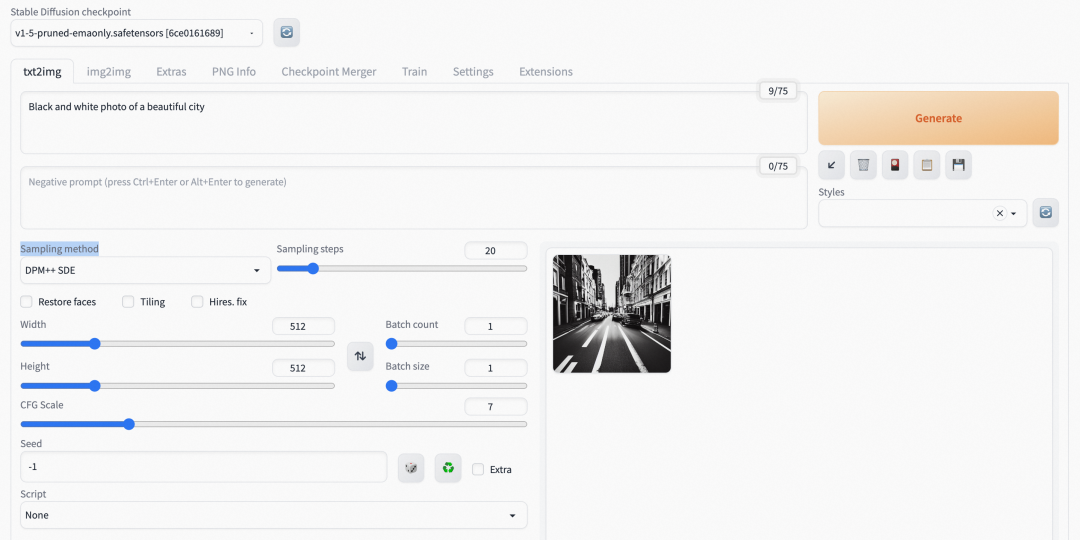
**GPU 版本的图片生成速度明显优于 CPU 版本。**
> *注:镜像可拉取时间截止至 2023 年 5 月 17 日*
>
> *镜像仓库地址:zibai-registry.cn-hangzhou.cr.aliyuncs.com/gpt/stable-diffusion*
**相关链接:**
<https://github.com/AUTOMATIC1111/stable-diffusion-webui>
[1] 创建 Kubernetes 托管版集群
*<https://help.aliyun.com/document_detail/95108.htm#task-skz-qwk-qfb>*
[2] 通过 Kubectl 连接 Kubernetes 集群
*<https://help.aliyun.com/document_detail/86494.htm#task-ubf-lhg-vdb>*
[3] 容器服务管理控制台
*[https://account.aliyun.com/login/login.htm?oauth_callback=https%3A%2F%2Fcs.console.aliyun.com%2F](https://account.aliyun.com/login/login.htm?spm=a2c6h.13046898.0.0.13796ffaWAabwk&oauth_callback=https%253A%252F%252Fcs.console.aliyun.com%252F)*
[4] 创建托管 GPU 集群
*<https://help.aliyun.com/document_detail/171074.html?spm=a2c4g.171073.0.0.7989f95acmbnoT>*
点击[此处](https://www.aliyun.com/product/kubernetes)即可查看容器服务 ACK 产品详情
来自 “ ITPUB博客 ” ,链接:https://blog.itpub.net/69953029/viewspace-2948147/ ,如需转载,请注明出处,否则将追究法律责任。

最新文章
- 阿里云易立:以云原生之力,实现大模型时代基础设施能力跃升 | KubeCon 主论坛分享
- 网关改造正当时,跟学 HigressOps 夏季营
- 如何通过网关降低大模型的调用费用,并提升合规性
- 云原生微服务应用的平台工程实践
- 活动回顾丨阿里云 Serverless 技术实战与创新广州站回放& PPT 下载
- 阿里云斩获 4 项年度云原生优秀案例丨阿里云云原生 6 月动态
- 开发者评价:Serverless 容器最值得推荐的能力是什么?
- 【活动】30 秒上云体验,一键体验 RocketMQ 六大生产环境
- 云拨测全面升级丨单次拨测低至 0.001 元
- 应对突发流量,如何快速为自建 K8s 添加云上弹性能力
