openinstall - 产品概述
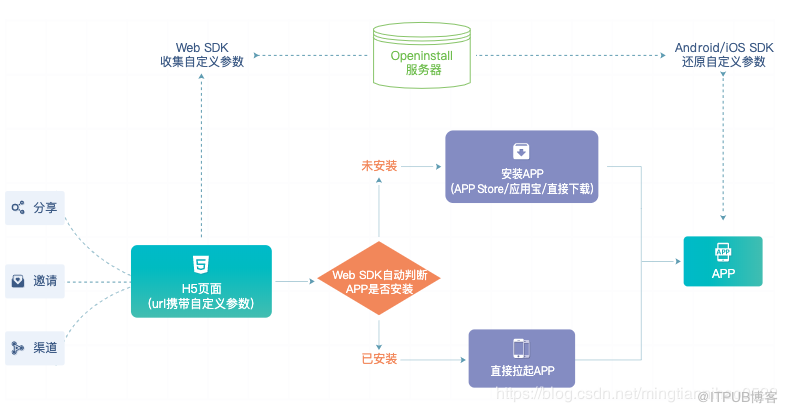
Android SDK 集成指南
一、下载并导入 SDK
libs gradle
implementation files('libs/OpenInstall_vX.X.X.jar')
libs jar
implementation fileTree(dir: 'libs', include: ['*.jar'])
二、初始化
AndroidManifest.xml
<uses-permission android:name="android.permission.INTERNET"/>
<uses-permission android:name="android.permission.ACCESS_NETWORK_STATE"/>
AndroidManifest.xml application AppKey
<meta-data
    android:name="com.openinstall.APP_KEY"
    android:value="OPENINSTALL_APPKEY"/>
备注: OPENINSTALL_APPKEY openinstall appkey
OpenInstall.init(context) sdk
示例代码
Application
public class MyApplication extends Application {
    @Override
    public void onCreate() {
        super.onCreate();
        if (isMainProcess()) {
         OpenInstall.init(this);
        }
    }
<span class="hljs-function"><span class="hljs-keyword">public</span> <span class="hljs-keyword">boolean</span> <span class="hljs-title">isMainProcess</span><span class="hljs-params">()</span> </span>
{
    <span class="hljs-keyword">int</span> pid = android.os.Process.myPid();
    ActivityManager activityManager = (ActivityManager) getSystemService(Context.ACTIVITY_SERVICE);
    <span class="hljs-keyword">for</span> (ActivityManager.RunningAppProcessInfo appProcess : activityManager.getRunningAppProcesses()) {
        <span class="hljs-keyword">if</span> (appProcess.pid == pid) {
            <span class="hljs-keyword">return</span> getApplicationInfo().packageName.equals(appProcess.processName);
        }
    }
    <span class="hljs-keyword">return</span> <span class="hljs-keyword">false</span>;
}
备注:
AndroidManifest.xml application android:name=".MyApplication Application Application Application
<application
android:name=".MyApplication"
android:allowBackup=“false”
android:icon="@drawable/ic_launcher"
android:label="@string/app_name"
android:supportsRtl=“true”
android:theme="@style/AppTheme">
…
</application>
三、功能集成
<activity
android:name=".MainActivity"
android:launchMode=“singleTask”>
<intent-filter>
<action android:name=“android.intent.action.VIEW”/>
<category android:name=“android.intent.category.DEFAULT”/>
<category android:name=“android.intent.category.BROWSABLE”/>
<data android:scheme=“OPENINSTALL_SCHEME”/>
</intent-filter>
</activity>
Activity AndroidManifest.xml
<activity
android:name=".MainActivity"
android:launchMode=“singleTask”>
<intent-filter>
<action android:name=“android.intent.action.MAIN”/>
<category android:name=“android.intent.category.LAUNCHER”/>
</intent-filter>
<intent-filter>
<action android:name=“android.intent.action.VIEW”/>
<category android:name=“android.intent.category.DEFAULT”/>
<category android:name=“android.intent.category.BROWSABLE”/>
<data android:scheme=“OPENINSTALL_SCHEME”/>
</intent-filter>
</activity>
备注: OPENINSTALL_SCHEME openinstall scheme
public class MainActivity extends Activity {
@Override
public void onCreate(Bundle savedInstanceState) {
super.onCreate(savedInstanceState);
setContentView(R.layout.activity_main);
//获取唤醒参数
OpenInstall.getWakeUp(getIntent(), wakeUpAdapter);
}
@Override
protected void onNewIntent(Intent intent) {
super.onNewIntent(intent);
// 此处要调用,否则App在后台运行时,会无法截获
OpenInstall.getWakeUp(intent, wakeUpAdapter);
}

AppWakeUpAdapter wakeUpAdapter = new AppWakeUpAdapter() {
@Override
public void onWakeUp(AppData appData) {
//获取渠道数据
String channelCode = appData.getChannel();
//获取绑定数据
String bindData = appData.getData();
Log.d(“OpenInstall”, "getWakeUp : wakeupData = " + appData.toString());
}
};
@Override
protected void onDestroy() {
super.onDestroy();
wakeUpAdapter = null;
}
}
OpenInstall.getInstall
OpenInstall.getInstall(new AppInstallAdapter() {
@Override
public void onInstall(AppData appData) {
//获取渠道数据
String channelCode = appData.getChannel();
//获取自定义数据
String bindData = appData.getData();
Log.d(“OpenInstall”, "getInstall : installData = " + appData.toString());
}
});
//用户注册成功后调用
OpenInstall.reportRegister();
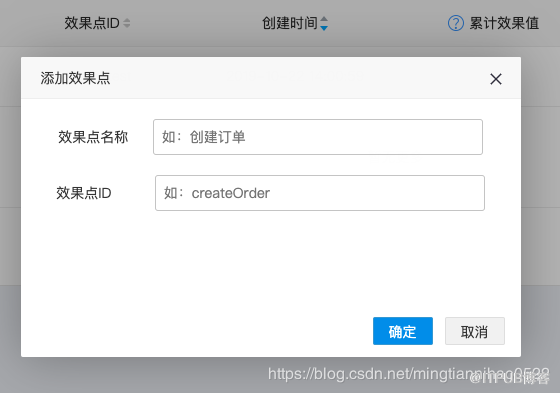
pointId
OpenInstall.reportEffectPoint(pointId, pointValue);
前面大都是官网文档。下面简述一下渠道管理
1.首先您在集成过程中,先上传基础包(未区分渠道)
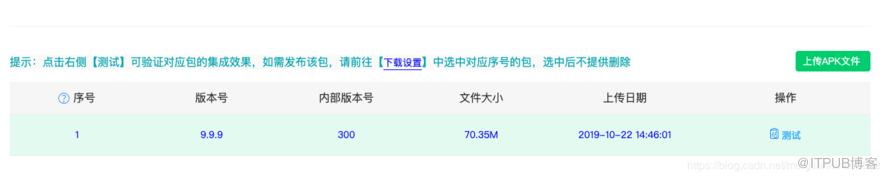
2.新建渠道


3.导出渠道包

OpenInstall.getInstall(new AppInstallAdapter() {
    @Override
    public void onInstall(AppData appData) {
        //获取渠道数据
        String channelCode = appData.getChannel();
        //获取自定义数据
        String bindData = appData.getData();
        Log.d("OpenInstall", "getInstall : installData = " + appData.toString());
    }
});
来自 “ ITPUB博客 ” ,链接:https://blog.itpub.net/69942334/viewspace-2667836/ ,如需转载,请注明出处,否则将追究法律责任。

