Multi-tenants is an architecture concept that can handle multiple projects in a single project container. If you look at popular sites like Nike.com or Mi.com, you will find out the project redirection based on the continent or country region. This post more about understanding the Angular 8 project package configuration, using this how are we leveraging the project for multi-tenant architecture.

Required Softwares
- NodeJS Version 12+
- Angular Cli 8+
Create an Angular Project
Use the following command to generate a new Angular codebase project.
$
ng
new
angular-multi
Video Tutorial
package.json
Angular 8 package files

Project File Struture
Default Angular project structure.

Getting Started
New Tenant Based Struture
Move all of the files under tenants/US

tsconfig.json
Remove baseUrl under the complilerOptions . You will find this in project root level.
{
"
compileOnSave
"
:
false
,
"
compilerOptions
"
:
{
"
outDir
"
:
"
./dist/out-tsc
"
,
"
sourceMap
"
:
true
,
"
declaration
"
:
false
,
"
module
"
:
"
esnext
"
,
"
moduleResolution
"
:
"
node
"
,
"
emitDecoratorMetadata
"
:
true
,
"
experimentalDecorators
"
:
true
,
"
importHelpers
"
:
true
,
"
target
"
:
"
es2015
"
,
"
typeRoots
"
:
[
"
node_modules/@types
"
],
"
lib
"
:
[
"
es2018
"
,
"
dom
"
]
}
}
tsconfig.app.json
Project configuration file. Include the baseUrl and modify the tsconfig.json path with new location.
{
"
extends
"
:
"
../../../tsconfig.json
"
,
"
compilerOptions
"
:
{
"
baseUrl
"
:
"
./
"
,
"
outDir
"
:
"
../out-tsc/app
"
,
"
types
"
:
[]
},
"
exclude
"
:
[
"
test.ts
"
,
"
**/*.spec.ts
"
,
"
e2e
"
]
}
tsconfig.spec.json
Unit tests configuratin file. Just apply the same changes like the above one.
{
"
extends
"
:
"
../../../tsconfig.json
"
,
"
compilerOptions
"
:
{
"
baseUrl
"
:
"
./
"
,
"
outDir
"
:
"
../out-tsc/spec
"
,
"
types
"
:
[
"
jasmine
"
,
"
node
"
]
},
"
files
"
:
[
"
test.ts
"
,
"
polyfills.ts
"
],
"
include
"
:
[
"
**/*.spec.ts
"
,
"
**/*.d.ts
"
]
}
E2E - Automation
Move e2e folder under the tenants US folder.

tsconfig.e2e.json
Update the configration paths with new location.
{
}
"
extends
"
:
"
../../../../tsconfig.json
"
,
"
compilerOptions
"
:
{
"
baseUrl
"
:
"
./
"
,
"
outDir
"
:
"
../out-tsc/app
"
,
"
module
"
:
"
commonjs
"
,
"
target
"
:
"
es5
"
,
"
types
"
:
[
"
jasmine
"
,
"
jasminewd2
"
,
"
node
"
]
}
angular.json
Angular compailer configuration file. Replace default project( src ) path settings to new tenants( tenants/US ) stucture.
{
"
$schema
"
:
"
./node_modules/@angular/cli/lib/config/schema.json
"
,
"
version
"
:
1
,
"
newProjectRoot
"
:
"
projects
"
,
"
projects
"
:
{
"
US
"
:
{
"
root
"
:
""
,
"
sourceRoot
"
:
"
src
"
,
"
projectType
"
:
"
application
"
,
"
prefix
"
:
"
app
"
,
"
schematics
"
:
{
"
@schematics/angular:component
"
:
{
"
style
"
:
"
scss
"
}
},
"
architect
"
:
{
"
build
"
:
{
"
builder
"
:
"
@angular-devkit/build-angular:browser
"
,
"
options
"
:
{
"
outputPath
"
:
"
dist/us
"
,
"
index
"
:
"
src/tenants/US/index.html
"
,
"
main
"
:
"
src/tenants/US/main.ts
"
,
"
polyfills
"
:
"
src/tenants/US/polyfills.ts
"
,
"
tsConfig
"
:
"
src/tenants/US/tsconfig.app.json
"
,
"
assets
"
:
[
"
src/tenants/US/favicon.ico
"
,
"
src/tenants/US/assets
"
],
"
styles
"
:
[
"
src/tenants/US/styles.scss
"
],
"
scripts
"
:
[],
"
es5BrowserSupport
"
:
true
},
"
configurations
"
:
{
"
production
"
:
{
"
fileReplacements
"
:
[
{
"
replace
"
:
"
src/tenants/US/environments/environment.ts
"
,
"
with
"
:
"
src/tenants/US/environments/environment.prod.ts
"
}
],
"
optimization
"
:
true
,
"
outputHashing
"
:
"
all
"
,
"
sourceMap
"
:
false
,
"
extractCss
"
:
true
,
"
namedChunks
"
:
false
,
"
aot
"
:
true
,
"
extractLicenses
"
:
true
,
"
vendorChunk
"
:
false
,
"
buildOptimizer
"
:
true
,
"
budgets
"
:
[
{
"
type
"
:
"
initial
"
,
"
maximumWarning
"
:
"
2mb
"
,
"
maximumError
"
:
"
5mb
"
}
]
}
}
},
"
serve
"
:
{
"
builder
"
:
"
@angular-devkit/build-angular:dev-server
"
,
"
options
"
:
{
"
browserTarget
"
:
"
US:build
"
},
"
configurations
"
:
{
"
production
"
:
{
"
browserTarget
"
:
"
US:build:production
"
}
}
},
"
extract-i18n
"
:
{
"
builder
"
:
"
@angular-devkit/build-angular:extract-i18n
"
,
"
options
"
:
{
"
browserTarget
"
:
"
US:build
"
}
},
"
test
"
:
{
"
builder
"
:
"
@angular-devkit/build-angular:karma
"
,
"
options
"
:
{
"
main
"
:
"
src/tenants/US/test.ts
"
,
"
polyfills
"
:
"
src/tenants/US/polyfills.ts
"
,
"
tsConfig
"
:
"
src/tenants/US/tsconfig.spec.json
"
,
"
karmaConfig
"
:
"
src/tenants/US/karma.conf.js
"
,
"
styles
"
:
[
"
src/tenants/US/styles.scss
"
],
"
scripts
"
:
[],
"
assets
"
:
[
"
src/tenants/US/favicon.ico
"
,
"
src/tenants/US/assets
"
]
}
},
"
lint
"
:
{
"
builder
"
:
"
@angular-devkit/build-angular:tslint
"
,
"
options
"
:
{
"
tsConfig
"
:
[
"
src/tenants/US/tsconfig.app.json
"
,
"
src/tenants/US/tsconfig.spec.json
"
],
"
exclude
"
:
[
"
**/node_modules/**
"
]
}
}
}
},
"
US-e2e
"
:
{
"
root
"
:
"
e2e/
"
,
"
projectType
"
:
"
application
"
,
"
prefix
"
:
""
,
"
architect
"
:
{
"
e2e
"
:
{
"
builder
"
:
"
@angular-devkit/build-angular:protractor
"
,
"
options
"
:
{
"
protractorConfig
"
:
"
e2e/protractor.conf.js
"
,
"
devServerTarget
"
:
"
US:serve
"
},
"
configurations
"
:
{
"
production
"
:
{
"
devServerTarget
"
:
"
US:serve:production
"
}
}
},
"
lint
"
:
{
"
builder
"
:
"
@angular-devkit/build-angular:tslint
"
,
"
options
"
:
{
"
tsConfig
"
:
"
e2e/tsconfig.e2e.json
"
,
"
exclude
"
:
[
"
**/node_modules/**
"
]
}
}
}
}
},
"
defaultProject
"
:
"
US
"
}
Shared or Common
Create a shared folder for multiplie tenants.
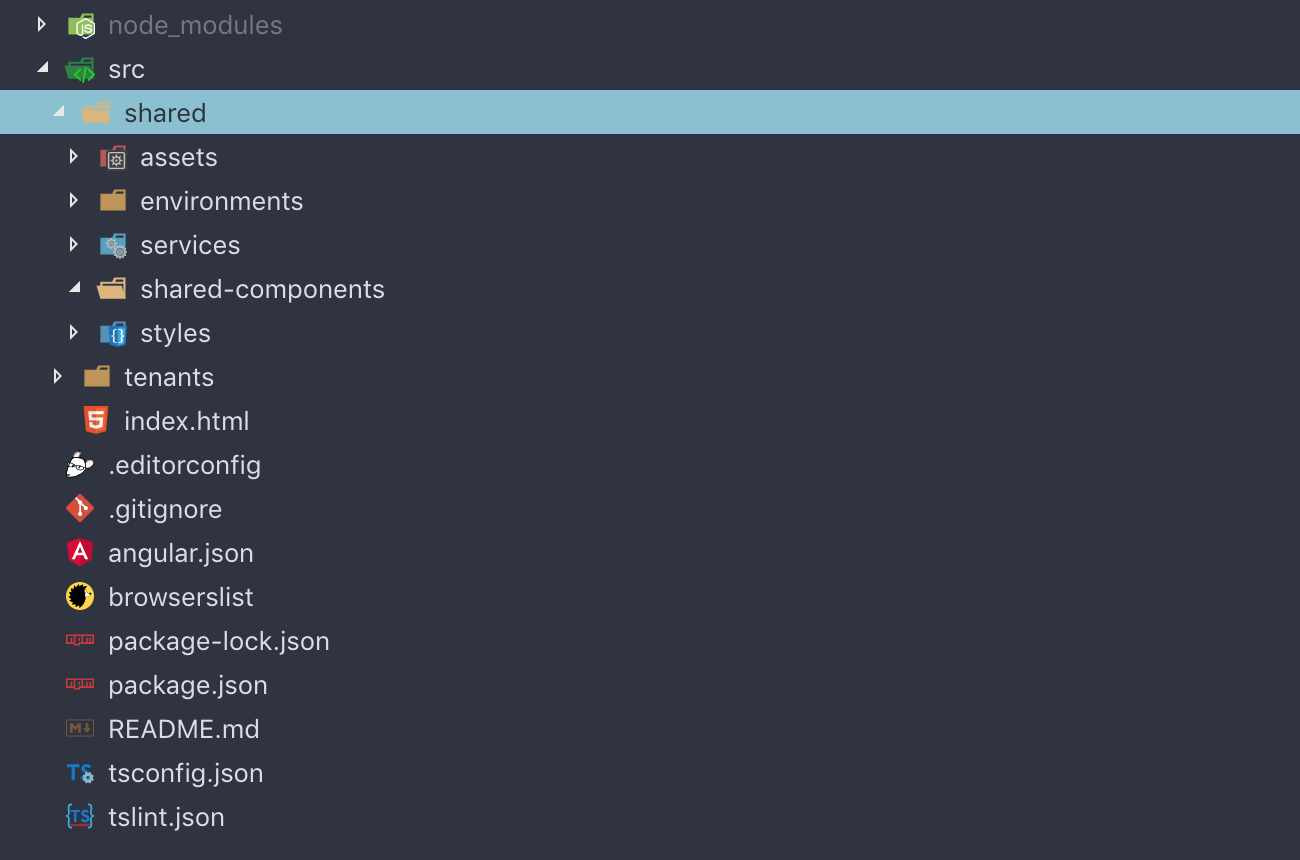
tsconfig.app.json
Include the paths for shared folder. So that you can easily import the shared resources using @shared/services/* , instead for ../../../shared/services . Note: Exclude the e2e folder from the Angular compiler process.
{
"
extends
"
:
"
../../../tsconfig.json
"
,
"
compilerOptions
"
:
{
"
baseUrl
"
:
"
./
"
,
"
outDir
"
:
"
../out-tsc/app
"
,
"
types
"
:
[],
"
paths
"
:
{
"
@shared/*
"
:
[
"
../../shared/*
"
]
}
},
"
exclude
"
:
[
"
test.ts
"
,
"
**/*.spec.ts
"
,
"
e2e
"
]
}
Generate Shared Components Module
Use Angular CLI command to generate a module for shared components.
$
ng
g m ../shared/shared-components
CREATE src/shared/shared-components/shared-components.module.ts (200 bytes)
CREATE src/shared/shared-components/shared-components.module.ts (200 bytes)
Logo Component
Generate project logo component under shared components. So that all other tenants can reuse.
$
ng
g c ../shared/shared-components/logo
CREATE src/shared/shared-components/logo/logo.component.scss (0 bytes)
CREATE src/shared/shared-components/logo/logo.component.html (23 bytes)
CREATE src/shared/shared-components/logo/logo.component.spec.ts (614 bytes)
CREATE src/shared/shared-components/logo/logo.component.ts (262 bytes)
UPDATE src/shared/shared-components/shared-components.module.ts (268 bytes)
CREATE src/shared/shared-components/logo/logo.component.scss (0 bytes)
CREATE src/shared/shared-components/logo/logo.component.html (23 bytes)
CREATE src/shared/shared-components/logo/logo.component.spec.ts (614 bytes)
CREATE src/shared/shared-components/logo/logo.component.ts (262 bytes)
UPDATE src/shared/shared-components/shared-components.module.ts (268 bytes)
shared-components.module.ts
Update the explore the newly generated components.
import
{
NgModule
}
from
'
@angular/core
'
;
import
{
CommonModule
}
from
'
@angular/common
'
;
import
{
LogoComponent
}
from
'
./logo/logo.component
'
;
@NgModule
(
{
declarations
:
[
LogoComponent
]
,
exports
:
[
LogoComponent
]
,
imports
:
[
CommonModule
]
}
)
export
class
SharedComponentsModule
{
}
Multiple Tenants
Duplicate the US tenant folder and replace with UK and IN.


