你如何增加网站的流量?
电子商务企业的主要目标是继续吸引现有用户并吸引新访客。
通过发送电子邮件通知,短信提醒,社交媒体和网络推送通知,有很多方法可以增加网站流量和客户互动度。
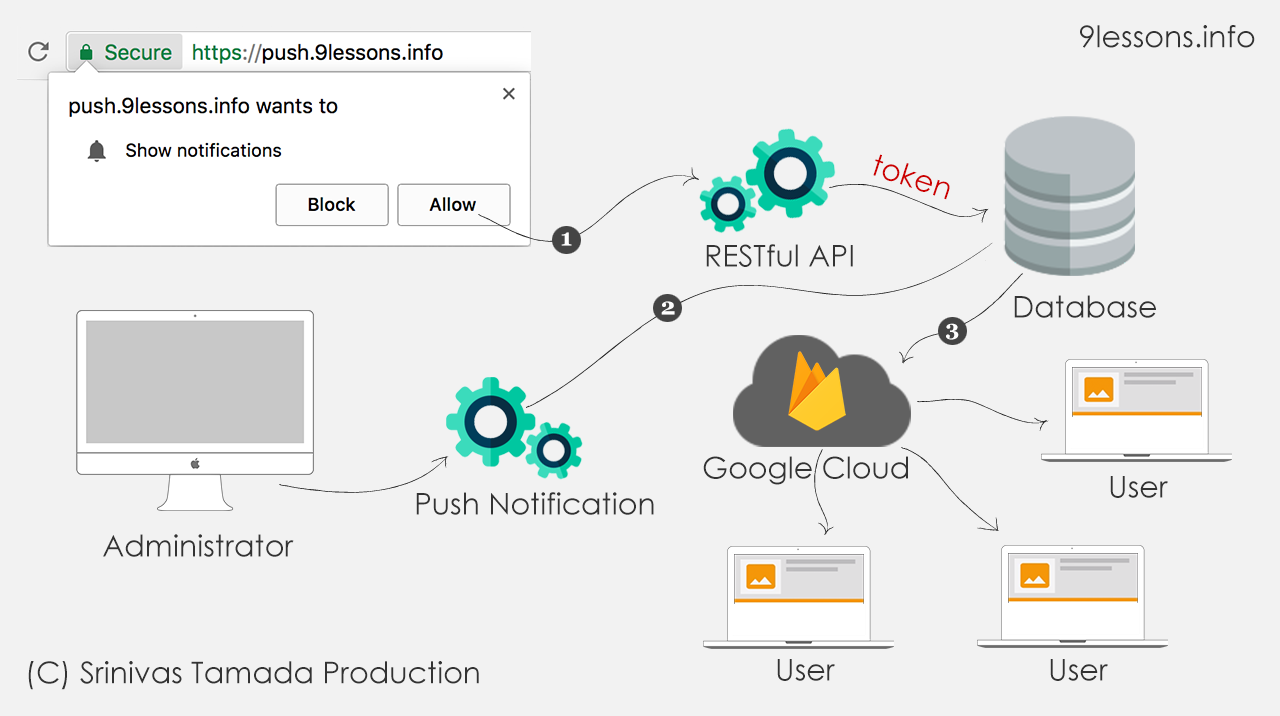
今天,我们将看到推送通知如何适用于Web浏览器。
这些是通过桌面和移动浏览器发送给用户的通知。
这些通知在用户的桌面或移动浏览器上提供 - 无论用户是否在网站上。
这些通知允许用户从他们喜欢的网站获得及时更新,并允许开发人员有效地重新使用相关内容以增加网站的流量。
此项目需要以下项目
Website
前端网站,您必须在index.html中包含jav.json文件
manifest.json
有关您的网站扩展的基本元数据信息,这将帮助您与浏览器操作进行通信。
service-worker.js
这是一个脚本文件,您的浏览器在后台运行并执行同步操作。
notification.js
允许浏览器通知的JavaScript文件。
这包含将用户注册令牌信息发送到后端服务器的所有操作。
RESTful或ServerSide URL
Subscribe
创建一个简单的服务端插入操作来存储用户注册令牌。
Unsubscribe
以同样的方式创建删除操作以从数据库中删除用户注册令牌。
Get Notification
此URL应以JSON数据格式返回通知数据。
CURL推送通知应用程序
服务器端CURL项目,用于向订阅用户列表发送通知。
数据库
You have to create a database for storing user registration ids/tokens.
CREATE TABLE
GMC
{
gid
INT
PRIMARY KEY
AUTO_INCREMENT
,
rid
TEXT
}
This will contain a push notification data.
CREATE TABLE
notifications
{
nid
INT
PRIMARY KEY
AUTO_INCREMENT
,
title
VARCHAR(
200
),
msg
VARCHAR(
200
),
logo
VARCHAR(
300
),
name
VARCHAR(
100
),
url
VARCHAR(
300
)
}
Firebase入门
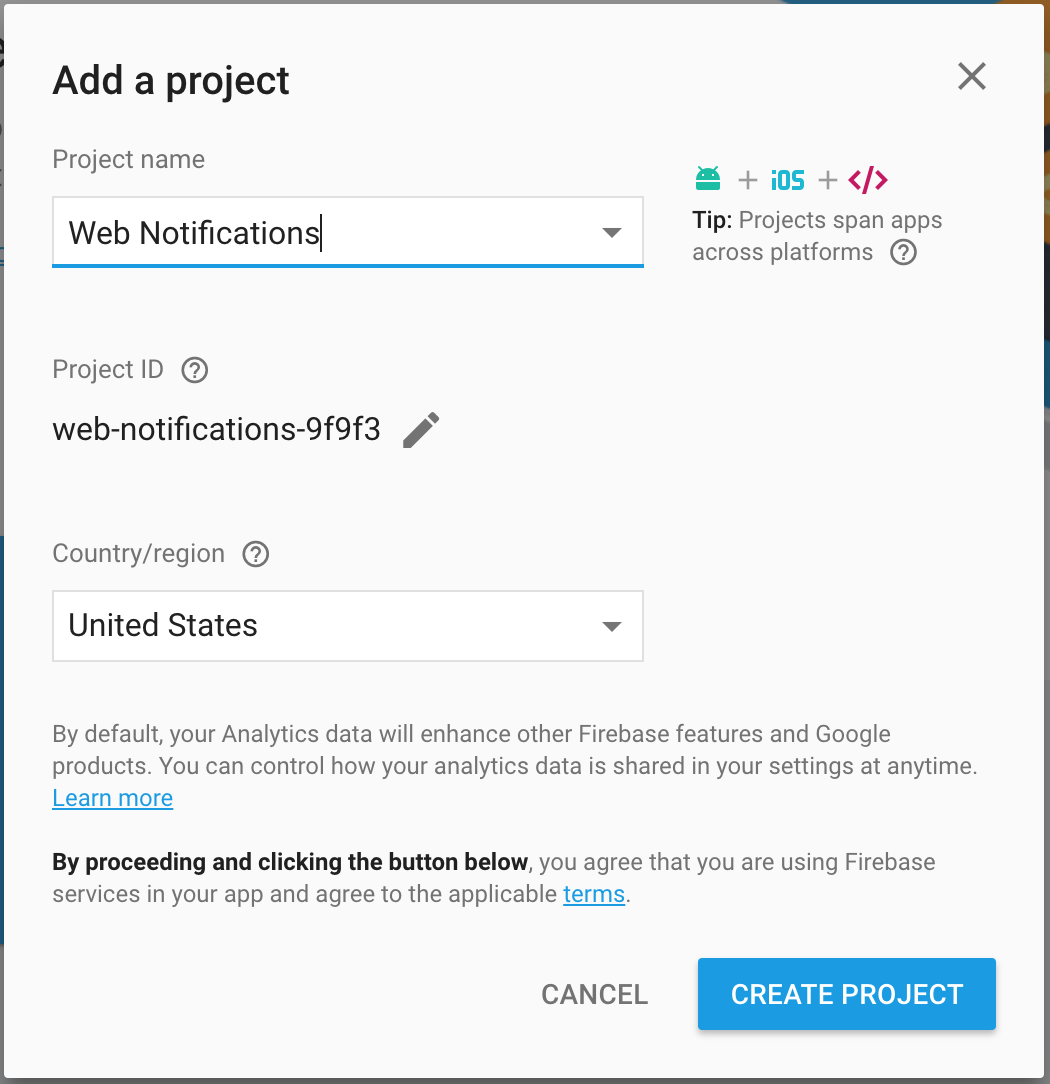
第1步
为Google Cloud Messing
创建
Firebase项目
。
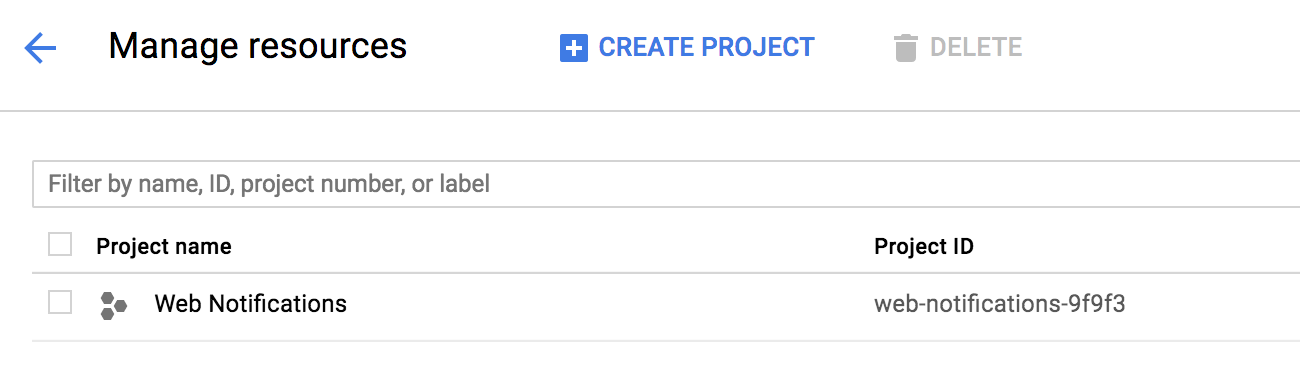
步骤2
登录
Google Developer Console
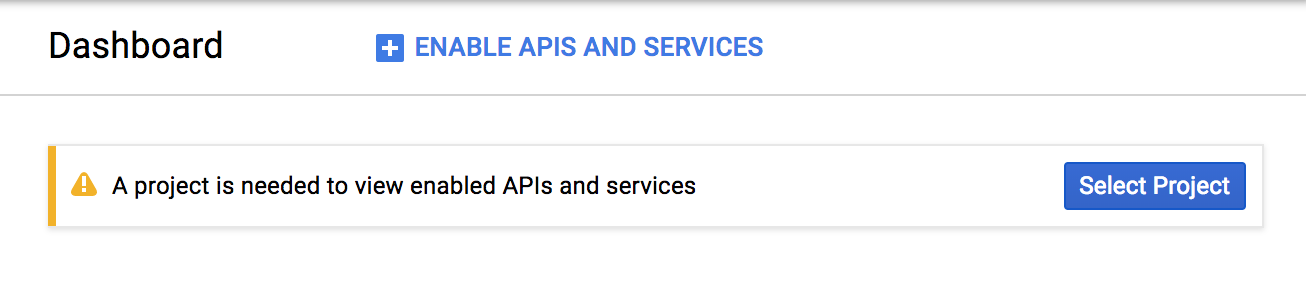
并转到您的信息中心
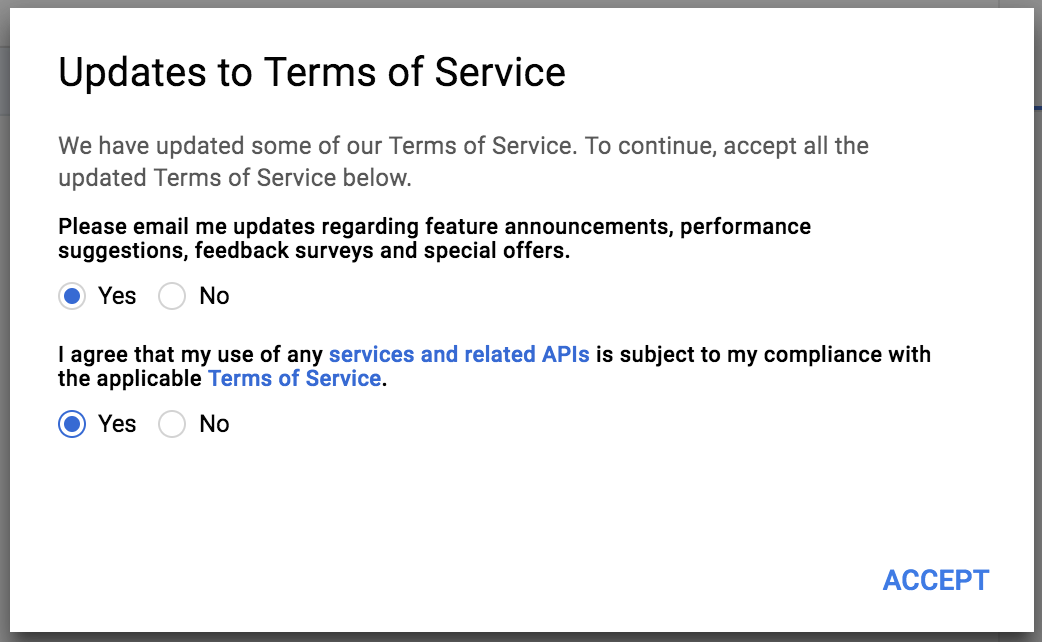
步骤3
同意firebase条款。
步骤3
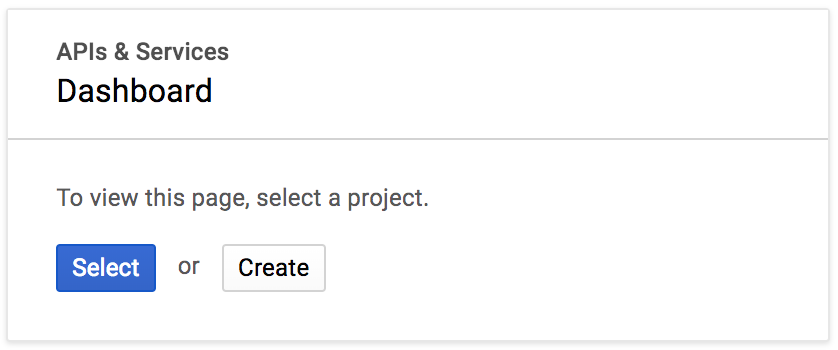
选择您的API项目。
步骤4
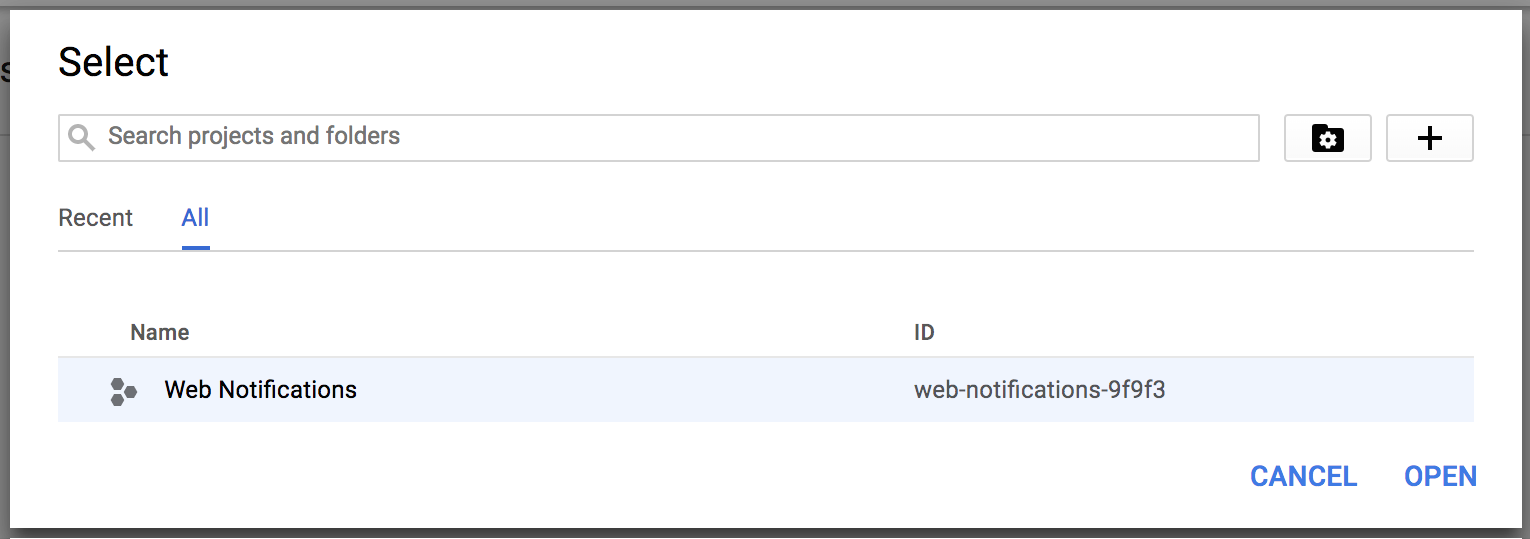
单击“选择”并选择现有的Firebase项目。
步骤5
选择现有项目
步骤6
复制项目身份验证密钥以发送Google Cloud Messaing
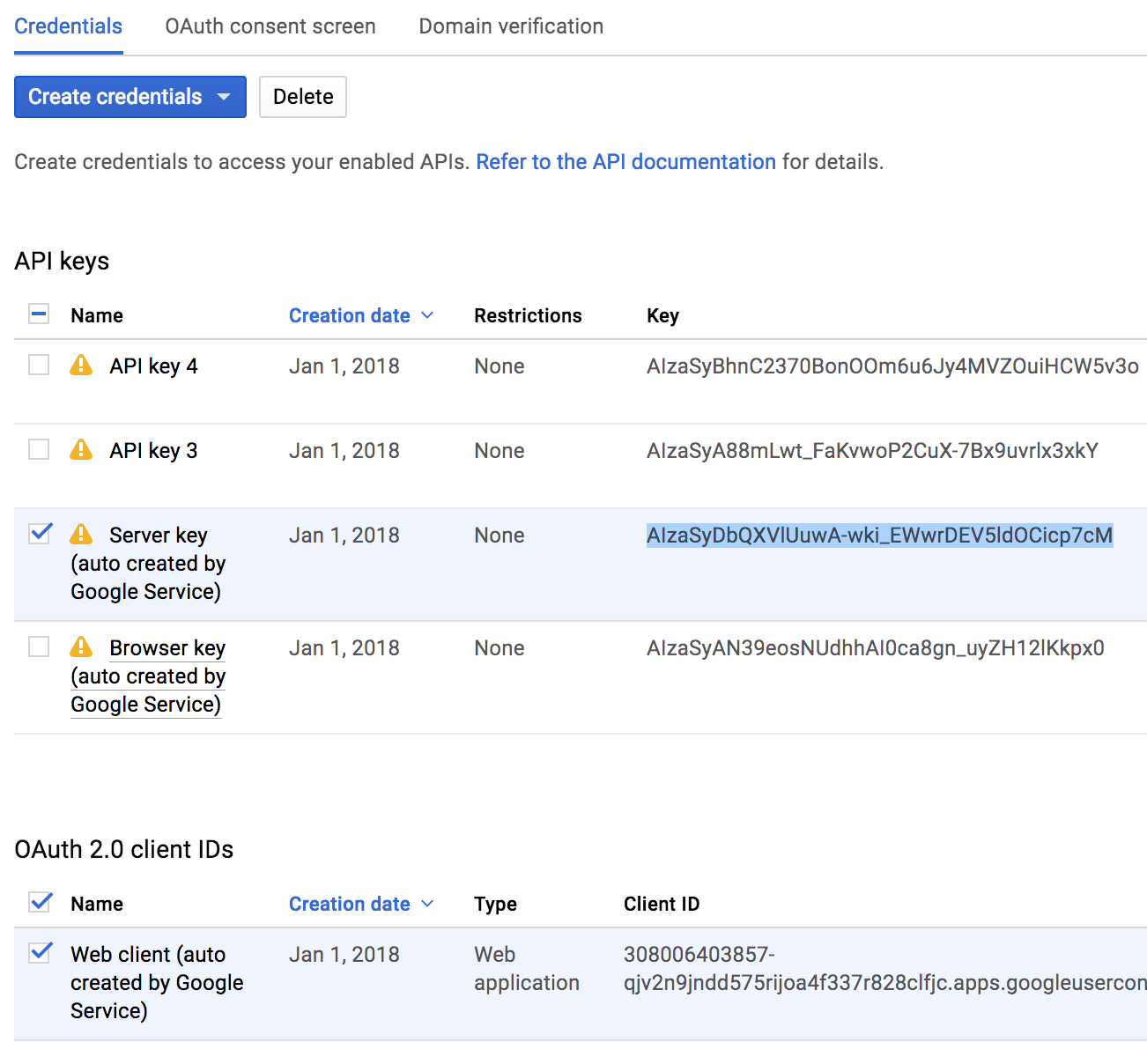
步骤7
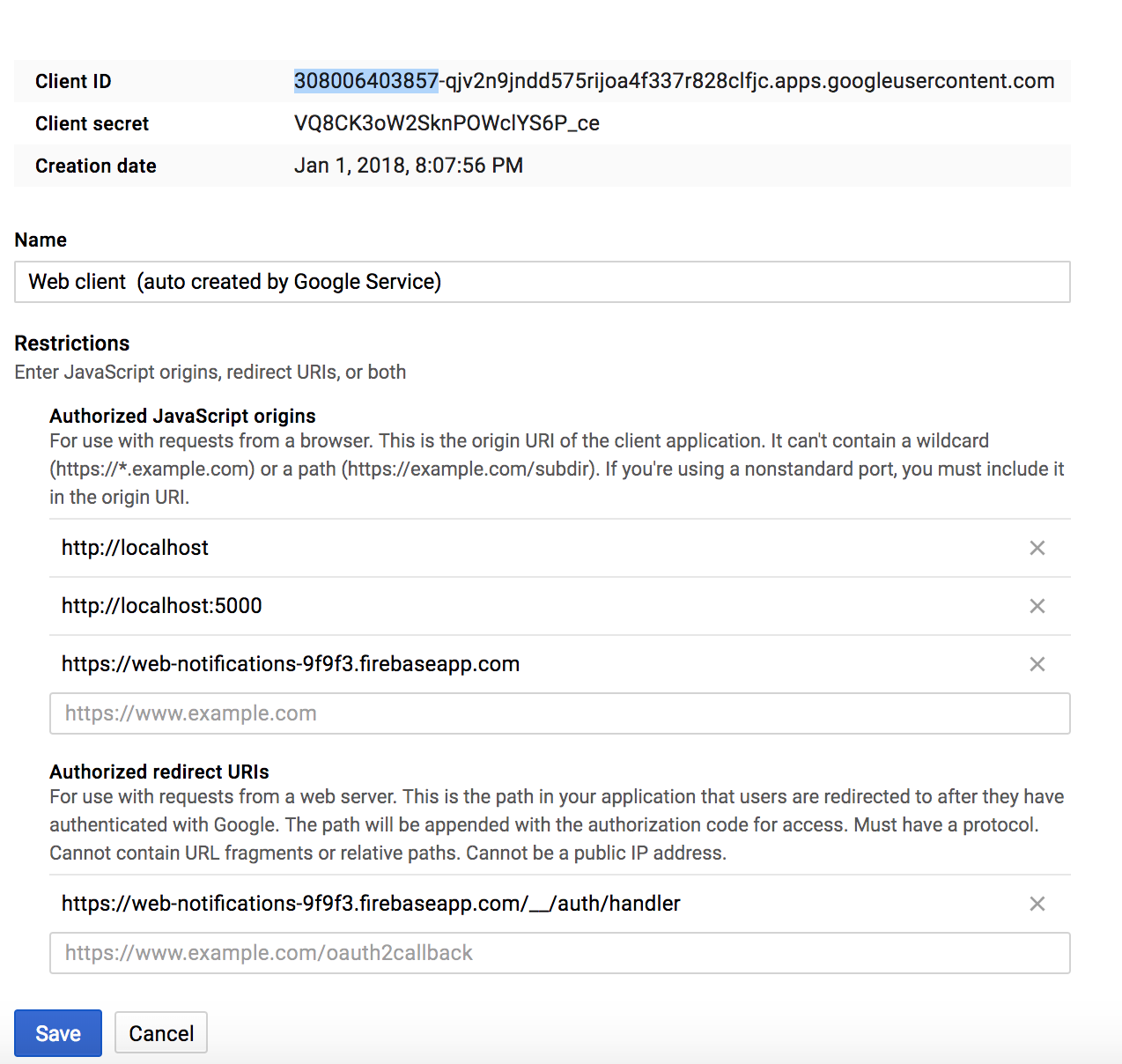
您的项目客户端ID。
manifest.json
Meta data information file to communicate with browsers. Here include your project client id, check Step 7 screenshot.
{
"name"
:
"Web Push Demo"
,
"short_name"
:
"push_demo"
,
"version"
:
"1.0.0"
,
"description"
:
"A simple site with push notification"
,
"author"
: {
"name"
:
"Srinivas Tamada"
},
"gcm_sender_id"
:
"Your_Client_ID"
,
"gcm_user_visible_only"
:
true
}
service-worker.js
JavaScript file that your browser runs at the background and perform sync operations. This will always communicate with your project api to get latest notification information. Upload this file in your project index location.
var
self
=
this
;
var
urlMain;
self
.
addEventListener
(
"push"
,
function
(event) {
event.
waitUntil
(
fetch
(
"https://yourwebiste.com/api/getNotification"
, {
method
:
"get"
})
.
then
(
function
(response) {
return
response
.
json
();
})
.
then
(
function
(result) {
urlMain
=
result
.data.
url
;
const
options
=
{
body
:
result
.data.
msg
,
icon
:
result
.data.
logo
,
image
:
result
.data.name,
action
:
result
.data.
url
};
self
.
registration
.
showNotification
(
result
.data.title, options);
})
);
});
self
.
addEventListener
(
"notificationclick"
,
function
(event) {
event.
notification
.
close
();
const
promiseChain
=
clients
.
openWindow
(urlMain);
event.
waitUntil
(promiseChain);
});
index.html
Include manifest.json and notification.js file. Here notification.js is a controller and this works with service-worker.js.
<!DOCTYPE html>
<
html
>
<
head
>
<
title
>Push Demo</
title
>
<
link
rel
=
"manifest"
href
=
"manifest.json"
>
</
head
>
<
body
>
<
div
id
=
"container"
>
<
div
class
=
"desc"
> </
div
>
<
button
class
=
"pushButton"
disabled
>
Subscribe
</
button
>
</
div
>
<
script
src
=
"notification.js"
></
script
>
</
body
>
</
html
>
notification.js
JavaScript file to control all the subscribers' information. Bit large file split into different parts.
DocumentContent Loader initilise the service worker and this will verify the user subscription. This Code will launch the Allow and Block popup.
var
isPushEnabled
=
false
;
var
pushButton
=
document.
querySelector
(
".pushButton"
);
var
desc
=
document.
querySelector
(
".desc"
);
var
disableText
=
"Unsubscribe"
;
var
enableText
=
"Subscribe"
;
var
disableDesc
=
"Thank you message"
;
var
enableDesc
=
"Click <span class='high'>Allow</span> button top left."
;
document.
addEventListener
(
"DOMContentLoaded"
,
function
() {
if
(isPushEnabled) {
unsubscribe
();
}
else
{
subscribe
();
}
serviceWorkerCall
();
});
serviceWorkerCall function will register the server-worker.js with initilise function for future actions.
function
serviceWorkerCall
() {
if
(
"serviceWorker"
in
navigator) {
navigator.
serviceWorker
.
register
(
"/service-worker.js"
)
.
then
(initialiseState);
}
else
{
console.
warn
(
"Service workers aren't supported in this browser."
);
}
}
function
initialiseState
() {
if
(
!
(
"showNotification"
in
ServiceWorkerRegistration
.prototype)) {
console.
log
(
"Notifications aren't supported."
);
return
;
}
if
(
Notification
.
permission
===
"denied"
) {
console.
log
(
"The user has blocked notifications."
);
return
;
}
if
(
!
(
"PushManager"
in
window)) {
console.
log
(
"Push messaging isn't supported."
);
return
;
}
navigator.
serviceWorker
.
ready
.
then
(
function
(serviceWorkerRegistration) {
serviceWorkerRegistration
.
pushManager
.
getSubscription
()
.
then
(
function
(subscription) {
pushButton
.disabled
=
false
;
if
(
!
subscription) {
return
;
}
if
(subscription) {
sendSubscriptionToServer
(subscription);
}
pushButton
.
textContent
=
disableText;
desc
.
textContent
=
disableDesc;
isPushEnabled
=
true
;
})
.
catch
(
function
(e) {
console.
log
(
"Error during getSubscription()"
, e);
});
});
}
subscribe and unsubscribe function to change the message and button status.
function
subscribe
() {
pushButton
.disabled
=
true
;
navigator.
serviceWorker
.
ready
.
then
(
function
(serviceWorkerRegistration) {
serviceWorkerRegistration
.
pushManager
.
subscribe
({ userVisibleOnly
:
true
})
.
then
(
function
(subscription) {
isPushEnabled
=
true
;
pushButton
.
textContent
=
disableText;
desc
.
textContent
=
disableDesc;
pushButton
.disabled
=
false
;
if
(subscription) {
sendSubscriptionToServer
(subscription);
}
})
.
catch
(
function
(e) {
if
(
Notification
.
permission
===
"denied"
) {
console.
warn
(
"Permission for Notification is denied"
);
pushButton
.disabled
=
true
;
}
else
{
console.
error
(
"Unable to subscribe to push"
, e);
pushButton
.disabled
=
true
;
pushButton
.
textContent
=
"Enable Push Messages"
;
}
});
});
}
function
unsubscribe
() {
pushButton
.disabled
=
true
;
navigator.
serviceWorker
.
ready
.
then
(
function
(serviceWorkerRegistration) {
serviceWorkerRegistration
.
pushManager
.
getSubscription
()
.
then
(
function
(pushSubscription) {
if
(
!
pushSubscription) {
isPushEnabled
=
false
;
pushButton
.disabled
=
false
;
pushButton
.
textContent
=
enableText;
desc
.
textContent
=
enableDesc;
return
;
}
var
temp
=
pushSubscription
.
endpoint
.
split
(
"/"
);
var
registration_id
=
temp[
temp
.length
-
1
];
deleteSubscriptionToServer
(registration_id);
pushSubscription.
unsubscribe
().
then
(
function
(successful) {
pushButton
.disabled
=
false
;
pushButton
.
textContent
=
enableText;
desc
.
textContent
=
enableDesc;
isPushEnabled
=
false
;
})
.
catch
(
function
(e) {
console.
error
(
"Error thrown while unsbscribing from push messaging."
);
});
});
});
}
About functions are calling these following functions. Ajax calls to store and delete the user's registation ids.
// send subscription id to server
function
sendSubscriptionToServer
(subscription) {
var
temp
=
subscription
.
endpoint
.
split
(
"/"
);
var
registration_id
=
temp[
temp
.length
-
1
];
fetch
(
"http://yourwebsite.com/api/insertGCM/"
+
registration_id,
{
method
:
"get"
}
).
then
(
function
(response) {
return
response
.
json
();
});
}
function
deleteSubscriptionToServer
(rid) {
fetch
(
"https://yourwebsite.com/api/deleteGCM/"
+
rid, {
method
:
"get"
}).
then
(
function
(response) {
return
response
.
json
();
});
}
InsertGCM
PHP code to insert registartion id in GCM table. Alwasy check HTTP_ORIGIN to avoid wrong inputs.
function
insertGCM
(
$rid
) {
$check
=
false
;
if
(
$_SERVER
[
'HTTP_ORIGIN'
]
&&
$_SERVER
[
'HTTP_ORIGIN'
]
==
"http://yourwesbite.com"
){
$check
=
true
;
}
if
(
$check
){
$db
=
getDB
();
$sql1
=
"
SELECT
*
FROM
GMC
WHERE
rid
=
:rid
"
;
$stmt1
=
$db
->
prepare
(
$sql1
);
$stmt1
->
bindParam
(
"rid"
,
$rid
,
PDO
::
PARAM_STR
);
$stmt1
->
execute
();
$mainCount
=
$stmt1
->
rowCount
();
if
(
$mainCount
<
1
){
$sql
=
"
INSERT
INTO
GMC(rid)
VALUES
(:rid)
"
;
$stmt
=
$db
->
prepare
(
$sql
);
$stmt
->
bindParam
(
"rid"
,
$rid
,
PDO
::
PARAM_STR
);
$stmt
->
execute
();
echo
'{"success":{"text":"done"}}'
;
}
else
{
echo
'{"success":{"text":"already users"}}'
;
}
}
else
{
echo
'{"error":{"text":"No access"}}'
;
}
}
Delete
Delete GCM table data based on the registration id.
function
deleteGCM
(
$rid
) {
$check
=
false
;
if
(
$_SERVER
[
'HTTP_ORIGIN'
]
&&
$_SERVER
[
'HTTP_ORIGIN'
]
==
"https://push.9lessons.info"
){
$check
=
true
;
}
if
(
$check
){
$db
=
getDB
();
$sql
=
"
DELETE
FROM
GMC
WHERE
rid
=
:rid
"
;
$stmt
=
$db
->
prepare
(
$sql
);
$stmt
->
bindParam
(
"rid"
,
$rid
,
PDO
::
PARAM_STR
);
$stmt
->
execute
();
echo
'{"success":{"text":"done"}}'
;
}
else
{
echo
'{"error":{"text":"No access"}}'
;
}
}
GetNotification
Get latest notifiaction for service-worker.js
function
getNotification
(){
$db
=
getDB
();
$sql1
=
"
SELECT
title, msg, logo,
url
,
name
FROM
notifications
ORDER BY
nid
DESC
LIMIT
1
"
;
$stmt1
=
$db
->
prepare
(
$sql1
);
$stmt1
->
execute
();
$notification
=
$stmt1
->
fetch
(
PDO
::
FETCH_OBJ
);
$notification
->
action
=
$notification
->
url
;
$notification
->
click_action
=
$notification
->
url
;
if
(
$notification
){
$notification
=
json_encode
(
$notification
);
echo
'{"data": '
.
$notification
.
'}'
;
}
}
Administrator for Sending Push Notifications
SendGCM.php
PHP Curl to communcate with Google Firebase APIs. Modify Your_Authorization_API and check Step 6.
<?php
function
sendGCM
(
$fields
) {
$url
=
'https://fcm.googleapis.com/fcm/send'
;
$fields
=
json_encode
(
$fields
);
$headers
=
array
(
'Authorization: key='
.
"Your_Authorization_Key"
,
'Content-Type: application/json'
);
$ch
=
curl_init
();
curl_setopt
(
$ch
,
CURLOPT_URL
,
$url
);
curl_setopt
(
$ch
,
CURLOPT_POST
,
true
);
curl_setopt
(
$ch
,
CURLOPT_HTTPHEADER
,
$headers
);
curl_setopt
(
$ch
,
CURLOPT_RETURNTRANSFER
,
true
);
curl_setopt
(
$ch
,
CURLOPT_IPRESOLVE
,
CURL_IPRESOLVE_V4
);
curl_setopt
(
$ch
,
CURLOPT_POSTFIELDS
,
$fields
);
$result
=
curl_exec
(
$ch
);
echo
$result
;
curl_close
(
$ch
);
}
?
>
Push Notification Form
Simple HTML form with title, message, logo and url inputs. Make sure give some authentication/login to protect this page.
<
form
autocomplete
=
"off"
method
=
"post"
action
=
""
>
<
div
>
<
label
>Title</
label
>
<
input
type
=
"text"
placeholder
=
"Title"
name
=
"title"
>
</
div
>
<
div
>
<
label
>Message</
label
>
<
input
type
=
"text"
placeholder
=
"Message"
name
=
"msg"
>
</
div
>
<
div
>
<
label
>Logo</
label
>
<
input
type
=
"text"
placeholder
=
"Logo"
name
=
"logo"
value
=
""
>
</
div
>
<
div
>
<
label
>Name</
label
>
<
input
type
=
"text"
placeholder
=
"Name"
name
=
"name"
>
</
div
>
<
div
>
<
label
>URL</
label
>
<
input
type
=
"text"
placeholder
=
"URL"
name
=
"url"
>
</
div
>
<
div
>
<
input
type
=
"submit"
value
=
"Push Notification"
name
=
"notificationSubmit"
/>
</
div
>
</
form
>
home.php
This will insert form data and sending the push notications to registred users by calling $gcm->getIDs()
<?php
include
(
'config.php'
);
include
(
'sendGMC.php'
);
if
(
!
empty
(
$_POST
[
'notificationSubmit'
])){
$title
=
$_POST
[
'title'
];
$msg
=
$_POST
[
'msg'
];
$logo
=
$_POST
[
'logo'
];
$name
=
$_POST
[
'name'
];
$url
=
$_POST
[
'url'
];
if
(
strlen
(
trim
(
$title
))
>
1
&&
strlen
(
trim
(
$msg
))
>
1
&&
strlen
(
trim
(
$logo
))
>
1
&&
strlen
(
trim
(
$name
))
>
1
&&
strlen
(
trim
(
$url
))
>
1
)
{
if
(
$gcmClass
->
insertNotification
(
$title
,
$msg
,
$logo
,
$name
,
$url
)){
$registrationId
=
$gcmClass
->
getIDs
();
$total_rids
=
[];
foreach
(
$registrationId
as
$r
){
array_push
(
$total_rids
,
$r
->
rid
);
}
$fields
=
array
(
'registration_ids'
=>
$total_rids
);
sendGCM
(
$fields
);
echo
"Done"
;
}
}
}
include
(
'header.php'
);
?
>
gcmClass.php
PHP class for insert notification information and getting all the registration ids.
<?php
class
gcmClass
{
public
function
getIDs
()
{
try
{
$db
=
getDB
();
$stmt
=
$db
->
prepare
(
"
SELECT
rid
FROM
GMC
"
);
$stmt
->
execute
();
$data
=
$stmt
->
fetchALL
(
PDO
::
FETCH_OBJ
);
return
$data
;
}
catch
(
PDOException
$e
) {
echo
'{"error":{"text":'
.
$e
->
getMessage
()
.
'}}'
;
}
}
public
function
insertNotification
(
$a
,
$b
,
$c
,
$d
,
$e
)
{
try
{
$db
=
getDB
();
$stmt
=
$db
->
prepare
(
"
INSERT
INTO
notifications(title, msg, logo,
name
,
url
)
VALUES
(:title,:msg,:logo,:
name
,:
url
)
"
);
$stmt
->
bindParam
(
"title"
,
$a
,
PDO
::
PARAM_STR
) ;
$stmt
->
bindParam
(
"msg"
,
$b
,
PDO
::
PARAM_STR
) ;
$stmt
->
bindParam
(
"logo"
,
$c
,
PDO
::
PARAM_STR
) ;
$stmt
->
bindParam
(
"name"
,
$d
,
PDO
::
PARAM_STR
) ;
$stmt
->
bindParam
(
"url"
,
$e
,
PDO
::
PARAM_STR
) ;
$stmt
->
execute
();
return
true
;
}
catch
(
PDOException
$e
) {
echo
'{"error":{"text":'
.
$e
->
getMessage
()
.
'}}'
;
}
}
}
?
>
config.php
Database configuration file. You have to modify the database username and password.
<?php
/* DATABASE CONFIGURATION */
define
(
'DB_SERVER'
,
'localhost'
);
define
(
'DB_USERNAME'
,
'username'
);
define
(
'DB_PASSWORD'
,
'password'
);
define
(
'DB_DATABASE'
,
'database'
);
define
(
"BASE_URL"
,
"https://www.yourwebsite.com/"
);
define
(
"SITE_KEY"
,
'yourSecretKeyyx'
);
function
getDB
()
{
$dbhost
=
DB_SERVER
;
$dbuser
=
DB_USERNAME
;
$dbpass
=
DB_PASSWORD
;
$dbname
=
DB_DATABASE
;
$dbConnection
=
new
PDO
(
"mysql:host=
$dbhost
;dbname=
$dbname
"
,
$dbuser
,
$dbpass
);
$dbConnection
->
exec
(
"set names utf8"
);
$dbConnection
->
setAttribute
(
PDO
::
ATTR_ERRMODE
,
PDO
::
ERRMODE_EXCEPTION
);
return
$dbConnection
;
}
include
(
'class/gcmClass.php'
);
$gcmClass
=
new
gcmClass
();
?>
来自 “ ITPUB博客 ” ,链接:https://blog.itpub.net/69933200/viewspace-2648509/
,如需转载,请注明出处,否则将追究法律责任。