这篇文章,我将通过一个简单的例子来展现iPhone通过get和post方式请求asp.net webservice。
webservice
1、创建一个webservice
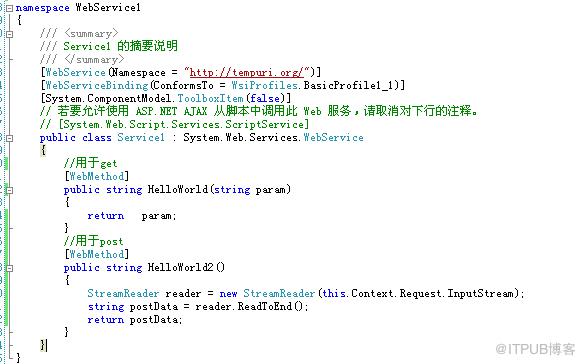
2、在webconfig中启用http get 和http post。


iphone客户端调用:
1、get的方式:
 NSString *queryString =
[NSString stringWithFormat:
@“http://10.5.23.117:5111/Service1.asmx/HelloWorld?param=123%@“,
ipAddress.text];
NSURL *url = [NSURL URLWithString:queryString];
NSMutableURLRequest *req = [NSMutableURLRequest requestWithURL:url];
[req addValue:@“text/xml; charset=utf-8” forHTTPHeaderField:@“Content-Type”];
[req addValue:0 forHTTPHeaderField:@“Content-Length”];
[req setHTTPMethod:@“GET”];
[activityIndicator startAnimating];
conn = [[NSURLConnection alloc] initWithRequest:req delegate:self];
if (conn) {
webData = [[NSMutableData data] retain];
}
2、post的方式:
?
NSString *postString =@"123"; NSURL *url = [NSURL URLWithString: @“http://10.5.23.117:5111/Service1.asmx/HelloWorld2”]; NSMutableURLRequest *req = [NSMutableURLRequest requestWithURL:url]; NSString *msgLength = [NSString stringWithFormat:@“%d”, [postString length]]; [req addValue:@“application/x-www-form-urlencoded” forHTTPHeaderField:@“Content-Type”]; [req addValue:msgLength forHTTPHeaderField:@“Content-Length”]; [req setHTTPMethod:@“POST”]; [req setHTTPBody: [postString dataUsingEncoding:NSUTF8StringEncoding]]; [activityIndicator startAnimating]; conn = [[NSURLConnection alloc] initWithRequest:req delegate:self]; if (conn) { webData = [[NSMutableData data] retain]; }
|
来自 “ ITPUB博客 ” ,链接:https://blog.itpub.net/4741/viewspace-2808922/ ,如需转载,请注明出处,否则将追究法律责任。

