完成CRUD操作
Mybatis分页
我们在上一篇中已经简单知道了Mybatis是怎么使用的以及工作流程了,这次我们使用Mybatis来完成CRUD的操作,再次巩固Mybatis的开发步骤以及一些细节
包与类之间的结构
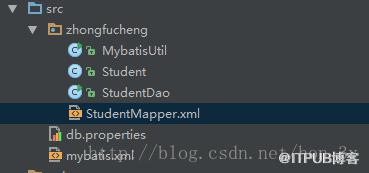
配置文件
<!-- 加载类路径下的属性文件 --><!-- 连接环境信息,取一个任意唯一的名字 --><!-- mybatis使用jdbc事务管理方式 --><!-- 配置与数据库交互的4个必要属性 --> <!-- 连接环境信息,取一个任意唯一的名字 --><!-- mybatis使用jdbc事务管理方式 --><!-- 配置与数据库交互的4个必要属性 --> 映射文件
<!-- namespace属性是名称空间,必须唯一 -->
<!-- resultMap标签:映射实体与表
         type属性:表示实体全路径名
         id属性:为实体与表的映射取一个任意的唯一的名字
    --><!-- id标签:映射主键属性
             result标签:映射非主键属性
             property属性:实体的属性名
             column属性:表的字段名
        -->
        INSERT INTO ZHONGFUCHENG.STUDENTS (ID, NAME, SAL) VALUES (#{id},#{name},#{sal});
插入数据
public class StudentDao {

    public void add(Student student) throws Exception {
        //得到连接对象
        SqlSession sqlSession = MybatisUtil.getSqlSession();
        try{
            //映射文件的命名空间.SQL片段的ID,就可以调用对应的映射文件中的SQL
            sqlSession.insert("StudentID.add", student);
            sqlSession.commit();
        }catch(Exception e){
            e.printStackTrace();
            sqlSession.rollback();
            throw e;
        }finally{
            MybatisUtil.closeSqlSession();
        }
    }
    public static void main(String[] args) throws Exception {
        StudentDao studentDao = new StudentDao();
        Student student = new Student(3, "zhong3", 10000D);
        studentDao.add(student);
    }
}
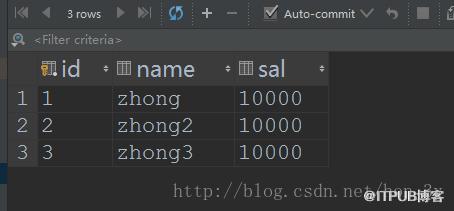
增加select标签
<!--
查询根据id
resultMap这个属性代表是返回值类型,返回值的类型是Student,就是上面实体类型
-->
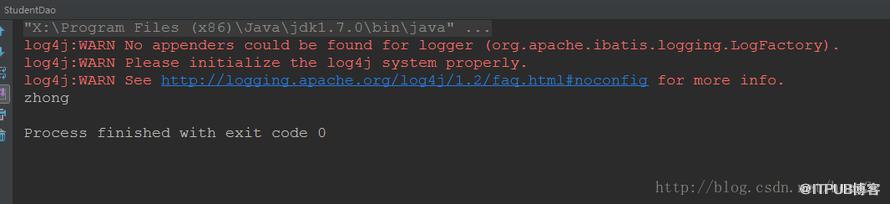
查询出来的结果是一个Student对象,我们调用SelectOne方法
    public Student findById(int id) throws Exception {
        //得到连接对象
        SqlSession sqlSession = MybatisUtil.getSqlSession();
        try{
            //映射文件的命名空间.SQL片段的ID,就可以调用对应的映射文件中的SQL
            return sqlSession.selectOne("StudentID.findById",id);
        }catch(Exception e){
            e.printStackTrace();
            sqlSession.rollback();
            throw e;
        }finally{
            MybatisUtil.closeSqlSession();
        }
    }
    public static void main(String[] args) throws Exception {
        StudentDao studentDao = new StudentDao();
        Student student = studentDao.findById(1);
        System.out.println(student.getName());

    }
<!--
查询所有数据
返回值类型讲道理是List的,但我们只要写集合中的类型就行了
-->
我们查询出来的结果不单单只有一个对象了,因此我们使用的是SelectList这个方法
  public List findAll() throws Exception {
        //得到连接对象
        SqlSession sqlSession = MybatisUtil.getSqlSession();
        try{
            //映射文件的命名空间.SQL片段的ID,就可以调用对应的映射文件中的SQL
            return sqlSession.selectList("StudentID.findAll");
        }catch(Exception e){
            e.printStackTrace();
            sqlSession.rollback();
            throw e;
        }finally{
            MybatisUtil.closeSqlSession();
        }
    }
    public static void main(String[] args) throws Exception {
        StudentDao studentDao = new StudentDao();
        List students = studentDao.findAll();
        System.out.println(students.size());

    }
    <!--根据id删除-->

        DELETE FROM STUDENTS WHERE id=#{id};
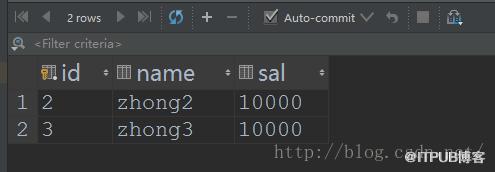
调用delete方法删除
    public void delete(int id ) throws Exception {
        //得到连接对象
        SqlSession sqlSession = MybatisUtil.getSqlSession();
        try{
            //映射文件的命名空间.SQL片段的ID,就可以调用对应的映射文件中的SQL
            sqlSession.delete("StudentID.delete", id);
            sqlSession.commit();
        }catch(Exception e){
            e.printStackTrace();
            sqlSession.rollback();
            throw e;
        }finally{
            MybatisUtil.closeSqlSession();
        }
    }
    public static void main(String[] args) throws Exception {
        StudentDao studentDao = new StudentDao();
        studentDao.delete(1);

    }
    <!--更新-->


        update students set name=#{name},sal=#{sal} where id=#{id};
查询出对应的对象,对其进行修改
    public void update(Student student ) throws Exception {
        //得到连接对象
        SqlSession sqlSession = MybatisUtil.getSqlSession();
        try{
            //映射文件的命名空间.SQL片段的ID,就可以调用对应的映射文件中的SQL
            sqlSession.update("StudentID.update", student);
            sqlSession.commit();
        }catch(Exception e){
            e.printStackTrace();
            sqlSession.rollback();
            throw e;
        }finally{
            MybatisUtil.closeSqlSession();
        }
    }
    public static void main(String[] args) throws Exception {
        StudentDao studentDao = new StudentDao();
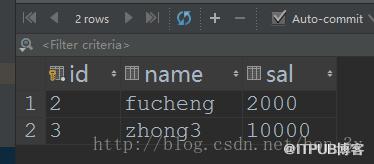
        Student student = studentDao.findById(2);
        student.setName("fucheng");
        student.setSal(2000D);
        studentDao.update(student);

    }
    <!--
        注意:这个insert/update/delete标签只是一个模板,在做操作时,其实是以SQL语句为核心的
             即在做增/删/时,insert/update/delete标签可通用,
             但做查询时只能用select标签
             我们提倡什么操作就用什么标签
    -->
Mybatis分页
分页是一个非常实用的技术点,我们也来学习一下使用Mybatis是怎么分页的...
我们的分页是需要多个参数的,并不是像我们之前的例子中只有一个参数。当需要接收多个参数的时候,我们使用Map集合来装载!
    public List  pagination(int start ,int end) throws Exception {
        //得到连接对象
        SqlSession sqlSession = MybatisUtil.getSqlSession();
        try{
            //映射文件的命名空间.SQL片段的ID,就可以调用对应的映射文件中的SQL

            /**
             * 由于我们的参数超过了两个,而方法中只有一个Object参数收集
             * 因此我们使用Map集合来装载我们的参数
             */
            Map map = new HashMap();
            map.put("start", start);
            map.put("end", end);
            return sqlSession.selectList("StudentID.pagination", map);
        }catch(Exception e){
            e.printStackTrace();
            sqlSession.rollback();
            throw e;
        }finally{
            MybatisUtil.closeSqlSession();
        }
    }
    public static void main(String[] args) throws Exception {
        StudentDao studentDao = new StudentDao();
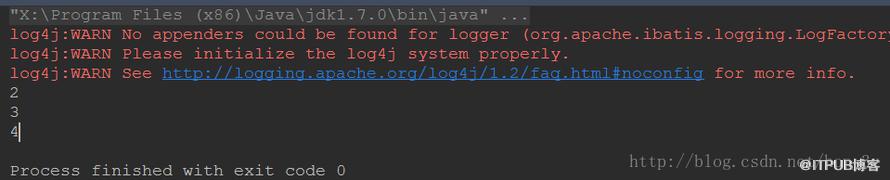
        List students = studentDao.pagination(0, 3);
        for (Student student : students) {

            System.out.println(student.getId());

        }

    }
那么在实体与表映射文件中,我们接收的参数就是map集合
<!--分页查询-->
- 在Mybatis中,增删改查都是需要我们自己写SQL语句的,然后在程序中调用即可了。SQL由于是我们自己写的,于是就相对Hibernate灵活一些。
- 如果需要传入多个参数的话,那么我们一般在映射文件中用Map来接收。
来自 “ ITPUB博客 ” ,链接:https://blog.itpub.net/4615/viewspace-2799813/ ,如需转载,请注明出处,否则将追究法律责任。
上一篇:
Mybatis入门看这一篇就够了(2)

请登录后发表评论
登录
全部评论
