我们在使用Office Excel的时候,有很多时候需要冻结行或者列。这时,Excel会在冻结的行列和非冻结的区域之间绘制上一条明显的黑线。如下图:
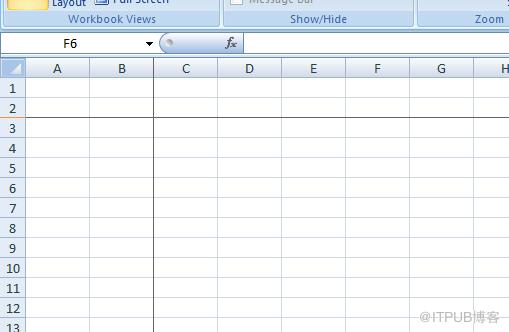
(图1)
WinForm下的DataGridView控件也能实现类似的冻结行或者列的功能(参见:http://msdn.microsoft.com/zh-cn/library/28e9w2e1(VS.85).aspx) ,但是呢,DataGridView控件默认不会在冻结列或者行的分界处绘制一个明显的分界线,这样的话,最终用户很难注意到当前有列或者行是冻结的。如下图所示:你能很快的找到那一列是Freeze的么?
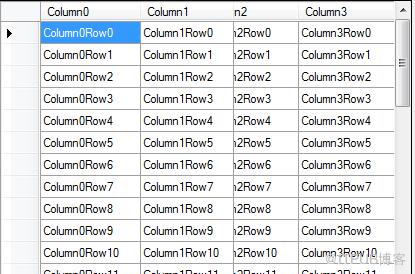
(图2)
正是因为如此,我们如果能做出类似Excel的效果,就可以大大提高数据的可读性。
通常,我们如果想在现有的控件上多画点什么,就会去Override OnPaint方法,然后加入自己的OwnerDraw逻辑,但是呢在DataGridView上有一些困难:
1.如何确定冻结分界线的位置
2.如何保证分界线不会绘制到ScrollBar上
研究了一下,我们可以借用DataGridView提供的CellPainting方法。在DataGridView绘制每一个Cell的时候判断当前Cell是否是分界线所在的位置,然后进行绘制。最终做出的效果如下图:
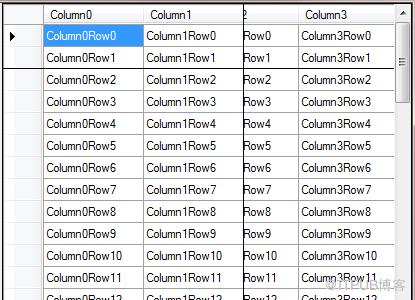
(图3)
以下是DataGridView控件扩展源代码:
?
public class DataGridViewEx : DataGridView{ protected override void OnCellPainting(DataGridViewCellPaintingEventArgs e) { base.OnCellPainting(e); // // Paints the Frozen line // int lastFreezeColumnIndex = GetDisplayColumnFrozenLineIndex(); int lastFreezeRowIndex = GetDisplayRowFrozenLineIndex(); bool drawRowLine = lastFreezeRowIndex != -1 && lastFreezeRowIndex == e.RowIndex; bool drawColumLine = lastFreezeColumnIndex != -1 && lastFreezeColumnIndex == e.ColumnIndex; if (drawRowLine || drawColumLine) { e.Paint(e.ClipBounds, e.PaintParts); if (drawColumLine) { e.Graphics.DrawLine(Pens.Black, e.CellBounds.Right - 1, e.CellBounds.Top, e.CellBounds.Right - 1, this.ClientRectangle.Bottom); } if (drawRowLine) { e.Graphics.DrawLine(Pens.Black, e.CellBounds.Left, e.CellBounds.Bottom - 1, e.CellBounds.Right, e.CellBounds.Bottom - 1); } e.Handled = true; } } private int GetDisplayColumnFrozenLineIndex() { int lastFreezeColumnIndex = -1; for (int i = 0; i
|
来自 “ ITPUB博客 ” ,链接:https://blog.itpub.net/4022/viewspace-2806263/ ,如需转载,请注明出处,否则将追究法律责任。

