
本文以python 2.7.8(64位)为例说明,具体安装步骤如下:
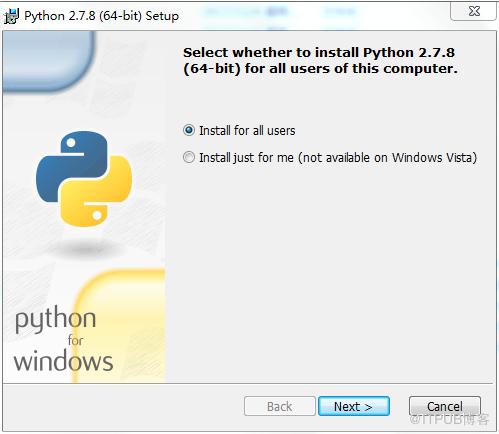
1.双击下载包,进入Python安装向导。
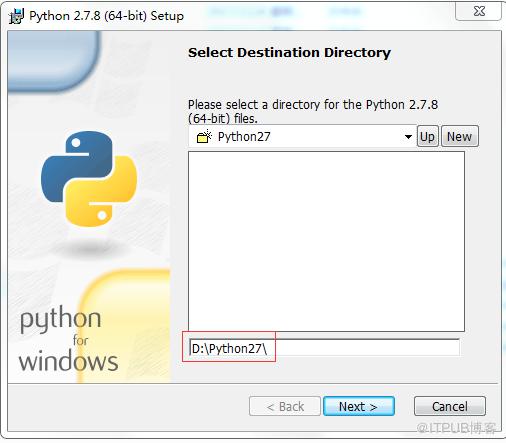
2.选择安装目录。如:D:Python27
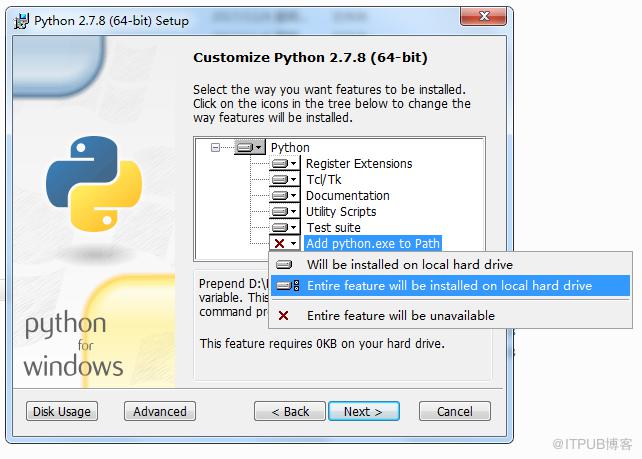
3.选择 Add python.exe to Path>>Entire feature will be installed on local hard drive
环境变量配置:
使用cmd命令添加path环境变量
在cmd下输入: path=%path%;D:Python27  接着按"Enter"回车键。
其中: D:Python27  是Python的安装目录。
python学习网,每天更新大量免费的学习资源,欢迎学习!
来自 “ ITPUB博客 ” ,链接:https://blog.itpub.net/4022/viewspace-2834781/ ,如需转载,请注明出处,否则将追究法律责任。
上一篇:
pycharm用着卡为什么
下一篇:
python theano是什么

请登录后发表评论
登录
全部评论
