-Intellij Idea 2017创建web项目及tomcat部署实战
https://www.cnblogs.com/shindo/p/7272646.html
-
代码实例
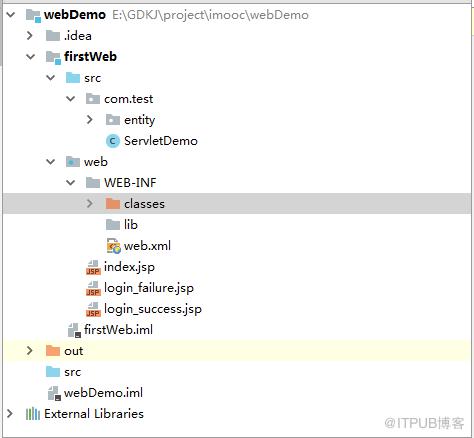
- 实体类层
package com.test.entity;

public class Employee {
    private int userid;
    private String username;
    private String password;

    public Employee() {
    }

    public Employee(int userid,String username, String password) {
        this.userid = userid;
        this.username = username;
        this.password = password;
    }

    public int getUserid() {
        return userid;
    }

    public void setUserid(int userid) {
        this.userid = userid;
    }

    public String getUsername() {
        return username;
    }

    public void setUsername(String username) {
        this.username = username;
    }

    public String getPassword() {
        return password;
    }

    public void setPassword(String password) {
        this.password = password;
    }

}
- 数据持久层
package com.test.dao;

import com.test.entity.Employee;
import com.test.util.ConnectionFactory;

public class EmployeeDao {
    public int insert(Employee employee){
        int flag = 3;
        int userid = employee.getUserid();
        String username = employee.getUsername();
        String password = employee.getPassword();
        try {
            String sql_exist = String.format(
                    "select 1 from kj_user where userid = %s and username='%s' and password='%s'",
                    userid,username,password
            );
            String sql_regist = String.format(
                    "select 1 from kj_user where userid = %s",
                    userid
            );
            String res = ConnectionFactory.queryNoPage(sql_exist);
            String regist = ConnectionFactory.queryNoPage(sql_regist);
            if(res.indexOf("1") == -1){
                System.out.println("登录失败");
                if (regist.indexOf("1") == -1){
                    System.out.println("用户未注册,请注册!");
                    String sql = String.format(
                            "insert into kj_user(userid,username,password) select %s,'%s','%s' from dual",
                            userid,username,password
                    );
                    ConnectionFactory.executeSQL(sql);
                    flag = 1;
                }else{
                    System.out.println("请换不同ID注册!");
                    flag = 2;
                }
            }else {
                System.out.println("登录成功");
                flag = 0;
            }
        } catch (Exception e){
            e.printStackTrace();
        }
        return flag;
    }
}
- 连接数据库
package com.test.util;

import java.sql.*;

public class ConnectionFactory {
    private static ConnectionFactory instance = null;
    public static ConnectionFactory getInstance() {
        if (instance == null) instance = new ConnectionFactory();
        return instance;
    }

    private static String USERNAMR = "mine";
    private static String PASSWORD = "mine";
    private static String DRVIER = "oracle.jdbc.OracleDriver";
    private static String URL = "jdbc:oracle:thin:@192.168.100.103:1521:orcl";

    private static Connection conn = null;
    public static Connection getConnection(){
        try {
            Class.forName(DRVIER);
            conn = DriverManager.getConnection(URL, USERNAMR, PASSWORD);
            System.out.println("成功连接数据库");
        } catch (ClassNotFoundException e) {
            throw new RuntimeException("class not find !", e);
        } catch (SQLException e) {
            throw new RuntimeException("get connection error!", e);
        }
        return conn;
    }

    public static void executeSQL(String sql) {
        Statement stat = null;
        try {
            conn = getConnection();
            stat = conn.createStatement();
        } catch (Exception e) {
            e.printStackTrace();
            return;
        }
        try {
            stat.execute(sql);
        } catch (Exception e) {
            e.printStackTrace();
            return;
        }
        try {
            if (stat != null) stat.close();
            if (conn != null) conn.close();
        } catch (Exception e) {
            e.printStackTrace();
        }
    }

    public static String queryNoPage(String sql) {
        Connection conn      = null;
        Statement  stat      = null;
        StringBuffer   buff = new StringBuffer();
        try {
            conn   =  getConnection();
            stat   =  conn.createStatement();
        }
        catch (Exception e) {
            e.printStackTrace();
            return "[]";
        }
        try {
            ResultSet rows    = stat.executeQuery(sql);
            //得到数据集的列数
            ResultSetMetaData rsmd = rows.getMetaData();
            int    colCount      = rsmd.getColumnCount();
            boolean first = true;
            buff.append("[");
            while (rows.next()) {
                String rowStr  = "";
                for (int i = 1; i 1) rowStr += ",";
                    String tempValue   =  rows.getString(i);
                    if (tempValue!=null){
                        tempValue        =  tempValue.replace("'","\'");
                        tempValue        =  tempValue.replace("n","\n");
                        tempValue        =  tempValue.replace("t","\t");
                    }
                    rowStr          += String.format("%s", tempValue);
                }
                rowStr = String.format(""%s"", rowStr);
                if (first) first = false;
                else buff.append(",");
                buff.append(rowStr);
            }
            buff.append("]");
            rows.close();
        }
        catch (Exception e) {
            e.printStackTrace();
            return "[]";
        }
        try {
            if (stat != null) stat.close();
            if (conn != null) conn.close();
        }
        catch (Exception e) {
            e.printStackTrace();
            return "[]";
        }
        return buff.toString();
    }
}
- 业务逻辑层
package com.test.service;

import com.test.dao.EmployeeDao;
import com.test.entity.Employee;

public class EmployeeService {
    public int regist(Employee employee){
        EmployeeDao dao= new EmployeeDao();
        int result = dao.insert(employee);
        return result;
    }
}
- 控制层
package com.test.servlet;

import com.test.entity.Employee;
import com.test.service.EmployeeService;
import javax.servlet.http.HttpServletRequest;
import javax.servlet.http.HttpServletResponse;
import java.io.IOException;
public class EmployeeServlet extends javax.servlet.http.HttpServlet{
    protected void doPost(HttpServletRequest request, HttpServletResponse response) throws javax.servlet.ServletException, IOException {
        response.setContentType("text/html");
        request.setCharacterEncoding("utf-8");
        Employee u = new Employee();
        int userid = Integer.parseInt(request.getParameter("userid"));
        String username = request.getParameter("username");
        String password = request.getParameter("password");
        u.setUsername(username);
        u.setPassword(password);
        System.out.println(username);
        Employee employee=new Employee(userid,username,password);
        EmployeeService service=new EmployeeService();
        int result = service.regist(employee);
        if (result==0){
            response.sendRedirect(request.getContextPath()+"/login_success.jsp");
        }else if (result==1){
            response.sendRedirect(request.getContextPath()+"/regist_success.jsp");
        }else {
            response.sendRedirect(request.getContextPath()+"/login_failure.jsp");
        }
    }
    protected void doGet(HttpServletRequest request, HttpServletResponse response) throws javax.servlet.ServletException, IOException {
        doPost(request,response);
    }
}
- 用户界面层
用户登录
- web.xml
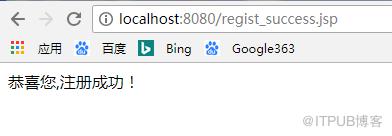
This is the description of my J2EE component This is the display name of my J2EE component EmployeeServlet com.test.servlet.EmployeeServlet EmployeeServlet /EmployeeServlet login.jsp 效果图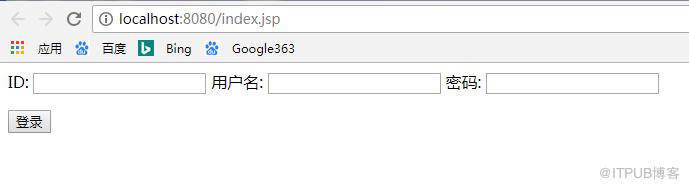
来自 “ ITPUB博客 ” ,链接:https://blog.itpub.net/4022/viewspace-2800082/ ,如需转载,请注明出处,否则将追究法律责任。

请登录后发表评论
登录
全部评论
