用vue写一个仿简书的轮播图
原文地址:Bougie的博客
先展示最终效果:
Vue的理念是以数据驱动视图,所以拒绝通过改变元素的margin-top来实现滚动效果。写好css样式,只需改变每张图片的class即可实现轮播效果。可以将轮播图看成两个,如图所示: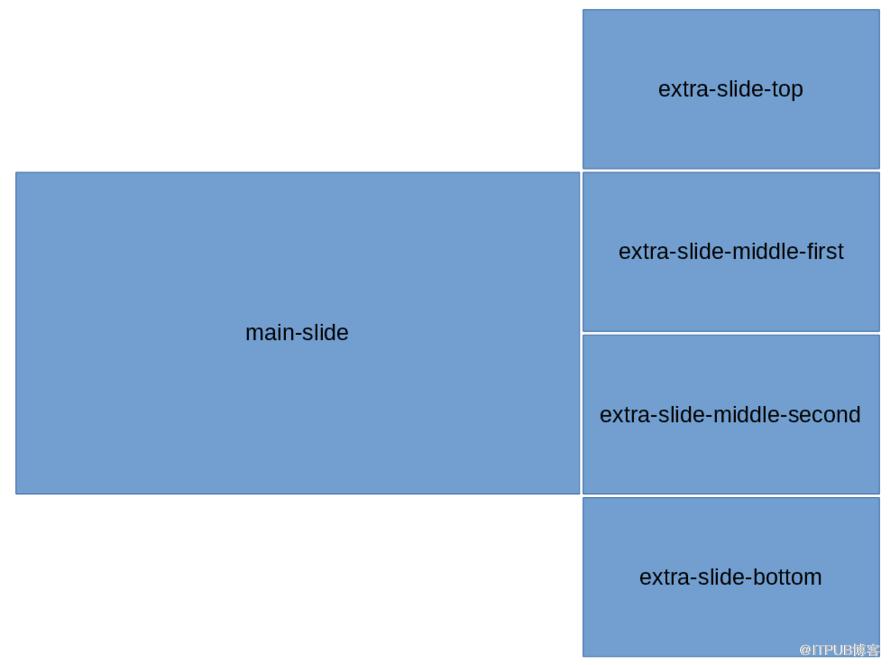
写好每个class的样式:
$width: 800px;      // 容器宽度
$height: 300px;     // 容器高度
$bWidth: 500px;     // 大图片宽度
$sWidth: $width - $bWidth;  // 小图片宽度
$sHeight: $height / 2;  // 小图片高度
#slider-wrapper{
    width: $width;
    height: $height;
    margin: 0 auto;
    cursor: pointer;
    background: #ddd;
    border-radius: 5px;
    box-shadow: 0 1px 6px rgba(0,0,0,0.117647), 0 1px 4px rgba(0,0,0,0.117647);
    display: flex;
    overflow: hidden;
    div{
        display: inline-block;
    }
}
.main-slide{
    width: $bWidth;
    height: $height;
    float: left;
    transition: all .4s ease;
}
.extra-slide{
    width: $sWidth;
    position: relative;
    .extra-slide-item{
        position: absolute;
        width: $sWidth;
        height: $sHeight;
        left: 0;
        transition: .4s ease-out;
    }
    .extra-slide-top{
        top: -$sHeight;
    }
    .extra-slide-middle-first{
        top: 0;
        z-index: 2
    }
    .extra-slide-middle-second{
        top: $sHeight;
        z-index: 2
    }
    .extra-slide-bottom{
        top: $height
    }
    .extra-slide-hide{
        display: none!important;
    }
}
模板包含两个轮播图:
scripts部分,设置一个nowIndex,定时改变nowIndex。所有图片的class根据这个nowIndex来变化:
import slideConfig from './slideConfig'
const slideLength = slideConfig.length
export default {
    name: 'slider',
    data: function() {
        return {
            slideConfig: slideConfig,
            slideInterval: null,
            nowIndex: 0
        }
    },
    methods: {
        resetIndex(i) {
            return i > slideLength - 1 ? i - slideLength : i
        },
        slideClass(i) {
            let nowIndex = this.nowIndex
            let map = new Map([
                [this.resetIndex(nowIndex), 'extra-slide-top'],
                [this.resetIndex(nowIndex + 1), 'extra-slide-middle-first'],
                [this.resetIndex(nowIndex + 2), 'extra-slide-middle-second'],
                [this.resetIndex(nowIndex + 3), 'extra-slide-bottom']
            ])
            return map.get(i) ? map.get(i) : 'extra-slide-hide'
        },
        start() {
            this.slideInterval = setInterval(() => {
                this.nowIndex = this.nowIndex > slideLength - 2 ? 0 : this.nowIndex + 1
                console.log(this.nowIndex)
            }, 2000)
        },
        stop() {
            clearInterval(this.slideInterval)
            this.slideInterval = null
        }
    },
    mounted() {
        this.start()
    },
    destroyed() {
        this.stop()
    }
}
slideConfig,这里可以写成组件的props:
const prefix = '/src/assets/'
const slideConfig = [{
  src: prefix + 's1.jpg',
  title: '图1',
  desc: '说明1'
}, {
  src: prefix + 's2.jpg',
  title: '图2',
  desc: '说明2'
}, {
  src: prefix + 's3.jpg',
  title: '图3',
  desc: '说明3'
}, {
  src: prefix + 's4.jpg',
  title: '图4',
  desc: '说明4'
}, {
  src: prefix + 's5.jpg',
  title: '图5',
  desc: '说明5'
}, {
  src: prefix + 's6.jpg',
  title: '图6',
  desc: '说明6'
}]
export default slideConfiggitHub传送门:https://github.com/bougieL/jianshuslider
来自 “ ITPUB博客 ” ,链接:https://blog.itpub.net/3996/viewspace-2810101/ ,如需转载,请注明出处,否则将追究法律责任。

请登录后发表评论
登录
全部评论
