GoldenDB 启停命令
前面提到过,
GoldenDB 在部署时会为每个组件创建一个
操作系统用户,组件的相关操作,需要切换到相应的用户下执行。
| 组件 | 用户名规则 |
|---|---|
| Manager |
zxmanager |
| GTM |
zxgtm1、
zxgtm2 ... |
| CN |
zxdbproxy1、
zxdbproxy2 ... |
| DN |
zxdb1、
zxdb2 ... |
| LoadServer |
zxload1、
zxload2 ... |
| InsightServer/Agent |
insight |
| 安装检查和巡检 |
zxgdbcheck |
因此,
GoldenDB 提供了一套
通用的组件管理命令:
dbmoni -start 、
dbmoni -stop 以及
dbstate ,实现组件的启动、关闭和状态查看。
1. 命令操作
1.1 Manager 组件
切换到 zxmanager 用户,一条命令同时管理 4 个主要进程:
MetadataServer 、
ProxyManager 、
ClusterManager 以及
ommagent 代理。
[root@golden1 goldendb]# su - zxmanager
[zxmanager@golden1 ~]$ dbstate
[metadataserver]The metadataserver process is running, PID:5216
[proxymanager]The proxymanager process is running, PID:5483
[clustermanager]The clustermanager process is running, PID:5710
[ommagent]The ommagent process is running, PID:5795
[zxmanager@golden1 ~]$ dbmoni -stop
[dbmoni -stop]The script dbmoni metadataserver process is stopped
[metadataserver]The metadataserver process is stopped
[dbmoni -stop]The script dbmoni proxymanager process is stopped
[proxymanager]The proxymanager process is stopped
[dbmoni -stop]The script dbmoni clustermanager process is stopped
[clustermanager]The clustermanager process is stopped
[dbmoni -stop]The script dbmoni ommagent process is stopped
[ommagent]The ommagent process is stopped
[zxmanager@golden1 ~]$  dbmoni -start
[dbmoni -start]dbmoni metadataserver ......starting......
[dbmoni -start]dbmoni proxymanager ......starting......
[dbmoni -start]dbmoni clustermanager ......starting......
[dbmoni -start]dbmoni ommagent ......starting......
[zxmanager@golden1 ~]$ dbstate
[metadataserver]The metadataserver process is running, PID:92029
[proxymanager]The proxymanager process is running, PID:92106
[clustermanager]The clustermanager process is running, PID:92176
[ommagent]The ommagent process is running, PID:92251
1.2 GTM 组件
切换到 zxgtm1 用户,一条命令同时操作 3 个主要进程:
gtm、
gtm_aide 和
ommagent 。
[root@golden3 DB]# su - zxgtm1
[zxgtm1@golden3 ~]$ dbmoni -stop
[dbmoni -stop]The script dbmoni gtm process is stopped
[gtm]The gtm_aide process is stopped
[gtm]The gtm process is stopped
[dbmoni -stop]The script dbmoni ommagent process is stopped
[ommagent]The ommagent process is stopped
[zxgtm1@golden3 ~]$ dbmoni -start
[dbmoni -start]dbmoni gtm ......starting......
[dbmoni -start]dbmoni ommagent ......starting......
gtm_aide 是
gtm 的守护进程,它监控本地
GTM 进程的健康状况,并与管理节点保持实时的心跳通信。如果 GTM 自身因为内存溢出或高并发压力导致进程 Hang 住,它自己无法发出告警或主备切换请求。这时候
gtm_aide 作为一个轻量级的辅助进程,可以迅速发起高可用仲裁流程,通知 CN 切换路由(跨多个分片的写操作时,CN 要从 GTM 获取 GTID)。
1.3 Proxy 组件
切换到 zxdbproxy1 用户,一条命令同时操作
dbproxy 和
ommagent 两个主进程。
[root@golden2 goldendb]# su - zxdbproxy1
[zxdbproxy1@golden2 ~]$ dbstate
[dbproxy]The dbproxy process is running, PID:23573
[ommagent]The ommagent process is running, PID:23519
[zxdbproxy1@golden2 ~]$ dbmoni -stop
[dbmoni -stop]The script dbmoni dbproxy process is stopped
[dbproxy]The dbproxy process is stopped
[dbmoni -stop]The script dbmoni ommagent process is stopped
[ommagent]The ommagent process is stopped
[zxdbproxy1@golden2 ~]$ dbmoni -start
[dbmoni -start]dbmoni dbproxy ......starting......
[dbmoni -start]dbmoni ommagent ......starting......
1.4 mysqld 数据库
切换到 zxdbN 用户,一条命令同时操作
dbproxy 、
loadserver 和
ommagent 3 个主进程。
[root@golden1 ~]# su - zxdb2
[zxdb2@golden1 ~]$ dbstate
[dbagent]The dbagent process is running, PID:119185
[loadserver]The loadserver process is running, PID:119241
[ommagent]The ommagent process is running, PID:119580
--insight 用户下的mysqld 是 RDB,zxdb1 用户下的 mysqld 是系统租户,zxdb2 下面的是业务租户
[zxdb2@golden1 ~]$ ps -ef |grep mysqld
insight    1956      1 99 00:37 ?        14:47:49 /home/goldendb/insight/bin/mysqld --defaults-file=/home/goldendb/insight/etc/my.cnf --datadir=/home/goldendb/insight/data/data --pid-file=/home/goldendb/insight/bin/mysqld1.pid
zxdb1      6338      1 99 00:38 ?        15:46:04 /home/goldendb/zxdb1/bin/mysqld --defaults-file=/home/goldendb/zxdb1/etc/my.cnf --datadir=/home/goldendb/zxdb1/data/data --pid-file=/home/goldendb/zxdb1/bin/mysqld1.pid
zxdb2     29985  26712  0 15:26 pts/1    00:00:00 grep --color=auto mysqld
zxdb2    117979      1 99 02:10 ?        13:46:21 /zxdb2/bin/mysqld --defaults-file=/zxdb2/etc/my.cnf --datadir=/zxdb2/data/data --pid-file=/zxdb2/bin/mysqld1.pid
zxdbN 用户下,
dbstate 只检查
GoldenDB 的
dbagent 、
loadserver 和
ommagent 组件的状态,不直接显示 mysqld 的进程,mysqld 由 dbagent 托管,只要
dbagent 状态正常,且 mysqld 进程存在,就说明 DB 实例正常。
我们先看一下业务租户的一主两从同步状态:
dbtool -cm -query-latest-slave -clusterID=2 -groupID=1
[zxmanager@golden1 ~]$  dbtool -cm -query-latest-slave -clusterID=2 -groupID=1
Send message to module[ClusterManager,127.0.0.1:6016] localport[5600] pid[115994] successfully!
The response message: RSP Code[0].{0:success; other: fail.}
[09-18 15:19:43:820]Successful response:
ClusterID: 2, GroupID: 1
MasterDB[6]: [192.168.182.41:5502] cityID:1 roomID:1 mysql-bin.000001:564550
sync binlog DBs:
   *DB[4]: [192.168.182.43:5501] cityID:1 roomID:1 mysql-bin.000001:564550
    DB[5]: [192.168.182.42:5501] cityID:1 roomID:1 mysql-bin.000001:564550
relay binlog DBs:
   *DB[4]: [192.168.182.43:5501] cityID:1 roomID:1 mysql-bin.000001:564550
    DB[5]: [192.168.182.42:5501] cityID:1 roomID:1 mysql-bin.000001:564550

~success~
由于业务租户的 ClusterID 为 2,集中式集群,只有一个分片组,因此:
-clusterID=2 -groupID=1 。
- MasterDB 的信息: [192.168.182.41:5502] ;
- 同步备库:
- standby: [192.168.182.43:5501]
- standby: [192.168.182.42:5501]
我们停掉 MasterDB 验证一下:
[zxdb2@golden1 ~]$ dbmoni -stop
[dbmoni -stop]The script dbmoni dbagent process is stopped
Shutting down MySQL ....... SUCCESS!
[dbagent]The dbagent process is stopped
[dbmoni -stop]The script dbmoni loadserver process is stopped
[loadserver]The loadserver process is stopped
[dbmoni -stop]The script dbmoni ommagent process is stopped
[ommagent]The ommagent process is stopped
[zxdb2@golden1 ~]$ ps -ef |grep zxdb2 |grep mysqld
zxdb2     45346  26712  0 15:28 pts/1    00:00:00 grep --color=auto mysqld
[zxdb2@golden1 ~]$ dbstate
[dbagent]The dbagent process is not running
[loadserver]The loadserver process is not running
[ommagent]The ommagent process is not running
可以看到,最先停掉该用户下的
mysqld 进程,随后停掉了
dbagent 、
loadserver 和
ommagent 3 个主进程。再次查看业务租户的同步状态:
[zxmanager@golden1 ~]$  dbtool -cm -query-latest-slave -clusterID=2 -groupID=1
Send message to module[ClusterManager,127.0.0.1:6016] localport[5600] pid[61989] successfully!
The response message: RSP Code[0].{0:success; other: fail.}
[09-18 15:30:34:210]Successful response:
ClusterID: 2, GroupID: 1
MasterDB[5]: [192.168.182.42:5501] cityID:1 roomID:1 mysql-bin.000002:867
sync binlog DBs:
   *DB[4]: [192.168.182.43:5501] cityID:1 roomID:1 mysql-bin.000002:867
relay binlog DBs:
   *DB[4]: [192.168.182.43:5501] cityID:1 roomID:1 mysql-bin.000002:867

~success~
- MasterDB : [192.168.182.42:5501]
- 备库是 [192.168.182.43:5501]
- 原先的主库 [192.168.182.41:5502] 则不在列表中了。
现在我们启动一下:
[zxdb2@golden1 ~]$ dbmoni -start
[dbmoni -start]dbmoni dbagent ......starting......
[dbmoni -start]dbmoni loadserver ......starting......
[dbmoni -start]dbmoni ommagent ......starting......
-- 数据库进程启动了
[zxdb2@golden1 ~]$ ps -ef |grep zxdb2 |grep mysqld
zxdb2     87011      1 97 15:50 ?        00:00:03 /zxdb2/bin/mysqld --defaults-file=/zxdb2/etc/my.cnf --datadir=/zxdb2/data/data --pid-file=/zxdb2/bin/mysqld1.pid
zxdb2     87567  26712  0 15:50 pts/1    00:00:00 grep --color=auto mysqld
[zxdb2@golden1 ~]$ dbstate
[dbagent]The dbagent process is running, PID:86234
[loadserver]The loadserver process is running, PID:86216
[ommagent]The ommagent process is running, PID:86275
再次查看主备关系:
[zxmanager@golden1 ~]$  dbtool -cm -query-latest-slave -clusterID=2 -groupID=1
Send message to module[ClusterManager,127.0.0.1:6016] localport[5600] pid[93443] successfully!
The response message: RSP Code[0].{0:success; other: fail.}
[09-18 15:51:38:320]Successful response:
ClusterID: 2, GroupID: 1
MasterDB[5]: [192.168.182.42:5501] cityID:1 roomID:1 mysql-bin.000002:867
sync binlog DBs:
   *DB[4]: [192.168.182.43:5501] cityID:1 roomID:1 mysql-bin.000002:867
    DB[6]: [192.168.182.41:5502] cityID:1 roomID:1 mysql-bin.000002:867
relay binlog DBs:
   *DB[4]: [192.168.182.43:5501] cityID:1 roomID:1 mysql-bin.000002:867
    DB[6]: [192.168.182.41:5502] cityID:1 roomID:1 mysql-bin.000002:867

~success~
原先的主库 [192.168.182.41:5502] 作为备库加入到复制关系中了。
1.5 Insight 组件
Insight 的管理命令是
serverdbmoni,稍微特殊一些。
[insight@golden1 ~]$ netstat -ntlp |grep 8444
(Not all processes could be identified, non-owned process info
 will not be shown, you would have to be root to see it all.)
tcp6       0      0 :::8444                 :::*                    LISTEN      68540/java
[insight@golden1 ~]$ serverdbmoni -stop
[serverdbmoni -stop] serverdbmonidamon will stop, kill -9 68378
[serverdbmoni -stop] serverdbmonidamon is not running, stop cmd is ignored
[serverdbmoni -stop] insightserver will stop, kill -9 68540
[serverdbmoni -stop] insightserver is not running, stop cmd is ignored
[serverdbmoni -stop] /home/goldendb/insight/bin/.serverdbmonidamon_lock will stop, kill -9 128631
[serverdbmoni -stop] /home/goldendb/insight/bin/.serverdbmonidamon_lock is not running, stop cmd is ignored
状态查看:8444 端口是 Insight 的 WEB 端口。
[insight@golden1 ~]$ serverdbmoni -status
[serverdbmoni -status] serverdbmonidamon pid:
[serverdbmoni -status] insightserver pid:
[insight@golden1 ~]$ netstat -ntlp |grep 8444
(Not all processes could be identified, non-owned process info
 will not be shown, you would have to be root to see it all.)
启动 Insight ,再次查看状态,8444 端口已经被占用了。
[insight@golden1 ~]$ serverdbmoni -start
[serverdbmoni -start] serverdbmonidamon ......starting......Done
[insight@golden1 ~]$ serverdbmoni -status
[serverdbmoni -status] serverdbmonidamon pid:15874
[serverdbmoni -status] insightserver pid:16016
[insight@golden1 ~]$ netstat -ntlp |grep 8444
(Not all processes could be identified, non-owned process info
 will not be shown, you would have to be root to see it all.)
tcp6       0      0 :::8444                 :::*                    LISTEN      16016/java
2. Insight 界面操作
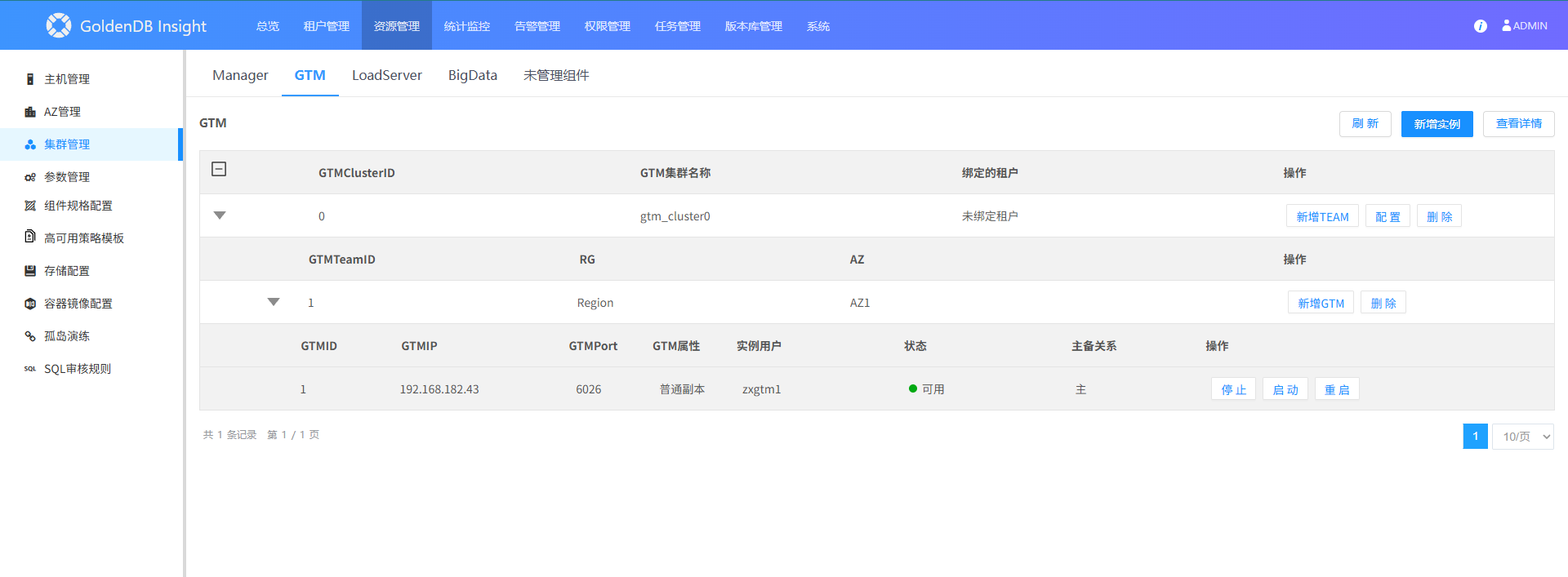
2.1 Manager 等组件的管理
2.2 租户的管理
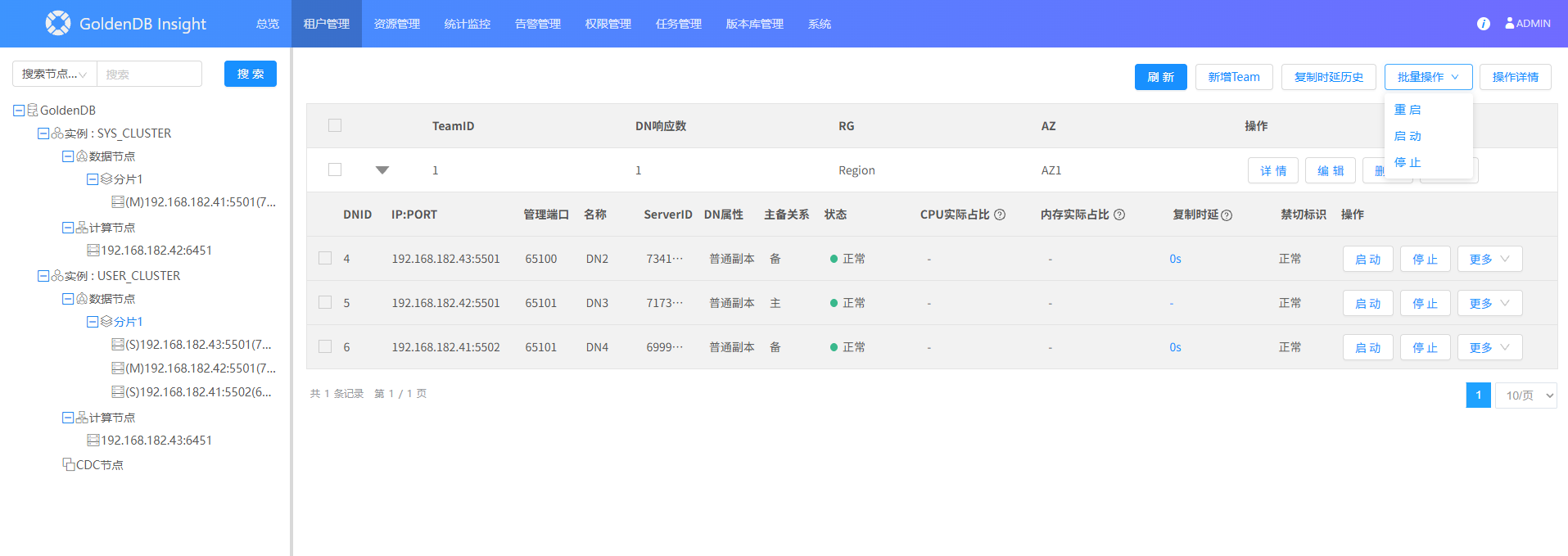
总体来说,
GoldenDB 的组件管理比较方便,既可以在 Insight 可视化界面进行集中管控,也可以在命令行中执行操作命令,虽然需要切换到组件对应的用户下,但是能够显著降低误操作风险。
这里是《实战派K8S&DB》,更多干货敬请关注公众号。如果本文对你有所帮助,欢迎点赞、推荐和转发,也欢迎关注后续文章,一起考证、一起学习
GoldenDB 分布式数据库。
来自 “ ITPUB博客 ” ,链接:https://blog.itpub.net/31444449/viewspace-3183043/ ,如需转载,请注明出处,否则将追究法律责任。

