[INS-30131]installing ORACLE 12C RAC DATABASE on AIX 6.1
第一次搭建12C的RAC,可真是一波三折啊,系统环境配置,安装GI,安装DB各个环节都碰到不少问题,幸好
的是不用翻工,只要在哪个环节有问题,就针对该环节的问题去解决就可以了。
以下是讲述的是在安装DB软件的时候,在第2步的时候,碰到的报错(如下图所示),让安装无法进行。查找了网上
很多的文章,都没有提及到在AIX或者Linux搭建12.1.0.2.0RAC安装DB时遇到这用情况,基本都是讲述在Windows系统安装12c
的RAC时遇到这个报错,然后提及共享文件的事情。对于这样的文章,这时候我是无法拿来参考的,想着还是再仔细看看报错。
报错的内容就是:
Cause - Failed to access the temporary location. Action - Ensure that the current user has required permissions to access the temporary location. Additional Information: - Framework setup check failed on all the nodes - Cause: Cause Of Problem Not Available - Action: User Action Not Available Summary of the failed nodes test- Version of exectask could not be retrieved from node "test" - Cause: Cause Of Problem Not Available - Action: User Action Not Available
在这个报错里面,我们很容易看到一个地方就是 temporary location。指的就是本地的临时目录,大概就是oracle权限不够,具体是哪个文件或者目录的权限不够还不清楚
报错截图:

报错详细信息:

后面继续查找相关的文章,其中也有人在 Fedora 20上安装遇到这个报错,在他提了SR之后,恢复就说可能在/tmp/CVU_12.1.0.2.0_oracle/exectask.sh
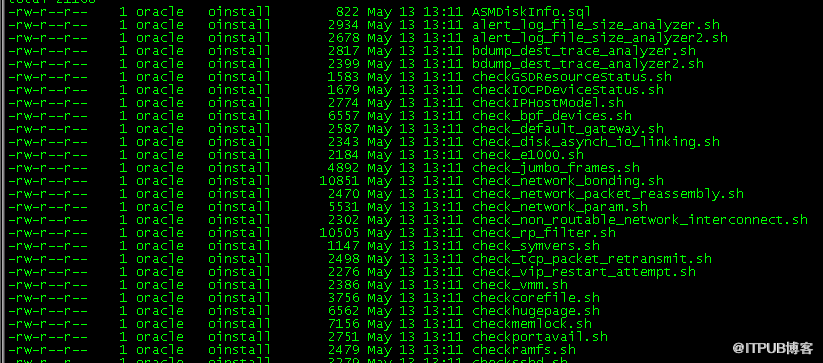
上权限不够,也就提到了/tmp/CVU_12.1.0.2.0_oracle这个目录,后面进入到这个目录查看oracle的权限,对目录下所有的文件都没有执行权限。
/tmp/CVU_12.1.0.2.0_oracle目录下文件的权限属性:
为了首先能够解决报错,解除安装阻碍,就通过root用户授予足够执行权限:
root用户执行目录/tmp/CVU_12.1.0.2.0_oracle的授权:
chown -R oracle:oinstall /tmp/CVU_12.1.0.2.0_oracle
#可执行可不执行,其实本身该目录的属主已经授给oracle用户了。
chmod -R 775 /tmp/CVU_12.1.0.2.0_oracle
chmod -R 755 /tmp/CVU_12.1.0.2.0_oracle
chmod -R 770 /tmp/CVU_12.1.0.2.0_oracle
chmod -R 750 /tmp/CVU_12.1.0.2.0_oracle
#以上任意一条命令,只要确保oracle用户有执行目录CVU_12.1.0.2.0_oracle下所有文件或者目录的权限就可以了。
准确性的授权,可以按照以下授权方式:
cd /tmp/CVU_12.1.0.2.0_oracle
chmod +x *.sh
chmod +x exectask
chmod +x cvuhelper
#就是针对部分文件进行授权。
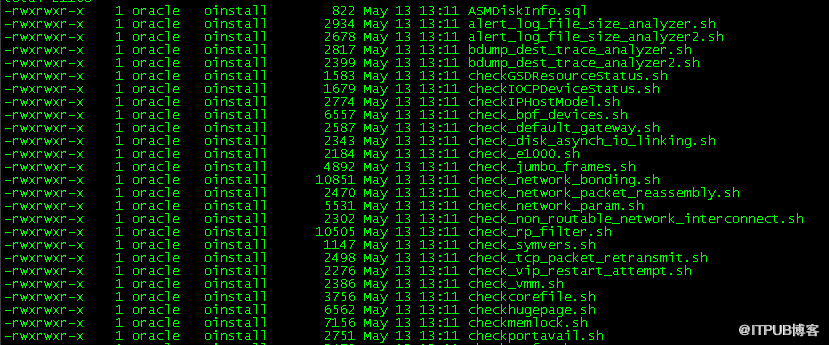
授权后/tmp/CVU_12.1.0.2.0_oracle目录下文件的权限属性:
这样,后面重新启动安装DB的程序,在第2步就顺利地通过了环境检测,正常进行下面的安装步骤。
注意:上面说到的,是安装12C的RAC,所以记得,同样的问题要在两个节点进行解除相同的问题,不然后面安装也同样会
检测另外一个节点的权限问题,没有的话,也同样不能正常安装。
的是不用翻工,只要在哪个环节有问题,就针对该环节的问题去解决就可以了。
以下是讲述的是在安装DB软件的时候,在第2步的时候,碰到的报错(如下图所示),让安装无法进行。查找了网上
很多的文章,都没有提及到在AIX或者Linux搭建12.1.0.2.0RAC安装DB时遇到这用情况,基本都是讲述在Windows系统安装12c
的RAC时遇到这个报错,然后提及共享文件的事情。对于这样的文章,这时候我是无法拿来参考的,想着还是再仔细看看报错。
报错的内容就是:
Cause - Failed to access the temporary location. Action - Ensure that the current user has required permissions to access the temporary location. Additional Information: - Framework setup check failed on all the nodes - Cause: Cause Of Problem Not Available - Action: User Action Not Available Summary of the failed nodes test- Version of exectask could not be retrieved from node "test" - Cause: Cause Of Problem Not Available - Action: User Action Not Available
在这个报错里面,我们很容易看到一个地方就是 temporary location。指的就是本地的临时目录,大概就是oracle权限不够,具体是哪个文件或者目录的权限不够还不清楚
报错截图:

报错详细信息:

后面继续查找相关的文章,其中也有人在 Fedora 20上安装遇到这个报错,在他提了SR之后,恢复就说可能在/tmp/CVU_12.1.0.2.0_oracle/exectask.sh
上权限不够,也就提到了/tmp/CVU_12.1.0.2.0_oracle这个目录,后面进入到这个目录查看oracle的权限,对目录下所有的文件都没有执行权限。
/tmp/CVU_12.1.0.2.0_oracle目录下文件的权限属性:
为了首先能够解决报错,解除安装阻碍,就通过root用户授予足够执行权限:
root用户执行目录/tmp/CVU_12.1.0.2.0_oracle的授权:
chown -R oracle:oinstall /tmp/CVU_12.1.0.2.0_oracle
#可执行可不执行,其实本身该目录的属主已经授给oracle用户了。
chmod -R 775 /tmp/CVU_12.1.0.2.0_oracle
chmod -R 755 /tmp/CVU_12.1.0.2.0_oracle
chmod -R 770 /tmp/CVU_12.1.0.2.0_oracle
chmod -R 750 /tmp/CVU_12.1.0.2.0_oracle
#以上任意一条命令,只要确保oracle用户有执行目录CVU_12.1.0.2.0_oracle下所有文件或者目录的权限就可以了。
准确性的授权,可以按照以下授权方式:
cd /tmp/CVU_12.1.0.2.0_oracle
chmod +x *.sh
chmod +x exectask
chmod +x cvuhelper
#就是针对部分文件进行授权。
授权后/tmp/CVU_12.1.0.2.0_oracle目录下文件的权限属性:
这样,后面重新启动安装DB的程序,在第2步就顺利地通过了环境检测,正常进行下面的安装步骤。
注意:上面说到的,是安装12C的RAC,所以记得,同样的问题要在两个节点进行解除相同的问题,不然后面安装也同样会
检测另外一个节点的权限问题,没有的话,也同样不能正常安装。
来自 “ ITPUB博客 ” ,链接:https://blog.itpub.net/31392094/viewspace-2139046/ ,如需转载,请注明出处,否则将追究法律责任。

请登录后发表评论
登录
全部评论
