史上最全的安装Oracle时遇到的错误解决方法汇总----第一季
对的地方,还请大家点评、指出。大家共同进步。
在安装Oracle的时候,由于安装Oracle需要做一系列的前期准备,以及Oracle安装过程需要做很多操作,初学者第一次安装Oracle,
尤其是在Linux系统下安装,经常会遇到一些错误,下面是我总结的一些经常会遇到的错误,希望对你有所帮助。
1、安装Oracle时,在运行runInstaller进行图形安装报如下错误:
Checking operating system version: must be redhat-3, SuSE-9, redhat-4, UnitedLinux-1.0, asianux-1 or asianux-2
Failed <<<<
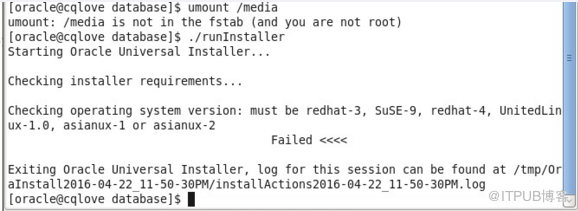
解决方法:这个是因为Oracle 10g及以上版本只能安装在redhat-3, SuSE-9, redhat-4, UnitedLinux-1.0, asianux-1 or asianux-2这些版本上,
你如果是在RedHat 5、6、7及对应版本上,runInstaller在检查操作系统的时候会报错,这个我可以通过修改/etc/redhat-release文件,把里
面的版本信息修改了已达到“骗过”runInstaller检查的目的

把里面的6.4改成4.4
2、运行runInstaller进行图形安装报如下错误:
No protocol specified
Exception in thread "main" java.lang.InternalError: Can't connect to X11 window server using ':0.0' as the value of the DISPLAY variable.

解决方法:此错误是因为安装Oracle的用户(一般是oracle用户),没有权限调用图形界面,只需退出oracle用户,在root下执行xhost +命令,然后
再进入oracle用户重新运行./runInstaller即可
[root@wyzc ~]# xhost +
[root@wyzc ~]# su - oracle
3、在使用图形安装Oracle的时候出现乱码:

解决方法:只需使用安装Oracle的用户运行以下命令即可:
export LANG=C
4、安装Oracle的过程中,检查发现缺少pdksh包,如下:

解决方法:这是因为你用的是RedHat,在RedHat中是ksh包,不是pdksh包,只要你确定你安装了ksh包,这个错误就可以忽略
附赠几个安装Grid过程中遇到的错误:
1、检查安装环境是否支持安装Grid
[grid@gusha grid]$ ./runcluvfy.sh stage -pre crsinst -n `hostname` -verbose
Performing pre-checks for cluster services setup
Checking node reachability...
Check: Node reachability from node "gusha"
Destination Node Reachable?
------------------------------------ ------------------------
gusha yes
Result: Node reachability check passed from node "gusha"
Checking user equivalence...
Check: User equivalence for user "grid"
Node Name Status
------------------------------------ ------------------------
gusha failed
Result: PRVF-4007 : User equivalence check failed for user "grid"
ERROR:
User equivalence unavailable on all the specified nodes
Verification cannot proceed
Pre-check for cluster services setup was unsuccessful on all the nodes.
grid用户没有做等效性
[grid@gusha grid]$ ssh-keygen
[grid@gusha grid]$ cat ~/.ssh/id_rsa.pub >>~/.ssh/authorized_keys
[grid@gusha grid]$ ssh gusha date
[grid@gusha grid]$ ssh gusha.wyzc.com date
[grid@gusha grid]$ ./runcluvfy.sh stage -pre crsinst -n `hostname` -verbose
Performing pre-checks for cluster services setup
Checking node reachability...
Check: Node reachability from node "gusha"
Destination Node Reachable?
------------------------------------ ------------------------
gusha yes
Result: Node reachability check passed from node "gusha"
Checking user equivalence...
单机版的DNS可以不通过
如果配置了DNS可以在[root@gusha ~]# vi /etc/resolv.conf里把
search项去掉不让其寻找DNS,这样再检查就通过了
在prerequisite Check的时候出错
[root@gusha ~]# vi /etc/ntp.conf
[root@gusha ~]# /etc/init.d/ntpd
ntpd ntpdate
[root@gusha ~]# /etc/init.d/ntpd restart
[root@gusha ~]# service ntpd status
ntpd (pid 38498) is running...
[root@gusha ~]# ntpq -pn
No association ID's returned
2、装好GI然后重启电脑,在grid用户中输入以下命令查看CRS是否启动:
[grid@localhost ~]$ crs_stat -t
CRS-0184: Cannot communicate with the CRS daemon
报上名的错误只需在root下运行以下命令,大概5分钟后CTRL+C取消即可
[root@localhost Desktop]# /etc/init.d/init.ohasd run >/dev/null 2>&1
如果不想每次开机都报上面的错误,只需把/etc/rc.local里加上这样一行,/etc/init.d/init.ohasd run >/dev/null 2>&1
如果发现其他的问题,我还会再次更新,谢谢大家的关注哦!!!看完觉得好的不好的都留言,我也可以更好的改进,谢谢大家了啦!!!来自 “ ITPUB博客 ” ,链接:https://blog.itpub.net/31133113/viewspace-2120279/ ,如需转载,请注明出处,否则将追究法律责任。

