Oracle 10g 安装gc:OPMN Process Manager failed to start和OUI - 25031解决方案
2014.12.24
今天在oracle Linux里面安装oracle 10g gridcontrol的时候报如下错误:
OPMN进程没有开启
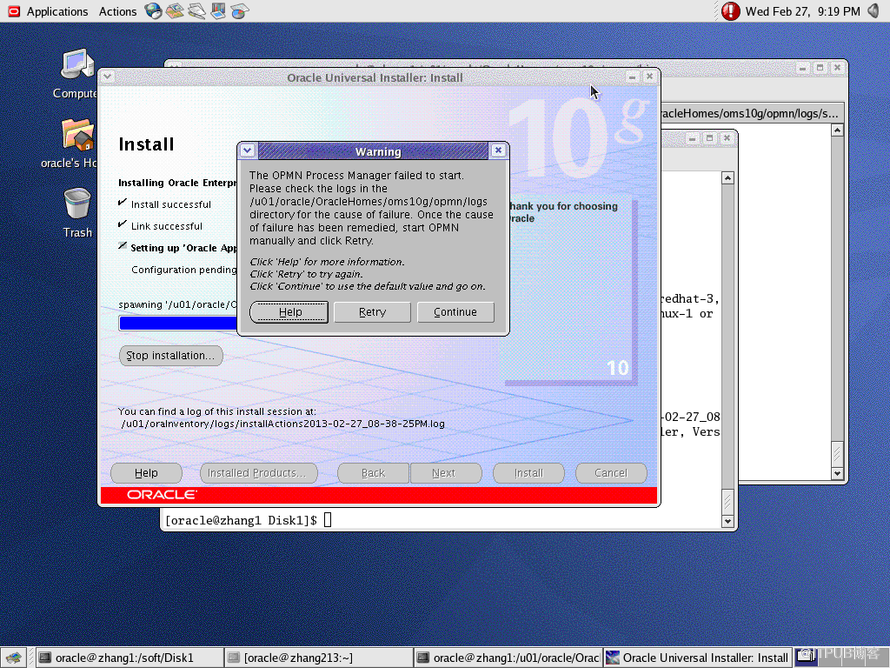
今天在oracle Linux里面安装oracle 10g gridcontrol的时候报如下错误:
OPMN进程没有开启
这几乎是每个安装过oracle 10g GC都会遇到的报错,初次接触的时候还真不知道怎么解决,更不知道原理所在。经过我的总结,大部分报opmn 都是因为http服务或者进程没有起来。要么是系统没有安装httpd服务,要么是没有启动http
那么为什么要http进程是运行的呢?
答:我是这样理解的,不对之处请谅解!grid control(简称GC) 它本身是一个网页形式用过oracle的监控和管理系统。所以在安装GC的时候会涉及和http交互。
解决办法:
1、 可能是介质错误
2、 手动的启动opmn
cd ?/OracleHomes/oms10g/opmn/bin
[oracle@zhang1 bin]$ ./opmnctl stopall
[oracle@zhang1 bin]$ ./opmnctl startall
具体的步骤:
[root@zhanglin bin]# ./opmnctl status ----查看opmn 服务的状态
我做过很多次,基本上上面的步骤都可以解决,而且后面可能还会报 OUI - 25031的错误,首先去查看一下opmn 的四个服务是否都起来了。一般是没有起来才会报25031。-
Processes in Instance: EnterpriseManager0.zhanglin.oracle.com
-
-------------------+--------------------+---------+---------
-
ias-component | process-type | pid | status
-
-------------------+--------------------+---------+---------
-
DSA | DSA | N/A | Down
-
HTTP_Server | HTTP_Server | N/A | Down ----http进程没有起来
-
LogLoader | logloaderd | N/A | Down
-
dcm-daemon | dcm-daemon | N/A | Down
-
OC4J | home | 6542 | Alive
-
WebCache | WebCache | 6566 | Alive
-
WebCache | WebCacheAdmin| 6543 | Alive
-
-
[root@zhanglin bin]# /etc/init.d/httpd start ----尝试启动http
-
Starting httpd:
-
[root@zhanglin bin]# /etc/init.d/httpd stop
-
Stopping httpd: [ OK ]
-
[root@zhanglin bin]# /etc/init.d/httpd start
-
Starting httpd: [ OK ]
-
[root@zhanglin bin]# ./opmnctl startall ----再次查看opmn 但是报错
-
opmnctl: starting opmn and all managed processes...
-
================================================================================
-
opmn id=zhanglin.oracle.com:6200
-
0 of 1 processes started.
-
-
ias-instance id=EnterpriseManager0.zhanglin.oracle.com
-
++++++++++++++++++++++++++++++++++++++++++++++++++++++++++++++++++++++++++++++++
-
ias-component/process-type/process-set:
-
HTTP_Server/HTTP_Server/HTTP_Server
-
-
Error
-
--> Process (pid=9426)
-
failed to start a managed process after the maximum retry limit
-
Log:
-
/u01/app/oracle/OracleHomes/oms10g/opmn/logs/HTTP_Server~1
-
-
[root@zhanglin bin]# ./opmnctl status
-
-
Processes in Instance: EnterpriseManager0.zhanglin.oracle.com
-
-------------------+--------------------+---------+---------
-
ias-component | process-type | pid | status
-
-------------------+--------------------+---------+---------
-
DSA | DSA | N/A | Down
-
HTTP_Server | HTTP_Server | N/A | Down -----还是没有起来
-
LogLoader | logloaderd | N/A | Down
-
dcm-daemon | dcm-daemon | N/A | Down
-
OC4J | home | 6542 | Alive
-
WebCache | WebCache | 6566 | Alive
-
WebCache | WebCacheAdmin | 6543 | Alive
-
-
[root@zhanglin bin]# cd /u01/app/oracle/OracleHomes/oms10g/opmn/logs/
-
[root@zhanglin logs]# ls
-
HTTP_Server~1 OC4J~home~default_island~1 opmn.log WebCache~WebCache~1
-
ipm.log ons.log states WebCache~WebCacheAdmin~1
-
[root@zhanglin logs]# tail -100 HTTP_Server~1 ----查看刚刚提示日志log
-
-
--------
-
14/12/23 17:16:32 Start process
-
--------
-
/u01/app/oracle/OracleHomes/oms10g/Apache/Apache/bin/apachectl start: execing httpd
-
/u01/app/oracle/OracleHomes/oms10g/Apache/Apache/bin/httpd: error while loading shared libraries: libdb.so.2: cannot open shared object file: No such file or directory
-
-
--------
-
14/12/23 17:22:56 Start process
-
--------
-
/u01/app/oracle/OracleHomes/oms10g/Apache/Apache/bin/apachectl start: execing httpd
-
/u01/app/oracle/OracleHomes/oms10g/Apache/Apache/bin/httpd: error while loading shared libraries: libdb.so.2: cannot open shared object file: No such file or directory
-
-
--------
-
14/12/23 17:47:52 Start process
-
--------
-
/u01/app/oracle/OracleHomes/oms10g/Apache/Apache/bin/apachectl start: execing httpd
-
/u01/app/oracle/OracleHomes/oms10g/Apache/Apache/bin/httpd: error while loading shared libraries: libdb.so.2: cannot open shared object file: No such file or directory
-
-----提示很明显,确实文件,其实这个只需要做个软链接,指向另外一个libdb.so.2
-
--------
-
14/12/23 17:47:54 Start process
-
--------
-
/u01/app/oracle/OracleHomes/oms10g/Apache/Apache/bin/apachectl start: execing httpd
-
/u01/app/oracle/OracleHomes/oms10g/Apache/Apache/bin/httpd: error while loading shared libraries: libdb.so.2: cannot open shared object file: No such file or directory
-
[root@zhanglin logs]# ln -s /usr/lib/libgdbm.so.2.0.0 /usr/lib/libdb.so.2 ----做一个链接指向真正的文件
-
[root@zhanglin logs]# cd /u01/app/oracle/OracleHomes/oms10g/opmn/bin/
-
[root@zhanglin bin]# ls
-
argus opmn opmnconfig opmnctl opmnctl.tmp opmndep
-
[root@zhanglin bin]# ./opmnctl startall ----再次尝试启动opmn
-
opmnctl: starting opmn and all managed processes...
-
[root@zhanglin bin]# ./opmnctl status
-
-
Processes in Instance: EnterpriseManager0.zhanglin.oracle.com
-
-------------------+--------------------+---------+---------
-
ias-component | process-type | pid | status
-
-------------------+--------------------+---------+---------
-
DSA | DSA | N/A | Down
-
HTTP_Server | HTTP_Server | 10280 | Alive ----起来了
-
LogLoader | logloaderd | N/A | Down
-
dcm-daemon | dcm-daemon | N/A | Down
-
OC4J | home | 6542 | Alive
-
WebCache | WebCache | 6566 | Alive
-
WebCache | WebCacheAdmin | 6543 | Alive
-
- [root@zhanglin bin]#
来自 “ ITPUB博客 ” ,链接:https://blog.itpub.net/30936525/viewspace-2016678/ ,如需转载,请注明出处,否则将追究法律责任。

请登录后发表评论
登录
全部评论
