19c的rac库,两边补丁不一致导致在添加磁盘组空间的时候报如下错

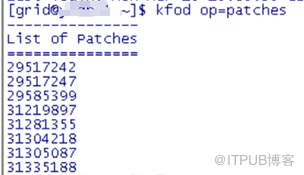
节点1查看补丁
节点2查看补丁
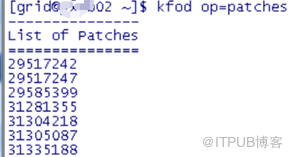
可以看出,节点1多了一个31219897的补丁,在mos上一查,这是一个ojvm的补丁,也可以通过opatch lsinv来查看详细
处理方式:将节点1上的这个补丁回退,根据此ojvm的补丁回退规则进行回退
将u01进行备份,先清理trc等文件,停掉1节点的集群和库进行备份
#find /u01/app/grid/diag/asm/+asm/+ASM1/trace -name "*.trc" -mtime +10 -exec rm {} \;
# tar cvpzf /root/u01bak.tar.gz /u01
1) $opatch rollback -id 31219897
上面可能会遇到权限问题,改文件权限没用,直接修改目录权限
2 )# $GRID_HOME/crs/install/rootcrs.sh -postpatch
3 )#启动节点1的集群和数据库
4 )再次进行添加磁盘组,成功
执行rootcrs.sh -postpatch最后报错:
2021/03/15 18:14:55 CLSRSC-180: An error occurred while executing the command '/u01/app/19.0.0/grid/bin/mgmtca applysql'
Died at /u01/app/19.0.0/grid/crs/install/crspatch.pm line 1845.
The command '/u01/app/19.0.0/grid/perl/bin/perl -I/u01/app/19.0.0/grid/perl/lib -I/u01/app/19.0.0/grid/crs/install -I/u01/app/19.0.0/grid/xag /u01/app/19.0.0/grid/crs/install/rootcrs.pl -postpatch' execution failed
通过观察此脚本运行日志,正常,可不用理会。
这里贴出mos的解决方法:
1. Execute below steps as root
# sudo -s
# $GRID_HOME/crs/install/rootcrs.sh -prepatch
2. Execute the below steps to remove from kfod
# sudo su - grid
# $GRID_HOME/bin/patchgen commit -rb 29757256
3. Execute below steps as root
# $GRID_HOME/crs/install/rootcrs.sh -postpatch
4. Then collect below command outputs, again
# $GRID_HOME/bin/kfod op=patches
# $GRID_HOME/binkfod op=PATCHLVL
# opatch lsinv -oh <GRID HOME>
# crsctl query crs softwarepatch
# crsctl query crs activeversion -f
5. Also check
# sudo su - grid
ASMCMD> showclusterstate
# sqlplus / as sysasm
SQL> select sys_context('SYS_CLUSTER_PROPERTIES', 'CLUSTER_STATE') from dual;
SQL> select sys_context('SYS_CLUSTER_PROPERTIES', 'CURRENT_PATCHLVL') from dual;
Note: We have to execute the command on the node where we have that patch present in kfod.
After completing this action plan, we can re-initiated the scaling (which completed successfully for the customer).
Patch 31219897 - Oracle JavaVM Component Release Update 19.8.0.0.200714
参考mos ID 2681040.1
来自 “ ITPUB博客 ” ,链接:https://blog.itpub.net/30654353/viewspace-2763016/ ,如需转载,请注明出处,否则将追究法律责任。

