oracle死锁问题查询及处理
一、
数据库死锁的现象 首先确认登录的界面 sys/dba
程序在执行的过程中,点击确定或保存按钮,程序没有响应,也没有出现报错。
二、死锁的原理
当对于数据库某个表的某一列做更新或删除等操作,执行完毕后该条语句不提
交,另一条对于这一列数据做更新操作的语句在执行的时候就会处于等待状态,
此时的现象是这条语句一直在执行,但一直没有执行成功,也没有报错。
-------------------------------------->>涉及到的数据字典:
------->>系统级别
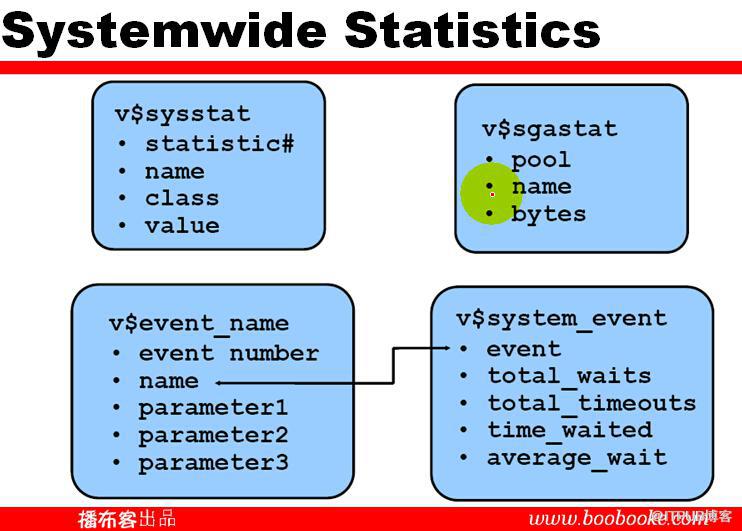
---------->>会话级别:

--------->>官方文档相关指南:
10.1.3.3 Dynamic Performance Views Containing Wait Event Statistics
These dynamic performance views can be queried for wait event statistics:
-
V$ACTIVE_SESSION_HISTORY
The V$ACTIVE_SESSION_HISTORY view displays active database session activity, sampled once every second. See "Active Session History".
-
V$SESS_TIME_MODEL and V$SYS_TIME_MODEL
The V$SESS_TIME_MODEL and V$SYS_TIME_MODEL views contain time model statistics, including DB time which is the total time spent in database calls.
-
V$SESSION_WAIT
The V$SESSION_WAIT view displays information about the current or last wait for each session (such as wait ID, class, and time).
-
V$SESSION
The V$SESSION view displays information about each current session and contains the same wait statistics as those found in the V$SESSION_WAIT view. If applicable, this view also contains detailed information about
the object that the session is currently waiting for (such as object
number, block number, file number, and row number), the blocking session
responsible for the current wait (such as the blocking session ID,
status, and type), and the amount of time waited.
-
V$SESSION_EVENT
The V$SESSION_EVENT view provides summary of all the events the session has waited for since it started.
-
V$SESSION_WAIT_CLASS
The V$SESSION_WAIT_CLASS view provides the number of waits and the time spent in each class of wait events for each session.
-
V$SESSION_WAIT_HISTORY
The V$SESSION_WAIT_HISTORY view displays information about the last ten wait events for each active session (such as event type and wait time).
-
V$SYSTEM_EVENT
The V$SYSTEM_EVENT view provides a summary of all the event waits on the instance since it started.
-
V$EVENT_HISTOGRAM
The V$EVENT_HISTOGRAM view displays a histogram of the number of waits, the maximum wait, and total wait time on an event basis.
-
V$FILE_HISTOGRAM
The V$FILE_HISTOGRAM view displays a histogram of times waited during single block reads for each file.
-
V$SYSTEM_WAIT_CLASS
The V$SYSTEM_WAIT_CLASS view provides the instance wide time totals for the number of waits and the time spent in each class of wait events.
-
V$TEMP_HISTOGRAM
The V$TEMP_HISTOGRAM view displays a histogram of times waited during single block reads for each temporary file.
-------------------------------------------------------------->>
三、死锁的定位方法
通过检查数据库表,能够检查出是哪一条语句被死锁,产生死锁的机器是哪一台。
1)用dba用户执行以下语句
select username,lockwait,status,machine,program from v$session where sid in
(select session_id from v$locked_object)
如果有输出的结果,则说明有死锁,且能看到死锁的机器是哪一台。字段说明:
Username:死锁语句所用的数据库用户;
Lockwait:死锁的状态,如果有内容表示被死锁。
Status: 状态,active表示被死锁
Machine: 死锁语句所在的机器。
Program: 产生死锁的语句主要来自哪个应用程序。
2)用dba用户执行以下语句,可以查看到被死锁的语句。
select sql_text from v$sql where hash_value in
(select sql_hash_value from v$session where sid in
(select session_id from v$locked_object))
四、死锁的解决方法
一般情况下,只要将产生死锁的语句提交就可以了,但是在实际的执行过程中。用户可
能不知道产生死锁的语句是哪一句。可以将程序关闭并重新启动就可以了。
经常在
Oracle的使用过程中碰到这个问题,所以也总结了一点解决方法。
1)查找死锁的进程:
sqlplus "/as sysdba" (sys/change_on_install)
SELECT s.username,l.OBJECT_ID,l.SESSION_ID,s.SERIAL#,
l.ORACLE_USERNAME,l.OS_USER_NAME,l.PROCESS
FROM V$LOCKED_OBJECT l,V$SESSION S WHERE l.SESSION_ID=S.SID;
2)kill掉这个死锁的进程:
alter system kill session ‘sid,serial#’; (其中sid=l.session_id)
3)如果还不能解决:
select pro.spid from v$session ses,v$process pro where ses.sid=XX and ses.paddr=pro.addr;
其中sid用死锁的sid替换: exit
ps -ef|grep spid
其中spid是这个进程的进程号,kill掉这个Oracle进程
KILL -9 “刚才查出的SPID”
在WINDOWS平台,可以是偶那个orakill。
4)查询死锁语句
select A.SQL_TEXT, B.USERNAME, C.OBJECT_ID, C.SESSION_ID,
B.SERIAL#, C.ORACLE_USERNAME,C.OS_USER_NAME,C.Process,
''''||C.Session_ID||','||B.SERIAL#||''''
from v$sql A, v$session B, v$locked_object C
where A.HASH_VALUE = B.SQL_HASH_VALUE and
B.SID = C.Session_ID
精简处理步骤
--1、查找被锁表的object_id
select object_id from all_objects where object_name = upper('table_name') and object_type = 'TABLE'
--2、根据第1步查到的object_id查找被锁对象的会话ID
select session_id from v$locked_object where object_id = 1779474
--3、根据第2步查到的session_id查找serial#
select sid,serial# from v$session where sid = 284
--4、根据session_id和serial#杀掉进程
alter system kill session 'sid,serial#'
--查找在被锁对象上的操作语句
select sql_text from v$sqlarea where address = '00' --address为v$session中的sql_address字段
出处:
http://blog.chinaunix.net/uid-25472509-id-4455966.html
来自 “ ITPUB博客 ” ,链接:https://blog.itpub.net/30152793/viewspace-1454634/
,如需转载,请注明出处,否则将追究法律责任。