[oracle@node4 ~]$ export ORACLE_SID=test
[oracle@node4 ~]$ sqlplus / as sysdba
SQL*Plus: Release 11.2.0.3.0 Production on Tue Feb 3 11:33:09 2015
Copyright (c) 1982, 2011, Oracle. All rights reserved.
Connected to an idle instance.
SQL> startup
ORA-01078: failure in processing system parameters
ORA-01565: error in identifying file '+DATADG/test/spfiletest.ora'
ORA-17503: ksfdopn:2 Failed to open file +DATADG/test/spfiletest.ora
ORA-15056: additional error message
ORA-17503: ksfdopn:2 Failed to open file +DATADG/test/spfiletest.ora
ORA-15001: diskgroup "DATADG" does not exist or is not mounted
ORA-06512: at line 4
SQL> select GROUP_NUMBER,DISK_NUMBER,TOTAL_MB,FAILGROUP,NAME,PATH from v$asm_disk;
select GROUP_NUMBER,DISK_NUMBER,TOTAL_MB,FAILGROUP,NAME,PATH from v$asm_disk
*
ERROR at line 1:
ORA-01034: ORACLE not available
Process ID: 0
Session ID: 0 Serial number: 0
SQL>
[oracle@node4 ~]$ export ORACLE_SID=+ASM1
[oracle@node4 ~]$ sqlplus / as sysdba
SQL*Plus: Release 11.2.0.3.0 Production on Tue Feb 3 12:24:06 2015
Copyright (c) 1982, 2011, Oracle. All rights reserved.
Connected to an idle instance.
SQL> startup nomount
ORA-01078: failure in processing system parameters
LRM-00109: could not open parameter file '/u01/app/oracle/product/11.2/db_1/dbs/init+ASM1.ora'
SQL> select state,header_status,substr(name,1,12) Name,free_mb,substr(path,1,16) PATH from v$asm_disk;
select state,header_status,substr(name,1,12) Name,free_mb,substr(path,1,16) PATH from v$asm_disk
*
ERROR at line 1:
ORA-01034: ORACLE not available
Process ID: 0
Session ID: 0 Serial number: 0
SQL> select operation,state,power,actual,sofar,est_work,est_minutes from v$asm_operation;
select operation,state,power,actual,sofar,est_work,est_minutes from v$asm_operation
*
ERROR at line 1:
ORA-01034: ORACLE not available
Process ID: 0
Session ID: 0 Serial number: 0
SQL> select group_number,disk_number,path from v$asm_disk;
select group_number,disk_number,path from v$asm_disk
*
ERROR at line 1:
ORA-01034: ORACLE not available
Process ID: 0
Session ID: 0 Serial number: 0
SQL> select group_number , name ,state from v$asm_diskgroup;
select group_number , name ,state from v$asm_diskgroup
*
ERROR at line 1:
ORA-01034: ORACLE not available
Process ID: 0
Session ID: 0 Serial number: 0
SQL>
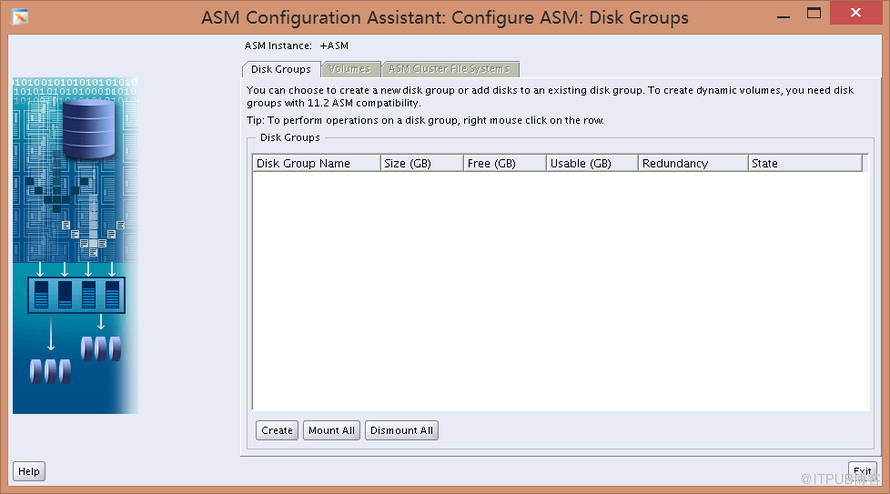
这里显示根本就没磁盘组
NNDD
。。。。。
检查相应的磁盘权限发现,重启后/dev/sdd 的权限就是root 600
没办法 把赋权操作写到LINUX初始文件中
[root@node4 rc.d]# pwd
/etc/rc.d
[root@node4 rc.d]# cat rc.local
#!/bin/sh
#
# This script will be executed *after* all the other init scripts.
# You can put your own initialization stuff in here if you don't
# want to do the full Sys V style init stuff.
touch /var/lock/subsys/local
chown -R grid:asmadmin /dev/sdd
chmod 775 /dev/sdd
[root@node4 rc.d]#
[oracle@node4 ~]$ export ORACLE_SID=test
[oracle@node4 ~]$ sqlplus / as sysdba
SQL*Plus: Release 11.2.0.3.0 Production on Tue Feb 3 14:46:06 2015
Copyright (c) 1982, 2011, Oracle. All rights reserved.
Connected to an idle instance.
SQL>
SQL>
SQL> startup
ORACLE instance started.
Total System Global Area 1319473152 bytes
Fixed Size 2228104 bytes
Variable Size 352321656 bytes
Database Buffers 956301312 bytes
Redo Buffers 8622080 bytes
Database mounted.
Database opened.
SQL>
[oracle@node4 ~]$ sqlplus / as sysdba
SQL*Plus: Release 11.2.0.3.0 Production on Tue Feb 3 11:33:09 2015
Copyright (c) 1982, 2011, Oracle. All rights reserved.
Connected to an idle instance.
SQL> startup
ORA-01078: failure in processing system parameters
ORA-01565: error in identifying file '+DATADG/test/spfiletest.ora'
ORA-17503: ksfdopn:2 Failed to open file +DATADG/test/spfiletest.ora
ORA-15056: additional error message
ORA-17503: ksfdopn:2 Failed to open file +DATADG/test/spfiletest.ora
ORA-15001: diskgroup "DATADG" does not exist or is not mounted
ORA-06512: at line 4
SQL> select GROUP_NUMBER,DISK_NUMBER,TOTAL_MB,FAILGROUP,NAME,PATH from v$asm_disk;
select GROUP_NUMBER,DISK_NUMBER,TOTAL_MB,FAILGROUP,NAME,PATH from v$asm_disk
*
ERROR at line 1:
ORA-01034: ORACLE not available
Process ID: 0
Session ID: 0 Serial number: 0
SQL>
[oracle@node4 ~]$ export ORACLE_SID=+ASM1
[oracle@node4 ~]$ sqlplus / as sysdba
SQL*Plus: Release 11.2.0.3.0 Production on Tue Feb 3 12:24:06 2015
Copyright (c) 1982, 2011, Oracle. All rights reserved.
Connected to an idle instance.
SQL> startup nomount
ORA-01078: failure in processing system parameters
LRM-00109: could not open parameter file '/u01/app/oracle/product/11.2/db_1/dbs/init+ASM1.ora'
SQL> select state,header_status,substr(name,1,12) Name,free_mb,substr(path,1,16) PATH from v$asm_disk;
select state,header_status,substr(name,1,12) Name,free_mb,substr(path,1,16) PATH from v$asm_disk
*
ERROR at line 1:
ORA-01034: ORACLE not available
Process ID: 0
Session ID: 0 Serial number: 0
SQL> select operation,state,power,actual,sofar,est_work,est_minutes from v$asm_operation;
select operation,state,power,actual,sofar,est_work,est_minutes from v$asm_operation
*
ERROR at line 1:
ORA-01034: ORACLE not available
Process ID: 0
Session ID: 0 Serial number: 0
SQL> select group_number,disk_number,path from v$asm_disk;
select group_number,disk_number,path from v$asm_disk
*
ERROR at line 1:
ORA-01034: ORACLE not available
Process ID: 0
Session ID: 0 Serial number: 0
SQL> select group_number , name ,state from v$asm_diskgroup;
select group_number , name ,state from v$asm_diskgroup
*
ERROR at line 1:
ORA-01034: ORACLE not available
Process ID: 0
Session ID: 0 Serial number: 0
SQL>
这里显示根本就没磁盘组
NNDD
。。。。。
检查相应的磁盘权限发现,重启后/dev/sdd 的权限就是root 600
没办法 把赋权操作写到LINUX初始文件中
[root@node4 rc.d]# pwd
/etc/rc.d
[root@node4 rc.d]# cat rc.local
#!/bin/sh
#
# This script will be executed *after* all the other init scripts.
# You can put your own initialization stuff in here if you don't
# want to do the full Sys V style init stuff.
touch /var/lock/subsys/local
chown -R grid:asmadmin /dev/sdd
chmod 775 /dev/sdd
[root@node4 rc.d]#
[oracle@node4 ~]$ export ORACLE_SID=test
[oracle@node4 ~]$ sqlplus / as sysdba
SQL*Plus: Release 11.2.0.3.0 Production on Tue Feb 3 14:46:06 2015
Copyright (c) 1982, 2011, Oracle. All rights reserved.
Connected to an idle instance.
SQL>
SQL>
SQL> startup
ORACLE instance started.
Total System Global Area 1319473152 bytes
Fixed Size 2228104 bytes
Variable Size 352321656 bytes
Database Buffers 956301312 bytes
Redo Buffers 8622080 bytes
Database mounted.
Database opened.
SQL>
来自 “ ITPUB博客 ” ,链接:https://blog.itpub.net/29805834/viewspace-1425123/ ,如需转载,请注明出处,否则将追究法律责任。
下一篇:
没有了~

请登录后发表评论
登录
全部评论
