DeepSeek一键生成网页版SQL生成器(科技感十足)
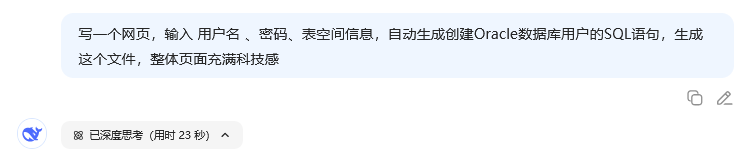
记不住SQL命令不用怕,SQL生成器一键生成SQL语句!
下面是一个充满科技感的Oracle用户创建SQL生成器页面,用户可以输入用户名、密码和表空间信息,系统会自动生成创建Oracle用户的SQL语句。
效果
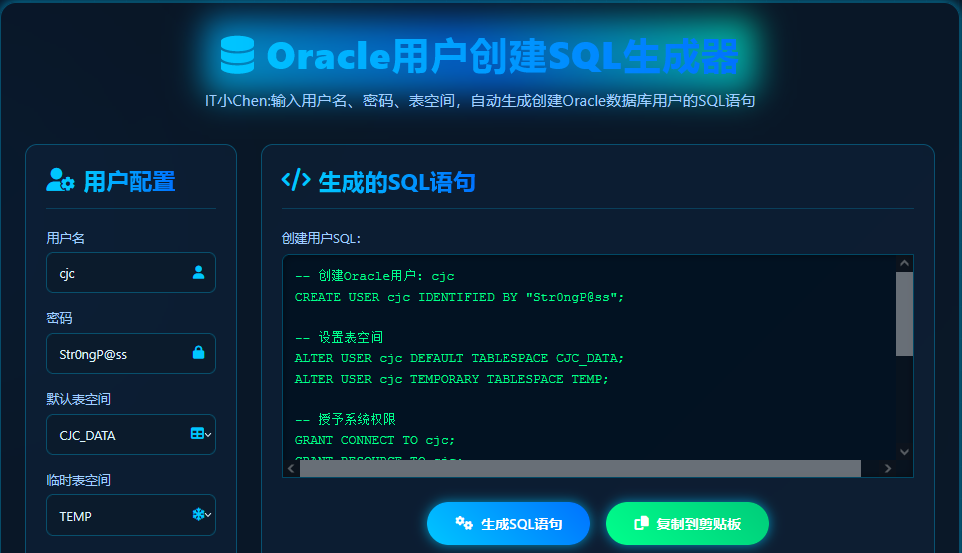
先看效果:
左侧手动输入需要创建用户的用户名、密码、表空间等信息,自动生成右侧的SQL语句。
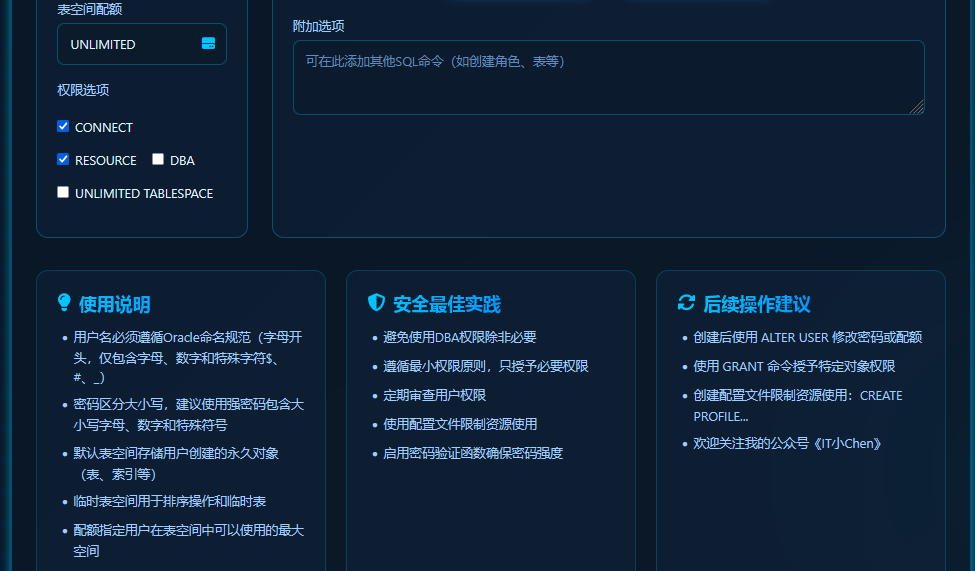
除此以外,还支持表空间配额、权限、使用说明等。
完整代码
完整代码如下,可以根据不同需求进行修改。
<!DOCTYPE html><html lang="zh-CN"><head>
<meta charset="UTF-8">
<meta name="viewport" content="width=device-width, initial-scale=1.0">
<title>Oracle用户创建SQL生成器 | 科技感设计</title>
<link rel="stylesheet" href="https://cdnjs.cloudflare.com/ajax/libs/font-awesome/6.4.0/css/all.min.css">
<style>
:root { --primary: #00c6ff; --secondary: #0072ff; --dark: #0a1929; --darker: #071120; --light: #e0f7ff; --glow: 0 0 15px rgba(0, 198, 255, 0.7); --success: #00ff8c;
}
* { margin: 0; padding: 0; box-sizing: border-box; font-family: 'Segoe UI', 'SF Pro Display', -apple-system, BlinkMacSystemFont, sans-serif;
}
body { background: linear-gradient(135deg, var(--darker), var(--dark)); color: var(--light); min-height: 100vh; overflow-x: hidden; position: relative; padding: 20px;
}
body::before { content: ""; position: absolute; top: 0; left: 0; width: 100%; height: 100%; background:
radial-gradient(circle at 10% 20%, rgba(0, 114, 255, 0.1) 0%, transparent 20%), radial-gradient(circle at 90% 80%, rgba(0, 198, 255, 0.1) 0%, transparent 20%); z-index: -1;
}
.cyber-grid { position: absolute; top: 0; left: 0; width: 100%; height: 100%; background-image:
linear-gradient(rgba(0, 114, 255, 0.1) 1px, transparent 1px), linear-gradient(90deg, rgba(0, 114, 255, 0.1) 1px, transparent 1px); background-size: 40px 40px; z-index: -1; opacity: 0.3;
}
.container { max-width: 1200px; margin: 40px auto; padding: 30px; background: rgba(10, 25, 41, 0.6); border-radius: 20px; border: 1px solid rgba(0, 198, 255, 0.3); box-shadow: var(--glow); backdrop-filter: blur(10px);
}
header { text-align: center; margin-bottom: 40px; position: relative;
}
.holographic { position: relative; display: inline-block;
}
.holographic::before { content: ""; position: absolute; top: -10px; left: -20px; right: -20px; bottom: -10px; background: linear-gradient(45deg, var(--primary), var(--secondary), #00ffcc); z-index: -1; filter: blur(20px); opacity: 0.7; border-radius: 10px;
}
h1 { font-size: 3rem; font-weight: 800; background: linear-gradient(to right, #00c6ff, #0072ff); -webkit-background-clip: text; background-clip: text; color: transparent; letter-spacing: 1px; margin-bottom: 10px; position: relative; z-index: 2;
}
.subtitle { font-size: 1.2rem; color: #a0cfff; max-width: 700px; margin: 0 auto; line-height: 1.6;
}
.app-container { display: grid; grid-template-columns: 1fr 1fr; gap: 30px; margin-bottom: 30px;
}
@media (max-width: 900px) { .app-container { grid-template-columns: 1fr;
}
}
.input-section, .output-section { background: rgba(15, 35, 60, 0.5); border: 1px solid rgba(0, 198, 255, 0.3); border-radius: 15px; padding: 25px; transition: all 0.3s ease; backdrop-filter: blur(5px);
}
.input-section:hover, .output-section:hover { box-shadow: 0 0 25px rgba(0, 198, 255, 0.5); border-color: var(--primary);
}
.section-header { display: flex; align-items: center; gap: 10px; margin-bottom: 25px; padding-bottom: 15px; border-bottom: 1px solid rgba(0, 198, 255, 0.2);
}
.section-header i { font-size: 1.8rem; color: var(--primary);
}
.section-header h2 { font-size: 1.8rem; background: linear-gradient(to right, var(--primary), var(--secondary)); -webkit-background-clip: text; background-clip: text; color: transparent;
}
.form-group { margin-bottom: 20px;
}
label { display: block; margin-bottom: 8px; font-weight: 500; color: #a0cfff;
}
.input-wrapper { position: relative;
}
input, select, textarea { width: 100%; padding: 14px 15px; background: rgba(10, 25, 41, 0.7); border: 1px solid rgba(0, 198, 255, 0.3); border-radius: 8px; color: var(--light); font-size: 1rem; outline: none; transition: all 0.3s ease;
}
input:focus, select:focus, textarea:focus { border-color: var(--primary); box-shadow: 0 0 10px rgba(0, 198, 255, 0.5);
}
input::placeholder, textarea::placeholder { color: #5d8cbe;
}
.input-wrapper i { position: absolute; right: 15px; top: 50%; transform: translateY(-50%); color: var(--primary);
}
.checkbox-group { display: flex; flex-wrap: wrap; gap: 20px; margin-top: 25px;
}
.checkbox-item { display: flex; align-items: center; gap: 8px;
}
.checkbox-item input { width: auto;
}
.checkbox-item label { margin-bottom: 0; color: var(--light);
}
.action-buttons { display: flex; justify-content: center; gap: 20px; margin: 30px 0; flex-wrap: wrap;
}
.cyber-button { background: linear-gradient(45deg, var(--primary), var(--secondary)); color: white; border: none; padding: 15px 35px; font-size: 1.1rem; font-weight: 600; border-radius: 50px; cursor: pointer; transition: all 0.3s ease; position: relative; overflow: hidden; box-shadow: var(--glow); display: flex; align-items: center; gap: 10px;
}
.cyber-button.copy { background: linear-gradient(45deg, var(--success), #00cc7a);
}
.cyber-button::after { content: ""; position: absolute; top: 0; left: -100%; width: 100%; height: 100%; background: linear-gradient(90deg, transparent, rgba(255, 255, 255, 0.2), transparent); transition: 0.5s;
}
.cyber-button:hover::after { left: 100%;
}
.cyber-button:hover { transform: translateY(-3px); box-shadow: 0 0 25px rgba(0, 198, 255, 0.9);
}
.cyber-button:active { transform: translateY(1px);
}
#sql-output { width: 100%; height: 280px; background: rgba(0, 15, 30, 0.8); border: 1px solid rgba(0, 198, 255, 0.3); border-radius: 8px; color: var(--success); font-family: 'Courier New', monospace; font-size: 1rem; padding: 15px; line-height: 1.6; overflow-y: auto; white-space: pre; margin-top: 10px; box-shadow: inset 0 0 10px rgba(0, 0, 0, 0.5);
}
.info-cards { display: grid; grid-template-columns: repeat(auto-fit, minmax(300px, 1fr)); gap: 25px; margin-top: 40px;
}
.info-card { background: rgba(15, 35, 60, 0.5); border: 1px solid rgba(0, 198, 255, 0.2); border-radius: 15px; padding: 25px; transition: all 0.3s ease;
}
.info-card:hover { transform: translateY(-5px); border-color: var(--primary); box-shadow: var(--glow);
}
.info-card h3 { font-size: 1.4rem; margin-bottom: 15px; background: linear-gradient(to right, var(--primary), var(--secondary)); -webkit-background-clip: text; background-clip: text; color: transparent; display: flex; align-items: center; gap: 10px;
}
.info-card ul { padding-left: 20px; color: #a0cfff;
}
.info-card li { margin-bottom: 10px; line-height: 1.5;
}
footer { text-align: center; padding: 30px 0; color: #5d8cbe; margin-top: 50px; border-top: 1px solid rgba(0, 114, 255, 0.2);
}
.notification { position: fixed; bottom: 20px; right: 20px; background: var(--success); color: #003320; padding: 15px 25px; border-radius: 8px; font-weight: 600; box-shadow: 0 5px 15px rgba(0,0,0,0.3); transform: translateY(100px); opacity: 0; transition: all 0.4s ease; z-index: 1000;
}
.notification.show { transform: translateY(0); opacity: 1;
} </style></head><body>
<div class="cyber-grid"></div>
<div class="container">
<header>
<div class="holographic">
<h1><i class="fas fa-database"></i> Oracle用户创建SQL生成器</h1>
</div>
<p class="subtitle">输入用户名、密码和表空间信息,自动生成创建Oracle数据库用户的SQL语句</p>
</header>
<div class="app-container">
<div class="input-section">
<div class="section-header">
<i class="fas fa-user-cog"></i>
<h2>用户配置</h2>
</div>
<div class="form-group">
<label for="username">用户名</label>
<div class="input-wrapper">
<input type="text" id="username" placeholder="输入新用户名 (例如: app_user)" value="app_user">
<i class="fas fa-user"></i>
</div>
</div>
<div class="form-group">
<label for="password">密码</label>
<div class="input-wrapper">
<input type="text" id="password" placeholder="输入用户密码 (例如: Str0ngP@ss)" value="Str0ngP@ss">
<i class="fas fa-lock"></i>
</div>
</div>
<div class="form-group">
<label for="default-tablespace">默认表空间</label>
<div class="input-wrapper">
<select id="default-tablespace">
<option value="USERS">USERS</option>
<option value="APP_DATA" selected>APP_DATA</option>
<option value="USER_DATA">USER_DATA</option>
<option value="custom">自定义...</option>
</select>
<i class="fas fa-table"></i>
</div>
<input type="text" id="custom-default-tablespace" placeholder="输入自定义默认表空间名称" style="display: none; margin-top: 10px;">
</div>
<div class="form-group">
<label for="temporary-tablespace">临时表空间</label>
<div class="input-wrapper">
<select id="temporary-tablespace">
<option value="TEMP" selected>TEMP</option>
<option value="TEMP2">TEMP2</option>
<option value="TMP_DATA">TMP_DATA</option>
<option value="custom">自定义...</option>
</select>
<i class="fas fa-snowflake"></i>
</div>
<input type="text" id="custom-temporary-tablespace" placeholder="输入自定义临时表空间名称" style="display: none; margin-top: 10px;">
</div>
<div class="form-group">
<label for="quota">表空间配额</label>
<div class="input-wrapper">
<input type="text" id="quota" placeholder="例如: 500M, 10G 或 UNLIMITED" value="UNLIMITED">
<i class="fas fa-hdd"></i>
</div>
</div>
<div class="form-group">
<label>权限选项</label>
<div class="checkbox-group">
<div class="checkbox-item">
<input type="checkbox" id="connect" checked>
<label for="connect">CONNECT</label>
</div>
<div class="checkbox-item">
<input type="checkbox" id="resource" checked>
<label for="resource">RESOURCE</label>
</div>
<div class="checkbox-item">
<input type="checkbox" id="dba">
<label for="dba">DBA</label>
</div>
<div class="checkbox-item">
<input type="checkbox" id="unlimited-tablespace">
<label for="unlimited-tablespace">UNLIMITED TABLESPACE</label>
</div>
</div>
</div>
</div>
<div class="output-section">
<div class="section-header">
<i class="fas fa-code"></i>
<h2>生成的SQL语句</h2>
</div>
<div class="form-group">
<label for="sql-output">创建用户SQL:</label>
<div id="sql-output">-- 填写左侧表单后自动生成SQL</div>
</div>
<div class="action-buttons">
<button id="generate-btn" class="cyber-button">
<i class="fas fa-cogs"></i> 生成SQL语句 </button>
<button id="copy-btn" class="cyber-button copy">
<i class="fas fa-copy"></i> 复制到剪贴板 </button>
</div>
<div class="form-group">
<label for="additional-sql">附加选项</label>
<textarea id="additional-sql" rows="3" placeholder="可在此添加其他SQL命令(如创建角色、表等)"></textarea>
</div>
</div>
</div>
<div class="info-cards">
<div class="info-card">
<h3><i class="fas fa-lightbulb"></i> 使用说明</h3>
<ul>
<li>用户名必须遵循Oracle命名规范(字母开头,仅包含字母、数字和特殊字符$、#、_)</li>
<li>密码区分大小写,建议使用强密码包含大小写字母、数字和特殊符号</li>
<li>默认表空间存储用户创建的永 久对象(表、索引等)</li>
<li>临时表空间用于排序操作和临时表</li>
<li>配额指定用户在表空间中可以使用的最大空间</li>
</ul>
</div>
<div class="info-card">
<h3><i class="fas fa-shield-alt"></i> 安全最佳实践</h3>
<ul>
<li>避免使用DBA权限除非必要</li>
<li>遵循最小权限原则,只授予必要权限</li>
<li>定期审查用户权限</li>
<li>使用配置文件限制资源使用</li>
<li>启用密码验证函数确保密码强度</li>
</ul>
</div>
<div class="info-card">
<h3><i class="fas fa-sync-alt"></i> 后续操作建议</h3>
<ul>
<li>创建后使用 ALTER USER 修改密码或配额</li>
<li>使用 GRANT 命令授予特定对象权限</li>
<li>创建配置文件限制资源使用:CREATE PROFILE...</li>
<li>定期备份用户元数据:使用DBMS_METADATA.GET_DDL</li>
</ul>
</div>
</div>
</div>
<footer>
<p>© 2023 Oracle用户创建SQL生成器 | 科技感设计 | 数据库管理工具</p>
</footer>
<div class="notification" id="notification">SQL已成功复制到剪贴板!</div>
<script>
// DOM元素
const usernameInput = document.getElementById('username'); const passwordInput = document.getElementById('password'); const defaultTablespaceSelect = document.getElementById('default-tablespace'); const customDefaultTablespaceInput = document.getElementById('custom-default-tablespace'); const temporaryTablespaceSelect = document.getElementById('temporary-tablespace'); const customTemporaryTablespaceInput = document.getElementById('custom-temporary-tablespace'); const quotaInput = document.getElementById('quota'); const connectCheckbox = document.getElementById('connect'); const resourceCheckbox = document.getElementById('resource'); const dbaCheckbox = document.getElementById('dba'); const unlimitedTablespaceCheckbox = document.getElementById('unlimited-tablespace'); const sqlOutput = document.getElementById('sql-output'); const generateBtn = document.getElementById('generate-btn'); const copyBtn = document.getElementById('copy-btn'); const additionalSql = document.getElementById('additional-sql'); const notification = document.getElementById('notification');
// 表空间选择事件
defaultTablespaceSelect.addEventListener('change', function() {
customDefaultTablespaceInput.style.display = this.value === 'custom' ? 'block' : 'none';
});
temporaryTablespaceSelect.addEventListener('change', function() {
customTemporaryTablespaceInput.style.display = this.value === 'custom' ? 'block' : 'none';
});
// 生成SQL函数
function generateSQL() { const username = usernameInput.value.trim() || 'app_user'; const password = passwordInput.value.trim() || 'Str0ngP@ss';
// 获取表空间值
const defaultTablespace = defaultTablespaceSelect.value === 'custom'
? customDefaultTablespaceInput.value.trim() || 'CUSTOM_DATA'
: defaultTablespaceSelect.value;
const temporaryTablespace = temporaryTablespaceSelect.value === 'custom'
? customTemporaryTablespaceInput.value.trim() || 'CUSTOM_TEMP'
: temporaryTablespaceSelect.value;
const quota = quotaInput.value.trim() || 'UNLIMITED';
// 构建SQL
let sql = `-- 创建Oracle用户: ${username}\n`;
sql += `CREATE USER ${username} IDENTIFIED BY "${password}";\n\n`;
sql += `-- 设置表空间\n`;
sql += `ALTER USER ${username} DEFAULT TABLESPACE ${defaultTablespace};\n`;
sql += `ALTER USER ${username} TEMPORARY TABLESPACE ${temporaryTablespace};\n\n`;
if (quota.toUpperCase() !== 'UNLIMITED') {
sql += `-- 设置表空间配额\n`;
sql += `ALTER USER ${username} QUOTA ${quota} ON ${defaultTablespace};\n\n`;
}
sql += `-- 授予系统权限\n`;
if (connectCheckbox.checked) {
sql += `GRANT CONNECT TO ${username};\n`;
}
if (resourceCheckbox.checked) {
sql += `GRANT RESOURCE TO ${username};\n`;
}
if (dbaCheckbox.checked) {
sql += `GRANT DBA TO ${username};\n`;
}
if (unlimitedTablespaceCheckbox.checked) {
sql += `GRANT UNLIMITED TABLESPACE TO ${username};\n`;
}
if (!connectCheckbox.checked && !resourceCheckbox.checked &&
!dbaCheckbox.checked && !unlimitedTablespaceCheckbox.checked) {
sql += `-- 无权限被选中\n`;
}
sql += `\n-- 解锁用户(如果账户被锁定)\n`;
sql += `ALTER USER ${username} ACCOUNT UNLOCK;\n`;
// 添加附加SQL
const additional = additionalSql.value.trim(); if (additional) {
sql += `\n-- 附加SQL命令\n`;
sql += additional;
}
sql += `\n\n-- 验证用户创建\nSELECT username, account_status, created FROM dba_users WHERE username = '${username.toUpperCase()}';`;
sqlOutput.textContent = sql;
}
// 复制到剪贴板
function copyToClipboard() { const sql = sqlOutput.textContent;
navigator.clipboard.writeText(sql).then(() => {
showNotification('SQL已成功复制到剪贴板!');
});
}
// 显示通知
function showNotification(message) {
notification.textContent = message;
notification.classList.add('show');
setTimeout(() => {
notification.classList.remove('show');
}, 3000);
}
// 事件监听
generateBtn.addEventListener('click', generateSQL);
copyBtn.addEventListener('click', copyToClipboard);
// 输入变化时实时生成SQL
usernameInput.addEventListener('input', generateSQL);
passwordInput.addEventListener('input', generateSQL);
defaultTablespaceSelect.addEventListener('change', generateSQL);
temporaryTablespaceSelect.addEventListener('change', generateSQL);
customDefaultTablespaceInput.addEventListener('input', generateSQL);
customTemporaryTablespaceInput.addEventListener('input', generateSQL);
quotaInput.addEventListener('input', generateSQL);
connectCheckbox.addEventListener('change', generateSQL);
resourceCheckbox.addEventListener('change', generateSQL);
dbaCheckbox.addEventListener('change', generateSQL);
unlimitedTablespaceCheckbox.addEventListener('change', generateSQL);
additionalSql.addEventListener('input', generateSQL);
// 初始生成SQL
generateSQL(); </script></body></html>
功能说明
这个Oracle用户创建SQL生成器具有以下特点:
-
用户配置:
- 用户名输入(支持Oracle命名规范)
- 密码设置(自动生成带引号的密码)
- 默认表空间选择(包含预设选项和自定义)
- 临时表空间选择(包含预设选项和自定义)
- 表空间配额设置(支持大小限制或UNLIMITED)
- 权限选项(CONNECT、RESOURCE、DBA等)
-
SQL生成:
- 自动创建CREATE USER语句
- 生成ALTER USER设置表空间
- 添加GRANT权限语句
- 包含解锁用户账户命令
- 添加验证查询
-
附加功能:
- 复制SQL到剪贴板
- 添加自定义SQL命令
- 实时预览生成的SQL
-
科技感设计:
- 深色背景搭配霓虹蓝绿色调
- 网格背景和发光效果
- 未来主义卡片设计
- 悬停动画和渐变效果
- 终端风格的SQL输出框
-
信息卡片:
- 使用说明(命名规范、表空间作用等)
- 安全最佳实践(最小权限原则等)
- 后续操作建议(修改用户、创建配置文件等)
使用说明
- 在左侧表单中输入用户名、密码
- 选择或自定义表空间
- 设置配额和权限选项
- 点击"生成SQL语句"按钮(或表单输入时自动生成)
- 检查右侧生成的SQL语句
- 点击"复制到剪贴板"使用生成的SQL
这个工具适合DBA、开发人员和系统管理员快速创建Oracle用户,避免手动编写SQL语句的错误,提高工作效率。
欢迎关注我的公众号《 IT小Chen》

来自 “ ITPUB博客 ” ,链接:https://blog.itpub.net/29785807/viewspace-3086946/ ,如需转载,请注明出处,否则将追究法律责任。

请登录后发表评论
登录
全部评论
