Oracle重建企业管理器
1.首先创建监听
[root@primary ~]# xhost +
access control disabled, clients can connect from any host
[root@primary ~]# su - oracle
[oracle@primary ~]$ netca
[root@primary ~]# xhost +
access control disabled, clients can connect from any host
[root@primary ~]# su - oracle
[oracle@primary ~]$ netca
批注:此处创建的监听名字LISTENER,database_ID=orcl
查看企业管理器的网页浏览方式所在目录参考,如下:
[root@primary ~]# su - oracle
[oracle@primary ~]$ cd $ORACLE_HOME
[oracle@primary db_1]$ cd install
[oracle@primary install]$ more readme.txt
The following J2EE Applications have been deployed and are accessible at the URL
s listed below.
iSQL*Plus URL:
http://primary:5560/isqlplus
iSQL*Plus DBA URL:
http://primary:5560/isqlplus/dba
http://primary:1158/em
http://primary:1158/em
2.打开数据库
[oracle@primary install]$ sqlplus / as sysdba
SQL*Plus: Release 10.2.0.1.0 - Production on Tue Jun 17 08:33:17 2014
Copyright (c) 1982, 2005, Oracle. All rights reserved.
Connected to:
Oracle Database 10g Enterprise Edition Release 10.2.0.1.0 - Production
With the Partitioning, OLAP and Data Mining options
SQL> select instance_name,status from V$instance;
INSTANCE_NAME STATUS
---------------- ------------
orcl OPEN
[oracle@primary install]$ sqlplus / as sysdba
SQL*Plus: Release 10.2.0.1.0 - Production on Tue Jun 17 08:33:17 2014
Copyright (c) 1982, 2005, Oracle. All rights reserved.
Connected to:
Oracle Database 10g Enterprise Edition Release 10.2.0.1.0 - Production
With the Partitioning, OLAP and Data Mining options
SQL> select instance_name,status from V$instance;
INSTANCE_NAME STATUS
---------------- ------------
orcl OPEN
3.查看监听状态,必须是运行状态
[oracle@primary install]$ lsnrctl status
LSNRCTL for Linux: Version 10.2.0.1.0 - Production on 17-JUN-2014 08:35:40
Copyright (c) 1991, 2005, Oracle. All rights reserved.
Connecting to (DESCRIPTION=(ADDRESS=(PROTOCOL=TCP)(HOST=primary)(PORT=1521)))
STATUS of the LISTENER
------------------------
Alias LISTENER
Version TNSLSNR for Linux: Version 10.2.0.1.0 - Production
Start Date 17-JUN-2014 08:29:31
Uptime 0 days 0 hr. 6 min. 8 sec
Trace Level off
Security ON: Local OS Authentication
SNMP OFF
Listener Parameter File /u01/oracle/db_1/network/admin/listener.ora
Listener Log File /u01/oracle/db_1/network/log/listener.log
Listening Endpoints Summary...
(DESCRIPTION=(ADDRESS=(PROTOCOL=tcp)(HOST=primary)(PORT=1521)))
(DESCRIPTION=(ADDRESS=(PROTOCOL=ipc)(KEY=EXTPROC0)))
Services Summary...
Service "PLSExtProc" has 1 instance(s).
Instance "PLSExtProc", status UNKNOWN, has 1 handler(s) for this service...
Service "orcl" has 1 instance(s).
Instance "orcl", status READY, has 1 handler(s) for this service...
Service "orclXDB" has 1 instance(s).
Instance "orcl", status READY, has 1 handler(s) for this service...
Service "orcl_XPT" has 1 instance(s).
Instance "orcl", status READY, has 1 handler(s) for this service...
The command completed successfully
[oracle@primary install]$ lsnrctl status
LSNRCTL for Linux: Version 10.2.0.1.0 - Production on 17-JUN-2014 08:35:40
Copyright (c) 1991, 2005, Oracle. All rights reserved.
Connecting to (DESCRIPTION=(ADDRESS=(PROTOCOL=TCP)(HOST=primary)(PORT=1521)))
STATUS of the LISTENER
------------------------
Alias LISTENER
Version TNSLSNR for Linux: Version 10.2.0.1.0 - Production
Start Date 17-JUN-2014 08:29:31
Uptime 0 days 0 hr. 6 min. 8 sec
Trace Level off
Security ON: Local OS Authentication
SNMP OFF
Listener Parameter File /u01/oracle/db_1/network/admin/listener.ora
Listener Log File /u01/oracle/db_1/network/log/listener.log
Listening Endpoints Summary...
(DESCRIPTION=(ADDRESS=(PROTOCOL=tcp)(HOST=primary)(PORT=1521)))
(DESCRIPTION=(ADDRESS=(PROTOCOL=ipc)(KEY=EXTPROC0)))
Services Summary...
Service "PLSExtProc" has 1 instance(s).
Instance "PLSExtProc", status UNKNOWN, has 1 handler(s) for this service...
Service "orcl" has 1 instance(s).
Instance "orcl", status READY, has 1 handler(s) for this service...
Service "orclXDB" has 1 instance(s).
Instance "orcl", status READY, has 1 handler(s) for this service...
Service "orcl_XPT" has 1 instance(s).
Instance "orcl", status READY, has 1 handler(s) for this service...
The command completed successfully
查看监听端口号,如下:
[oracle@primary install]$ cd $ORACLE_HOME/network/admin/
[oracle@primary install]$ cd $ORACLE_HOME/network/admin/
[oracle@primary admin]$ ls
listener.ora samples shrept.lst tnsnames.ora
[oracle@primary admin]$ more listener.ora
# listener.ora Network Configuration File: /u01/oracle/db_1/network/admin/listen
er.ora
# Generated by Oracle configuration tools.
SID_LIST_LISTENER =
(SID_LIST =
(SID_DESC =
(SID_NAME = PLSExtProc)
(ORACLE_HOME = /u01/oracle/db_1)
(PROGRAM = extproc)
)
)
LISTENER =
(DESCRIPTION_LIST =
(DESCRIPTION =
(ADDRESS = (PROTOCOL = TCP)(HOST = primary)(PORT = 1521))
(ADDRESS = (PROTOCOL = IPC)(KEY = EXTPROC0))
)
)
listener.ora samples shrept.lst tnsnames.ora
[oracle@primary admin]$ more listener.ora
# listener.ora Network Configuration File: /u01/oracle/db_1/network/admin/listen
er.ora
# Generated by Oracle configuration tools.
SID_LIST_LISTENER =
(SID_LIST =
(SID_DESC =
(SID_NAME = PLSExtProc)
(ORACLE_HOME = /u01/oracle/db_1)
(PROGRAM = extproc)
)
)
LISTENER =
(DESCRIPTION_LIST =
(DESCRIPTION =
(ADDRESS = (PROTOCOL = TCP)(HOST = primary)(PORT = 1521))
(ADDRESS = (PROTOCOL = IPC)(KEY = EXTPROC0))
)
)
4.查看/etc/hosts里边的IP地址和主机名必须与实际一致
[root@primary ~]# hostname
primary
[root@primary ~]# ifconfig eth0
eth0 Link encap:Ethernet HWaddr 00:0C:29:DA:7E:F0
inet addr:192.168.10.10 Bcast:192.168.10.255 Mask:255.255.255.0
inet6 addr: fe80::20c:29ff:feda:7ef0/64 Scope:Link
UP BROADCAST RUNNING MULTICAST MTU:1500 Metric:1
RX packets:6392 errors:0 dropped:0 overruns:0 frame:0
TX packets:10621 errors:0 dropped:0 overruns:0 carrier:0
collisions:0 txqueuelen:1000
RX bytes:458467 (447.7 KiB) TX bytes:1665793 (1.5 MiB)
Interrupt:59 Base address:0x2024
[root@primary ~]# cat /etc/hosts
# Do not remove the following line, or various programs
# that require network functionality will fail.
127.0.0.1 localhost
192.168.10.10 primary
#::1 localhost6.localdomain6 localhost6
[root@primary ~]# hostname
primary
[root@primary ~]# ifconfig eth0
eth0 Link encap:Ethernet HWaddr 00:0C:29:DA:7E:F0
inet addr:192.168.10.10 Bcast:192.168.10.255 Mask:255.255.255.0
inet6 addr: fe80::20c:29ff:feda:7ef0/64 Scope:Link
UP BROADCAST RUNNING MULTICAST MTU:1500 Metric:1
RX packets:6392 errors:0 dropped:0 overruns:0 frame:0
TX packets:10621 errors:0 dropped:0 overruns:0 carrier:0
collisions:0 txqueuelen:1000
RX bytes:458467 (447.7 KiB) TX bytes:1665793 (1.5 MiB)
Interrupt:59 Base address:0x2024
[root@primary ~]# cat /etc/hosts
# Do not remove the following line, or various programs
# that require network functionality will fail.
127.0.0.1 localhost
192.168.10.10 primary
#::1 localhost6.localdomain6 localhost6
5.关闭企业管理器 emctl stop dbconsole
[oracle@primary ~]$ emctl stop dbconsole
TZ set to PRC
Oracle Enterprise Manager 10g Database Control Release 10.2.0.1.0
Copyright (c) 1996, 2005 Oracle Corporation. All rights reserved.
http://primary:1158/em/console/aboutApplication
Stopping Oracle Enterprise Manager 10g Database Control ...
... Stopped.
[oracle@primary ~]$ emctl stop dbconsole
TZ set to PRC
Oracle Enterprise Manager 10g Database Control Release 10.2.0.1.0
Copyright (c) 1996, 2005 Oracle Corporation. All rights reserved.
http://primary:1158/em/console/aboutApplication
Stopping Oracle Enterprise Manager 10g Database Control ...
... Stopped.
6.删除em资料库 emca –repos drop
[oracle@primary ~]$ emca -repos drop
STARTED EMCA at Jun 17, 2014 8:44:08 AM
EM Configuration Assistant, Version 10.2.0.1.0 Production
Copyright (c) 2003, 2005, Oracle. All rights reserved.
Enter the following information:
Database SID: orcl
Listener port number: 1521
Password for SYS user:
Password for SYSMAN user:
Do you wish to continue? [yes(Y)/no(N)]: y
Jun 17, 2014 8:44:19 AM oracle.sysman.emcp.EMConfig perform
INFO: This operation is being logged at /u01/oracle/db_1/cfgtoollogs/emca/orcl/emca_2014-06-17_08-44-08-AM.log.
Jun 17, 2014 8:44:20 AM oracle.sysman.emcp.EMReposConfig dropRepository
INFO: Dropping the EM repository (this may take a while) ...
Jun 17, 2014 8:46:27 AM oracle.sysman.emcp.EMReposConfig invoke
INFO: Repository successfully dropped
Enterprise Manager configuration completed successfully
FINISHED EMCA at Jun 17, 2014 8:46:28 AM
[oracle@primary ~]$ emca -repos drop
STARTED EMCA at Jun 17, 2014 8:44:08 AM
EM Configuration Assistant, Version 10.2.0.1.0 Production
Copyright (c) 2003, 2005, Oracle. All rights reserved.
Enter the following information:
Database SID: orcl
Listener port number: 1521
Password for SYS user:
Password for SYSMAN user:
Do you wish to continue? [yes(Y)/no(N)]: y
Jun 17, 2014 8:44:19 AM oracle.sysman.emcp.EMConfig perform
INFO: This operation is being logged at /u01/oracle/db_1/cfgtoollogs/emca/orcl/emca_2014-06-17_08-44-08-AM.log.
Jun 17, 2014 8:44:20 AM oracle.sysman.emcp.EMReposConfig dropRepository
INFO: Dropping the EM repository (this may take a while) ...
Jun 17, 2014 8:46:27 AM oracle.sysman.emcp.EMReposConfig invoke
INFO: Repository successfully dropped
Enterprise Manager configuration completed successfully
FINISHED EMCA at Jun 17, 2014 8:46:28 AM
7.创建em资料库 emca -repos create
[oracle@primary ~]$ emca -repos create
STARTED EMCA at Jun 17, 2014 8:47:23 AM
EM Configuration Assistant, Version 10.2.0.1.0 Production
Copyright (c) 2003, 2005, Oracle. All rights reserved.
Enter the following information:
Database SID: orcl
Listener port number: 1521
Password for SYS user:
Password for SYSMAN user:
Do you wish to continue? [yes(Y)/no(N)]: y
Jun 17, 2014 8:47:34 AM oracle.sysman.emcp.EMConfig perform
INFO: This operation is being logged at /u01/oracle/db_1/cfgtoollogs/emca/orcl/emca_2014-06-17_08-47-23-AM.log.
Jun 17, 2014 8:47:34 AM oracle.sysman.emcp.EMReposConfig createRepository
INFO: Creating the EM repository (this may take a while) ...
Jun 17, 2014 8:50:33 AM oracle.sysman.emcp.EMReposConfig invoke
INFO: Repository successfully created
Enterprise Manager configuration completed successfully
FINISHED EMCA at Jun 17, 2014 8:50:33 AM
[oracle@primary ~]$ emca -repos create
STARTED EMCA at Jun 17, 2014 8:47:23 AM
EM Configuration Assistant, Version 10.2.0.1.0 Production
Copyright (c) 2003, 2005, Oracle. All rights reserved.
Enter the following information:
Database SID: orcl
Listener port number: 1521
Password for SYS user:
Password for SYSMAN user:
Do you wish to continue? [yes(Y)/no(N)]: y
Jun 17, 2014 8:47:34 AM oracle.sysman.emcp.EMConfig perform
INFO: This operation is being logged at /u01/oracle/db_1/cfgtoollogs/emca/orcl/emca_2014-06-17_08-47-23-AM.log.
Jun 17, 2014 8:47:34 AM oracle.sysman.emcp.EMReposConfig createRepository
INFO: Creating the EM repository (this may take a while) ...
Jun 17, 2014 8:50:33 AM oracle.sysman.emcp.EMReposConfig invoke
INFO: Repository successfully created
Enterprise Manager configuration completed successfully
FINISHED EMCA at Jun 17, 2014 8:50:33 AM
8.配置em :emca –config
dbcontrol db
首先在实体机上添加一块网卡:
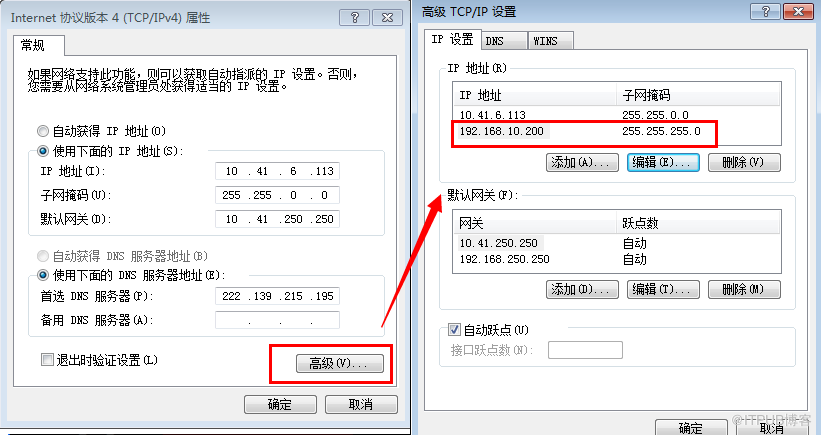
批注:此处设置的第二块网卡应与虚拟机中的网卡在同一个网段,然后虽然实体机的IP和虚拟机不在同一个网段,也能够通过刚刚设置的第二块网卡和之相通。
[oracle@primary ~]$ emca -config dbcontrol db
STARTED EMCA at Jun 17, 2014 8:55:23 AM
EM Configuration Assistant, Version 10.2.0.1.0 Production
Copyright (c) 2003, 2005, Oracle. All rights reserved.
Enter the following information:
Database SID: orcl
Database Control is already configured for the database orcl
You have chosen to configure Database Control for managing the database orcl
This will remove the existing configuration and the default settings and perform a fresh configuration
Do you wish to continue? [yes(Y)/no(N)]: y
Listener port number: 1521
Password for SYS user:
Password for DBSNMP user:
Password for SYSMAN user:
Email address for notifications (optional):
Outgoing Mail (SMTP) server for notifications (optional):
-----------------------------------------------------------------
You have specified the following settings
Database ORACLE_HOME ................ /u01/oracle/db_1
Database hostname ................ primary
Listener port number ................ 1521
Database SID ................ orcl
Email address for notifications ...............
Outgoing Mail (SMTP) server for notifications ...............
-----------------------------------------------------------------
Do you wish to continue? [yes(Y)/no(N)]: y
Jun 17, 2014 8:55:43 AM oracle.sysman.emcp.EMConfig perform
INFO: This operation is being logged at /u01/oracle/db_1/cfgtoollogs/emca/orcl/emca_2014-06-17_08-55-23-AM.log.
Jun 17, 2014 8:55:44 AM oracle.sysman.emcp.DatabaseChecks performReposChecks
WARNING: 'shared_pool_size' must be greater than or equal to 80 MB.
Jun 17, 2014 8:55:46 AM oracle.sysman.emcp.util.DBControlUtil stopOMS
INFO: Stopping Database Control (this may take a while) ...
Jun 17, 2014 8:55:56 AM oracle.sysman.emcp.util.DBControlUtil startOMS
INFO: Starting Database Control (this may take a while) ...
Jun 17, 2014 8:57:33 AM oracle.sysman.emcp.EMDBPostConfig performConfiguration
INFO: Database Control started successfully
Jun 17, 2014 8:57:33 AM oracle.sysman.emcp.EMDBPostConfig performConfiguration
INFO: >>>>>>>>>>> The Database Control URL is http://primary:1158/em <<<<<<<<<<<
Enterprise Manager configuration completed successfully
FINISHED EMCA at Jun 17, 2014 8:57:33 AM
首先在实体机上添加一块网卡:
批注:此处设置的第二块网卡应与虚拟机中的网卡在同一个网段,然后虽然实体机的IP和虚拟机不在同一个网段,也能够通过刚刚设置的第二块网卡和之相通。
[oracle@primary ~]$ emca -config dbcontrol db
STARTED EMCA at Jun 17, 2014 8:55:23 AM
EM Configuration Assistant, Version 10.2.0.1.0 Production
Copyright (c) 2003, 2005, Oracle. All rights reserved.
Enter the following information:
Database SID: orcl
Database Control is already configured for the database orcl
You have chosen to configure Database Control for managing the database orcl
This will remove the existing configuration and the default settings and perform a fresh configuration
Do you wish to continue? [yes(Y)/no(N)]: y
Listener port number: 1521
Password for SYS user:
Password for DBSNMP user:
Password for SYSMAN user:
Email address for notifications (optional):
Outgoing Mail (SMTP) server for notifications (optional):
-----------------------------------------------------------------
You have specified the following settings
Database ORACLE_HOME ................ /u01/oracle/db_1
Database hostname ................ primary
Listener port number ................ 1521
Database SID ................ orcl
Email address for notifications ...............
Outgoing Mail (SMTP) server for notifications ...............
-----------------------------------------------------------------
Do you wish to continue? [yes(Y)/no(N)]: y
Jun 17, 2014 8:55:43 AM oracle.sysman.emcp.EMConfig perform
INFO: This operation is being logged at /u01/oracle/db_1/cfgtoollogs/emca/orcl/emca_2014-06-17_08-55-23-AM.log.
Jun 17, 2014 8:55:44 AM oracle.sysman.emcp.DatabaseChecks performReposChecks
WARNING: 'shared_pool_size' must be greater than or equal to 80 MB.
Jun 17, 2014 8:55:46 AM oracle.sysman.emcp.util.DBControlUtil stopOMS
INFO: Stopping Database Control (this may take a while) ...
Jun 17, 2014 8:55:56 AM oracle.sysman.emcp.util.DBControlUtil startOMS
INFO: Starting Database Control (this may take a while) ...
Jun 17, 2014 8:57:33 AM oracle.sysman.emcp.EMDBPostConfig performConfiguration
INFO: Database Control started successfully
Jun 17, 2014 8:57:33 AM oracle.sysman.emcp.EMDBPostConfig performConfiguration
INFO: >>>>>>>>>>> The Database Control URL is http://primary:1158/em <<<<<<<<<<<
Enterprise Manager configuration completed successfully
FINISHED EMCA at Jun 17, 2014 8:57:33 AM
9.查看em状态emctl status dbconsole
[oracle@primary ~]$ emctl status dbconsole
TZ set to PRC
Oracle Enterprise Manager 10g Database Control Release 10.2.0.1.0
Copyright (c) 1996, 2005 Oracle Corporation. All rights reserved.
http://primary:1158/em/console/aboutApplication
Oracle Enterprise Manager 10g is running.
------------------------------------------------------------------
Logs are generated in directory /u01/oracle/db_1/primary_orcl/sysman/log
[oracle@primary ~]$ emctl status dbconsole
TZ set to PRC
Oracle Enterprise Manager 10g Database Control Release 10.2.0.1.0
Copyright (c) 1996, 2005 Oracle Corporation. All rights reserved.
http://primary:1158/em/console/aboutApplication
Oracle Enterprise Manager 10g is running.
------------------------------------------------------------------
Logs are generated in directory /u01/oracle/db_1/primary_orcl/sysman/log
10.简单测试
测试前的准备工作,如下:
1)检测实体机能否ping通虚拟机(虚拟机能ping通实体机,这个没得说)

2)检测虚拟机中设置的端口能否连接:

出现如下界面表示能够连通:

3)浏览器中输入 http://192.168.10.10:1158/em 测试
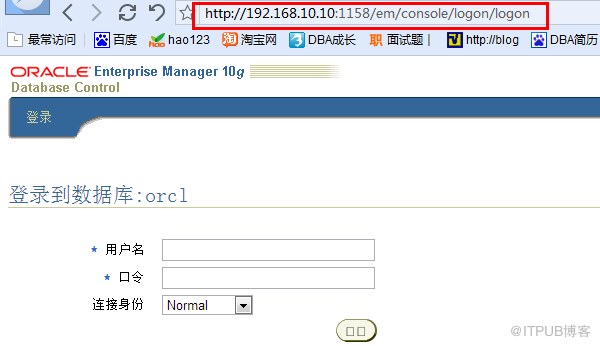
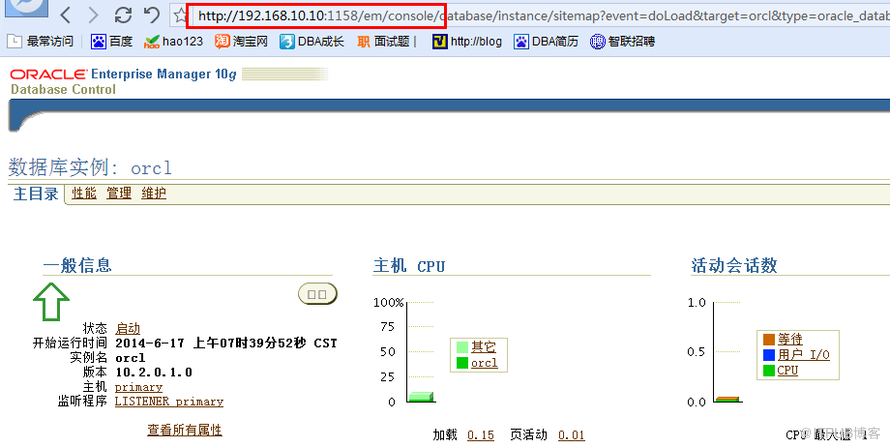
成功登陆之后显示如下界面表示em重置成功:
测试前的准备工作,如下:
1)检测实体机能否ping通虚拟机(虚拟机能ping通实体机,这个没得说)

2)检测虚拟机中设置的端口能否连接:

出现如下界面表示能够连通:

3)浏览器中输入 http://192.168.10.10:1158/em 测试
成功登陆之后显示如下界面表示em重置成功:
来自 “ ITPUB博客 ” ,链接:https://blog.itpub.net/29634949/viewspace-1184425/ ,如需转载,请注明出处,否则将追究法律责任。
下一篇:
Oracle Flashback(一)

请登录后发表评论
登录
全部评论
最新文章
- 手工删除卸载oracle 11g rac的具体步骤(方法)
- 启动数据库至open状态报错:ORA-03113: end-of-file on communication channel
- ORA-19870 ORA-19504 ORA-17502 ORA-15001 ORA-15040
- windows Server 2008管理员密码禁用了怎么处理
- Msg 3702:Cannot drop the database 'gcard' because it is currently in use.
- OVF 部署失败: SHA1 digest of file SLM7-87-disk2.vmdk does not match manifest
- suse linux ssh远程无法访问问题
- VSAN 配置过程中遭遇"滑铁卢"
- Sybase RS 介绍
- Sybase中的APL与DOL表
