iOS 11开发教程(十六)iOS11应用视图之删除空白视图
当开发者不再需要主视图的某一视图时,可以将该视图删除。实现此功能需要使用到removeFromSuperview()方法,其语法形式如下:
要删除的视图对象名.removeFromSuperview()
【示例1-3】以下代码将在主视图中添加两个视图,然后再使用removeFromSuperview()方法删除其中一个视图。代码如下:
import UIKit
class ViewController: UIViewController {
override func viewDidLoad() {
super.viewDidLoad()
// Do any additional setup after loading the view, typically from a nib.
//添加空白视图newView1
let newView1=UIView(frame: CGRect(x: 0, y: 75, width: 375, height: 232))
newView1.backgroundColor=UIColor.cyan
self.view.addSubview(newView1)
//添加空白视图newView2
let newView2=UIView(frame: CGRect(x: 0, y: 352, width: 375, height: 232))
newView2.backgroundColor=UIColor.orange
self.view.addSubview(newView2)
}
……
}
此时运行程序,会看到如图1.54所示的效果。如果想要删除视图对象newView1的话,需要使用removeFromSuperview()方法,代码如下:
newView1.removeFromSuperview() //删除视图对象newView1
运行效果如图1.55所示。
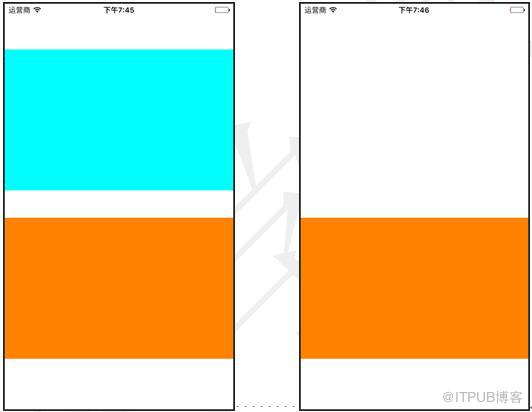
图1.54 运行效果 图1.55 运行效果
来自 “ ITPUB博客 ” ,链接:https://blog.itpub.net/29597077/viewspace-2148580/ ,如需转载,请注明出处,否则将追究法律责任。

