Xamarin XAML语言教程模板视图TemplatedView(二)
(2)打开MainPage.xaml文件,编写代码,将构建的控件模板应用于中TemplatedView。代码如下:
- <?xml version="1.0" encoding="utf-8" ?>
- <ContentPage xmlns="http://xamarin.com/schemas/2014/forms"
- xmlns:x="http://schemas.microsoft.com/winfx/2009/xaml"
- xmlns:local="clr-namespace:TemplatedViewDemo"
- x:Class="TemplatedViewDemo.MainPage">
- <TemplatedView x:Name="templatedView"
- Padding="0,20,0,0"
- ControlTemplate="{StaticResource ChineseTemplate}">
- </TemplatedView>
- </ContentPage>
(3)打开MainPage.xaml.cs文件,编写代码,实现控件模板的切换功能。代码如下:
- using System;
- using System.Collections.Generic;
- using System.Linq;
- using System.Text;
- using System.Threading.Tasks;
- using System.Windows.Input;
- using Xamarin.Forms;
- namespace TemplatedViewDemo
- {
- public partial class MainPage : ContentPage
- {
- ControlTemplate chineseTemplate;
- ControlTemplate englishTemplate;
- public ICommand CommandEnglish { private set; get; }
- public ICommand CommandChinese { private set; get; }
- public MainPage()
- {
- CommandEnglish = new Command(() => OnEnterEnglishTemplate());
- CommandChinese = new Command(() => OnEnterChineseTemplate());
- InitializeComponent();
- chineseTemplate = (ControlTemplate)Application.Current.Resources["ChineseTemplate"];
- englishTemplate = (ControlTemplate)Application.Current.Resources["EnglishTemplate"];
- }
- //设置为EnglishTemplate控件模板
- public void OnEnterEnglishTemplate()
- {
- templatedView.ControlTemplate = englishTemplate;
- }
- //设置为ChineseTemplate控件模板
- public void OnEnterChineseTemplate()
- {
- templatedView.ControlTemplate = chineseTemplate;
- }
- }
- }
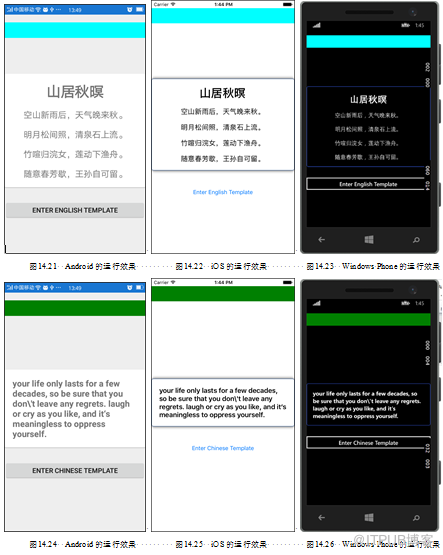
此时运行程序,会看到如图14.21~14.23所示的效果。当开发者轻拍Enter English Template按钮后,会看到如图14.24~14.26所示的效果。当开发者轻拍Enter Chinese Template按钮后,会看到如图14.21~14.23所示的效果。
来自 “ ITPUB博客 ” ,链接:https://blog.itpub.net/29597077/viewspace-2142837/ ,如需转载,请注明出处,否则将追究法律责任。
下一篇:
文件还原工具Foremost

请登录后发表评论
登录
全部评论
