Xamarin XAML语言教程构建ControlTemplate控件模板 (四)
2.在页面级别中构建控件模板
如果开发者要在页面级别中构建控件模板,首先必须将ResourceDictionary添加到页面中,然后在ResourceDictionary中实现模板的构建即可,其语法形式如下:
- <Page>
- <Page.Resources>
- <ResourceDictionary>
- <ControlTemplate x:Key="KeyName">
- ……
- </ControlTemplate>
- </ResourceDictionary>
- </Page.Resources>
- </Page>
其中,Page表示的是页面以及页面的子类。KeyName用来指定一个字典键,此键指代的就是控件模板。
【示例14-4:ControlTemplateContentPage】以下将在内容页面中构建控件模板。代码如下:
- <?xml version="1.0" encoding="utf-8" ?>
- <ContentPage xmlns="http://xamarin.com/schemas/2014/forms"
- xmlns:x="http://schemas.microsoft.com/winfx/2009/xaml"
- xmlns:local="clr-namespace:ControlTemplateContentPage"
- x:Class="ControlTemplateContentPage.MainPage">
- <ContentPage.Resources>
- <ResourceDictionary>
- <!--构建控件模板-->
- <ControlTemplate x:Key="TealTemplate">
- <StackLayout VerticalOptions="CenterAndExpand"
- Spacing="20"
- Padding="20">
- <Entry Placeholder="Username" />
- <Entry Placeholder="Password"
- IsPassword="True"/>
- <Button Text="Click Here To Log In" />
- <ContentPresenter />
- </StackLayout>
- </ControlTemplate>
- </ResourceDictionary>
- </ContentPage.Resources>
- <ContentView x:Name="contentView"
- Padding="0,20,0,0"
- ControlTemplate="{StaticResource TealTemplate}">
- <Frame OutlineColor="Accent">
- <Label Text="请在确认环境安全后,输入账号和对应的密码"
- FontAttributes="Bold"
- FontSize="18"/>
- </Frame>
- </ContentView>
- </ContentPage>
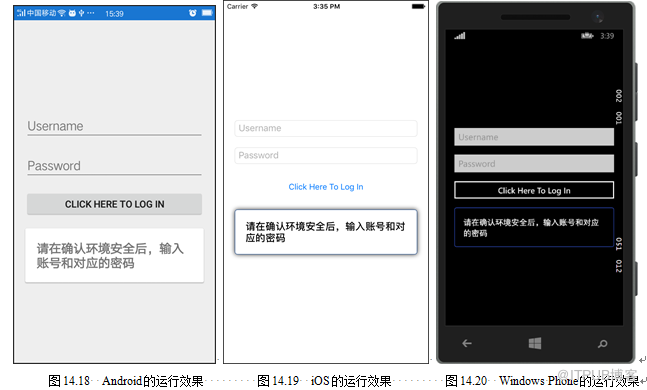
此时运行程序,会看到如图14.18~14.20所示的效果。
来自 “ ITPUB博客 ” ,链接:https://blog.itpub.net/29597077/viewspace-2142271/ ,如需转载,请注明出处,否则将追究法律责任。
上一篇:
Web应用漏洞评估工具Paros
下一篇:
网站模糊测试爆破工具Wfuzz

请登录后发表评论
登录
全部评论
