Xamarin XAML语言教程ContentView视图作为自定义视图的父类
自定义视图的父类:ContentView视图可以作为自定义视图的父类。
【示例14-2】以下将自定义一个颜色视图。具体的操作步骤如下:
(1)创建一个Forms Xaml View文件,命名为ColorView。
(2)打开ColorView.xaml文件,编写代码,构建自定义颜色视图。代码如下:
- <?xml version="1.0" encoding="UTF-8"?>
- <ContentView xmlns="http://xamarin.com/schemas/2014/forms"
- xmlns:x="http://schemas.microsoft.com/winfx/2009/xaml"
- x:Class="ContentViewCustomControls.ColorView">
- <Frame OutlineColor="Accent">
- <StackLayout Orientation="Horizontal">
- <BoxView x:Name="boxView"
- WidthRequest="70"
- HeightRequest="70" />
- <StackLayout>
- <Label x:Name="colorNameLabel"
- FontSize="Large"
- VerticalOptions="CenterAndExpand" />
- <Label x:Name="colorValueLabel"
- VerticalOptions="CenterAndExpand" />
- </StackLayout>
- </StackLayout>
- </Frame>
- </ContentView>
(3)打开ColorView.xaml.cs文件,编写代码,实现一些与颜色视图相关的属性。代码如下:
- using System;
- using System.Collections.Generic;
- using System.Linq;
- using System.Text;
- using System.Threading.Tasks;
- using Xamarin.Forms;
- namespace ContentViewCustomControls
- {
- public partial class ColorView : ContentView
- {
- string colorName;
- ColorTypeConverter colorTypeConv = new ColorTypeConverter();
- public ColorView()
- {
- InitializeComponent();
- }
- //颜色名称
- public string ColorName
- {
- set
- {
- colorName = value;
- colorNameLabel.Text = value;
- Color color = (Color)colorTypeConv.ConvertFromInvariantString(colorName);
- boxView.Color = color;
- colorValueLabel.Text = String.Format("{0:X2}-{1:X2}-{2:X2}",
- (int)(255 * color.R),
- (int)(255 * color.G),
- (int)(255 * color.B));
- }
- get
- {
- return colorName;
- }
- }
- }
- }
(4)打开MainPage.xaml文件,编写代码,通过颜色视图实现对内容页面的布局。代码如下:
- <?xml version="1.0" encoding="utf-8" ?>
- <ContentPage xmlns="http://xamarin.com/schemas/2014/forms"
- xmlns:x="http://schemas.microsoft.com/winfx/2009/xaml"
- xmlns:local="clr-namespace:ContentViewCustomControls"
- x:Class="ContentViewCustomControls.MainPage">
- <ContentPage.Padding>
- <OnPlatform x:TypeArguments="Thickness"
- iOS="0, 20, 0, 0" />
- </ContentPage.Padding>
- <StackLayout Padding="6, 0">
- <local:ColorView ColorName="Aqua" />
- <local:ColorView ColorName="Black" />
- <local:ColorView ColorName="Blue" />
- <local:ColorView ColorName="Fuchsia" />
- <local:ColorView ColorName="Gray" />
- </StackLayout>
- </ContentPage>
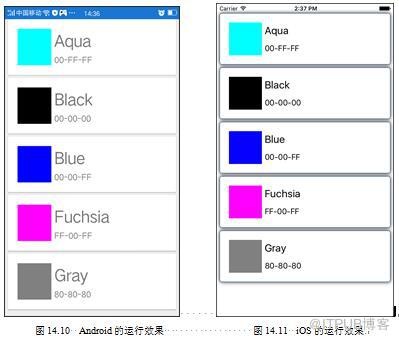
此时运行程序,会看到如图14.10~14.11所示的效果。
(5)构建更复杂的布局模式:在ContentView中可以包含视图,还可以包括布局,从而构建更为复杂的布局模式。
来自 “ ITPUB博客 ” ,链接:https://blog.itpub.net/29597077/viewspace-2141888/ ,如需转载,请注明出处,否则将追究法律责任。

请登录后发表评论
登录
全部评论
