错误 bash: ifconfig: command not found
题外话:问题发生在我使用ifconfig 时报的错误。
1.错误明细
[root@muqx ~]# ifconfig
bash: ifconfig: command not found
2.错误截图

3.错误分析
ifconfig 没有找到
针对错误判断有两个情况:
①没有快捷命令导致
②安装系统时没有安装此命令
4.问题处理
①查看环境变量,一般ifconfig 在/usr/sbin下面,确定文件是否存在
[root@muqx ~]# echo $PATH


查看是否存在对应的文件
[root@muqx ~]# ls /usr/sbin/ifconfig


ls: cannot access /usr/sbin/ifconfig: No such file or directory
确定不存在,需要进行安装。
②查看安装包
[root@muqx ~]# yum search ifconfig


安装包名称:net-tools.x86_64 : Basic networking tools
③进行yum 安装 ifconfig # -y 表示yes
[root@muqx ~]# yum -y install net-tools.x86_64 -y
或者
[root@muqx ~]# yum -y install net-tools.x86_64
出现问题,一直选择y
④ifconfig安装完成,进行验证
[root@muqx ~]# ifconfig

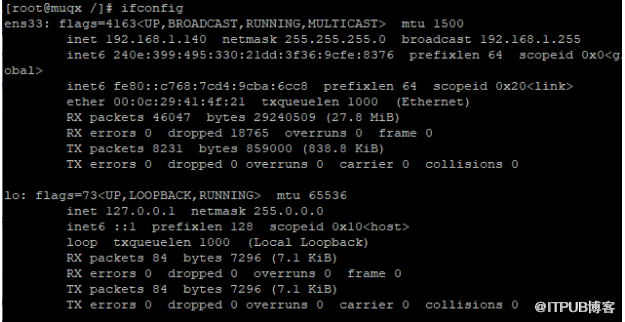
确定存在ifconfig 命令


更改配置文件
[root@muqx /]# vi /etc/profile
i 进入编辑模式,在最后一行添加:
PATH=$PATH:/sbin
export PATH
Esc 退出编辑模式
:wq 保存退出
配置文件生效:
[root@muqx /]# source /etc/profile
游戏是我的全部图景,我将演绎所有的游戏角色,我是每个活着角色的传奇。 --开心研
来自 “ ITPUB博客 ” ,链接:https://blog.itpub.net/29494175/viewspace-2913673/ ,如需转载,请注明出处,否则将追究法律责任。
上一篇:
linux 配置hostname
下一篇:
linux 磁盘分区挂载-fdisk

请登录后发表评论
登录
全部评论
