说明:
Oracle加密技术主要分为两种,一种是使用包DBMS_CRYPTO来加密解密应用数据,另一个是透明加密技术(TDE,Oracle10.2开始)。
前者针对应用程序数据加密,应用程序或者函数的调用者必须提供加密秘钥,支持类型限制较多,对数据库整体性能、数据安全(登录到数据库或者提取数据文件都是查看到相关数据的明文)意义不大。
后者主要针对对象存储在数据文件中的内容加密,或直接表空间加密,应用无需调整,推荐使用表空间透明加密,限制较少。如使用加密技术,需定期备份钱包,避免因外部存储设备损坏造成秘钥丢失,影响数据库数据正常使用。
目前Oracle不支持其他加密算法,对数据库本身性能影响较小、限制较小为表空间的透明加密。
两种加密,具体介绍如下:
DBMS_CRYPTO简单介绍
:
DBMS_CRYPTO
提供用于加密和解密存储的数据的接口,并且可以与运行网络通信的PL / SQL程序结合使用。它支持多种行业标准的加密和哈希算法,包括高级加密标准(AES)加密算法。AES已获得美国国家标准技术研究院(NIST)的批准,以取代数据加密标准(DES)。
支持以下加密算法:
- 数据加密标准(DES),三重DES(3DES,2键和3键)
- 高级加密标准(AES)
- MD5,MD4和SHA-1加密哈希
- MD5和SHA-1消息认证码(MAC)
限制:
该
VARCHAR2
数据类型不直接支持
DBMS_CRYPTO
。在对类型的数据执行加密操作之前
VARCHAR2
,必须将其转换为统一的数据库字符集AL32UTF8,然后将其转换为
RAW
数据类型。完成这些转换后,您可以使用
DBMS_CRYPTO
程序包对其进行加密。
密钥管理是程序化的。也就是说,应用程序(或函数的调用者)必须提供加密密钥。这意味着应用程序开发人员必须找到一种安全地存储和检索密钥的方法。该
DBMS_OBFUSCATION_TOOLKIT
程序包(不推荐使用,替代者是
DBMS_CRYPTO
)可以处理字符串和原始数据,需要提交64位密钥。DES算法本身的有效密钥长度为56位。
举例:
--AES 256数据加密解密
declare
   input_string       VARCHAR2 (200) := 'Secret Message';
   output_string      VARCHAR2 (200);
   encrypted_raw      RAW (2000);             -- stores encrypted binary text
   decrypted_raw      RAW (2000);             -- stores decrypted binary text
   num_key_bytes      NUMBER := 256/8;        -- key length 256 bits (32 bytes)
   key_bytes_raw      RAW (32);               -- stores 256-bit encryption key
   encryption_type    PLS_INTEGER :=          -- total encryption type
                            DBMS_CRYPTO.ENCRYPT_AES256
                          + DBMS_CRYPTO.CHAIN_CBC
                          + DBMS_CRYPTO.PAD_PKCS5;
begin
   DBMS_OUTPUT.PUT_LINE ('Original string: ' || input_string);
   key_bytes_raw := DBMS_CRYPTO.RANDOMBYTES (num_key_bytes);
   encrypted_raw := DBMS_CRYPTO.ENCRYPT
      (
         src => UTL_I18N.STRING_TO_RAW (input_string, 'AL32UTF8'),
         typ => encryption_type,
         key => key_bytes_raw
      );
    -- The encrypted value in the encrypted_raw variable can be used here:
   decrypted_raw := DBMS_CRYPTO.DECRYPT
      (
         src => encrypted_raw,
         typ => encryption_type,
         key => key_bytes_raw
      );
   output_string := UTL_I18N.RAW_TO_CHAR (decrypted_raw, 'AL32UTF8');
   DBMS_OUTPUT.PUT_LINE ('Decrypted string: ' || output_string);
end;
BLOB的数据加密解密。
- 创建一个有BLOB列的表
- 插入raw值
- 加密raw
- 解密数据
- 1. Create a table for BLOB column:
create table table_lob (id number, loc blob);
-- 2. Insert 3 empty lobs for src/enc/dec:
insert into table_lob values (1, EMPTY_BLOB());
insert into table_lob values (2, EMPTY_BLOB());
insert into table_lob values (3, EMPTY_BLOB());
set echo on
set serveroutput on
declare
    srcdata    RAW(1000);
    srcblob    BLOB;
    encrypblob BLOB;
    encrypraw  RAW(1000);
    encrawlen  BINARY_INTEGER;
    decrypblob BLOB;
    decrypraw  RAW(1000);
    decrawlen  BINARY_INTEGER;

    leng       INTEGER;
begin

    -- RAW input data 16 bytes
    srcdata := hextoraw('6D6D6D6D6D6D6D6D6D6D6D6D6D6D6D6D');

    dbms_output.put_line('---');
    dbms_output.put_line('input is ' || srcdata);
    dbms_output.put_line('---');

    -- select empty lob locators for src/enc/dec
    select loc into srcblob from table_lob where id = 1;
    select loc into encrypblob from table_lob where id = 2;
    select loc into decrypblob from table_lob where id = 3;

    dbms_output.put_line('Created Empty LOBS');
    dbms_output.put_line('---');

    leng := DBMS_LOB.GETLENGTH(srcblob);
    IF leng IS NULL THEN
        dbms_output.put_line('Source BLOB Len NULL ');
    ELSE
        dbms_output.put_line('Source BLOB Len ' || leng);
    END IF;

    leng := DBMS_LOB.GETLENGTH(encrypblob);
    IF leng IS NULL THEN
        dbms_output.put_line('Encrypt BLOB Len NULL ');
    ELSE
        dbms_output.put_line('Encrypt BLOB Len ' || leng);
    END IF;

    leng := DBMS_LOB.GETLENGTH(decrypblob);
    IF leng IS NULL THEN
        dbms_output.put_line('Decrypt  BLOB Len NULL ');
    ELSE
        dbms_output.put_line('Decrypt BLOB Len ' || leng);
    END IF;

    -- 3. Write source raw data into blob:
    DBMS_LOB.OPEN (srcblob, DBMS_LOB.lob_readwrite);
    DBMS_LOB.WRITEAPPEND (srcblob, 16, srcdata);
    DBMS_LOB.CLOSE (srcblob);

    dbms_output.put_line('Source raw data written to source blob');
    dbms_output.put_line('---');

    leng := DBMS_LOB.GETLENGTH(srcblob);
    IF leng IS NULL THEN
        dbms_output.put_line('source BLOB Len NULL ');
    ELSE
        dbms_output.put_line('Source BLOB Len ' || leng);
    END IF;

    /*
    * Procedure Encrypt
    * Arguments: srcblob -> Source BLOB
    *            encrypblob -> Output BLOB for encrypted data
    *            DBMS_CRYPTO.AES_CBC_PKCS5 -> Algo : AES
    *                                         Chaining : CBC
    *                                         Padding : PKCS5
    *            256 bit key for AES passed as RAW
    *                ->
    hextoraw('000102030405060708090A0B0C0D0E0F101112131415161718191A1B1C1D1E1F')
    *            IV (Initialization Vector) for AES algo passed as RAW
    *                -> hextoraw('00000000000000000000000000000000')
    */

    DBMS_CRYPTO.Encrypt(encrypblob,
                srcblob,
                DBMS_CRYPTO.AES_CBC_PKCS5,
                hextoraw ('000102030405060708090A0B0C0D0E0F101112131415161718191A1B1C1D1E1F'),
                hextoraw('00000000000000000000000000000000'));


    dbms_output.put_line('Encryption Done');
    dbms_output.put_line('---');

    leng := DBMS_LOB.GETLENGTH(encrypblob);
    IF leng IS NULL THEN
        dbms_output.put_line('Encrypt BLOB Len NULL');
    ELSE
        dbms_output.put_line('Encrypt BLOB Len ' || leng);
    END IF;

    -- 4. Read encrypblob to a raw:
    encrawlen := 999;

    DBMS_LOB.OPEN (encrypblob, DBMS_LOB.lob_readwrite);
    DBMS_LOB.READ (encrypblob, encrawlen, 1, encrypraw);
    DBMS_LOB.CLOSE (encrypblob);

    dbms_output.put_line('Read encrypt blob to a raw');
    dbms_output.put_line('---');

    dbms_output.put_line('Encrypted data is (256 bit key) ' || encrypraw);
    dbms_output.put_line('---');

    /*
    * Procedure Decrypt
    * Arguments: encrypblob -> Encrypted BLOB to decrypt
    *            decrypblob -> Output BLOB for decrypted data in RAW
    *            DBMS_CRYPTO.AES_CBC_PKCS5 -> Algo : AES
    *                                         Chaining : CBC
    *                                         Padding : PKCS5
    *            256 bit key for AES passed as RAW (same as used during Encrypt)
    *                ->
    hextoraw('000102030405060708090A0B0C0D0E0F101112131415161718191A1B1C1D1E1F')
    *            IV (Initialization Vector) for AES algo passed as RAW (same as
                 used during Encrypt)
    *                -> hextoraw('00000000000000000000000000000000')
    */

    DBMS_CRYPTO.Decrypt(decrypblob,
                encrypblob,
                DBMS_CRYPTO.AES_CBC_PKCS5,
                hextoraw
           ('000102030405060708090A0B0C0D0E0F101112131415161718191A1B1C1D1E1F'),
                hextoraw('00000000000000000000000000000000'));

    leng := DBMS_LOB.GETLENGTH(decrypblob);
    IF leng IS NULL THEN
        dbms_output.put_line('Decrypt BLOB Len NULL');
    ELSE
        dbms_output.put_line('Decrypt BLOB Len ' || leng);
    END IF;

    -- Read decrypblob to a raw
    decrawlen := 999;

    DBMS_LOB.OPEN (decrypblob, DBMS_LOB.lob_readwrite);
    DBMS_LOB.READ (decrypblob, decrawlen, 1, decrypraw);
    DBMS_LOB.CLOSE (decrypblob);

    dbms_output.put_line('Decrypted data is (256 bit key) ' || decrypraw);
    dbms_output.put_line('---');

    DBMS_LOB.OPEN (srcblob, DBMS_LOB.lob_readwrite);
    DBMS_LOB.TRIM (srcblob, 0);
    DBMS_LOB.CLOSE (srcblob);

    DBMS_LOB.OPEN (encrypblob, DBMS_LOB.lob_readwrite);
    DBMS_LOB.TRIM (encrypblob, 0);
    DBMS_LOB.CLOSE (encrypblob);

    DBMS_LOB.OPEN (decrypblob, DBMS_LOB.lob_readwrite);
    DBMS_LOB.TRIM (decrypblob, 0);
    DBMS_LOB.CLOSE (decrypblob);

end;
/
truncate table table_lob;
drop table table_lob;
透明加密介绍:
1、概述
透明数据加密(TDE)使您可以加密存储在表和表空间中的敏感数据,例如信用卡号。对有权访问数据的数据库用户或应用程序
透明地解密加密的数据。如果
存储介质
或
数据文件
被盗,TDE有助于保护存储在介质上的数据。
说明:秘钥通过钱包管理,具体说明可参见本文钱包相关说明。加密后,没有钱包,无法直接获取数据文件中的数据。
如果wallet文件丢失,没有办法open钱包,也就是说加密数据无法读取.备份ewallet.p12文件非常重要。
透明数据加密(TDE)具有以下优点:
- 作为安全管理员,您可以确保敏感数据是安全的,以防存储媒体或数据文件被盗。
- 实施TDE可帮助您解决与安全相关的法规遵从性问题。
- 您无需创建触发器或视图即可为授权用户或应用程序解密数据。表中的数据为数据库用户和应用程序透明地解密。
- 数据库用户和应用程序不必知道他们正在访问的数据是以加密形式存储的事实。对数据库用户和应用程序透明地解密数据。
- 无需修改应用程序即可处理加密数据。数据加密和解密由数据库管理。
- 密钥管理操作是自动化的。用户或应用程序不需要管理加密密钥。
2、 透明加密的类型
透明数据加密(TDE)
列加密
使您能够加密存储在选择表列中的敏感数据。TDE
表空间加密
使您可以加密存储在表空间中的所有数据。
TDE列加密和TDE表空间加密都使用基于密钥的两层体系结构。即使检索到加密数据,也无法理解,直到发生授权解密为止,这对于授权访问该表的用户是自动的。
2.1 列加密过程:

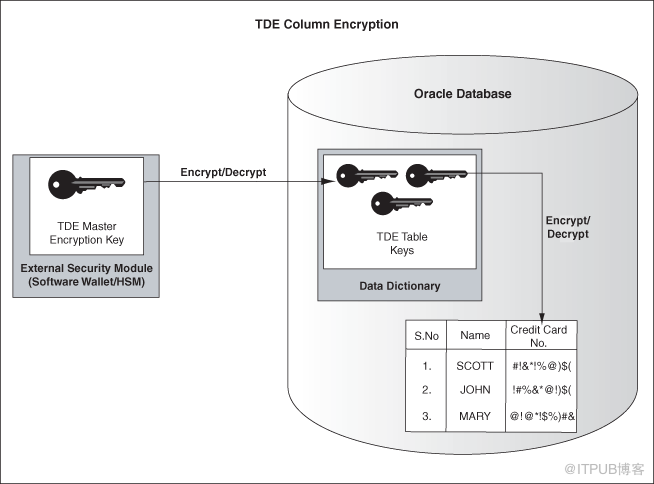
如上图所示,主加密密钥存储在数据库外部的外部安全模块中,并且只能由安全管理员访问。对于此外部安全模块,Oracle使用Oracle钱包或硬件安全模块(HSM),如本章所述。以这种方式存储主加密密钥可以防止未经授权的使用。
使用
外部安全模块
(钱包/ HSM)可以将常规程序功能与加密操作分开,从而可以在数据库管理员和安全管理员之间划分职责。由于数据库管理员可以知道钱包密码,因此需要安全管理员提供密码,从而增强了安全性。
当表包含加密列时,无论加密列的数量如何,都将使用单个表密钥。所有表的表密钥均使用数据库服务器主加密密钥加密,并存储在数据库的字典表中。没有密钥存储在明文中。
- B树以外的索引类型
- 通过索引进行范围扫描搜索
- 外部大对象( BFILE )
- 同步更改数据捕获
- 传输表空间
- 原始导入/导出实用程序
此外,您不能使用TDE列加密来加密外键约束中使用的列。
2.2 表空间加密过程:

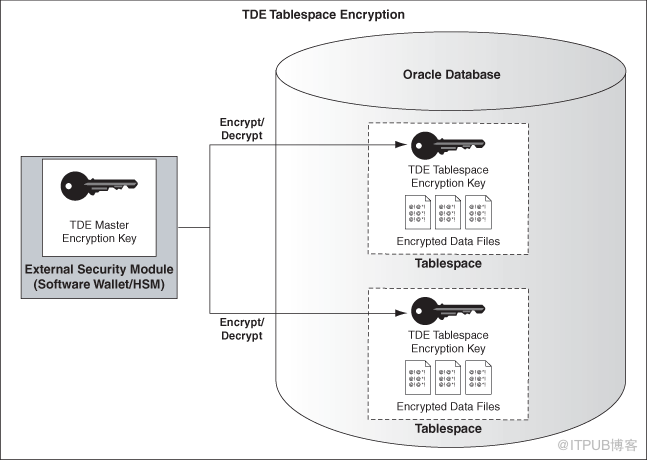
以下列表包括适用于TDE表空间加密的限制:
- BFILE 不能使用TDE表空间加密来加密外部大对象。这是因为这些文件位于数据库外部。
- 要执行导入和导出操作,请使用Oracle Data Pump。
3、步骤及简单说明
--1 使用钱包(wallet)作为外部安全模块,保存主密钥
--oracle建议对TDE使用一个单独的的钱包
--在sqlnet.ora中使用参数 ENCRYPTION_WALLET_LOCATION指定钱包的位置

ENCRYPTION_WALLET_LOCATION= (SOURCE=(METHOD=FILE)(METHOD_DATA=
(DIRECTORY=/u02/app/oracle/product/11.2.0/dbhome_1/wallet)))


--生成主密钥
SQL> ALTER SYSTEM SET ENCRYPTION KEY IDENTIFIED BY "oracle123";

--打开关闭钱包
SQL> ALTER SYSTEM SET ENCRYPTION WALLET OPEN IDENTIFIED BY "oracle123";
SQL> ALTER SYSTEM SET ENCRYPTION WALLET CLOSE IDENTIFIED BY "oracle123";

V$ENCRYPTION_WALLET displays information on the status of the wallet and the wallet location for TDE

--重置主密钥
ALTER SYSTEM SET ENCRYPTION KEY IDENTIFIED BY "oracle321";

--数据库只有读取钱包中的主密钥才能加密解密数据
默认情况下,TDE 使用具有192位密钥长度 (AES192) 的 AES 加密算法。可以指定非默认加密算法
默认情况下,TDE使用salt选项,加密之前将随机码添加到明文,这样很难破解加密。可以使用no salt取消随机码添加
默认情况下,TDE使用SHA-1完整性算法生成Authentication Code (MAC),做完整性检查。可以使用nomac取消完整性检查,
这样会提高性能节省存储空间。

--注意:可以将钱包配置为autologin方式

--2 列加密

--启用列加密
CREATE TABLE em (
     first_name VARCHAR2(128),
     last_name VARCHAR2(128),
     empid NUMBER,
     salary NUMBER(6) ENCRYPT
);
--使用非默认加密算法
CREATE TABLE emp (
     first_name VARCHAR2(128),
     last_name VARCHAR2(128),
     empid NUMBER,
     salary NUMBER(6) ENCRYPT USING '3DES168' NO SALT
);

SQL> ALTER TABLE emp MODIFY (first_name ENCRYPT);

--注意:在加密列上创建索引,加密列不能使用salt方式
SQL> ALTER TABLE employee MODIFY (first_name ENCRYPT NO SALT);
create index first_name_indx on emp (first_name);

--取消列加密
SQL> ALTER TABLE employee MODIFY (first_name DECRYPT);

--3 表空间加密

--启用表空间加密

CREATE TABLESPACE securespace2
DATAFILE '/u02/app/oracle/secure01.dbf'
SIZE 10M
ENCRYPTION
DEFAULT STORAGE(ENCRYPT);

--DBA_TABLESPACES: The ENCRYPTED column indicates whether a tablespace is encrypted--
--USER_TABLESPACES: The ENCRYPTED column indicates whether a tablespace is encrypted
 --注意:You cannot access any encrypted data without the master encryption key

--》管理TDE
1 启用AUTO LOGIN wallet

--2 备份和管理主密钥
--如果没有主密钥是不能访问加密数据的,主密钥存储在wallet中,需要对wallet做备份
--当产生新的主密钥时必须备份wallet
--备份时不应同时备份加密数据和钱包wallet,应单独备份wallet,以防止恶意用户同时获取加密数据和wallet钱包

--rman不会备份wallet
--rman如果使用了Oracle Secure Backup OSB(如带库)会自动排除auto login wallet(cwallet.sso),
但不会排除普通的wallet(ewallet.p12 ),所以使用此备份方式,建议添加以下语句排除wallet
exclude name *.p12

--如果存储主密钥的wallet丢失或损坏,将备份版本拷贝至适当位置即可恢复
--1 如果备份版本是上次重置主密钥之后版本,无需任何操作
--2 如果备份版本是上次重置主密钥之前版本,即不包含最新主密钥,则需要将数据库恢复至重置主密钥之前时间点。
之后的数据将丢失。
================================ --》其他加密
--加密数据无法使用exp/imp工具移动,只能使用datapump移动数据,
--导出TDE加密 数据时,必须打开钱包wallet,因为数据需要主密钥解密

--使用数据泵datapump或恢复管理器rman移动数据时,如果使用TDE加密功能,需要wallet。
也可以使用工具自带的加密功能单独加密数据。


--数据泵(datapump)加密

--1 涉及TDE数据时,需要wallet钱包打开,只适合本机原地操作。

--导出数据后,数据以非加密的形式存储在转储文件集中
expdp hr/hr TABLES=emp DIRECTORY=DATA_PUMP_DIR DUMPFILE=emp.dmp logfile=emp.expdp
ORA-39173: Encrypted data has been stored unencrypted in dump file set.
ALTER SYSTEM SET ENCRYPTION WALLET CLOSE IDENTIFIED BY "oracle123";
impdp \'/ as sysdba\' DIRECTORY=DATA_PUMP_DIR DUMPFILE=emp.dmp logfile=emp.impdp remap_schema=hr:test

--如果想转储文件集也加密,可以单独指定以下参数(TDE数据解密后再加密)
ENCRYPTION_PASSWORD
ENCRYPTION = [ALL | DATA_ONLY | ENCRYPTED_COLUMNS_ONLY | METADATA_ONLY | NONE]
ALL enables encryption for all data and metadata in the export operation.
DATA_ONLY specifies that only data is written to the dump file set in encrypted format.
ENCRYPTED_COLUMNS_ONLY specifies that only encrypted columns are written to the dump file set in
encrypted format. To use this option, you must have Oracle Advanced Security transparent data
encryption enabled. See Oracle Database Advanced Security Administrator's Guide for more
information about transparent data encryption.
METADATA_ONLY specifies that only metadata is written to the dump file set in encrypted format.
NONE specifies that no data is written to the dump file set in encrypted format.

ENCRYPTION不指定默认为all

--2 不涉及TDE数据时,不需要wallet钱包,可单独加密转储文件集。适用于所有场景

expdp hr/hr TABLES=employees DIRECTORY=DATA_PUMP_DIR DUMPFILE=employees.dmp logfile=employees.expdp
encryption_password=oracle
impdp \'/ as sysdba\' DIRECTORY=DATA_PUMP_DIR DUMPFILE=employees.dmp logfile=employees.impdp
 remap_schema=hr:test
ORA-39174: Encryption password must be supplied.
encryption_password=oracle

--RMAN备份加密
--1 使用TDE,适合本机原地操作

--1)创建钱包(已创建)
--2)打开钱包
SQL> alter system set encryption wallet open identified by oracle;
--3)开启RMAN加密功能
RMAN> configure encryption for database on;
--4)备份与恢复命令不会发生更改,需要打开钱包
--5)通过命令可以暂时覆盖永久配置
RMAN> set encryption off;


--2 口令模式设置(不需要钱包),使用与所有场景

RMAN> set encryption on identified by admin only;
RMAN> backup datafile 4;
RMAN> set decryption identified by admin;    --还原时必须解密
RMAN> restore datafile 4;

--3 如果创建了钱包,可以使用双重模式
SQL> alter system set encryption wallet open identified by oracle;
RMAN> set encryption on identified by oracle;
RMAN> backup datafile 4;
SQL> alter system set encryption wallet close;   --关闭钱包
RMAN> set decryption identified by oracle;    --钱包、口令任选一个
SQL> alter system set encryption wallet open identified by oracle;
RMAN> restore datafile 4;
RMAN> recover datafile 4;
RMAN> alter database open;

--改变rman加密算法
SQL> select algorithm_name from v$rman_encryption_algorithms;
RMAN> configure encryption algorithm 'AES192';
RMAN> set encryption algorithm 'AES256';

--relate view
--在dba_tablespaces会添加新列encrypted让你查看状态
v$encryption_wallet
v$encrypted_tablespaces
钱包管理说明:
Oracle钱包管理器(Wallet Manager),管理客户端或服务器上公共密钥(public key )的安全认证。数据库可以读取钱包中的密钥。
Oracle钱包(wallet)是一个可以存储认证和证书的安全软件,Oracle钱包(wallet)也可作为安全的外部密码存储区,使用此特性后,应用程序,脚本等都不需要写出用户名密码即可连接数据库。降低了密码泄露的风险。
Wallet 可以使用Oracle Wallet Manger工具来创建,也可以使用orapki 命令来创建,也可以使用SQL 语句来创建。这里最方便的是使用SQL语句。
-- 在sqlnet.ora 文件里添加: ENCRYPTION_WALLET_LOCATION 和WALLET_LOCATION参数。
 默认位置是:$ORACLE_BASE/admin/$ORACLE_SID/wallet。
--指定ORACLE WALLET的位置,这里使用ORACLE_HOME/network/admin,在sqlnet.ora里添加如下内容:
WALLET_LOCATION =
  (SOURCE =
    (METHOD = FILE)
    (METHOD_DATA =
      (DIRECTORY= /u01/app/oracle/product/11.2.0/db_1/network/admin)
    )
   )
ENCRYPTION_WALLET_LOCATION =
  (SOURCE =
   (METHOD = FILE)
    (METHOD_DATA =
      (DIRECTORY= /u01/app/oracle/admin/dave/wallet)
    )
   )

SQLNET.WALLET_OVERRIDE = TRUE
SSL_CLIENT_AUTHENTICATION = FALSE
SSL_VERSION = 0
--添加完之后,重启listener,使参数生效。
--创建wallet:包括设置密码、生成信任文件、并启动wallet
CONN / AS SYSDBA
-- 10g version
ALTER SYSTEM SET ENCRYPTIONKEYAUTHENTICATED BY "myPassword";
-- 11g version
ALTER SYSTEM SET ENCRYPTIONKEYIDENTIFIED BY "myPassword";
当实例重启后或者wallet被关闭后,必须重新open wallets,这样才能保护被加密的列.
而在Openwallet之前,数据库必须处于mount 状态。
SQL>STARTUP MOUNT;
SQL> ALTERSYSTEM SET ENCRYPTION WALLET OPEN IDENTIFIED BY "myPassword";
SQL>ALTER DATABASE OPEN;
-- 10g version
ALTER SYSTEM SET ENCRYPTION WALLET OPEN AUTHENTICATEDBY "myPassword";
-- 11g version
ALTER SYSTEM SET ENCRYPTION WALLET OPEN IDENTIFIEDBY "myPassword";
--关闭Wallet:
ALTER SYSTEM SET ENCRYPTIONWALLET CLOSE IDENTIFIED BY "myPassword";
--使用SQL 创建的wallet 的问题是不能自动登陆,这样我们在关闭wallet或者重启实例后,
都需要手动的来open wallet。 这样有点麻烦,Oracle 提供了wallet 自动登陆功能,可以在创建wallet指定该属性,
也可以在创建后使用owm(Oracle wallet manager)来修改。
--也可使用orapki,显示
orapki wallet display -wallet  /u01/app/oracle/admin/dave/encryption_wallet
--修改密码
orapki wallet change_pwd -wallet wallet_location[-oldpwd password ] [-newpwd password]
--创建自动登录
orapki wallet create -wallet wallet_location -auto_login_only
相关试图:
V$ENCRYPTION_WALLET
v$wallet
dba_encrypted_columns
参考:
来自 “ ITPUB博客 ” ,链接:https://blog.itpub.net/29487349/viewspace-2697013/ ,如需转载,请注明出处,否则将追究法律责任。

请登录后发表评论
登录
全部评论
最新文章
- 【RESIZE】Oracle收缩表空间主要命令
- 【AUDIT]Oracle审计配置及常用sql
- 【MEMORY】Oracle内存结构资源常用视图及sql
- 【ORA-】ORA-12547: TNS:lost contact错误的跟踪分析
- 【NUMBER】Oracle数据库优化之理解NUMBER存储机制
- 【STAT】函数索引和使用表达式统计信息有什么不同
- 【SQL】Oracle数据库sql优化小技巧索引不管用怎么办01
- 【AWR】DBA_HIST视图查看存储在AWR中的历史数据
- 【SQL】Oracle 19c SQL隔离详解(SQL Quarantine)
- 【小惊喜】总算一个小惊喜,Oracle ACEA
