【Oracle】RHEL6.4-64位 安装oracle11.2.0.3(一) 软、硬件需求检查
RHEL6.4-64位 安装oracle11.2.0.3(一)
软、硬件需求检查
数据库: Oracle 11.2.0.3 64位
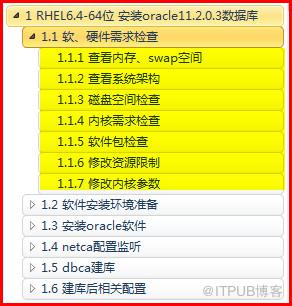
1.1 软、硬件需求检查
1.1.1 查看内存、swap空间
查看物理内存
[root@rhel64 ~]# free -m

查看操作系统共享内存,oracle数据库使用内存要小于此值
[root@rhel64 ~]# df -h /dev/shm/

调整方法:修改/etc/fstab
[root@rhel64 ~]# vi /etc/fstab 修改对应/dev/shm 项 defaults,size=1500M
[root@rhel64 ~]# cat /etc/fstab | grep shm

[root@rhel64 ~]# mount -o remount /dev/shm
[root@rhel64 ~]# df -h /dev/shm

1.1.2 查看系统架构
[root@rhel64 ~]# uname -m

1.1.3 磁盘空间检查
/tmp空间 >1G
[root@rhel64 ~]# df -h /tmp/

软件安装目录空间
[root@rhel64 ~]# df -h /u01/

软件存放目录空间 >2.5G (不安装grid)
[root@rhel64 ~]# df -h /software/

图形界面显示分辨率 1024*768 以上
1.1.4 内核需求检查
查看操作系统版本
[root@rhel64 ~]# cat /proc/version
[root@rhel64 ~]# lsb_release -id

内核需求:
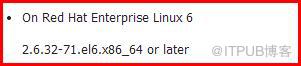
[root@rhel64 ~]# uname -r

1.1.5 软件包检查
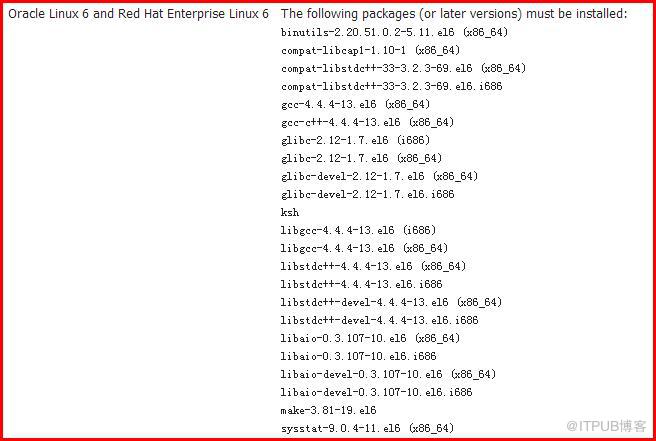
[root@rhel64 ~]# yum install binutils*
[root@rhel64 ~]# yum install compat*
[root@rhel64 ~]# yum install glibc*
[root@rhel64 ~]# yum install ksh*
[root@rhel64 ~]# yum install libgcc*
[root@rhel64 ~]# yum install libstdc*
[root@rhel64 ~]# yum install libaio*
[root@rhel64 ~]# yum install make*
[root@rhel64 ~]# yum install sysstat*
可以提前检查 也可以安装报错缺少包时再yum安装具体包

[root@rhel64 ~]# yum install unixODBC*
1.1.6 修改资源限制
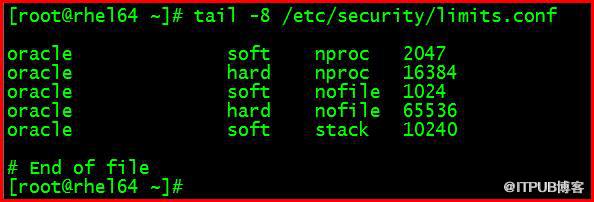
[root@rhel64 ~]# cp /etc/security/limits.conf /etc/security/limits.conf.bak
[root@rhel64 ~]# vi /etc/security/limits.conf
oracle soft nproc 2047
oracle hard nproc 16384
oracle soft nofile 1024
oracle hard nofile 65536
oracle soft stack 10240
[root@rhel64 ~]# tail -8 /etc/security/limits.conf
1.1.7 修改内核参数
建议编辑前给虚拟机做快照备份!!
[root@rhel64 ~]# cp /etc/sysctl.conf /etc/sysctl.conf.bak
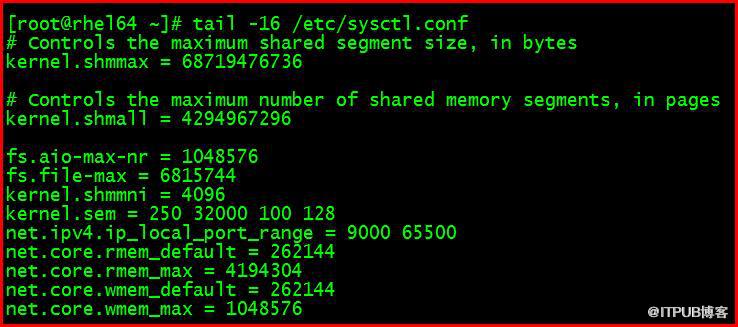
[root@rhel64 ~]# vi /etc/sysctl.conf
fs.aio-max-nr = 1048576
fs.file-max = 6815744
kernel.shmmni = 4096
kernel.sem = 250 32000 100 128
net.ipv4.ip_local_port_range = 9000 65500
net.core.rmem_default = 262144
net.core.rmem_max = 4194304
net.core.wmem_default = 262144
net.core.wmem_max = 1048576
[root@rhel64 ~]# tail -16 /etc/sysctl.conf
重启,验证
[root@rhel64 ~]# reboot
吕星昊
2015.12.22
来自 “ ITPUB博客 ” ,链接:https://blog.itpub.net/29475508/viewspace-1876930/ ,如需转载,请注明出处,否则将追究法律责任。

最新文章
- 【OCM】Oracle 12C OCMU 12c OCM升级考试大纲
- 【OGG】Oracle GoldenGate 11g (二) GoldenGate 11g 单向同步配置 下
- 【OGG】Oracle GoldenGate 11g (二) GoldenGate 11g 单向同步配置 上
- 【OGG】Oracle GoldenGate 11g (一) 安装GoldenGate 11g on Linux
- 【Linux】Linux操作系统 virtualbox虚拟机挂载光驱iso镜像文件安装oracle数据库软件
- 【Oracle】Windows安装oracle11gR1 database 11.1.0.6
- 【Linux】Linux网络配置基础4 RHEL6 操作系统更换网卡
- 【Oracle】Linux7安装11g Error in invoking target 'agent nmhs' of makefile
- 【Linux】Linux7服务管理 OracleLinux7 关闭、禁用防火墙服务
- 【Linux】Virtualbox 安装 Oracle Linux 7 -64位
