【DataGuard】Oracle 11g DataGuard 新特性之 Active Standby:Real-Time Apply+Query
在oracle 11g之前的版本。 物理备库处于日志应用状态时,是无法从备库读取数据的。如果想开库,需停止日志应用,备库可以开到read only状态。
如果物理备库从read only状态回到日志应用状态,要先关掉物理备库,再将库启到mount状态,最后重新应用日志。
这样要从备库读数据,日志应用就必须停掉。无法实现边应用日志、边读取数据。
11g 可以使用active standby,实现日志应用和查询同时进行。即Real-Time Apply + Real-Time Query.
【实验环境】
Red Hat Enterprise Linux Server release 5.4
Oracle Database 11g Enterprise Edition Release 11.2.0.3.0
【DG主库、物理备库结构信息】

【实验过程】
主库 Primary database:绿色
物理备库 Physical standby database:黄色
一、物理备库应用日志
查看角色、状态和保护模式
select database_role,open_mode from v$database;
主库处于read write状态,备库处于mounted状态


物理备库
应用日志
alter database recover managed standby database disconnect;

二、物理备库开库
物理备库在处于日志应用状态时,是无法开库进行数据查询的。直接尝试开库会报错。
直接尝试open备库报错
select instance_name,status from v$instance;
alter database open;
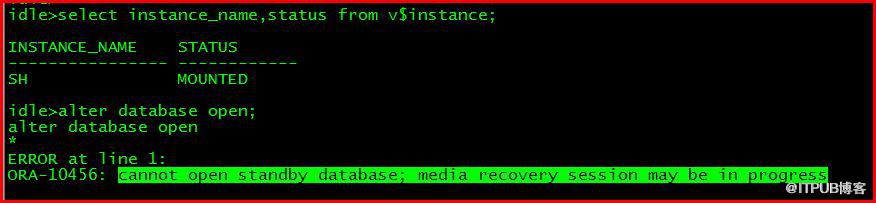
模拟生产环境中需要做报表,要查询物理备库数据。
物理备库取消日志应用:
alter database recover managed standby database cancel;
物理备库开库(read only)
alter database open;
select database_role,open_mode from v$database;

此时备库处于Read Only状态,可以进行数据查询,但无法应用日志。
如果物理备库从read only状态回到日志应用工状态,要先关掉物理备库,再将库启到mount状态,最后重新应用日志。
shutdown immediate;
mount startup mount;
alter database recover managed standby database disconnect from session;
这种日志应用方式无法实现备库上日志应用和数据查询同时进行。
如果想实现Active Standby,即日志实时应用 同时备库可以进行数据查询,备库上需使用Real-Time Apply来应用日志。
【Oracle官方文档中对Real-Time Apply介绍】
If the real-time apply feature is enabled, apply services can apply redo data as it is received, without waiting for the current standby redo log file to be archived. This results in faster switchover and failover times because the standby redo log files have been applied already to the standby database by the time the failover or switchover begins.
Use the ALTER DATABASE statement to enable the real-time apply feature, as follows:
-
For physical standby databases, issue the ALTER DATABASE RECOVER MANAGED STANDBY DATABASE USING CURRENT LOGFILE statement.
-
For logical standby databases, issue the ALTER DATABASE START LOGICAL STANDBY APPLY IMMEDIATE statement.
Real-time apply requires a standby database that is configured with a standby redo log and that is in ARCHIVELOG mode.
Figure 7-1 shows a Data Guard configuration with a local destination and a standby destination. As the remote file server (RFS) process writes the redo data to standby redo log files on the standby database, apply services can recover redo from standby redo log files as they are being filled.

三、物理备库Real-Time Apply 应用日志
1、主库日志传输方式
如果要实现真正的日志实时应用、数据实时查询,日志的远程传输方式必须是LGWR、SYNC、AFFIRM

2、备库添加standby日志组
先查看当前日志组数量和位置
select sequence#,group#,bytes/1024/1024 MB from v$log;

select member from v$logfile;
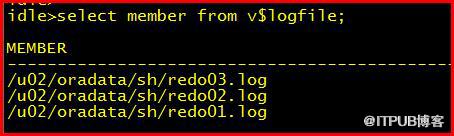
alter database add standby logfile group 4 '/u02/oradata/sh/redo04.std' size 50m;
alter database add standby logfile group 5 '/u02/oradata/sh/redo05.std' size 50m;
alter database add standby logfile group 6 '/u02/oradata/sh/redo06.std' size 50m;
alter database add standby logfile group 7 '/u02/oradata/sh/redo07.std' size 50m;


3、备库Real-Time Apply应用日志
alter database recover managed standby database using current logfile disconnect;
select database_role,open_mode from v$database;

【实验结论】
通过在物理备库添加standby日志组,设置主库远端归档传输方式为LGWR、SYNC、AFFIRM并在备库上使用Real-Time Apply 应用日志,实现备库Read Only With Apply状态开库。即在日志应用过程中,同时只读方式开库来读取数据。
实现了DataGuard物理备库的日志应用和数据读取的同时进行。
来自 “ ITPUB博客 ” ,链接:https://blog.itpub.net/29475508/viewspace-1244579/ ,如需转载,请注明出处,否则将追究法律责任。

最新文章
- 【OCM】Oracle 12C OCMU 12c OCM升级考试大纲
- 【OGG】Oracle GoldenGate 11g (二) GoldenGate 11g 单向同步配置 下
- 【OGG】Oracle GoldenGate 11g (二) GoldenGate 11g 单向同步配置 上
- 【OGG】Oracle GoldenGate 11g (一) 安装GoldenGate 11g on Linux
- 【Linux】Linux操作系统 virtualbox虚拟机挂载光驱iso镜像文件安装oracle数据库软件
- 【Oracle】Windows安装oracle11gR1 database 11.1.0.6
- 【Linux】Linux网络配置基础4 RHEL6 操作系统更换网卡
- 【Oracle】Linux7安装11g Error in invoking target 'agent nmhs' of makefile
- 【Linux】Linux7服务管理 OracleLinux7 关闭、禁用防火墙服务
- 【Linux】Virtualbox 安装 Oracle Linux 7 -64位
