通过 rman duplicate 配置Oracle 11g Active Dataguard
- [oracle@dg1 ~]$ cat $TNS_ADMIN/listener.ora
- SID_LIST_LISTENER =
- (SID_LIST =
- (SID_DESC =
- (GLOBAL_DBNAME = dg1.yang.com)
- (ORACLE_HOME = /u01/app/oracle/product/11.2.0/db1)
- (SID_NAME = dg)
- )
- )
- LISTENER =
- (DESCRIPTION_LIST =
- (DESCRIPTION =
- (ADDRESS_LIST =
- (ADDRESS = (PROTOCOL = TCP)(HOST = dg1.yang.com)(PORT = 1521))
- )
- )
- )
- [oracle@dg1 ~]$ cat $TNS_ADMIN/tnsnames.ora
- dg1 =
- (DESCRIPTION =
- (ADDRESS = (PROTOCOL = TCP)(HOST = 192.168.1.61)(PORT = 1521))
- (CONNECT_DATA =
- (SERVER = DEDICATED)
- (SERVICE_NAME = dg1.yang.com)
- )
- )
- dg2 =
- (DESCRIPTION =
- (ADDRESS = (PROTOCOL = TCP)(HOST = 192.168.1.62)(PORT = 1521))
- (CONNECT_DATA =
- (SERVER = DEDICATED)
- (SERVICE_NAME = dg2.yang.com)
- )
- )
- for_db =
- (DESCRIPTION =
- (ADDRESS = (PROTOCOL = TCP)(HOST = 192.168.1.61)(PORT = 1521))
- )
- SQL> alter database force logging;
- Database altered.
- SQL> alter system set db_unique_name='dg1' scope=spfile;
- System altered.
- SQL> alter system set log_archive_config='DG_CONFIG=(dg1,dg2)';
- System altered.
- SQL> alter system set log_archive_dest_1='LOCATION=/u01/app/oracle/archivelog valid_for=
- (all_logfiles,primary_role) db_unique_name=dg1' scope=spfile;
- System altered.
- SQL> alter system set log_archive_dest_2='SERVICE=dg2 lgwr sync valid_for=(online_logfile,primary_role)
- db_unique_name=dg2';
- System altered.
- SQL> alter system set log_archive_dest_3='LOCATION=/u01/app/oracle/standbylog valid_for=
- (standby_logfile,standby_role) db_unique_name=dg1' scope=spfile;
- System altered.
- SQL> alter system set fal_client='dg1';
- System altered.
- SQL> alter system set fal_server='dg2';
- System altered.
- SQL> alter system set standby_file_management=auto;
- System altered.
- SQL> alter database add standby logfile group 4 '/u01/app/oracle/oradata/dg/standby04.log' size 50M;
- Database altered.
- SQL> alter database add standby logfile group 5 '/u01/app/oracle/oradata/dg/standby05.log' size 50M;
- Database altered.
- SQL> alter database add standby logfile group 6 '/u01/app/oracle/oradata/dg/standby06.log' size 50M;
- Database altered.
- SQL> alter database add standby logfile group 7 '/u01/app/oracle/oradata/dg/standby07.log' size 50M;
- Database altered.
- SQL> shutdown immediate
- Database closed.
- Database dismounted.
- ORACLE instance shut down.
- SQL> startup
- ORACLE instance started.
- Total System Global Area 417546240 bytes
- Fixed Size 2228944 bytes
- Variable Size 285216048 bytes
- Database Buffers 121634816 bytes
- Redo Buffers 8466432 bytes
- Database mounted.
- Database opened.
- SQL> alter system set local_listener='for_db';
- System altered.
- SQL> create pfile='/home/oracle/initdg.ora' from spfile;
- File created.
- [oracle@dg2 ~]$ lsnrctl start
- [oracle@dg2 ~]$ orapwd file=$ORACLE_HOME/dbs/orapwdg password=123456 entries=5
- [oracle@dg2 ~]$ sqlplus /nolog
- SQL*Plus: Release 11.2.0.3.0 Production on Sun Apr 22 13:36:53 2012
- Copyright (c) 1982, 2011, Oracle. All rights reserved.
- SQL> conn /as sysdba
- Connected to an idle instance.
- SQL> create spfile from pfile='/home/oracle/initdg.ora';
- File created.
- SQL> startup nomount
- ORACLE instance started.
- Total System Global Area 417546240 bytes
- Fixed Size 2228944 bytes
- Variable Size 285216048 bytes
- Database Buffers 121634816 bytes
- Redo Buffers 8466432 bytes
- [oracle@dg2 ~]$ sqlplus /nolog
- SQL*Plus: Release 11.2.0.3.0 Production on Sun Apr 22 13:47:17 2012
- Copyright (c) 1982, 2011, Oracle. All rights reserved.
- SQL> conn /as sysdba
- Connected.
- SQL> select open_mode,database_role,db_unique_name from v$database;
- OPEN_MODE DATABASE_ROLE DB_UNIQUE_NAME
- -------------------- ---------------- ------------------------------
- MOUNTED PHYSICAL STANDBY dg2
- SQL> alter database open;
- Database altered.
- SQL> alter database recover managed standby database using current logfile disconnect from session;
- Database altered.
- SQL> select open_mode,database_role,db_unique_name from v$database;
- OPEN_MODE DATABASE_ROLE DB_UNIQUE_NAME
- -------------------- ---------------- ------------------------------
- READ ONLY WITH APPLY PHYSICAL STANDBY dg2
- SQL> select status from v$standby_log;
- STATUS
- ----------
- ACTIVE
- UNASSIGNED
- UNASSIGNED
- UNASSIGNED
- SQL> select member from v$logfile;
- MEMBER
- --------------------------------------------------------------------------------
- /u01/app/oracle/fast_recovery_area/DG2/onlinelog/o1_mf_3_7s76qbhq_.log
- /u01/app/oracle/fast_recovery_area/DG2/onlinelog/o1_mf_2_7s76q94s_.log
- /u01/app/oracle/fast_recovery_area/DG2/onlinelog/o1_mf_1_7s76q5w1_.log
- /u01/app/oracle/fast_recovery_area/DG2/onlinelog/o1_mf_4_7s76qdpk_.log
- /u01/app/oracle/fast_recovery_area/DG2/onlinelog/o1_mf_5_7s76qhmy_.log
- /u01/app/oracle/fast_recovery_area/DG2/onlinelog/o1_mf_6_7s76qlhz_.log
- /u01/app/oracle/fast_recovery_area/DG2/onlinelog/o1_mf_7_7s76qp99_.log
- 7 rows selected.
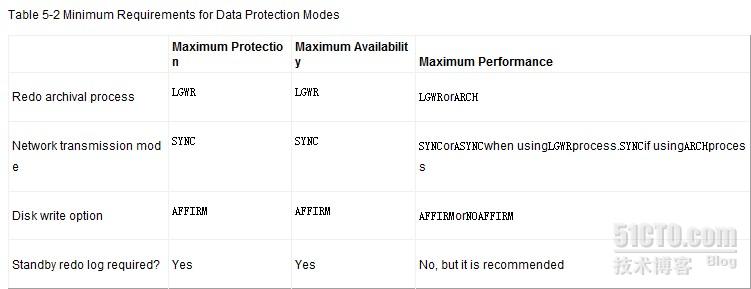
- SQL> select db_unique_name,protection_mode,protection_level from v$database;
- DB_UNIQUE_NAME PROTECTION_MODE PROTECTION_LEVEL
- ------------------------------ -------------------- --------------------
- dg2 MAXIMUM PERFORMANCE MAXIMUM PERFORMANCE
- SQL> select db_unique_name,protection_mode,protection_level from v$database;
- DB_UNIQUE_NAME PROTECTION_MODE PROTECTION_LEVEL
- ------------------------------ -------------------- --------------------
- dg1 MAXIMUM PERFORMANCE MAXIMUM PERFORMANCE
- SQL> alter database set standby database to maximize availability;
- Database altered.
- SQL> select db_unique_name,protection_mode,protection_level from v$database;
- DB_UNIQUE_NAME PROTECTION_MODE PROTECTION_LEVEL
- ------------------------------ -------------------- --------------------
- dg1 MAXIMUM AVAILABILITY MAXIMUM AVAILABILITY
- SQL> select db_unique_name,protection_mode,protection_level from v$database;
- DB_UNIQUE_NAME PROTECTION_MODE PROTECTION_LEVEL
- ------------------------------ -------------------- --------------------
- dg2 MAXIMUM AVAILABILITY MAXIMUM AVAILABILITY
- 将备库shutdown后,主库的PROTECTION_LEVEL将变为RESYNCHRONIZATION
- SQL> select db_unique_name,protection_mode,protection_level from v$database;
- DB_UNIQUE_NAME PROTECTION_MODE PROTECTION_LEVEL
- ------------------------------ -------------------- --------------------
- dg2 MAXIMUM AVAILABILITY MAXIMUM AVAILABILITY
- SQL> alter database recover managed standby database cancel;
- Database altered.
- SQL> shutdown immediate
- Database closed.
- Database dismounted.
- ORACLE instance shut down.
- SQL> select db_unique_name,protection_mode,protection_level from v$database;
- DB_UNIQUE_NAME PROTECTION_MODE PROTECTION_LEVEL
- ------------------------------ -------------------- --------------------
- dg1 MAXIMUM AVAILABILITY RESYNCHRONIZATION
来自 “ ITPUB博客 ” ,链接:https://blog.itpub.net/29440247/viewspace-1378805/ ,如需转载,请注明出处,否则将追究法律责任。

请登录后发表评论
登录
全部评论
最新文章
- 【转】一份高级技术支持笔试题(主要是Oracle和Unix,含参考答案)
- Oracle11gR2 性能KPI 定义规则
- 通过修改log_archive_dest_state_n参数的状态来控制主库的日志文件传输
- 【DATAGUARD】手工恢复备库日志中断
- 我对Load Balancing Advisory的理解
- oracle has a disk HB, but no network HB, DHB has r cfg , wrtcnt
- 使用RMAN备份集搭建Oracle Dataguard Step by Step(一)
- 使用RMAN备份集搭建Oracle Dataguard Step by Step(二)
- Oracle 11gR2 Active DataGuard配置Step By Step(三)
- Oracle 11gR2 Active DataGuard配置Step By Step(二)
